

Descript
A platform for editing videos and podcasts, where changes are made through a text transcript of the audio track.
Overview
About Descript
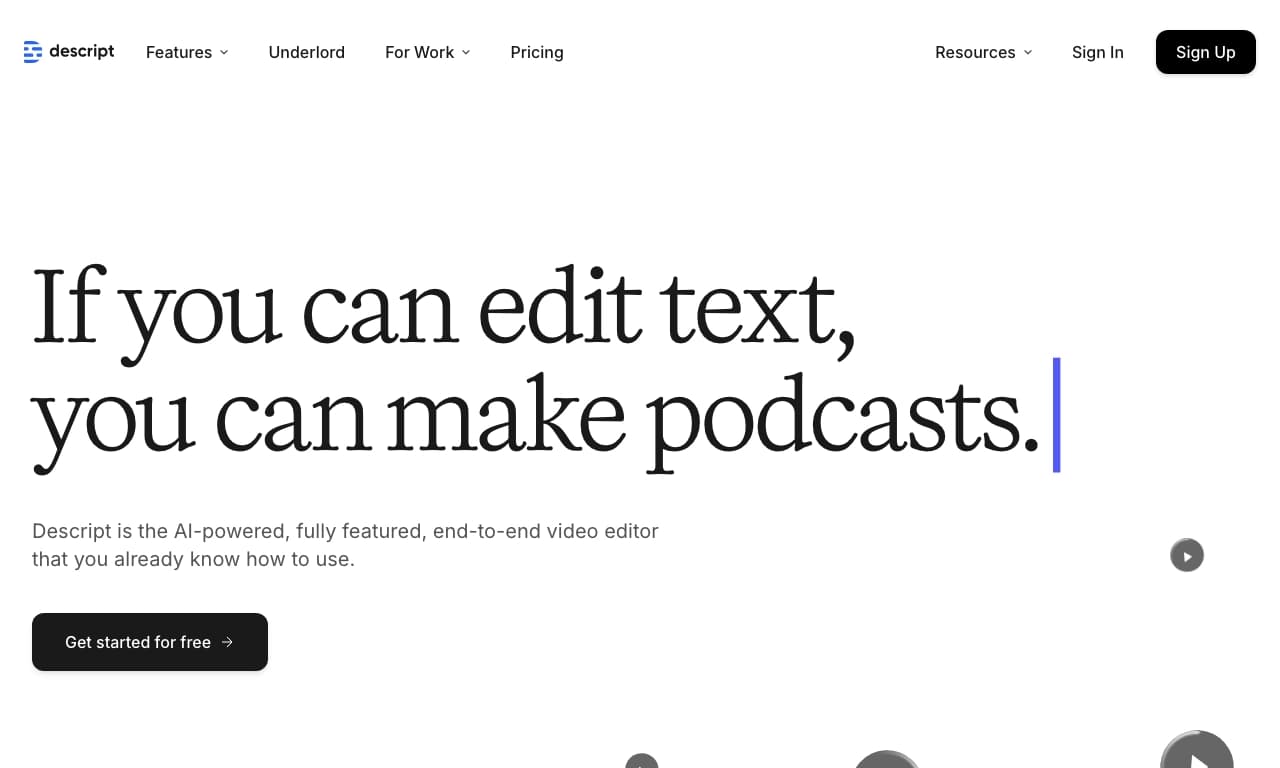
Descript is a platform for editing video and podcasts, built on automatic speech-to-text transcription. The key feature of the service is that all changes to media files are made by editing the text transcript of the audio track. Users can delete words, fix phrases, or rearrange paragraphs in the text, and the corresponding changes are automatically applied to the video or audio.
The platform includes built-in AI tools: voice cloning, filler-word removal, subtitle generation, virtual avatar creation, and speaker eye-contact correction. Descript is suitable for quickly processing podcasts, social media videos, and creating content without deep technical video-editing skills.
Descript Specifications
| Specification | Value |
|---|---|
| Type | Platform for editing video and podcasts |
| Categories | Video editing, audio processing, text-to-speech, podcasting, speech-to-text |
| Business model | Freemium |
| Pricing | From $12 per month |
| Platforms | Web version (descript.com), Windows and macOS apps |
| Mobile app | No official app for Android or iOS |
| Languages | Supports many languages, including English, Spanish, French, German, and Italian. Understands Russian speech, but the highest transcription accuracy is for English |
| Free version | Yes (with limitations: up to 1 hour of transcription, basic features, watermark) |
Who is Descript for?
Content creators and podcasters
Descript is aimed at podcasters, video bloggers, journalists, and anyone who regularly creates audio and video content. The platform allows users to quickly edit episodes, remove mistakes, and add professional effects without complex software.
Content managers
The service is suitable for content managers who prepare materials for social media. Automatic clip creation with subtitles and quick publishing features simplify routine tasks involved in adapting content for different platforms.
Teams and remote workers
Descript includes features for collaboration and remote podcast and video recording. This makes it useful for small media teams that need to edit projects together and share materials.
How to use Descript?
Getting started
To use Descript, you need to register on descript.com. A web version is available through the browser, as well as standalone apps for Windows and macOS. The free plan lets you start without paying, but with limited functionality.
Main workflow
Users upload an audio or video file to the platform. Descript automatically transcribes speech into text. Then editing is done by revising the transcript: deleting words in the text removes them from the media file, and rearranging paragraphs changes the order of fragments. The final result can be exported to formats such as MP3, WAV, MP4, and others.
Key Features of Descript
Text-based editing
Descript’s main feature is the ability to edit video and audio like a text document. Edits made to the text are automatically applied to the media file, eliminating the need to work with layers, tracks, and plugins. This turns a complex editing process into simple text work.
Transcription and subtitles
The platform performs automatic speech-to-text transcription with high accuracy. Based on the transcript, users can generate subtitles with customizable styles and fonts. Subtitles are added automatically when creating clips for social media.
AI tools for audio and video
Descript includes several built-in AI features: voice cloning (creating a voice model for text narration), removal of filler words and background noise, and regeneration of recording fragments while preserving natural sound. For video, there are a virtual green screen, automatic camera-angle switching, and an eye-contact correction feature.
Virtual avatars and voice models
Users can create virtual avatars — ready-made characters or digital twins based on an uploaded photo. Voice cloning is also available for text narration, along with ready-made voice models in different languages.
Advantages of Descript
Accessible to non-specialists
Descript makes video creation accessible to everyone, regardless of editing experience. The text interface is understandable even for those who have never worked with professional video editors.
Time savings
Automated transcription and editing significantly reduce the time spent processing materials. Instead of manually scrubbing and cutting clips, users simply edit the text.
Broad integrations
The platform integrates with other services, including Zoom and Google Drive, which simplifies importing materials and teamwork.
Disadvantages of Descript
Free version limitations
The free plan has significant restrictions: up to 1 hour of transcription, access to basic features only, and a watermark applied to exported files.
Platform availability
Descript is available only as a web version and desktop apps — there is no official mobile app for Android or iOS.
Language nuances
Despite supporting many languages, the highest transcription accuracy is achieved for English. Accuracy may be lower for Russian speech.
What tasks does Descript solve?
Editing video and podcasts
The platform’s main task is editing video and audio materials. Descript is suitable for quickly processing podcasts, interviews, lectures, and video blogs.
Improving content quality
The service helps improve the visual and audio components of materials: removing background noise, filler words, and bad takes, correcting the speaker’s eye contact, and replacing backgrounds.
Creating content for social media
Descript makes it easy to create clips for social media with automatically added subtitles, which is important for platforms where videos are watched without sound.
Analysis and transcription
The platform transcribes audio and video into text and also provides tools for analyzing audio and video materials.
Descript Pricing
Free plan
Includes up to 1 hour of transcription, basic export features, and a watermark on finished files.
Paid subscriptions
- Creator — $12 per month: 10 hours of transcription, no watermark, access to AI voices.
- Pro — $24 per month: 30 hours of transcription, advanced features, priority support.
- Enterprise — custom pricing: unlimited transcription, enterprise features.
All paid plans include a trial period.
Terms of Use for Descript
Descript uses a freemium model — basic functionality is available for free, and advanced features are provided through a paid subscription. A stable internet connection is required to use the platform (for the web version). Software is available for installation on Windows and macOS. On the free plan, exported files receive a watermark.
Descript Availability
Descript is available through a web browser at descript.com, as well as desktop apps for Windows and macOS. There is no official mobile app for Android or iOS. The interface and transcription support many languages; however, the best speech recognition accuracy is provided for English.
How Descript Differs from Alternatives
The main difference between Descript and most video editors is its text-based approach to editing. Instead of traditional timeline and layer work, users edit the text transcript, making the process intuitive. The platform combines transcription, video editing, voice cloning, and virtual avatar creation in one tool, while alternatives often specialize in only one of these tasks.
Conclusion
Descript is a platform for editing video and podcasts based on automatic transcription, which makes editing similar to working with a text document. It includes features for creating clips, virtual avatars, voice cloning, audio and video enhancement, and collaboration tools. The service is suitable for podcasters, vloggers, and content managers, helps save time on processing materials, and does not require deep technical skills. The free plan has limitations, and paid subscriptions start at $12 per month.
Pricing
Frequently asked questions
Similar AI tools










See also

Cloud service for automatic audio post-processing that normalizes volume and removes noise and pauses.

Neural network-based web service for automatic video subtitling and transcription.

Microsoft cloud platform for developing, training, and deploying AI models, including image generation, speech, and speech recognition.

A platform that combines several video creation tools in a single chat interface, from script generation to editing and voiceover.

Mobile app for photo and video editing using AI and an extensive library of filters.

AI tool for automatically cutting long videos into short clips for TikTok, Reels, and YouTube Shorts.
Screen recording tool with subsequent AI transcription and summarization of content.

A platform for creating talking videos with a teleprompter, AI-generated scripts, subtitles, and avatars.