
TurboScribe
Облачный сервис для автоматической транскрипции аудио и видеофайлов в текст на базе модели Whisper.
Место в рейтингах
Обзор
TurboScribe
Описание нейросети TurboScribe
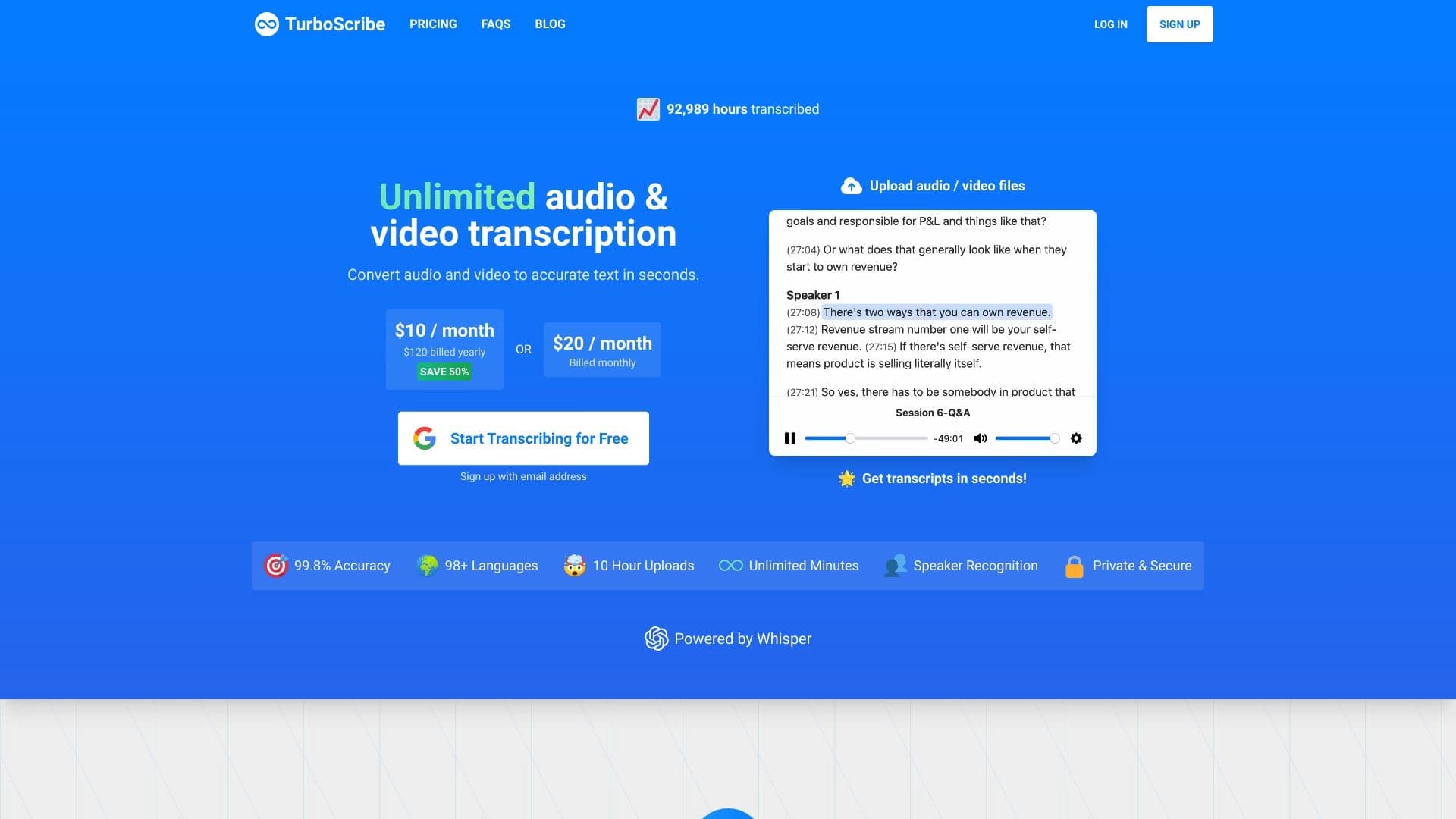
TurboScribe — это облачный сервис для автоматической транскрипции аудио и видеофайлов в текст. В основе работы инструмента лежит модель Whisper, которая распознаёт речь и преобразует её в текстовый формат. Сервис не требует установки программного обеспечения: вся обработка происходит на удалённых серверах, поэтому пользователю нужен только браузер и стабильное интернет-соединение.
Работа строится просто: пользователь загружает файл на сайт, при необходимости выбирает язык, и через несколько секунд получает готовую текстовую расшифровку. TurboScribe поддерживает 98 языков распознавания и 134 языка перевода, а заявленная точность распознавания достигает 99,8%. Кроме базовой расшифровки, сервис умеет автоматически определять спикеров, что особенно удобно при работе с интервью, подкастами и записями встреч.
Характеристики TurboScribe
| Характеристика | Значение |
|---|---|
| Тип | Облачный сервис для автоматической транскрипции |
| Базовая технология | Whisper |
| Языки транскрипции | 98 языков |
| Языки перевода | 134 языка |
| Точность | До 99,8% |
| Поддерживаемые форматы | MP3, MP4, M4A и другие |
| Платформа | Web (облачный сервис) |
| Определение спикеров | Автоматическое |
| Обработка данных | Онлайн, на удалённых серверах |
| Установка ПО | Не требуется |
| Модель распространения | Freemium |
Для кого подходит нейросеть TurboScribe?
Журналисты и создатели контента
Редакторам, репортёрам и интервьюерам TurboScribe помогает быстро превращать записи разговоров в текст и черновики статей. Подкастеры могут оперативно получать расшифровки выпусков и создавать субтитры к видео.
Исследователи и студенты
Академическим специалистам и учащимся сервис пригодится для обработки лекций, интервью и семинаров. Преобразование записанного материала в текст облегчает конспектирование, цитирование и дальнейший анализ содержания.
Бизнес-специалисты
Для деловых людей инструмент полезен при расшифровке записей рабочих встреч, переговоров и совещаний. Полученный текст легко использовать для подготовки протоколов, резюме и дальнейшей работы с документами.
Как использовать нейросеть TurboScribe?
Шаг за шагом
Чтобы начать работу, нужно перейти на сайт сервиса, создать бесплатный аккаунт или войти в него. Затем загружается аудио- или видеофайл, выбирается язык и желаемый формат результата. После нажатия кнопки транскрибации остаётся дождаться обработки и скачать готовый текстовый файл.
Что нужно учитывать
Для доступа к полному функционалу требуется регистрация. Поскольку данные обрабатываются онлайн, необходимо стабильное интернет-соединение — локальная обработка файлов не поддерживается.
Основные функции TurboScribe
Автоматическая транскрипция
Главная функция сервиса — преобразование аудио- и видеофайлов в текст. Загрузка файлов не ограничена, а обработка происходит быстро, что позволяет расшифровывать даже большие объёмы материала.
Многоязычность и перевод
TurboScribe распознаёт речь на 98 языках и предлагает перевод расшифровок на 134 языка. Это делает сервис удобным для международной работы и обработки материалов на иностранных языках.
Определение спикеров и точность
Сервис автоматически распознаёт, кто и когда говорит, что упрощает чтение и анализ диалогов. Заявленная точность до 99,8% обеспечивает высокое качество расшифровки.
Преимущества TurboScribe
Простота и облачная работа
TurboScribe не требует установки программного обеспечения — для работы достаточно браузера. Все данные обрабатываются на удалённых серверах, поэтому пользователю не нужно заботиться о мощностях собственного устройства.
Широкие языковые возможности
Поддержка 98 языков распознавания и 134 языков перевода существенно расширяет сферу применения сервиса. Встроенный перевод позволяет быстро получить расшифровку на нужном языке без дополнительных инструментов.
Точность и экономичность
Высокая заявленная точность (до 99,8%) снижает необходимость ручного редактирования. Предложение с неограниченным количеством транскрипций по фиксированной цене делает сервис экономичным при больших объёмах работы.
Недостатки TurboScribe
Требования к подключению
Для работы сервиса необходимо постоянное интернет-соединение, поскольку данные обрабатываются онлайн. Локальная обработка файлов не поддерживается, что может быть неудобно при нестабильной сети или работе с конфиденциальным материалом.
Ограничения функционала
Прямой экспорт транскрипций в другие сервисы отсутствует, а для доступа к полному функционалу требуется регистрация. Это добавляет дополнительные шаги в рабочий процесс тем, кто хотел бы начать использовать инструмент без создания аккаунта.
Какие задачи решает TurboScribe
Транскрибация контента
Основная задача сервиса — перевод аудио и видео в текстовый формат. Это охватывает расшифровку интервью, подкастов, записей лекций, видеороликов и деловых встреч.
Создание субтитров и конспектов
На основе распознанного текста можно создавать субтитры к видео, а также формировать конспекты и резюме из аудио- и видеоматериалов. Это упрощает подготовку материалов для публикации и дальнейшего использования.
Перевод и анализ материалов
Благодаря поддержке перевода расшифровок на 134 языка TurboScribe помогает работать с многоязычным контентом, а чёткий текстовый формат облегчает последующий анализ и цитирование материала.
Цены TurboScribe
Точные значения тарифов в исходных данных не раскрываются. Известно, что сервис работает по модели freemium и предлагает неограниченное количество транскрипций по фиксированной цене. Также упоминается наличие бесплатного пробного периода, однако конкретные цифры и детали тарифных планов в доступных данных не указаны.
Условия использования TurboScribe
Для доступа к полному функционалу требуется регистрация в сервисе. Данные пользователя обрабатываются онлайн на удалённых серверах, поэтому передача файлов в облако является обязательным условием работы. Локальная обработка не поддерживается, а для стабильной работы необходимо постоянное подключение к интернету.
Доступность TurboScribe
TurboScribe доступен как веб-платформа и работает на более чем 98 языках, что делает его доступным для пользователей из разных стран. По данным источников, основные регионы трафика включают Бразилию, США, Испанию, Италию и Индию. Сведений о необходимости использования VPN в доступных материалах нет.
Чем отличается TurboScribe от аналогов
Среди близких по функциям сервисов упоминаются Otter.ai, Descript, Sonix.ai, Trint и HappyScribe. В отличие от Otter.ai и Descript, TurboScribe не требует установки программного обеспечения и работает полностью в облаке. Сервис предлагает неограниченное количество транскрипций по фиксированной цене, поддерживает больше языков распознавания и включает встроенный перевод расшифровок на 134 языка. Эти особенности выделяют TurboScribe среди конкурентов, особенно для пользователей, работающих с многоязычным контентом и большими объёмами материалов.
Заключение
TurboScribe — это облачный сервис транскрибации на базе модели Whisper, который переводит аудио и видео в текст с заявленной точностью до 99,8% и поддержкой 98 языков распознавания и 134 языков перевода. Инструмент ориентирован на журналистов, подкастеров, исследователей, студентов и бизнес-специалистов, предлагая автоматическое определение спикеров, быстрое выполнение и неограниченную загрузку файлов. Главные ограничения связаны с необходимостью постоянного интернет-соединения, отсутствием локальной обработки и прямой интеграции с другими сервисами. При этом модель freemium и предложение с неограниченным числом транскрипций делают TurboScribe привлекательным решением для тех, кто регулярно работает с переводом речи в текст.
Часто задаваемые вопросы



Смотрите также


Инструмент, встраиваемый в Microsoft Word, который с помощью нейросетей автоматизирует создание, редактирование и анализ юридических контрактов.

AI-клавиатура для устройств Apple, которая ускоряет набор текста с помощью исправлений, перевода и генерации ответов.

Платформа для агрегации мировых новостей с использованием ИИ для анализа и снижения предвзятости.


Сервис для автоматической расшифровки аудио и видео в текст с поддержкой более 100 языков.


Сервис на базе ИИ для автоматической генерации текстового контента различного формата.

Онлайн-сервис на основе ИИ для автоматического создания субтитров к видео.


AI-помощник для проверки грамматики, орфографии и стиля английского текста, доступный как браузерное расширение и веб-редактор.

ИИ-помощник, который анализирует загруженные учебные документы, выделяет вопросы и даёт подробные объяснения.