

VEED IO
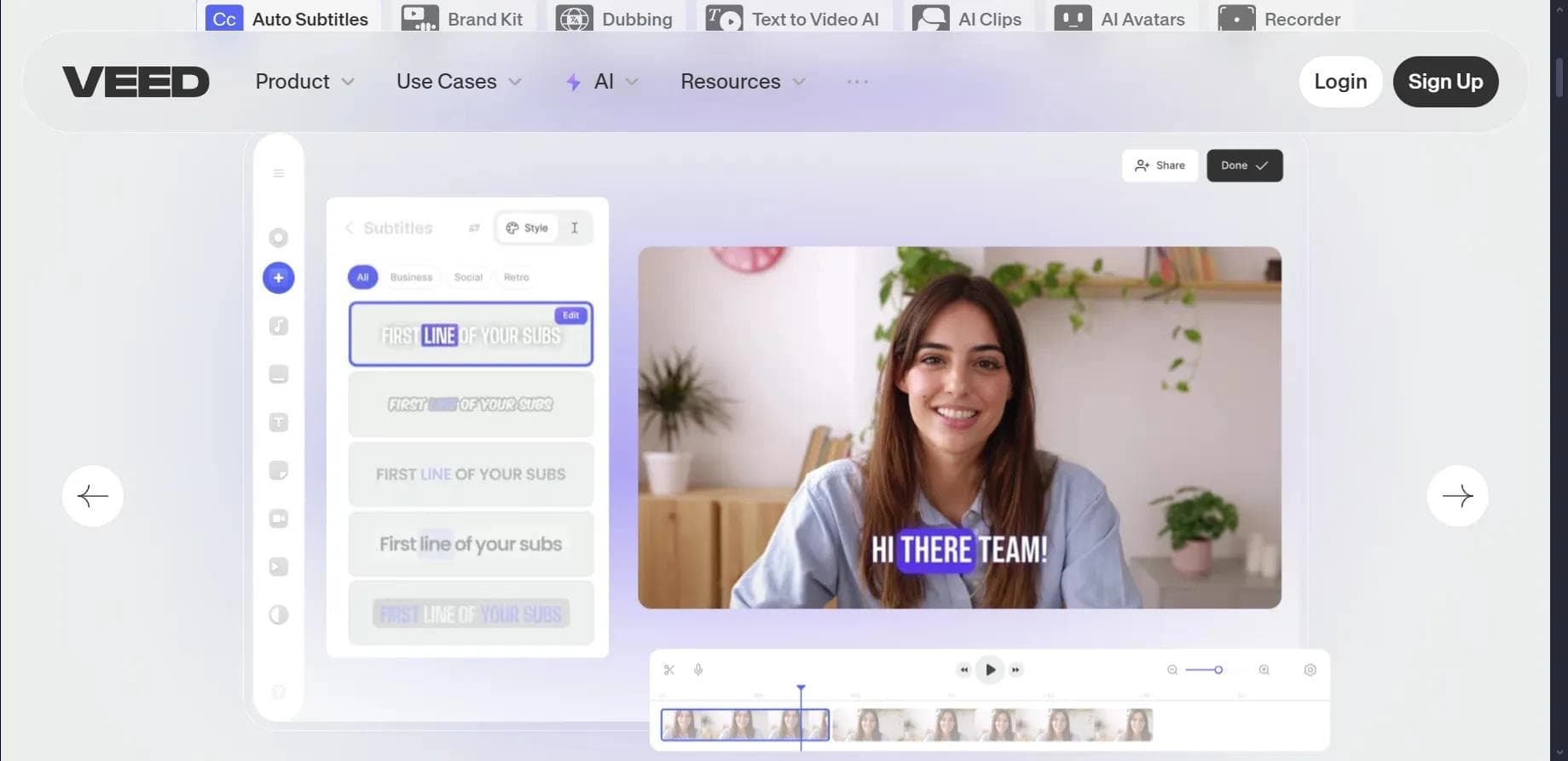
Облачный AI-видеоредактор для автоматического создания субтитров, перевода видео и базового монтажа в браузере.
Обзор
VEED IO
Описание нейросети VEED IO
VEED IO — это облачный AI-видеоредактор, работающий непосредственно в браузере и не требующий установки тяжёлого программного обеспечения на компьютер. Сервис был запущен в 2018 году и с тех пор собрал аудиторию более миллиона пользователей. Основное назначение платформы — автоматическое распознавание речи и создание субтитров к видео, перевод роликов на множество языков, а также базовые операции видеомонтажа, включая обрезку, сжатие и удаление шумов из аудиодорожки. VEED IO также поддерживает генерацию видео по текстовому описанию и работу с AI-аватарами. Доступ к сервису реализован по модели freemium: есть бесплатная версия с ограничением в 10 минут и качеством 720p, а также платные тарифы для расширенных возможностей. Помимо веб-версии, существует мобильное приложение для iOS.
Характеристики VEED IO
| Характеристика | Значение |
|---|---|
| Тип | AI-видеоредактор |
| Категория | Монтаж и редактирование, транскрибация аудио, субтитры |
| Платформы | Веб-приложение, мобильное приложение (iOS) |
| Язык интерфейса | Английский |
| Бесплатный тариф | Да (ограничение: 10 минут видео, 720p) |
| Год запуска | 2018 |
| Инвестор | Фонд Sequoia |
| Число пользователей | Более 1 миллиона |
Для кого подходит нейросеть VEED IO?
Создатели контента и блогеры
VEED IO будет полезен видеоблогерам и авторам коротких роликов, которым необходимо быстро добавлять субтитры к своим видео, переводить контент для международной аудитории или создавать мемы и короткие нарезки. Облачный характер сервиса позволяет работать над проектом с любого устройства без привязки к мощному компьютеру.
Маркетологи и SMM-специалисты
Специалисты по продвижению могут использовать платформу для оперативного создания рекламных и обучающих видео с субтитрами, а также для транскрибации аудиоматериалов в текст. Возможность командной коллаборации упрощает работу в рамках отдела или агентства.
Образовательные проекты и небольшие команды
Преподаватели, тренеры и создатели курсов могут применять VEED IO для генерации субтитров к лекциям, перевода учебных материалов и автоматической транскрипции аудиолекций. Простота интерфейса и наличие шаблонов позволяют быстро адаптировать контент без найма профессионального монтажёра.
Как использовать нейросеть VEED IO?
Регистрация и загрузка видео
Для начала работы необходимо перейти на сайт www.veed.io и зарегистрироваться — через электронную почту или аккаунт Google. После входа в систему можно загрузить видеофайл в поддерживаемом формате. Сервис работает с любыми популярными форматами, загрузка и обработка происходят на облачных серверах, что не нагружает устройство пользователя.
Выбор инструмента и настройка
После загрузки файла пользователю доступен набор инструментов для редактирования: автоматическое создание субтитров, перевод, удаление шумов, обрезка, сжатие и добавление музыки или стоковых материалов. Все настройки производятся через веб-интерфейс, и результат сразу отображается на предпросмотре.
Экспорт готового файла
По завершении редактирования ролик можно экспортировать в нужном формате и качестве. Бесплатный тариф ограничивает экспорт разрешением 720p и длительностью до 10 минут. Также доступно мобильное приложение для iOS, которое позволяет редактировать видео прямо на смартфоне.
Основные функции VEED IO
Автоматические субтитры и перевод
Система автоматически распознаёт речь в видео и генерирует субтитры. Поддерживается перевод субтитров на 100 языков, что позволяет адаптировать контент для международной аудитории без ручного труда. Транскрипция аудио в текст также доступна как отдельная функция.
Генерация видео по тексту и AI-аватары
VEED IO умеет создавать ролики на основе текстовых запросов — достаточно ввести описание, и сервис сгенерирует видеоряд. Дополнительно доступно редактирование с помощью AI-аватаров, что может быть полезно для корпоративных презентаций и обучающих материалов.
Базовый монтаж и обработка звука
Платформа включает набор стандартных инструментов для редактирования: обрезка и сжатие видео без заметной потери качества, удаление шумов из аудиодорожки, добавление фоновой музыки и стоковых материалов. Встроенные шаблоны ускоряют процесс создания типовых роликов.
Преимущества VEED IO
Облачная обработка и совместимость
Все вычисления производятся на серверах, поэтому пользователю не нужно мощное оборудование. Сервис поддерживает любые форматы видеофайлов. Доступна интеграция через API для подключения к внешним системам и автоматизации рабочих процессов.
Дополнительные возможности
Платформа предлагает AI-генерацию аватаров, сжатие видео без потери качества и готовые шаблоны для быстрого старта. Для команд предусмотрена функция коллаборации, позволяющая нескольким пользователям работать над одним проектом одновременно.
Низкий порог входа
Бесплатный тариф даёт возможность попробовать все основные функции без финансовых вложений, что особенно важно для начинающих авторов и небольших проектов. Регистрация простая, не требует верификации платёжных данных.
Недостатки VEED IO
Языковые ограничения
Интерфейс сервиса поддерживает только английский язык, что может создать неудобства для русскоязычных пользователей и тех, кто не владеет английским на достаточном уровне.
Ограничения бесплатного тарифа
Бесплатная версия существенно ограничена: максимальная длительность видео — 10 минут, качество экспорта — только 720p. Для работы с более длинными роликами или высоким разрешением потребуется оформление платной подписки.
Какие задачи решает VEED IO
VEED IO закрывает несколько типовых задач, связанных с видеопроизводством: создание и редактирование видеоконтента, автоматическое добавление субтитров и перевод видео на другие языки, транскрипция аудиозаписей в текст, очистка звука от посторонних шумов, а также быстрая генерация коротких роликов и мемов для социальных сетей. Платформа подходит как для разового использования под конкретную задачу, так и для регулярной работы в рамках контент-плана.
Цены VEED IO
Сервис работает по модели freemium. Бесплатный тариф позволяет редактировать видео длительностью до 10 минут и экспортировать в разрешении 720p. Платные тарифы включают: Lite — 12 долларов в месяц, Pro — 29 долларов в месяц за пользователя. Точный перечень возможностей каждого платного тарифа в предоставленных данных не раскрыт, но, по всей видимости, они снимают ограничения по длительности и качеству, а также открывают доступ к расширенному набору инструментов.
Условия использования VEED IO
Для начала работы с сервисом обязательна регистрация — можно завести аккаунт по электронной почте или через Google. Бесплатный план действует на условиях ограничения по длительности видео (не более 10 минут) и качеству экспорта (720p). Информации о других ограничениях или требованиях в предоставленных источниках нет.
Доступность VEED IO
Веб-приложение работает в любом современном браузере, не требует установки дополнительного ПО. Также выпущено мобильное приложение для iOS (требуется версия 16.0 и выше). Интерфейс полностью на английском языке. Сведений о необходимости использования VPN или о каких-либо региональных ограничениях в исходных данных не содержится.
Чем отличается VEED IO от аналогов
Ключевое отличие VEED IO от многих настольных видеоредакторов — полная облачная архитектура: пользователю не нужно устанавливать программы или иметь мощный компьютер, вся обработка происходит на стороне сервера. Встроенные AI-функции, такие как автоматическая генерация субтитров, перевод на 100 языков и создание видео по тексту, выделяют сервис среди простых онлайн-редакторов. При этом платформа нацелена не на профессиональный монтаж с десятками дорожек и сложными эффектами, а на быстрое решение типовых задач — субтитры, перевод, транскрибация, базовая обрезка. В отличие от ряда конкурентов, VEED IO поддерживает командную работу и предоставляет API для интеграции, что делает его пригодным для использования в бизнес-среде.
Заключение
VEED IO — это облачный AI-видеоредактор, ориентированный на быстрое создание субтитров, перевод видео и базовый монтаж без установки программ. Сервис подходит как начинающим авторам, так и небольшим командам благодаря низкому порогу входа, бесплатному тарифу и функциям коллаборации. Ключевые ограничения — англоязычный интерфейс и сравнительно скромные возможности бесплатной версии. При этом для своих задач — автоматическая транскрибация, перевод контента, генерация коротких роликов — платформа предлагает эффективное и простое решение, работающее из любого браузера.
Тарифы
Часто задаваемые вопросы


Смотрите также


Сервис на базе ИИ для автоматического создания «безликих» коротких видео для TikTok, YouTube Shorts и других платформ.


Платформа для автоматизированного создания, редактирования и перевода видеоклипов с помощью ИИ.


Набор инструментов для генерации и редактирования видео с помощью ИИ, включая аватары, липсинк и клонирование голоса.
Браузерный видеоредактор с автоматическими субтитрами на 50+ языках и переводом контента.


Генератор трендовых видео, постов и рекламных креативов на основе идей, изображений и текстовых запросов.

Платформа для генерации изображений, видео и аудио с помощью искусственного интеллекта по текстовым описаниям.

Облачная платформа для создания видео с помощью ИИ-аватаров, синтезированной речи и автоматического перевода роликов на десятки языков.

Веб-сервис для генерации изображений по текстовым запросам и преобразования фото и видео в художественные арты.