
GPTDisguise
Browser extension that disguises the interfaces of ChatGPT, Claude, and Gemini as a Google Docs editor.
Overview
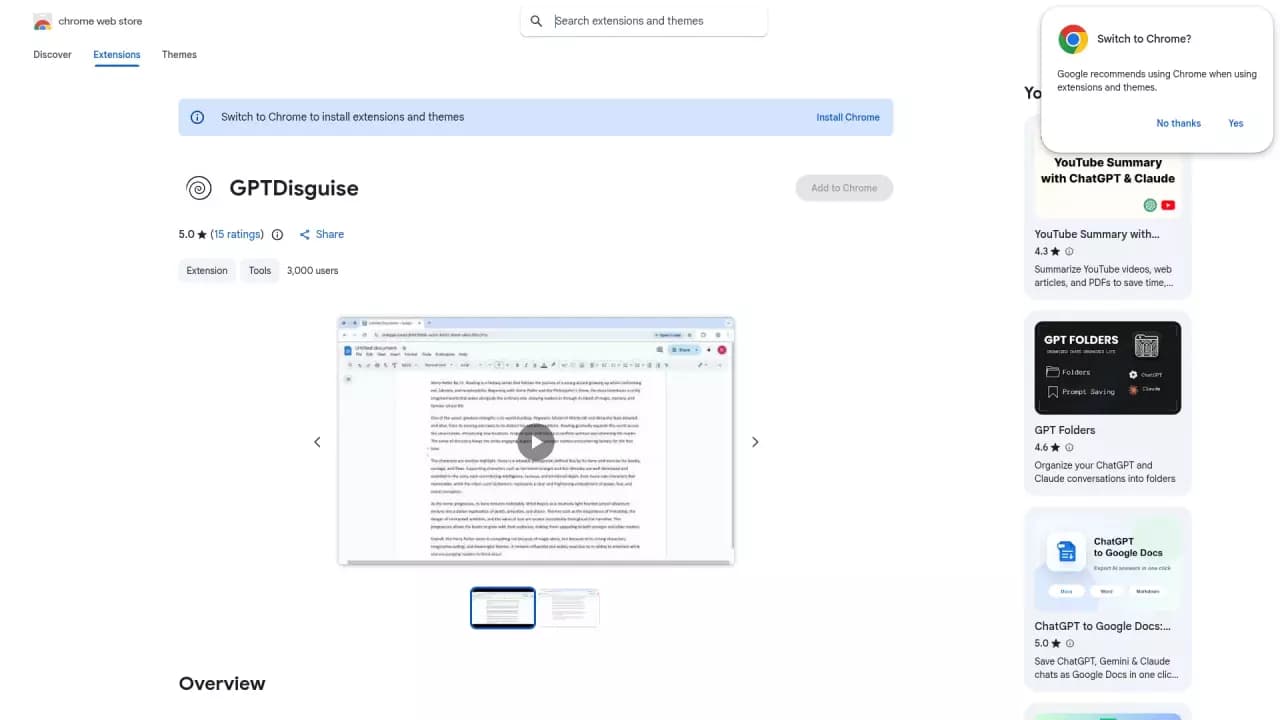
GPTDisguise is a browser extension that changes the appearance of popular AI chats (ChatGPT, Claude, and Gemini), transforming their interface into something resembling a Google Docs editor. Instead of the usual chat window with the neural network, the user sees a "document" that looks like an ordinary work file in a cloud editor.
This approach solves a practical problem: using neural networks in the office or during studies without drawing unnecessary attention from colleagues, teachers, or classmates. From the outside, you're working with text in a document, not chatting with a bot.
The developers have also introduced beta themes for Microsoft Word and Notion, with hotkeys for quickly switching between them.
GPTDisguise Features
| Feature | Value |
|---|---|
| Type | Chrome browser extension |
| Category | Assistants, Extensions |
| Business model | Freemium |
| Supported models | Gemini, Claude, ChatGPT, Mistral AI |
| Publication date | 24-06-2026 |
| Review date | 24.06.2026 |
Who is GPTDisguise for?
Office workers who actively use AI
GPTDisguise is aimed at users who regularly use AI chats during work hours but want to avoid unnecessary questions from management, colleagues, or clients. Disguising the interface as a document allows you to plausibly look busy working with text.
Students and learners
For those who use neural networks to prepare essays, notes, or homework, the extension helps hide the fact that AI is being used. The chat window looks like a standard document, allowing you to work in the library, classroom, or at home in front of parents.
Users accustomed to the Google Docs interface
Some people simply find the chat format of interacting with a neural network uncomfortable. They prefer working in a familiar document interface where text appears as a page rather than a conversation. For such users, GPTDisguise solves an ergonomics problem.
How to use GPTDisguise
Installation and setup
To get started, you need to install the Chrome browser extension from the appropriate catalog. After installation, you need to visit one of the supported sites: chatgpt.com, claude.ai, or gemini.google.com. Using Claude and Gemini requires a premium subscription to those services.
Activating the disguise
To enable the disguise, simply launch the extension and activate the toggle. The chat interface instantly transforms into a widget that mimics Google Docs styling. If you're using the premium version of GPTDisguise, quick activation is available via hotkeys: Ctrl+Shift+Y on Windows or Cmd+Shift+Y on MacOS.
Switching between themes
In addition to the base Google Docs theme, beta versions styled after Microsoft Word and Notion are available. Switching between them is also done via hotkeys in premium mode. This allows you to tailor the appearance to your specific work environment.
Key features of GPTDisguise
Disguising AI chat interfaces
The extension's main function is a complete visual replacement of the ChatGPT, Claude, and Gemini interfaces with styling that mimics Google Docs. The conversation with the neural network becomes "text in a document," which looks natural in a work setting.
Additional design themes
The developers offer beta themes for Microsoft Word and Notion. This lets users choose the editor look that best fits their work environment. The Word theme suits corporate settings, while Notion works well for teams already using that tool.
Quick switching via hotkeys
Premium users can instantly enable and disable the disguise and switch between themes without extra clicks. This is convenient when you need to quickly return to the normal interface for copying code or using other features unavailable in "document" mode.
Advantages of GPTDisguise
Privacy in the office
The extension effectively hides the fact that you're using neural networks. The AI chat window looks like an ordinary document, so people around you won't suspect you're working with artificial intelligence. This reduces the risk of unwanted questions or criticism if AI use isn't welcome in your organization.
Comfortable working atmosphere
The Google Docs-style design creates the feeling of working with regular text rather than a chat. Many users find this format psychologically more comfortable: it sets a productive tone and doesn't distract from the content of the neural network's responses.
Ease of use
Activating the disguise takes just one toggle or a hotkey press in the premium version. No complex settings or extra steps are required. The extension works immediately after installation.
Drawbacks of GPTDisguise
Subscription limitations
Disguising the Claude and Gemini interfaces requires a premium subscription to those AI services. If you use free tiers, the extension may not work with those chats. ChatGPT, meanwhile, is available without restrictions.
Unfinished themes
The Microsoft Word and Notion themes are in beta testing. This means they may be unstable, contain visual artifacts, or display interface elements incorrectly. For critical tasks, it's better to use the main Google Docs theme.
Ongoing development status
The GPTDisguise project itself is under active development. This carries certain risks: possible bugs, periodic updates, and changes in functionality. In some cases, glitches may occur when the AI chats themselves update their interfaces.
What problems does GPTDisguise solve?
Hiding AI use in a work environment
The extension's main purpose is to make neural network use unnoticeable to those around you. This is relevant for office workers, freelancers, and students who want to keep their work tools private.
Creating a familiar interface
Many users find chat interfaces uncomfortable to work with. GPTDisguise solves this by replacing it with the more familiar look of a text editor. This form of presenting information feels more traditional and work-oriented.
Adapting to the user's environment
The ability to switch between Google Docs, Word, and Notion themes lets you tailor the appearance to a specific setting: corporate standards, personal preferences, or academic requirements.
GPTDisguise pricing
The extension operates on a Freemium model. This means there's a free version with basic functionality: disguising the interface as Google Docs for all supported chats. A premium subscription unlocks additional features, including hotkeys for quick activation and, presumably, other advanced functions.
The exact cost of the premium subscription isn't specified in available sources. For up-to-date pricing information, it's recommended to visit the extension's official website or its page in the Chrome extensions catalog.
Terms of use for GPTDisguise
To use the extension, you need to install it in the Chrome browser. No other software requirements apply. To use the neural networks the extension disguises, you'll need corresponding accounts on the ChatGPT, Claude, or Gemini platforms. For Claude and Gemini, a premium subscription to those services is required.
Information about whether registration in the GPTDisguise service itself is needed isn't mentioned in the sources. For the free version, simply installing the extension from the Chrome Web Store catalog is enough.
Availability of GPTDisguise
The extension is designed for the Chrome browser and is distributed through the official extensions catalog. This means it's available to all Chrome users on various operating systems: Windows, MacOS, and Linux.
No restrictions by region, country, or language are mentioned in the sources. The extension is likely available to an international audience, since it works with the interfaces of all three supported AI chats in any language they operate in.
How GPTDisguise differs from alternatives
GPTDisguise stands out for its narrow focus on visually disguising AI chats. While extensions like Prompt Mania, Rewind, Agent Herbie, or Aurora focus on other tasks — prompt management, screen recording, or action automation — GPTDisguise solves a specific privacy problem.
The key difference is its imitation of the Google Docs interface specifically. This isn't just a color scheme change but a complete reworking of the chat window's appearance into a full-fledged document editor. The additional beta themes for Word and Notion also expand customization options. Closest alternatives typically either disguise only individual interface elements or don't offer alternative design themes.
Conclusion
GPTDisguise is a practical Chrome extension that solves the relevant problem of visually disguising AI chats as a Google Docs interface. It will be useful for those who want to discreetly use ChatGPT, Claude, or Gemini in the office, at school, or in any other environment where showing that you work with neural networks is undesirable. The main limitations are the need for a premium subscription for Claude and Gemini, as well as the unfinished status of the Word and Notion themes. Nevertheless, for the basic use case — disguising as Google Docs — the extension works effectively and is simple to set up.
Frequently asked questions
See also

AI keyboard for Apple devices that speeds up typing with corrections, translation, and response generation.


AI platform for fast website creation and small business process management.


Chrome extension that helps manage tabs, history, and bookmarks with an AI assistant.

AI-powered toolkit for optimizing workflows and boosting productivity.

AI agent for automating customer communications and support.

AI assistant for business that helps manage tasks and automate routine through dialogue.


Desktop AI assistant for macOS, Windows, and Linux that launches via hotkey above all windows and combines multiple language models in one interface.

AllChat is a universal platform that combines several popular language models in a single interface for communication, image generation, file analysis, and code execution.