

Edit Videos Online
Online video editor with AI features for trimming, merging, adding subtitles, and background removal.
Overview
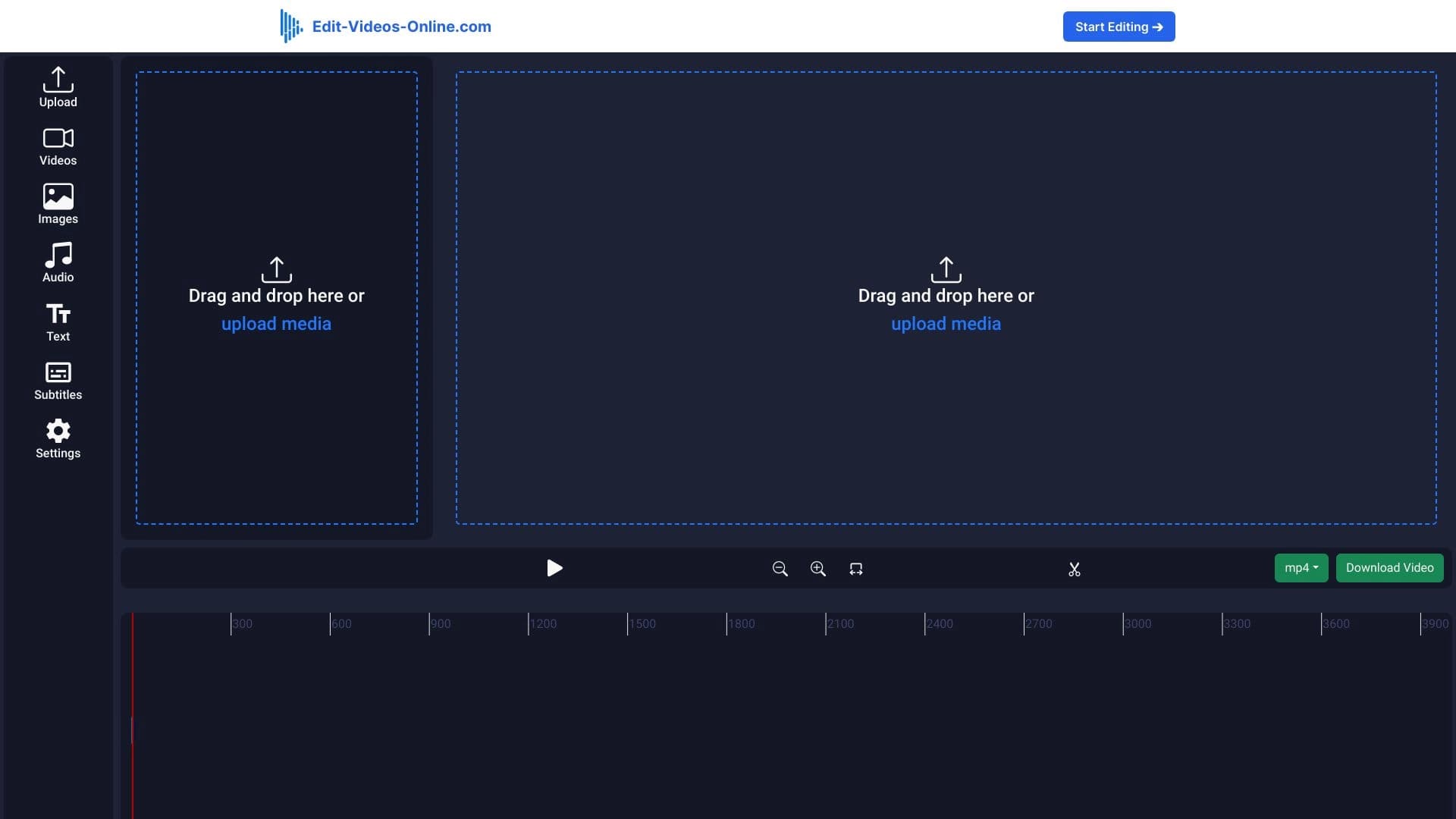
Edit Videos Online is a browser-based video editor that does not require installing additional software on your computer. The service allows you to perform basic and advanced video operations: trimming, merging, adding subtitles, and overlaying audio tracks. One of its key features is the ability to remove backgrounds from video recordings.
The editor is aimed at content creators and professionals who need to quickly prepare videos for publishing on social networks. No mandatory registration or entry barrier means you can start working immediately after opening the site. The interface is designed to be intuitive, making the tool accessible to users of different skill levels.
It is important to note that the service is positioned as a universal solution: it is equally convenient for casual editing and for daily professional tasks. The entire video processing workflow happens in the browser window, ensuring mobility and accessibility from any device that supports modern web applications.
Edit Videos Online Features
Below are the main technical and operational parameters of the service, recorded based on available data.
| Characteristic | Value |
|---|---|
| Type | Online video editor |
| Category | Editing and post-production, YouTube and blogging |
| Platforms | Browser (web application) |
| Free tier available | Not specified |
| Registration required | No |
| Installation | Not required |
Who is Edit Videos Online suitable for?
Bloggers and content creators
The tool is designed for bloggers who run channels on YouTube, TikTok, or Instagram. With it, you can quickly edit episodes without getting distracted by learning complex software. The simplicity of operations allows you to focus on the creative side rather than the technical details of the process.
Marketers and SMM specialists
For marketers working on promotional and brand videos, the service offers the necessary set of functions without unnecessary complexity. The ability to quickly trim clips and add captions makes it suitable for creating promo materials within tight deadlines.
Educators and course developers
Creators of educational videos and presentation materials will also find useful options in the editor. Thanks to the clear interface and the clip-joining feature, you can easily assemble lectures or instructions, adding emphasis with subtitles.
How to use Edit Videos Online?
Getting started
No complex setup is required to begin. Users simply need to open the service website in their browser and start uploading a video file right away. No registration, email verification, or driver installation is required.
Performing operations
After uploading your material, the available tools appear in the editor window. Users can select fragments to remove, join parts of a clip, overlay audio tracks, or activate the background processing feature. All changes are applied in real time, allowing you to evaluate the result immediately.
Using on different devices
Since the application runs exclusively in a browser environment, it is not tied to a specific computer. You can start editing on a desktop PC and, if needed, continue from a laptop or tablet by simply opening the service tab.
Key features of Edit Videos Online
Basic editing
The service allows you to trim video along the timeline, removing unwanted frames or entire scenes. A merging feature is also available for combining multiple fragments into a single clip, which is the primary operation when creating videos or compilations.
Working with captions and audio
Text blocks can be added in the form of subtitles and captions. To enhance the audiovisual experience, users can insert music or voice audio tracks into the project.
Special effects and background
A key advantage is the automatic background removal option for videos. Additionally, a set of tools for basic image quality enhancement is offered, helping to adjust color reproduction or sharpness of the final file.
Advantages of Edit Videos Online
- No installation required — the workflow does not require downloading heavy programs to your disk.
- Open access without registration — users do not need to create an account to log in.
- Cross-platform — the ability to work from any device with a browser.
- Low entry barrier — the intuitive interface makes it easy for beginners to learn the tool.
- Suitable for professionals — the functionality is sufficient for solving applied tasks of experienced users.
- Remote editing capability — all operations are performed in a cloud environment.
Disadvantages of Edit Videos Online
Current information about the service's disadvantages is limited. The collected data does not mention specific limitations, such as missing formats, file size limits, or watermarks. It also does not indicate whether a free tier exists, which could be a significant factor when choosing. All details regarding limitations should be clarified directly when using the service.
What tasks does Edit Videos Online solve?
The service is designed to address a wide range of video preparation tasks. First and foremost, it enables quick processing of clips for popular platforms: TikTok, Instagram, and YouTube. Secondly, the editor is suitable for basic technical editing operations — cutting and joining segments. Thirdly, it effectively solves the task of removing the original background from a recording, which is in demand when creating complex compositions or transferring a subject to an alternative backdrop.
Edit Videos Online Pricing
Currently, the official pricing policy of the service is presented as a special launch offer. Users are offered lifetime access to the professional editor through a one-time payment. No other pricing plans, including subscriptions or free trial periods, are described in available sources.
Terms of use for Edit Videos Online
A key condition of use is that no registration is required. This removes the barrier to quickly testing the editor's capabilities. No additional components are installed on the user's device. All other terms, including file processing rules and license agreements, are not explained in public sources; they can be reviewed in the documentation section on the service's official website.
Availability of Edit Videos Online
The service is a fully online application, so its availability directly depends on a stable internet connection. It works from any device, whether a personal computer, laptop, or mobile device. To launch it, simply use an up-to-date version of any modern browser. No restrictions on the type of device used for editing have been announced.
How Edit Videos Online differs from alternatives
The main difference between this editor and classic desktop programs is the complete autonomy of the browser environment. Users do not have to worry about system requirements, downloading distributions, or updates. Unlike many online services, this tool does not require a registration process, which significantly speeds up the workflow.
Additionally, the hybrid functionality deserves attention. While the main focus is on classic video editing (trimming, merging, subtitles), the AI-powered background removal feature sets it apart from simple video cutters. This allows the service to be used for more complex creative tasks without resorting to heavy professional editors.
Conclusion
Edit Videos Online is a practical online tool in the category of browser-based video editors that successfully handles the core task of quickly processing videos for social platforms. Its key advantages are the absence of mandatory installation and registration, as well as the combination of basic editing functions with background removal technology. This approach makes the service a convenient solution both for beginners taking their first steps in video creation and for experienced users who need to process material quickly away from their main workstation.
Frequently asked questions
See also


Bleepify automatically detects and bleeps out profanity in video and audio.
Service for generating videos from text descriptions and images using modern neural networks.


AI-based service for automatic generation of text content in various formats.


Online editor for removing unwanted objects, text, and defects from photos using a neural network.


AI-powered online service for automatically creating presentations from text, PDF, audio, video, or URL links.


A multifunctional platform for creating and editing media content using artificial intelligence.


AI-based platform for creating logos and brand identity.


AI service for automatically selecting music to match the mood of videos, images, or text, with legal licenses.