

CTRLpotato
AI assistant for real-time help during technical and product interviews.
Overview
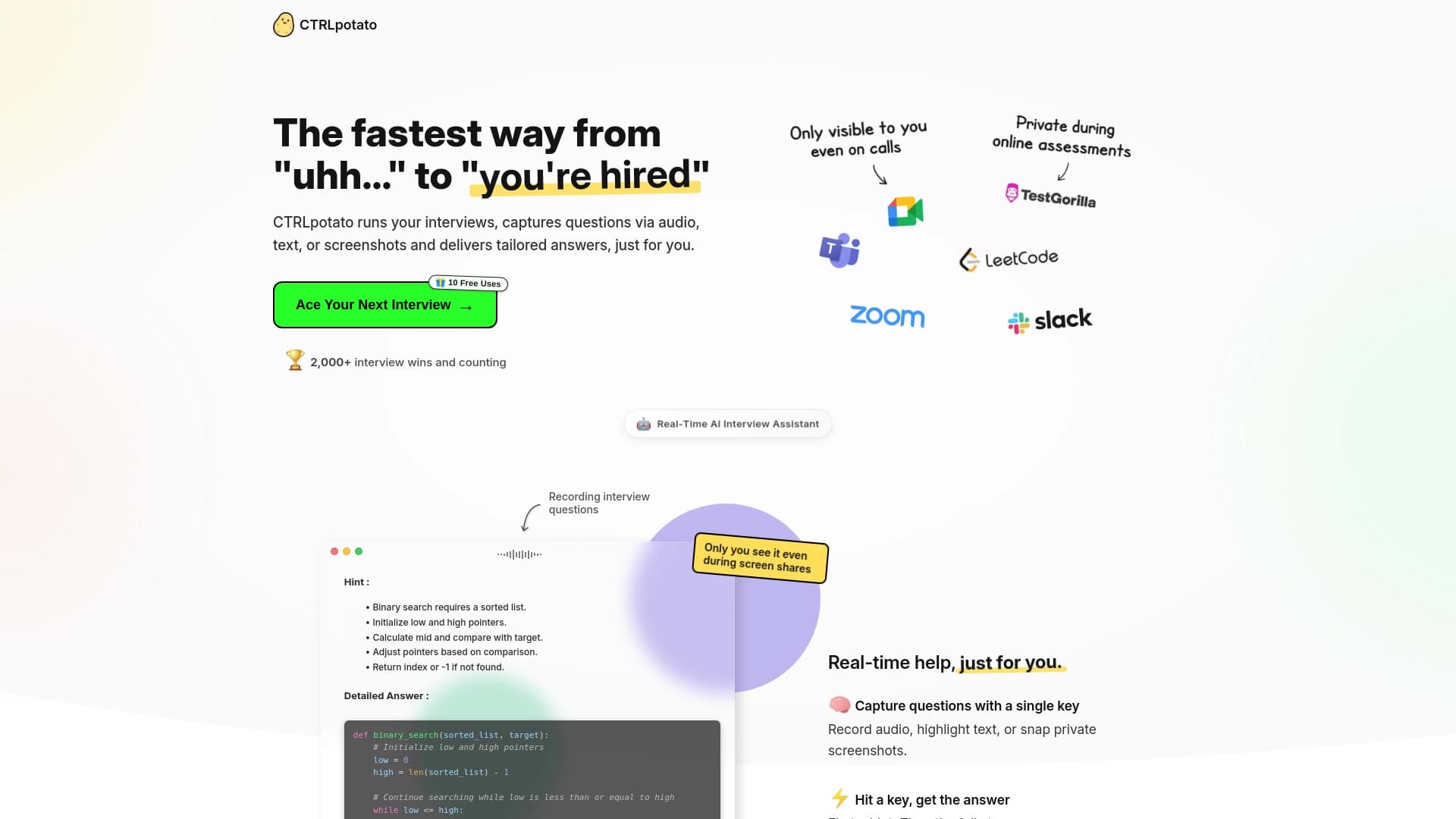
CTRLpotato is an AI assistant designed to support candidates during technical and product interviews in real time. The tool works as a "co-pilot": it captures the interviewer's questions coming through various channels — voice, text input, or screen screenshots — recognizes their essence, highlights key requirements, and instantly generates structured prompts.
CTRLpotato's main goal is to help candidates stay on track with their reasoning and quickly formulate a well-structured answer. This is especially relevant for algorithmic interviews, where not only the correctness of the solution matters but also a clear logic of explanation. The assistant handles the routine of analyzing wording and building an answer outline, leaving room for the candidate to engage in a live dialogue with the interviewer.
CTRLpotato Features
| Feature | Value |
|---|---|
| Type | AI assistant for interviews and coding |
| Categories | HR and recruiting, Code assistants |
| Website | www.ctrlpotato.com |
| Catalog publication date | December 6, 2025 |
| Distribution model | Not specified |
Who is CTRLpotato suitable for?
Candidates for technical positions
The tool is aimed at job seekers going through interviews for engineering roles. It is especially useful at algorithmic stages, where quick problem-solving in programming and the ability to explain one's approach are required.
Applicants for product roles
CTRLpotato is also applicable in product interviews, where it's important to express thoughts in a structured way, highlight metrics, and justify product decisions. The assistant helps build a logical answer even under stress.
Candidates preparing for system design interviews
For those going through system design interviews, the tool helps break down complex questions into parts, formulate architectural approaches, and not miss important details during the discussion.
How to use CTRLpotato?
Connecting to an interview
The tool works as a web service, so to start an interview session, you just need to open the website www.ctrlpotato.com and launch a session. The assistant runs in parallel with your call or in-person meeting and starts listening to or reading the questions.
Ways to submit questions
CTRLpotato accepts questions in three ways: via voice, text, or screen screenshot. This is convenient when the interviewer types a problem statement in a chat, voices it aloud, or shows code on the screen. The assistant recognizes the wording, extracts key requirements, and generates an answer.
Working with prompts
After analyzing the question, CTRLpotato suggests an answer outline and a detailed explanation. All you need to do is adapt the proposed structure to your communication style and deliver it to the interviewer. The interface is compact and unobtrusive so as not to distract from the conversation.
Core features of CTRLpotato
Recognizing interviewer questions
The assistant's key function is universal capture of incoming information. The tool can recognize questions via voice, text, and screenshots, which is important for different interview formats. It analyzes both the exact wording and the hidden requirements of the question.
Generating structured answers
CTRLpotato doesn't just output ready-made phrases; it creates a logical answer structure — from defining the problem to breaking down the solution. This helps the candidate appear confident and consistent, even when nervous.
Support for algorithmic and system design interviews
The assistant specializes in complex interview types. For algorithmic tasks, it offers step-by-step solution logic, and for system design interviews, it helps steer the answer in the right direction without missing important components.
CTRLpotato advantages
Real-time assistance
The main advantage is instant reaction to a question. The candidate doesn't need to prepare cheat sheets in advance — CTRLpotato works in the moment, adapting to the pace of the interview.
Multiple input methods
The ability to capture questions via voice, text, or screenshot makes the tool universal for any interview format, from video calls to in-person meetings with screen sharing.
No visual clutter
The interface is designed to minimally distract the candidate. Prompts appear neatly, without overloading the screen or interfering with the dialogue with the interviewer.
CTRLpotato drawbacks
Official sources contain no information about obvious drawbacks of the tool. One could assume that using an assistant during an interview may raise ethical questions; however, data on the service's policy in this regard is absent. There is also no information about potential limitations in speech recognition accuracy or handling of non-standard problem formulations.
What problems does CTRLpotato solve?
Passing technical interviews
The tool helps candidates confidently get through technical interviews by providing real-time support. This reduces stress levels and improves the quality of answers.
Formulating structured responses
CTRLpotato solves the problem of "mental fog," when a candidate knows the answer but can't articulate it clearly. The assistant gathers scattered thoughts into a logical response.
Solving programming problems
For algorithmic tasks, the tool generates step-by-step prompts, helping the candidate avoid getting stuck and move toward a solution sequentially while demonstrating their thought process to the interviewer.
CTRLpotato pricing
Official information about the service's cost is limited. It is known that new users receive several free uses to get familiar with the functionality. Detailed pricing plans and rate cards are not disclosed on the website, so it is recommended to visit www.ctrlpotato.com for up-to-date information about paid plans.
CTRLpotato terms of use
Detailed terms of service are not published in open sources. There is no data on age restrictions, regional availability, user technical requirements, or privacy policy. To get a full picture of the rules, you need to review the license agreement on the official website. The product's distribution model is also unknown, which makes it difficult to assess access conditions.
CTRLpotato availability
CTRLpotato is available as a web service at www.ctrlpotato.com. No special software installation is required — just follow the link from any browser. Information about mobile apps or desktop clients is absent from the sources. The tool's catalog publication date is December 6, 2025, indicating the product is relatively new to the market.
How CTRLpotato differs from alternatives
The main difference of CTRLpotato lies in its comprehensive approach to capturing questions. Most alternatives are limited to a single input method — for example, text only. CTRLpotato, on the other hand, combines three formats: voice, text, and screenshots. This allows the tool to be used in any situation, even when the interviewer doesn't type the problem into a chat but simply speaks it aloud.
Another distinguishing feature is its focus on structuring answers. Instead of simply searching for information or generating one "perfect" answer, the assistant offers a step-by-step plan that the candidate can develop in dialogue. This helps maintain natural communication and avoid looking like you're reading from a script.
Additionally, CTRLpotato's interface is designed with interview specifics in mind: compact, unobtrusive, without unnecessary distractions. Many competitors offer bulky windows or panels that are hard to use discreetly during a serious technical conversation.
Conclusion
CTRLpotato is a highly specialized AI assistant that solves a specific and pressing problem: helping candidates get through technical and product interviews in real time. Thanks to support for three input methods and the ability to generate structured prompts, the tool becomes a valuable aid for algorithmic and system design interviews. Despite limited public information about pricing and terms of use, the availability of free trial sessions allows potential users to evaluate the service's effectiveness. For job seekers looking to reduce stress and systematize their answers, CTRLpotato looks like a fairly promising assistant.
Frequently asked questions
See also


AI platform for fast website creation and small business process management.

AI-powered toolkit for optimizing workflows and boosting productivity.


Desktop AI assistant for macOS, Windows, and Linux that launches via hotkey above all windows and combines multiple language models in one interface.


AI toolkit for video generation and editing, including avatars, lip-sync, and voice cloning.

AI agent for automating customer communications and support.


Chrome extension that helps manage tabs, history, and bookmarks with an AI assistant.

AI assistant for business that helps manage tasks and automate routine through dialogue.

AI keyboard for Apple devices that speeds up typing with corrections, translation, and response generation.