

Voicemaker
A text-to-speech service with hundreds of customizable voices in multiple languages.
Overview
Voicemaker
Voicemaker neural network description
Voicemaker is an online text-to-speech service powered by artificial intelligence technologies. The platform lets you turn written content into a naturally sounding audio track while preserving the expressiveness and intonations characteristic of a live voice.
The service has established itself as one of the tools in its category thanks to a wide selection of voices and flexible synthesis settings. According to the developers, the platform is used by over 1.1 million people in more than 120 countries, and the total volume of voiced text exceeds 100 million characters.
Voicemaker suits a wide range of scenarios: from voicing videos and creating audiobooks to producing podcasts, educational materials, and marketing content. The ability to fine-tune speech and the large number of available voices make it suitable for both professional projects and personal use.
Voicemaker features
| Feature | Value |
|---|---|
| Type | Text-to-Speech (TTS) |
| Category | Voices and voiceover, voice generation, audio processing |
| Number of voices | More than 600–750 |
| Supported languages | 75 to 120 languages, including Russian and English |
| Audio export formats | MP3, WAV, OGG, AAC, OPUS |
| Sampling rate | From 8000 to 48000 Hz |
| Subtitle formats | SRT, TXT |
| Voice engines | Standard and neural |
| Additional features | Pronunciation editor, pause adjustment, voice cloning, API |
| Business model | Freemium (free and paid plans) |
| Free version | Yes, limited to 250 characters per conversion |
| Paid plan pricing | From $5 per month |
| Website | voicemaker.in |
Who is the Voicemaker neural network suitable for?
Content creators and videomakers
Voicemaker will be useful for bloggers, videomakers, and authors who regularly voice their videos. The service allows you to quickly get a high-quality audio track without recording in a studio, which significantly speeds up the content production process.
Marketers and advertising professionals
For those involved in advertising, the service is convenient for creating voiceovers for ad videos, product descriptions, and promo materials. The availability of expressiveness effects, including emotions and accents, helps choose the right tone for a specific advertising task.
Educational platforms and educators
Teachers and creators of educational programs can use Voicemaker to generate audio lessons, lectures, and learning materials. Support for many languages, including Russian and English, makes it possible to prepare educational content for different audiences.
Podcast and audiobook authors
Writers, podcast authors, and audiobook publishers will find in the service a convenient way to turn text content into audio format. A wide selection of voices with different accents and intonations helps create recordings with varied sound.
How to use the Voicemaker neural network?
Registration and login
To get started, you need to register on the official website voicemaker.in and log in to your personal account. Registration is mandatory — without an account, you will not be able to use the service.
Preparing and configuring voiceover
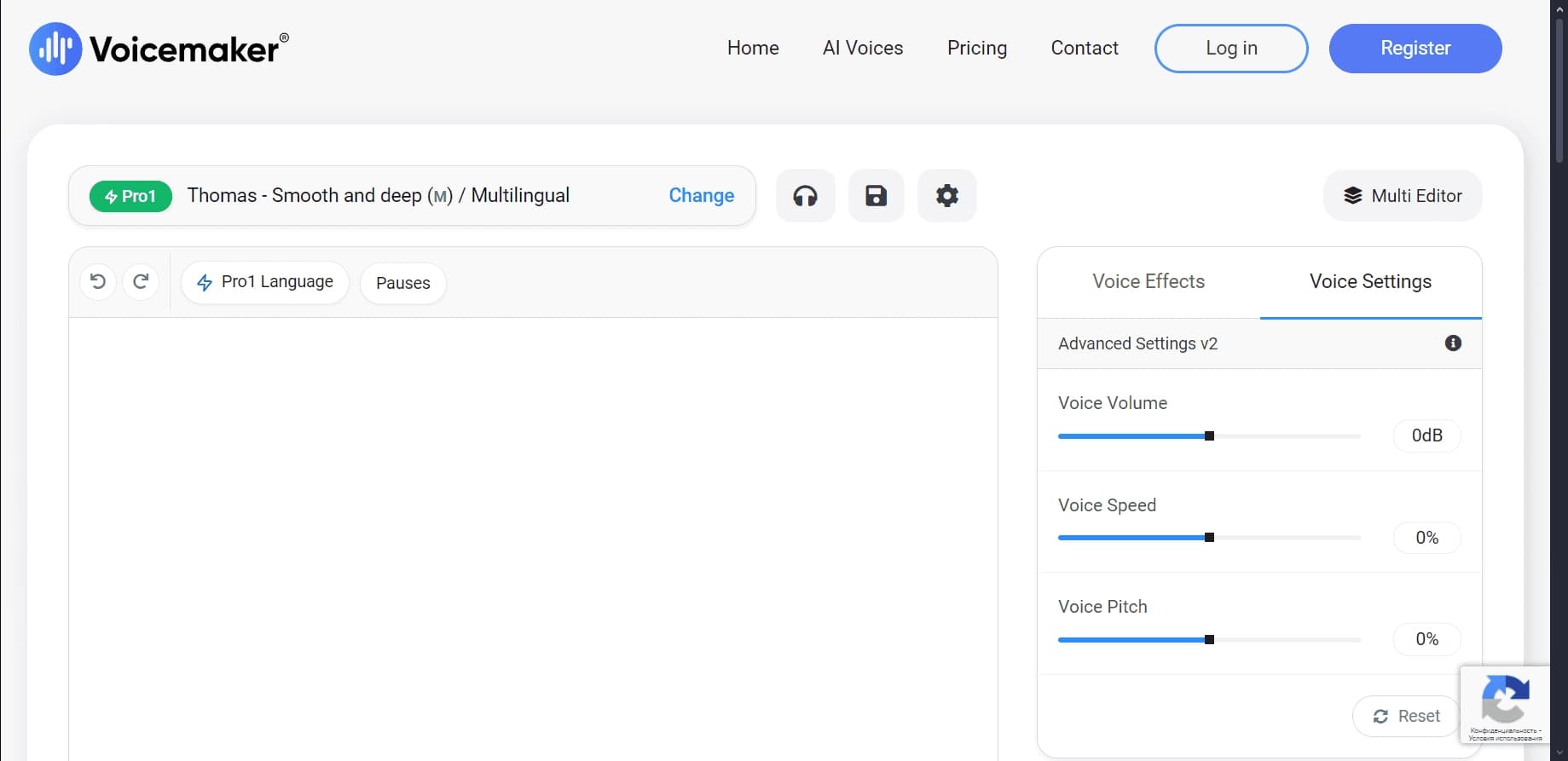
After logging in to your personal account, you need to select the text for voiceover and specify the language. Next, the user picks a voice and adjusts additional parameters: tempo, speed, volume, pitch, and, if necessary, pauses, pronunciation of individual words, and expressiveness effects.
Generating and downloading the result
Once the settings are complete, audio generation starts. The service provides a preview mode so the user can evaluate the result before downloading. The finished file is exported in the chosen format — for example, MP3, WAV, or OGG — and saved to the device.
Main Voicemaker functions
Voices and languages
The service offers a library of more than 750 voices that can be filtered by gender, age, and accent. It supports 75–120 languages, including Russian and English. Voices are grouped by use cases: animation, narration, social media, advertising, education, IVR, and others.
Speech parameter adjustment
The user can adjust the speed, pitch, volume, and tone of synthesis. A pronunciation editor is available to customize the voicing of individual words and phrases, as well as a pause insertion feature to control the pace of speech. Emotional coloring, whisper, and accents add extra expressiveness to recordings.
Voice engines and export
Voicemaker supports standard and neural TTS engines. Audio can be exported in several formats — MP3, WAV, OGG, AAC, OPUS — with a sampling rate from 8000 to 48000 Hz. Additionally, the service can generate subtitles in SRT and TXT formats and offers a voice cloning feature.
Other capabilities
Paid plans include an API for developers, allowing voiceover integration into your own applications and services. Categorization of voices by scenario simplifies selecting the right voice for a specific task.
Voicemaker advantages
Wide selection of voices and languages
One of the service's main strengths is its large set of voices — more than 750 — with detailed filtering by gender, age, and accent. Support for many languages, including Russian, makes the tool universal for users from different countries.
Flexible customization options
Voicemaker stands out with its many synthesis parameters: you can adjust speed, volume, tone, control pronunciation, and manage pauses. This flexibility makes it possible to achieve naturally sounding speech and adapt the result to a specific task.
Diverse export options and affordable pricing
The service provides extensive export capabilities: multiple audio formats, sampling rate adjustment, and subtitle generation. At the same time, paid plans start at an affordable $5 per month, making the tool quite budget-friendly for regular use.
Voicemaker disadvantages
Free plan limitations
The free version of the service is significantly limited: only up to 250 characters can be voiced per conversion. In addition, the free plan only provides access to basic voice models (AI1, AI2, AI3), while extended features such as the API remain unavailable.
Synthesis accuracy and privacy concerns
Users may encounter difficulties with accurate voicing of slang and specific terms that require manual adjustment in the pronunciation editor. It is also worth considering privacy concerns when uploading sensitive data to a cloud service.
What tasks does Voicemaker solve?
Voicing videos and audiobooks
The service is well suited for creating voiceovers for videos and audiobooks. Any text content can be quickly turned into a high-quality audio track, eliminating the need for studio recording.
Educational and advertising materials
Voicemaker helps generate speech for educational platforms, audio lessons, and learning materials. Marketers use it to create voiceovers for ad videos, product descriptions, and other promo content.
Voice interfaces and social media content
The service is suitable for preparing voice interfaces used in IVR systems and chatbots. It also allows creating voiceovers for social media, animated characters, and entertainment projects.
Voicemaker pricing
Voicemaker operates on a freemium model. The free plan provides access to basic voice models but limits the amount of voiceover to 250 characters per conversion.
Paid plans start at $5 per month. The entry-level plan includes 200,000 characters monthly, which corresponds to roughly 4 hours of audio. More expensive subscriptions allow voicing up to 10,000 characters at a time, unlock an extended set of voices, additional features, and an API for developers. All paid plans permit commercial use.
Voicemaker terms of use
Using the service requires registration on the official website voicemaker.in. After creating an account, the user gains access to a personal dashboard where they configure and generate voiceovers.
The free plan operates with restrictions on the number of characters (up to 250 per conversion), available voice models, and features. Paid subscriptions remove these restrictions and add extended capabilities, including the API. Commercial use of the service is permitted on paid plans.
Voicemaker availability
Voicemaker is a fully online service available through any web browser; no additional software installation is required. The platform supports more than 120 languages, including Russian and English, and the service's audience spans over 120 countries.
No regional usage restrictions are stated in official data, and no need for a VPN is mentioned either. The only mandatory requirement is having an account on the website, so registration will be required before getting started.
How Voicemaker differs from alternatives
The main difference between Voicemaker and its competitors is the combination of a very wide selection of voices (more than 750) with detailed filtering by gender, age, and accent. Not all alternatives offer such an extensive library and such flexible voice classification for different use cases.
The service also stands out with its many synthesis settings: in addition to standard parameters such as speed and volume, it offers a pronunciation editor, pause control, expressiveness effects, and voice cloning. The ability to export in a large number of formats with adjustable sampling rate and subtitle generation adds to the service's practicality.
An important advantage is the price. Paid plans start at $5 per month, making Voicemaker affordable compared to many competitors, while sound quality and flexibility of use remain at a high level.
Conclusion
Voicemaker is a powerful and affordable TTS service with a wide selection of voices (more than 750) and support for many languages, including Russian. Flexible pronunciation, speed, timbre, and expressiveness settings, combined with diverse export formats, make it suitable for a wide variety of tasks — from voicing videos and audiobooks to educational and advertising projects. The free plan is limited to 250 characters, but paid plans starting at $5 per month unlock full capabilities, including commercial use and the API, so the service is suitable for both personal and professional purposes.
Pricing
Frequently asked questions

See also


Platform for recording, editing, and publishing podcasts and video content with built-in AI tools.

AI-powered platform for generating and editing images and videos.
Cloud platform for text-to-speech conversion with realistic AI-powered voices.


Cloud platform for launching AI applications directly in the browser without installation.

AI-powered platform for real-time voice changing and cloning.

AI tool for creating and planning video content for social media.


AI-based online service for converting written text into realistic speech.
Screen recording tool with subsequent AI transcription and summarization of content.