

ShortMake
An AI service that automatically creates a ready-made short video with voiceover and visual effects based on a text idea.
Overview
ShortMake
Description of the ShortMake neural network
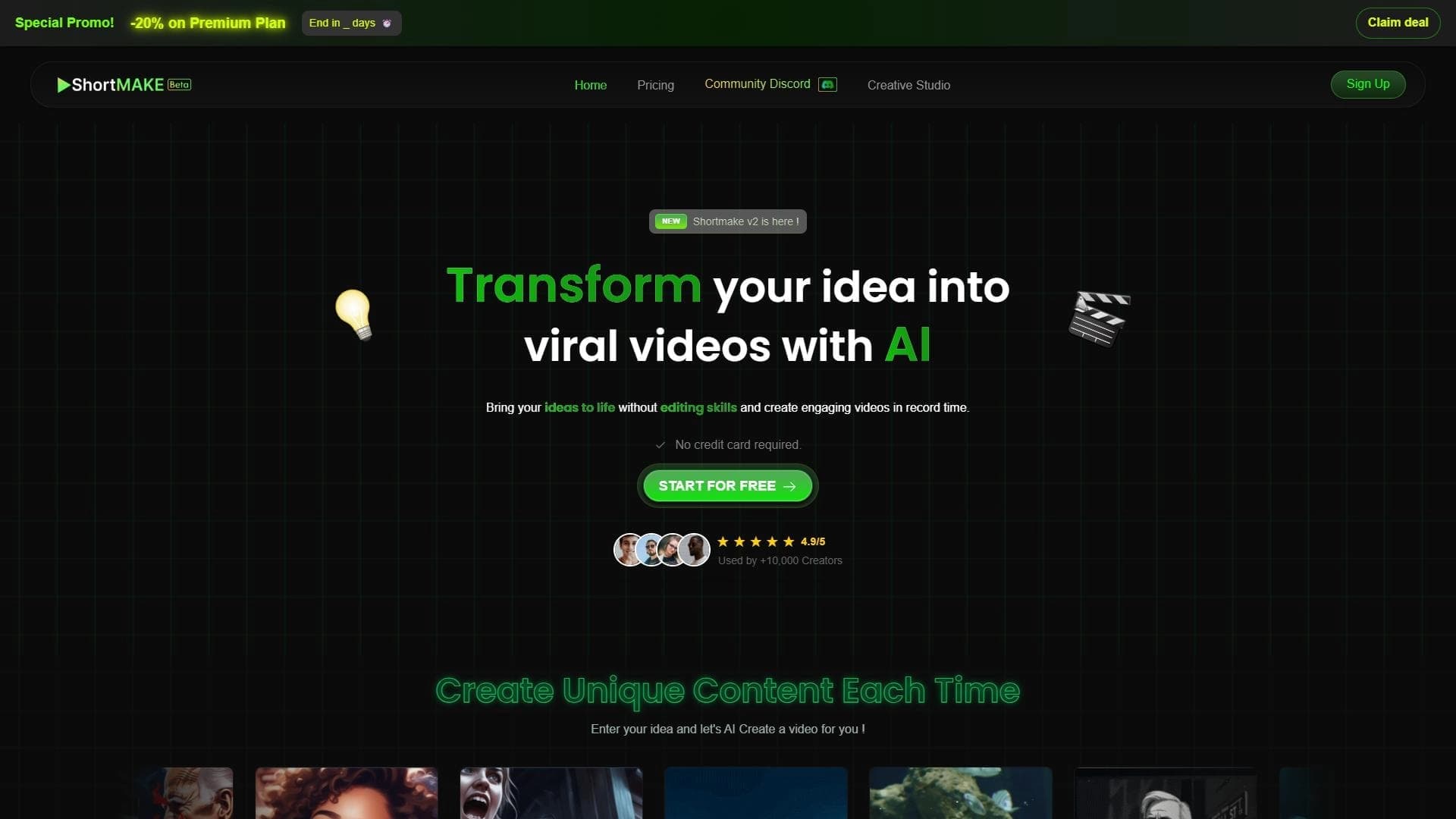
ShortMake is a free AI service for automatically creating short videos. The user only needs to describe the idea of the future video in text, and the neural network will independently assemble the finished video sequence, add voiceover and visual effects. A fully finished video appears in about 8 minutes.
The service is focused on popular short content formats: TikTok, YouTube Shorts, Instagram Reels and Snapchat. ShortMake does not require video editing skills — all technical stages are handled by artificial intelligence. It is important to keep in mind that the tool is in beta version, so the set of customization settings is still limited, and individual errors may occur during operation.
ShortMake characteristics
| Characteristic | Value |
|---|---|
| Type | Short video generation |
| Category | Short videos and clips, video generation, content for TikTok and Reels |
| Platforms | Web (app.shortmake.com) |
| Free plan availability | Yes (free use at the start, registration without card linking) |
| Status | Beta version |
| Video creation time | Less than 8 minutes |
| Number of voiceover voices | 4 (2 of them hyper-realistic) |
Who is the ShortMake neural network suitable for?
Content authors and bloggers
ShortMake is suitable for those who regularly publish short videos on social networks and want to speed up the content creation process. The tool allows turning text ideas into ready-made videos without lengthy work in an editor or time-consuming editing.
Small business owners and marketers
The service will be useful for small business owners and marketers who need to quickly create videos to promote goods and services on TikTok, Instagram Reels, YouTube Shorts and Snapchat. Since no editing skills are required, even an employee without special training can handle such tasks.
How to use the ShortMake neural network?
Step 1: Entering the video idea
To get started, simply describe the idea of the future video in text. ShortMake understands natural language descriptions and independently determines the content and structure of the future video.
Step 2: Setting up the voice and parameters
After entering the idea, you can choose one of the available voiceover voices — there are four in total, including two hyper-realistic ones. Basic settings are also available, which are still limited due to the beta status.
Step 3: Getting the finished video
At the final stage, the service automatically assembles the video sequence, adds voiceover and visual effects. After a few minutes, the user receives a finished video that can be immediately published on social networks.
Main functions of ShortMake
Fast generation of short videos
ShortMake creates a finished video on a given topic in about 8 minutes. The entire process — from a text idea to the final video — runs automatically without human involvement in technical operations.
Automatic voiceover
The service independently voices videos, offering four voices to choose from, two of which are hyper-realistic. This saves the user from having to separately record and synchronize the audio track.
Automatic editing and visual effects
Video editing and adding visual effects are performed automatically by the neural network. Thanks to the intuitive interface, the service does not require video editing skills — all technical stages are handled by artificial intelligence.
Advantages of ShortMake
Fast video creation
The main advantage of the service is speed. A fully finished video appears in less than 8 minutes, allowing you to quickly cover the need for fresh content for social networks.
No editing skills required
Working with ShortMake requires no knowledge of video editors or editing. All technical work is done by the neural network, making the tool accessible to any user.
Free use at the start
The service can be used for free, and registration does not require linking a bank card. This makes getting started with the tool as simple and safe as possible.
Intuitive interface
The service is simple and clear to use: the user needs to enter an idea, choose a voice and settings — the rest is done by the neural network. This approach lowers the entry barrier for beginners.
Disadvantages of ShortMake
Limited number of voices
Only four voiceover voices are currently available, of which only two are hyper-realistic. For users who need high voiceover variability, this set may not be enough.
Few customization settings
Due to the beta status, the set of settings for fine-tuning videos is still limited. Users accustomed to detailed control over editing and style may find the service's capabilities insufficient.
Possible operational errors
Like any product at an early stage of development, ShortMake may make individual errors and have some rough edges. This is normal for a beta version, but it is worth keeping in mind when planning important publications.
What tasks does ShortMake solve
Creating content for social networks
The main task of the service is generating short videos for TikTok, YouTube Shorts, Instagram Reels and Snapchat. The user describes the idea in text, and the neural network turns it into a finished video in the required format.
Automating video editing
ShortMake fully automates the editing process: selecting the video sequence, adding voiceover and visual effects happens without human involvement. This frees up time and resources that would normally go into manual work in editors.
ShortMake pricing
The service works free of charge. To start using it, you only need to register — no bank card linking is required. The distribution model is free, making the tool accessible to a wide audience of content creators.
Terms of use of ShortMake
Registration in the service does not require linking a bank card, so you can get started without any financial commitments. It is important to consider that ShortMake is in beta version: bugs and unfinished features may occur during use, and developers are gradually fixing them. This is worth keeping in mind when planning regular work with the service.
Availability of ShortMake
ShortMake is available as a web application on the app.shortmake.com platform. This means that no additional software installation is required to use the service — just open the site in your browser. At the start, usage is free and registration does not require card linking.
How ShortMake differs from alternatives
Full automation of the process
The main difference of ShortMake is deep automation. The user only needs to enter a text idea, and everything else — video sequence, voiceover, editing and visual effects — is handled by the service independently. Many alternatives require more active user involvement in setting up and editing the video.
Free start without obligations
Unlike a number of competing services, ShortMake lets you start working for free and without linking a bank card. This makes the tool more accessible to beginning creators and small projects.
Early version status
It is worth noting that ShortMake is still in beta version. On the one hand, this means limited customization settings and possible errors; on the other, it means slow but steady development of functionality as the product is refined.
Conclusion
ShortMake is a free AI tool for quickly generating short videos for TikTok, YouTube Shorts, Instagram Reels and Snapchat, with no editing skills required. It is a great fit for content creators, bloggers, small business owners and marketers who need to quickly produce finished videos from a text idea. However, due to its beta status, the service still has limited customization options, a small set of voices, and may make occasional errors in operation.
Frequently asked questions
Similar AI tools





See also

AI-powered service that converts cooking videos into step-by-step text recipes with ingredient lists.

A platform for creating talking videos with a teleprompter, AI-generated scripts, subtitles, and avatars.

AI service for creating covers and titles for YouTube channels.

A platform from MiniMax for generating short videos from text or images.
Video generation model from Google DeepMind that creates realistic videos based on a text description.

A platform that combines several video creation tools in a single chat interface, from script generation to editing and voiceover.

Mobile app for photo and video editing using AI and an extensive library of filters.

Multimodal family of Google models that combines text, code, images, video, and audio processing in a single system.