Nano Banana
Google's neural network for generating and editing images from text descriptions, based on Gemini models.
Overview
Nano Banana
Description of the Nano Banana neural network
Nano Banana is a web tool from Google for generating and editing images, built on Gemini models. With it, you can create images from scratch based on text descriptions, as well as make precise edits to existing photos.
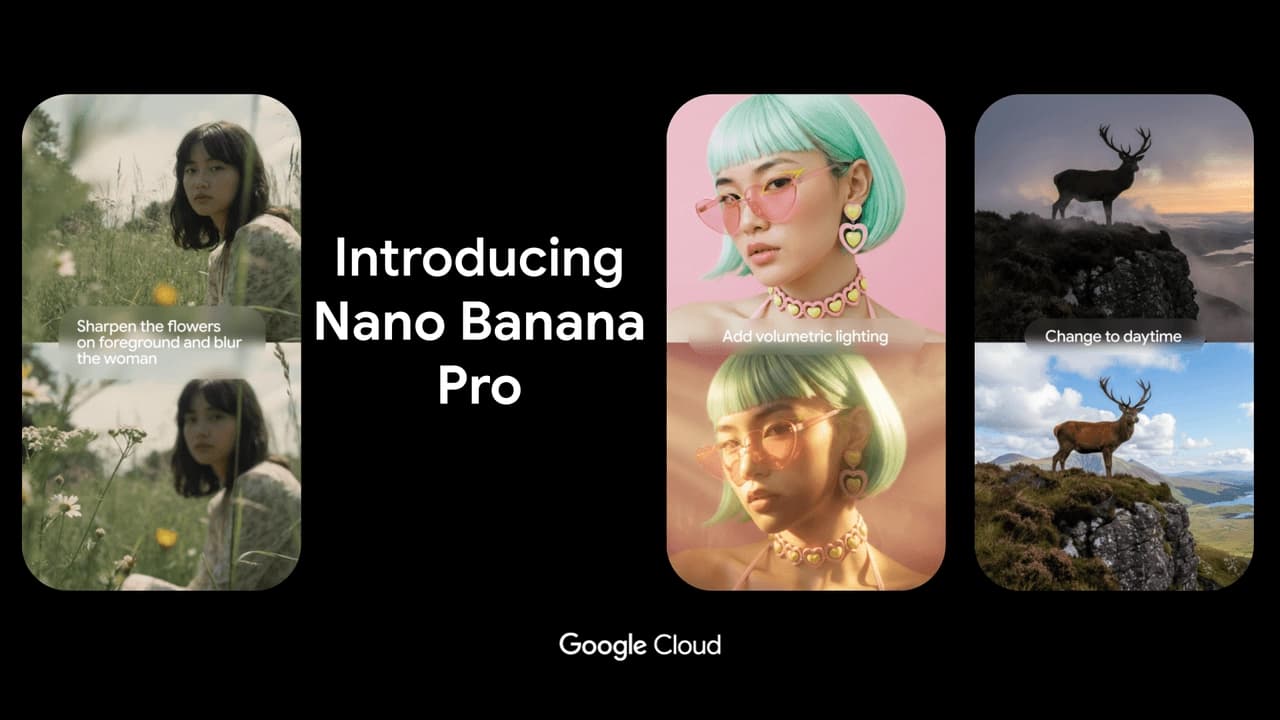
The model's main feature is the ability to edit images using text commands without masks. Nano Banana can remove objects and people, change backgrounds and poses, while keeping the faces of people and pets recognizable. The model also supports merging multiple images into one.
The tool works in the web and is available through a number of Google platforms, including the Gemini app and Google AI Studio. All generated files are marked with a watermark and an invisible SynthID marker, confirming their origin from the neural network.
Nano Banana characteristics
| Characteristic | Value |
|---|---|
| Developer | |
| Type | Model for image generation and editing |
| Categories | Image generation, photo editing, text to image |
| Pricing model | Freemium (free / paid API) |
| Based on | Gemini models |
| API model name | gemini-2.5-flash-image-preview |
| Availability | Gemini (web and mobile app), Google AI Studio / Gemini API, Vertex AI |
| Content labeling | Watermark and SynthID |
| Date added | 26.08.2025 |
Who is Nano Banana suitable for?
Users with personal photos
Nano Banana is suitable for those who need precise editing of personal photos and family albums. The model can carefully edit photos of people and pets, preserving their recognizability even after significant changes—changing background, hairstyle, or pose.
E-commerce product card creators
The tool is useful for preparing product cards with models. It can be used to process product images, remove unnecessary objects, change backgrounds, and create quality materials for catalogs without complex graphic editors.
Those who edit images without masks
The main audience is users who need precise edits based on text descriptions without manually selecting masks. This makes editing fast and intuitive even for people without experience in photo editors.
How to use Nano Banana?
Via Google AI Studio
To get started, open Google AI Studio and sign in to your Google account. Then choose a model from the Nano Banana family, after which you can describe the task in plain language and upload reference images if needed. After getting the result, you can give the model targeted edits.
Via the Gemini app
For an average user, the easiest way is to use the Gemini app and select the image creation feature. The workflow follows the same logic: describe the task in text, upload a photo if needed, get the result, and refine it.
Via API for developers
Developers can connect the model through Google AI Studio, Gemini API, or Vertex AI. This allows integrating image generation and editing into their own applications and services. The API model name is gemini-2.5-flash-image-preview.
Main features of Nano Banana
Editing without masks
The key feature is local edits based on text descriptions without manually selecting masks. Simply describe the desired change in words, and the model will apply it to the image.
Identity preservation
The model keeps faces of people and pets recognizable even when changing background, hairstyle, or pose. This is important when editing personal and family photos.
Image merging and creation from scratch
Nano Banana supports merging multiple images into one (multi-image fusion) and generating content from scratch. Additionally, the result can be converted into a short video directly in the Gemini app.
Additional capabilities
The model's arsenal includes global knowledge about the real world, which reduces the number of logical errors during generation, as well as the ability to reuse and refine created images. All content is marked with a watermark and an invisible SynthID marker.
Advantages of Nano Banana
Edit accuracy
The model performs precise edits based on text descriptions without requiring mask selection. This makes the editing process noticeably easier and faster compared with traditional photo editors.
Recognizability preservation
Keeping faces of people and pets recognizable even when changing background or hairstyle is a significant advantage for working with personal photos and family albums.
Understanding of the real world
The model understands the context and objects of the real world, which reduces the number of logical errors during generation and editing. In addition, it can merge multiple images and create pictures from scratch.
Disadvantages of Nano Banana
Uneven access
Access and free usage limits may depend on the country, account, and Google subscription. Free access to the more advanced version of the model can quickly switch to the regular version after the limit is exhausted.
Content labeling
All generated images are marked with an invisible SynthID watermark. For some use cases, this may be a limitation, although the labeling serves as confirmation of the files' origin.
Limitations of the base version
The base version of Nano Banana is inferior to the higher-tier model in control over the result, detail of complex scenes, and text rendering quality. For professional tasks with large text or high resolution, a more advanced version may be needed.
What tasks does Nano Banana solve
The model can solve a wide range of image-related tasks: removing an object or person from a photo, blurring the background, changing a pose, fixing defects (for example, stains on clothes), and coloring black-and-white photos.
The tool is also suitable for creating an image from scratch, editing uploaded photos based on text descriptions, mixing styles and transferring objects to a new scene, as well as merging multiple images into one.
Nano Banana pricing
Nano Banana operates on a freemium model. Basic access to the tool through Gemini and Google AI Studio is free, but the free mode has limitations.
For those who need more volume or professional capabilities, a paid API is available. Exact API rates are not specified in available sources. The higher-tier model in the lineup is available for $0.134 per image through the Gemini API and is also included in the Google One AI Premium subscription for $20 per month with generation limits.
Nano Banana terms of use
To use the model, a Google account is required. The tool is available in Gemini (free and paid) as well as through Google AI Studio and Vertex AI. The set of features and limits depend on the country, account, and Google subscription.
All images created with the model are marked with a watermark and an invisible SynthID marker to confirm their origin. Commercial use is allowed, and the user is responsible for respecting third-party copyrights.
Nano Banana availability
The model is available in the Gemini app (web and mobile) as well as through Google AI Studio, Gemini API, and Vertex AI. For regular users, the basic entry point is the Gemini app; for developers, Google AI Studio and the API.
Availability depends on the region and account. Certain features and more advanced versions of the model may have country restrictions and require an appropriate Google subscription. Interface languages are not specified in available sources.
How Nano Banana differs from alternatives
Nano Banana stands out among alternatives for its precise edits based on text descriptions without masks and for preserving the recognizability of people and pets. Thanks to its understanding of real-world context, the model makes fewer logical errors during generation.
The key advantage over classic editors is ease of use: no mask or layer skills are needed; you just describe the desired change in words. At the same time, the model remains freely available for basic use, which distinguishes it from paid alternatives focused on professional aesthetics or photorealism.
The higher-tier version in the lineup, Nano Banana Pro, is inferior to competitors such as Midjourney in artistic aesthetics and stylization, and to models such as FLUX in photorealism and precise composition control. At the same time, the Nano Banana family is stronger in prompt adherence and text rendering in images.
Conclusion
Nano Banana is a practical and accessible tool from Google for generating and precisely editing images. Its main strength lies in making neat edits from text descriptions without masks while preserving the recognizability of people and pets, as well as understanding real-world context. The model is freely available through the Gemini app and Google AI Studio, and for developers through the API and Vertex AI, making it a suitable choice both for personal tasks and for preparing commercial content.