

Emberly
A visual tool for organizing knowledge, combining notes and mind mapping into clear visual maps.
Overview
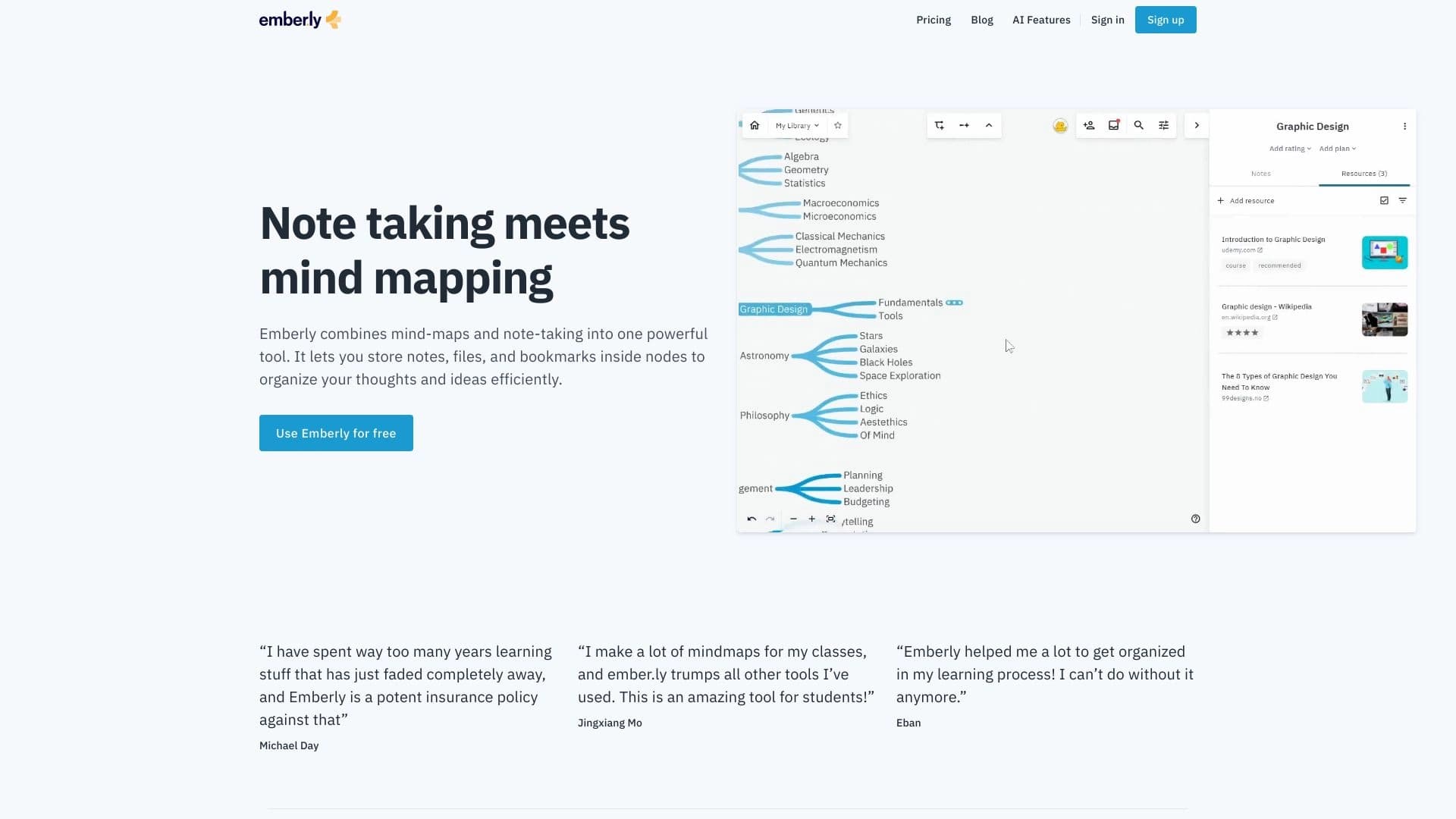
Emberly is a visual knowledge organization platform that combines classic notes with mind mapping. Instead of long text documents or scattered files, the service offers creating visual interactive maps where each element — an idea, note, or document — is represented as a separate node. This approach allows you to see the overall structure of information at a glance, understand the connections between individual parts, and quickly find the data you need.
The platform is positioned as a "living knowledge base": collected materials are not just stored but transformed into an interconnected system that is easy to expand and modify. Built-in AI features help speed up routine note-taking operations, freeing up time for creative and analytical work.
Emberly Features
| Feature | Value |
|---|---|
| Type | Visual knowledge organization tool |
| Category | Knowledge maps, Knowledge management |
| Website | ember.ly |
| Free tier available | Yes |
| AI features | Yes |
| Work format | Visual maps with nodes |
| Supported content | Notes, files, bookmarks, ideas |
Who is Emberly suitable for?
Students and educators
Emberly will become a useful tool for those who deal with large volumes of academic information on a daily basis. Students can structure lecture notes, prepare exam materials, and visualize complex topics. For educators, the service helps organize lesson plans, create visual diagrams for classes, and systematize teaching materials.
Content creators and researchers
For bloggers, course authors, journalists, and analysts, Emberly offers a convenient way to collect and structure source data. Research notes, book excerpts, source links, and your own ideas can be combined into a single map, significantly simplifying preparation for content creation and article writing.
Information professionals
Project managers, marketers, analysts, and other professionals whose work involves constant data processing will appreciate the ability to visually structure work materials. Emberly helps turn chaotic notes and documents into an organized system, reducing cognitive load.
How to use Emberly?
Creating a knowledge map
Start by creating a new map and adding main nodes corresponding to major topics or sections of your project. Each node can contain a title, note, attached file, or bookmark. As you fill the map, connections between nodes become more apparent, allowing you to see the big picture.
Filling nodes with content
Inside nodes, you can place full-fledged notes of any length, attach files, and save web bookmarks. This turns the map into a complete information repository where you don't need to switch between different applications to find a needed document or link.
Using AI features
To speed up routine operations, Emberly includes built-in AI capabilities. They help automate note processing: for example, structuring text, highlighting key points, or suggesting logical connections between individual nodes.
Key Emberly Features
Visual knowledge maps
The service allows creating visual maps where each idea is represented as a separate node. This structure lets you grasp the entire volume of information at a glance and understand how different elements relate to each other.
Multi-format nodes
Inside each node, you can add full-fledged notes, attach files of various formats, and save bookmarks to external resources. This makes the map a universal repository for all types of materials.
Living knowledge base
Emberly turns a static map into a dynamic knowledge base that is easy to update, expand, and modify. Information remains structured even as data volume grows significantly.
AI assistant
Built-in artificial intelligence algorithms help speed up work with notes by automating repetitive operations and suggesting optimal ways to organize information.
Emberly Advantages
Effective management of information overload
The visual format allows quickly processing large volumes of information without losing important details. A structured map helps highlight what matters most and keep all significant elements in view.
Reliable material preservation
Emberly prevents the loss of important data over time. All materials are stored in a structured form, eliminating situations where needed information gets forgotten in the depths of an overcrowded repository.
Improved memory and learning
Visual presentation of information promotes easier memorization and understanding of material. An interconnected knowledge system simplifies the learning process, information retrieval, and subsequent recall of what has been studied.
Accessibility for beginners
The availability of a free tier allows testing the service and evaluating its capabilities before deciding to move to a paid plan.
Emberly Disadvantages
Official sources do not mention any significant disadvantages of the service. Some limitations may exist in the free version, but the exact list of features available on the free tier is not disclosed. To fully understand the limitations, it is recommended to review the terms of use on the official website and test the service yourself.
What problems does Emberly solve?
Knowledge organization and managing information overload
Emberly helps organize the flow of information coming from various sources. Instead of a chaotic set of notes and files, the user gets a clear, visually understandable structure.
Structuring ideas and notes
The platform allows turning scattered ideas and notes into an interconnected visual system. This is especially useful during project planning and concept development stages.
Long-term storage and access to materials
Emberly provides convenient access to academic, work, and personal materials at any time. The structured nature of maps ensures that needed information will be found quickly and effortlessly.
Emberly Pricing
The service offers a free tier to get started, allowing users to test core features without financial investment. Information about the cost of paid plans and their contents is not disclosed in available sources. It is recommended to visit the official website ember.ly for up-to-date information on pricing and available plans.
Emberly Terms of Use
Detailed terms of service are published on the official website. Since Emberly involves storing user data — notes, files, and bookmarks — the service must ensure their reliable protection and integrity. Before active use, it is recommended to review the privacy policy and user agreement.
Emberly Availability
Emberly is available as a web service, allowing use through a browser on various devices. The availability of a free tier makes the service accessible to a wide audience. Detailed information about web version availability across platforms and the presence of mobile apps is not specified in available sources.
How Emberly differs from alternatives
Focused specialization on visual organization
Unlike universal note managers that may include mind mapping as an additional option, Emberly fully focuses on visual information representation. This makes the service more cohesive and well-thought-out in terms of knowledge map organization.
Combining notes and maps in a single space
Many competitors offer either classic notes or separate tools for creating mind maps. Emberly combines both approaches, allowing full-fledged notes, files, and bookmarks to be placed directly inside map nodes, creating a unified knowledge ecosystem.
Built-in AI features for faster work
The presence of AI tools that help process notes directly within the context of a visual map sets Emberly apart from many similar knowledge organization solutions.
Conclusion
Emberly is a well-designed visual knowledge organization tool that combines the functionality of notes and mind mapping. The service is intended for students, educators, content creators, and anyone who regularly works with large volumes of information. Emberly's key advantage lies in its ability to turn scattered materials into an interconnected visual system, preventing data loss and reducing information overload. AI feature support and the availability of a free tier make the service attractive for getting acquainted and for further use in academic, professional, and personal activities.
Frequently asked questions
See also


Desktop AI assistant for macOS, Windows, and Linux that launches via hotkey above all windows and combines multiple language models in one interface.

AI assistant that analyzes uploaded study documents, identifies questions, and provides detailed explanations.

Service for generating videos from text descriptions and images using modern neural networks.
Online platform for creating interactive AI twins based on the user's biography, personality, and personal experience.


AI-based platform for creating logos and brand identity.


A multifunctional platform for creating and editing media content using artificial intelligence.


AI-powered online service for automatically creating presentations from text, PDF, audio, video, or URL links.


AI-based service for automatic generation of text content in various formats.