
DeepTranslate-全页&双语页面翻译器
Free AI translator for bilingual web page viewing.
Overview
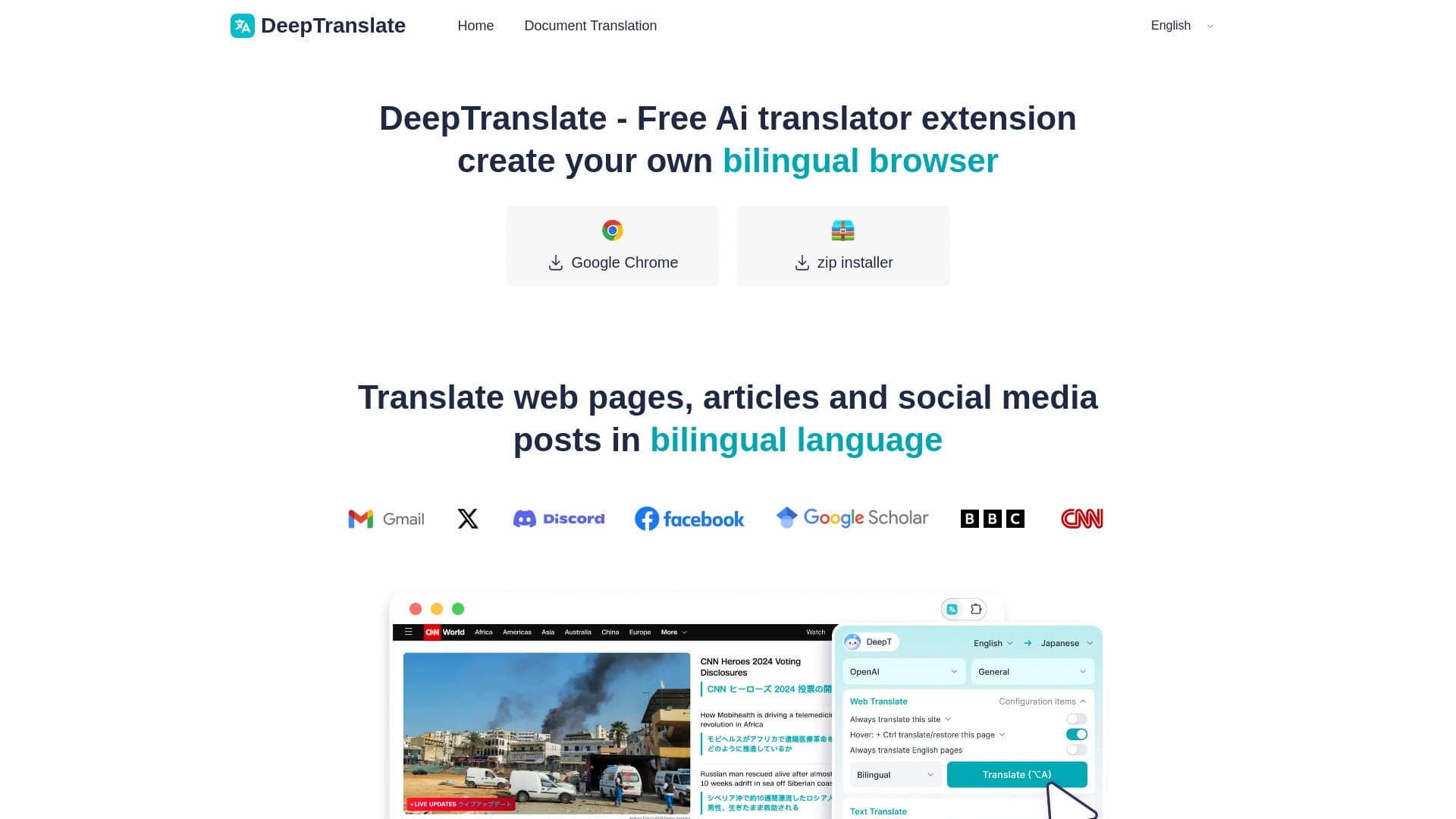
DeepTranslate — a free AI translator designed for those who regularly need to read foreign websites. Instead of copying text fragments into separate translation services, users can translate an entire page right in their browser. The tool's key feature is preserving the original layout: after translation, the site's structure, images, and element positioning remain untouched.
Core concept
The DeepTranslate developers focused on convenience and context. When reading foreign articles, documentation, or news, it's often important to see not just the translation but also the original text. This helps verify terminology, understand nuances, and simply control translation quality. DeepTranslate addresses this by offering a bilingual display mode where the source and translated text are visible simultaneously.
How page translation works
The tool automatically detects the language of the loaded page and offers one-click translation. Users don't need to configure settings manually or select fragments for processing. The system processes the entire page content, including main text, sidebars, and navigation elements, delivering a cohesive result ready for immediate reading.
DeepTranslate-全页&双语页面翻译器 Features
| Feature | Value |
|---|---|
| Tool type | AI translator for browser |
| Key function | Full-page website translation |
| Display mode | Bilingual (original + translation) |
| Layout preservation | Yes |
| Distribution model | Free |
| Purpose | Reading foreign sites without copying text |
Who is DeepTranslate-全页&双语页面翻译器 for?
Researchers and analysts
People who work daily with foreign information sources most often need fast, high-quality translation. DeepTranslate saves time by eliminating the need to copy text into third-party services. The bilingual mode helps scholars and analysts verify original wording, which is especially important when working with terminology, legal acts, or technical documentation.
Regular internet users
For the general user, the service solves a simpler but equally relevant task: reading news, blogs, forums, and online stores in foreign languages. Not having to manually switch between tabs makes browsing more comfortable and faster.
How to use DeepTranslate-全页&双语页面翻译器?
Simple usage scenario
To use the tool, simply open the foreign website you're interested in and activate translation. The system automatically processes all page content and displays the text in the desired language. No complex settings, technical knowledge, or prior preparation required.
Configuring bilingual mode
Users can choose the display format that suits them. Bilingual mode lets you see the original and translated texts simultaneously, which is convenient for comparison. If needed, you can switch to showing only the translated text within the preserved layout. The tool flexibly adapts to the reader's personal preferences.
Key features of DeepTranslate-全页&双语页面翻译器
Full-page translation
Instead of working with individual paragraphs or sentences, DeepTranslate processes the entire document as a single unit. This ensures translation consistency across all page sections and better conveys overall context and style. Users don't need to translate each text block one by one, saving time.
Bilingual viewing
The ability to see the source and translation side by side is the service's main distinguishing feature. This format is useful for language learning, quality control of machine translation, or working with technical texts where it's important to understand how a specific term was translated.
Advantages of DeepTranslate-全页&双语页面翻译器
Preserving the original page structure
Unlike many online translators that simply output text, DeepTranslate works directly with the page layout. The site's appearance is not disrupted: images, tables, and block positioning stay in place — only the language content changes.
No need to copy text
Users no longer have to select text, open a translator tab, paste the fragment, and then return to the site. The process is fully automated, which is especially noticeable when working with long articles or multi-page documents.
Free access
The tool is distributed under a free model, making it accessible to all user categories. No paid subscription or hidden fees allows unrestricted use of the translator for both work and personal purposes.
Drawbacks of DeepTranslate-全页&双语页面翻译器
Dependence on source content quality
Like any machine translator, DeepTranslate may struggle with highly specialized terminology, idiomatic expressions, or poetic texts. Translation quality directly depends on the complexity and specificity of the source material.
Limited information on additional capabilities
Public sources lack sufficient details about additional configuration options, integration capabilities with other services, or the availability of extensions for various browsers. This may limit users accustomed to customizing their work tools.
What tasks does DeepTranslate-全页&双语页面翻译器 solve?
Quick translation of informational materials
When reading news, blog posts, or online magazine content in a foreign language, the tool saves significant time. Information becomes understandable the moment you open the page, with no extra steps.
Working with foreign interfaces and documentation
Users who need to interact with foreign web services, instructions, or help pages get a full understanding of the page content. Bilingual mode helps navigate specific terms and commands, reducing the likelihood of errors when working with the interface.
DeepTranslate-全页&双语页面翻译器 Pricing
Currently, DeepTranslate is positioned as a completely free tool. Users can access all core features without payment or subscription. Public sources contain no information about paid plans or premium versions, making the service attractive to a wide range of users who need a simple and accessible web page translator.
Terms of use for DeepTranslate-全页&双语页面翻译器
Available to all user categories
Since the tool is distributed under a free model, it's available to everyone without prior registration or license purchase. Users can start using the translator immediately after installation for tasks related to reading foreign materials.
No strict technical requirements
The service requires a standard internet connection and a modern browser. No special hardware or complex software is needed, making the tool suitable for most devices — from desktop computers to basic laptops.
Availability of DeepTranslate-全页&双语页面翻译器
The tool is a browser extension or online service that works directly with web pages. Since DeepTranslate focuses on real-time site processing, a stable internet connection is key for transferring data between the user's browser and translation servers. No need for periodic updates and high operating speed make the service convenient for everyday use.
How DeepTranslate-全页&双语页面翻译器 differs from alternatives
Combining full-page translation with bilingual mode
Many translators offer either full-page translation with text replacement or line-by-line translation preserving the original. DeepTranslate combines both approaches, allowing users to see the source and translated texts simultaneously without losing the page's visual integrity.
Prioritizing layout preservation over simplicity
Most online translators display results as a plain text block. DeepTranslate works directly with the original page structure, letting users maintain familiar visual context when reading foreign sites. Materials look the same as on the source resource but in a language the user understands.
Added value of free access
While many services relegate full-page mode to premium features, DeepTranslate makes it publicly available. Users get advanced capabilities without financial investment, which favorably distinguishes the service from competitors with paid subscriptions.
Conclusion
DeepTranslate-全页&双语页面翻译器 is a reliable free tool that addresses the modern internet user's basic need for fast, comfortable reading of foreign websites. Its main advantages — layout preservation, bilingual mode, and no need to copy text — make exploring foreign content significantly easier and more efficient. Although the service may face typical machine translation challenges with specialized texts, it remains a practical solution for everyday tasks involving viewing and understanding information in foreign languages.
Frequently asked questions
See also


Chrome extension that helps manage tabs, history, and bookmarks with an AI assistant.

A platform for aggregating world news using AI to analyze and reduce bias.

A multimedia AI toolkit for editing and enhancing photos, videos, and PDF documents.

Cloud platform for creating videos using AI avatars, synthesized speech, and automatic translation of clips into dozens of languages.


An online service that recognizes text on manga and manhwa pages, translates it into different languages, and embeds it back into the image without damaging the original artwork.

Multifunctional AI platform for content creation, combining speech synthesis, text generation, avatar creation, and video editing.
Tool for translating text directly in images while preserving the original design.

AI keyboard for Apple devices that speeds up typing with corrections, translation, and response generation.