MagicAnimate
A tool for animating static images using a reference video, based on diffusion models.
Overview
MagicAnimate
Description of the MagicAnimate neural network
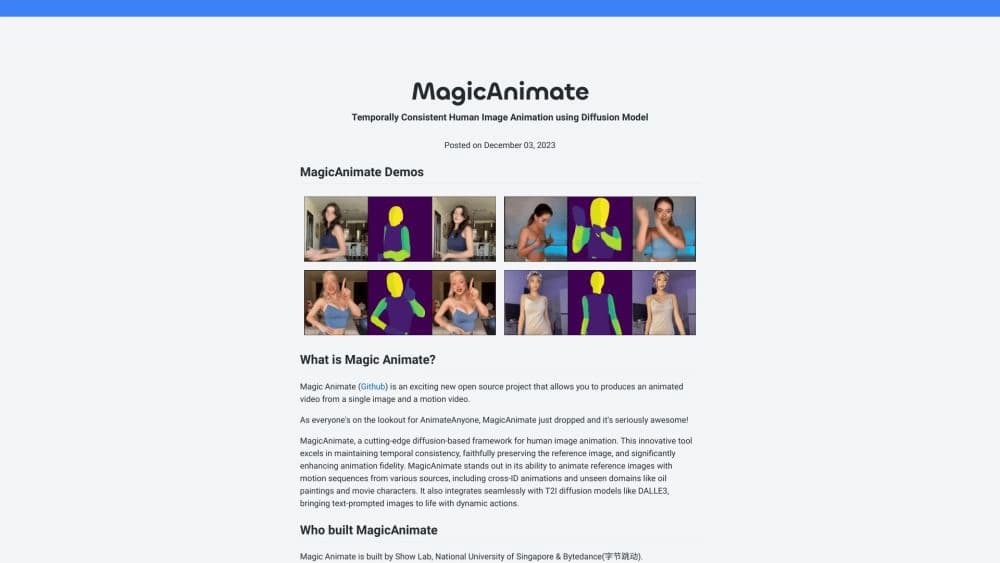
MagicAnimate is an open-source project designed to animate still images using a reference video. The technology is based on diffusion models, which make the animation smooth and preserve the key details and style of the original image throughout the video. The tool is available for local deployment, online testing through demos on Hugging Face and Replicate, and integration via API.
MagicAnimate characteristics
| Characteristic | Value |
|---|---|
| Type | Animated video generator |
| Categories | AI video generators, short video generators, animated video generators |
| Developer | Show Lab, National University of Singapore, Bytedance |
| Monthly visits | 10.2M |
| Availability | Website, online demo via Hugging Face and Replicate, API |
| Models | Stable Diffusion V1.5, MSE-finetuned VAE |
| License | Open source |
Who is the MagicAnimate neural network suitable for?
Beginners with no animation experience
MagicAnimate doesn't require any special skills: just upload a photo and a video with motion to get a finished animated clip. This makes the tool accessible to a wide audience.
Artists and video editors
Professionals can use MagicAnimate for quick animation prototyping, transferring motion to characters, and experimenting with styles, including the anime direction.
Anyone creating video content with AI
Bloggers, marketers, and content creators can use the tool to generate short videos for social media without lengthy manual work.
How to use the MagicAnimate neural network?
Local deployment
To install it on your own computer, you need to download the base Stable Diffusion V1.5 and MSE-finetuned VAE models, install the required libraries, and activate a conda environment. After setup, you can run animation locally using your own images and reference videos.
Online demo
Without installing anything, you can test MagicAnimate through the online demo on Hugging Face or Replicate. Just upload a photo and a video with motion, and in a few minutes the result will be ready.
API integration
For process automation, you can use the Replicate API. This allows you to generate animated videos programmatically, embedding MagicAnimate functionality into your own projects or services.
Main features of MagicAnimate
Animation from a single image and video
The neural network takes one still photo and a reference video with motion as input and creates an animated clip based on them. The original image serves as the source of style and details, while the video defines the nature of the motion.
Smoothness and frame consistency
The algorithm is designed so that motion doesn't break between frames and looks natural. This is achieved through diffusion models that align each new frame with the previous ones.
Advantages of MagicAnimate
Automatic animation without preparation
The process is extremely simple: upload a photo and a video — and within a couple of minutes you get a finished clip. This is especially valuable for beginners with no experience in traditional animation.
Accurate transfer of details and style
The system holds the style and fine details of the original image well. The animation looks consistent, and distortions are rare, which sets MagicAnimate apart from many similar solutions.
Room for style experimentation
The tool lets you try different styles and approaches — for example, animating images in anime style. This opens up a wide field for creative experimentation.
Disadvantages of MagicAnimate
Artifacts in complex scenes
Sometimes the neural network produces distorted faces or fingers, especially in frames with unusual or abrupt movements. Animation quality can drop when processing complex scenes.
Style instability
The style can "drift": instead of the expected anime look, you may get a nearly realistic image, or different styles may mix within a single clip. Finding the right settings is required to hit the desired style accurately.
Distorted body proportions
Body proportions can become distorted, especially when animating in anime style with complex movements. This limits the tool's use in some artistic projects.
What tasks does MagicAnimate solve?
Creating animated clips for social media
You can quickly turn an ordinary photo into a short animated video that will grab attention in a feed. This is useful for bloggers and SMM specialists.
Generating educational videos
The tool lets you animate a character from a single reference image, which can be used to create educational content or demonstrate movements.
MagicAnimate pricing
Free basic access
The basic plan provides access to core animation features at no cost. This is enough to get familiar with the tool and complete simple tasks.
Advanced plan
Available with a paid monthly subscription. Includes expanded capabilities and faster video processing.
Professional plan
Available with a higher-tier paid monthly subscription. Provides maximum capabilities, priority support, and additional tools.
Terms of use for MagicAnimate
For local deployment, you need the base Stable Diffusion V1.5 and MSE-finetuned VAE models, as well as installed libraries and a conda environment. Those who don't want to handle installation can use the online demo versions without any setup.
MagicAnimate availability
The tool is available on the official website magicianimate.org. You can test it through the online demo on Hugging Face and Replicate. An API is provided for programmatic integration.
How MagicAnimate differs from alternatives
MagicAnimate is an open-source project, which sets it apart from many commercial solutions such as Google VEO, Hailuo, Kling AI, Sora, or Pika Labs. Thanks to its open license, users can run the neural network locally and adapt it to their own tasks. At the same time, MagicAnimate maintains high-quality style and detail transfer, although it lags behind some alternatives in handling complex motion and result stability.
Conclusion
MagicAnimate is a free, open-source animated video generator suitable for quickly bringing photos to life based on a reference video. The tool is easy to use, doesn't require animation experience, and delivers good results on simple scenes. However, when working with complex movements or specific styles, artifacts, face distortions, and proportion issues can occur, which requires additional tuning and parameter adjustment.