Canva AI
A set of AI tools built into the Canva platform for creating and editing graphic and video content from text prompts.
Overview
Canva AI
Description of Canva AI
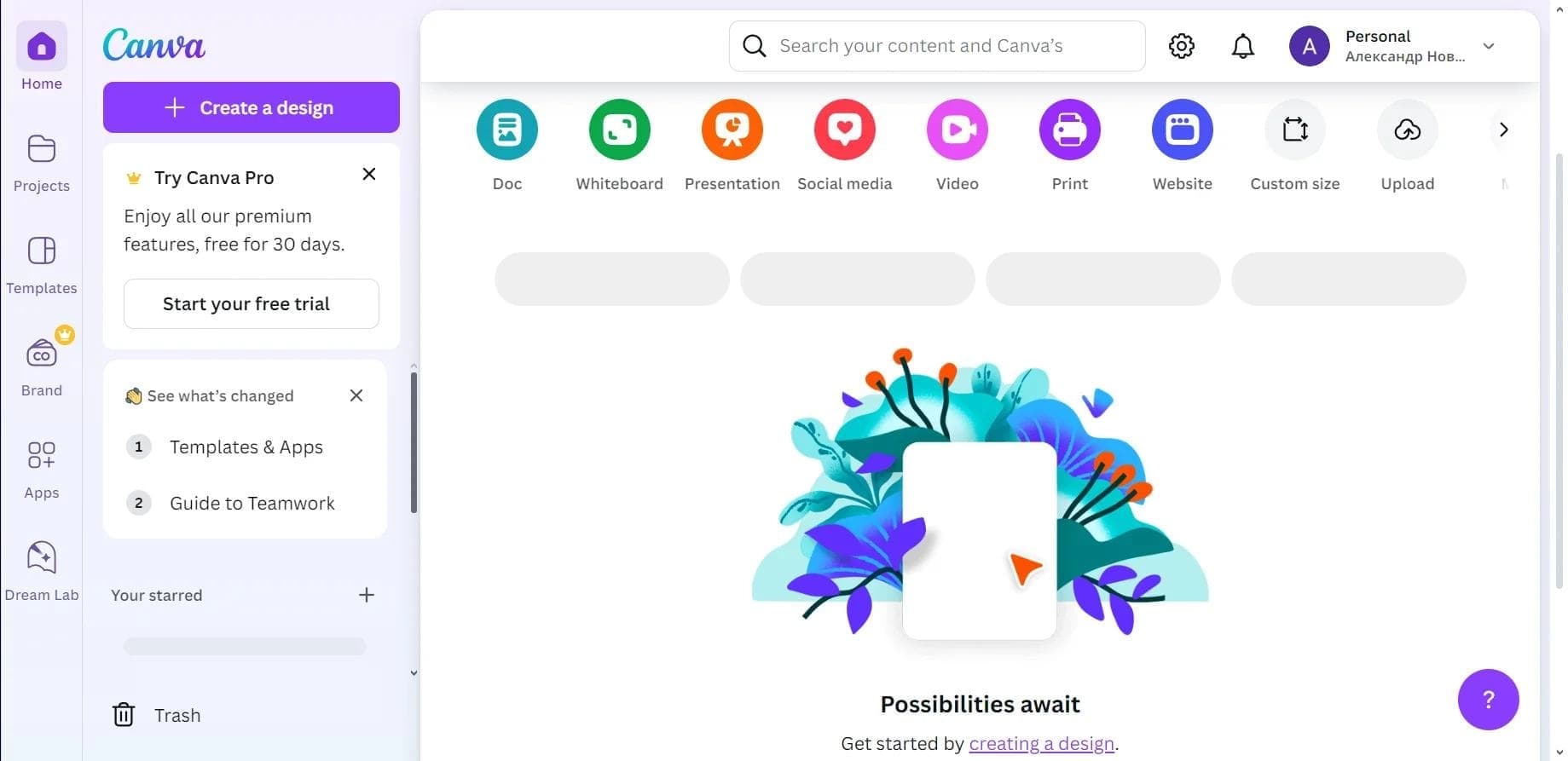
Canva AI is a set of artificial intelligence tools built directly into the Canva platform. The neural network lets you generate images and videos from text descriptions, automatically process photos (remove backgrounds, improve quality), create presentation and website layouts, and write and edit text. All the key features are combined in the Magic Studio package, which is designed to simplify graphic design for users without specialized skills.
The tool suits users of any skill level — from beginners to professionals — allowing them to create professional designs without needing in-depth knowledge of graphic design. Canva AI is especially convenient for marketers, bloggers, and small businesses that need to quickly create visually appealing content.
Canva AI characteristics
| Characteristic | Value |
|---|---|
| Type | AI design and photo editor |
| Platforms | Web version, desktop app, Android and iOS apps |
| Categories | Design assistants and layouts, image generation, presentations and reports |
| Free plan | Yes (free and paid features) |
| Registration | Via Google, Facebook or email |
| Rating | 4.2 (★★★★☆) |
| Editor's score | 8.7 out of 10 |
| Availability | Varies by region |
Who is Canva AI suitable for?
Designers and creative teams
Professional designers can use Canva AI to speed up routine tasks: choosing fonts, color schemes, generating ideas, and quickly creating drafts. Creative teams will appreciate the ability to maintain visual brand consistency with Brand Kits and Style Match.
Marketers and bloggers
Marketers, bloggers, and social media specialists get a convenient tool for mass-producing designs for ads and posts. The built-in Bulk Create feature makes it possible to generate many layout variations at once, which is especially useful when planning ad campaigns.
Small businesses and users without design skills
Canva AI is designed for anyone who needs to quickly create visual content without deep knowledge of graphic design. Small businesses can independently develop marketing materials, presentations, and social media graphics without hiring a professional designer.
How to use Canva AI?
Launch and registration
To get started, launch the web version, desktop app, or mobile application. Registration is done via Google or Facebook accounts or by email. After signing in, the user enters the Canva workspace.
Creating and editing a project
The user can create a new project or open an existing one. To generate content, simply enter a text prompt — the neural network will create an image, video, or layout based on the description. You can also upload your own images and apply editing tools to them: background removal, quality enhancement, and intelligent processing.
Saving and exporting
The finished project is saved in the required format. Canva AI supports integration with social networks, allowing content to be published directly from the platform. A bulk export function is available for marketing materials.
Main features of Canva AI
Magic Studio
The Magic Studio package combines the platform's key AI tools. It includes:
- Magic Write — writing and editing text with the help of a neural network.
- Magic Media — generating images and videos from text descriptions.
- Magic Design — automatically creating presentation and website layouts.
Image and video processing
Canva AI offers automatic processing tools: a smart eraser for removing unwanted objects, photo quality enhancement, background removal, and filter application. The video editor includes Enhanced Voice and Highlights features.
Brand and mass production tools
Brand Kits and Style Match help manage visual brand consistency — automatically selecting fonts, colors, and element arrangement according to brand style. Bulk Create allows mass-producing designs for social media and advertising.
Advantages of Canva AI
- Simplified and automated design — the neural network handles routine tasks such as choosing fonts, colors, and arranging elements, speeding up work several times over.
- Text-to-illustration generation — you can create unique images simply by describing them in words, without having to search for ready-made stock photos.
- Photo processing — automatic background removal, quality enhancement, filters, and intelligent editing are available in just a few clicks.
- Regular updates — the platform's functionality is constantly expanding.
- Mobility — Android and iOS apps allow you to work on designs from a smartphone.
- Social media integration — the ability to publish content directly from Canva.
Disadvantages of Canva AI
The main disadvantage of Canva AI is limited availability: the service may not be accessible in all regions, depending on local restrictions. In addition, the free plan includes only some features — a paid subscription is required to access the full set of Magic Studio tools and advanced capabilities.
What tasks does Canva AI solve?
Creating content for social media and advertising
The neural network is suitable for quickly creating graphics and illustrations from text descriptions and mass-producing designs for ad campaigns and social media posts. The Bulk Create feature lets you generate many layout variations at once.
Processing and enhancing images
Canva AI automatically removes backgrounds, improves photo quality, applies intelligent filters, and uses a smart eraser to remove unwanted objects.
Developing presentations and websites
The platform automatically creates presentation and website layouts, choosing fonts, colors, and element arrangement. Text generation is available for filling slides and pages.
Video editing
The built-in video editor helps remove noise, highlight key moments, and improve voice tracks. The neural network analyzes content and offers recommendations for improvement.
Canva AI pricing
Canva AI uses a freemium model. The platform has both free and paid features. Specific prices are not listed on the official page — exact subscription costs and plan details should be checked on the Canva website. The free plan provides a basic set of tools, while the extended Magic Studio capabilities and additional features are available by subscription.
Terms of use for Canva AI
Access to the neural network's features requires registration or authorization on the platform. You can log in via Google, Facebook, or email. Service availability may vary by region.
Canva AI availability
Canva AI is available through a browser-based web version, a desktop application (Windows, macOS), and mobile apps for Android and iOS. The web version is the primary platform, but native apps allow you to work on projects from any device. Availability may vary by region.
How is Canva AI different from alternatives?
Canva AI stands out from alternatives primarily because it is not a separate tool but a built-in set of AI features inside the full-featured Canva design platform. This means users get not only neural-network generation but also a rich set of traditional editing tools, a template library, social media integration, and brand management features.
Unlike specialized services such as Kolors by Kuaishou (image generation) or Erasio (object removal), Canva AI offers a comprehensive solution: from creating illustrations and videos from text to automatically laying out presentations and websites. The Magic Studio package brings several AI tools together in a single workspace, removing the need to switch between different services.
Conclusion
Canva AI is a neural network built into the Canva platform, combining artificial intelligence tools for generating images and videos, processing photos, creating presentation and website layouts, and writing texts. Thanks to its freemium model, it is accessible to a wide range of users — from beginners to professional designers. Canva AI greatly simplifies and automates graphic design, allowing you to quickly create high-quality visual content without specialized skills, although availability may vary by region.