

Galileo
Нейросеть для создания и редактирования макетов пользовательских интерфейсов по текстовым описаниям.
Обзор
Galileo
Описание нейросети Galileo
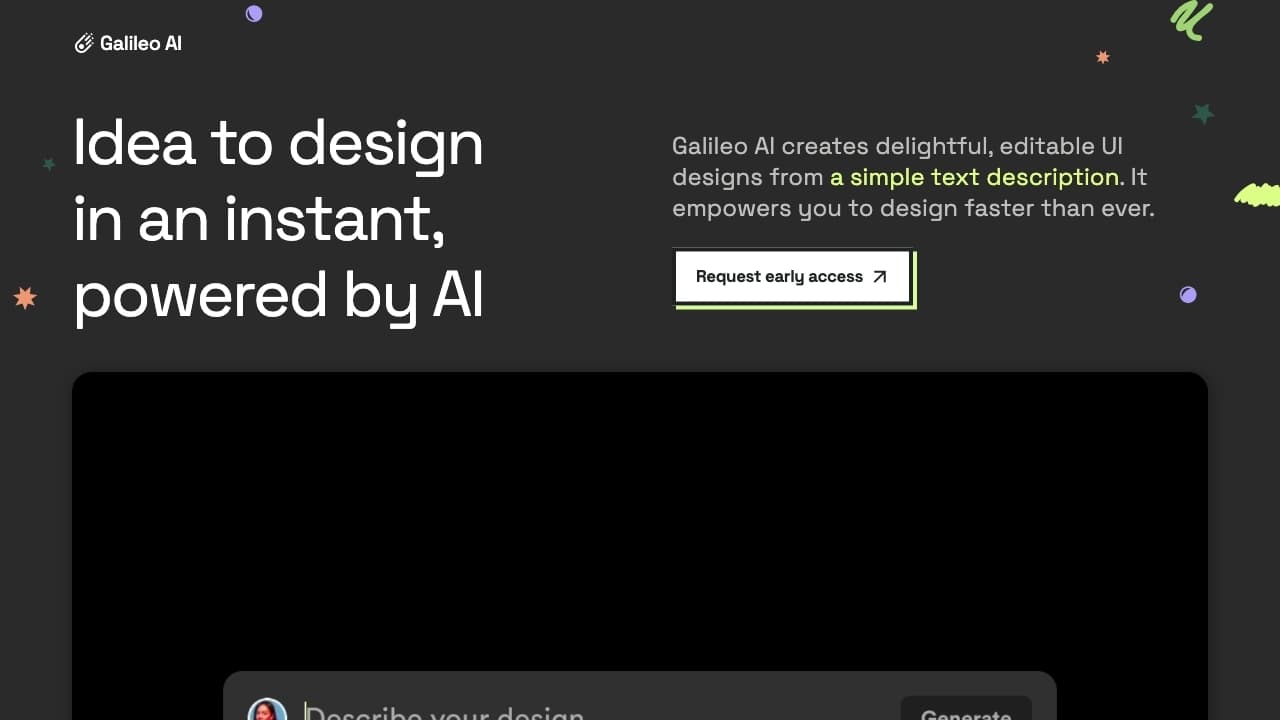
Galileo — это нейросеть, предназначенная для создания и редактирования макетов пользовательских интерфейсов по текстовым описаниям на естественном языке. Инструмент ориентирован на дизайнеров и разработчиков, которым важно быстро переходить от идеи к рабочему прототипу, не прорисовывая каждый элемент вручную.
Помимо интерфейсных макетов, сервис умеет генерировать иллюстрации в соответствии с заданным дизайн-видением. Платформа также поддерживает редактирование сложных готовых проектов, что ускоряет итерации и упрощает доработку существующих макетов.
Характеристики Galileo
| Характеристика | Значение |
|---|---|
| Тип | Нейросеть для дизайна, AI-инструмент для автоматизации прототипирования UI |
| Категория | Дизайн, Веб-дизайн, Универсальные; Дизайн-ассистенты и макеты, Конструкторы сайтов и интерфейсов, Визуальные доски и совместная работа |
| Платформа | Web |
| Основная задача | Генерация макетов интерфейсов и иллюстраций по текстовым описаниям |
| Доступ из России | Только с VPN |
| Оценка редакции | 8.6 из 10 |
| Рейтинг на странице | 4.8 ★ |
| Наличие бесплатного тарифа | Не указано |
| Веб-сайт | www.usegalileo.ai |
Для кого подходит нейросеть Galileo?
Дизайнеры
Инструмент будет полезен дизайнерам, которым необходимо быстро создавать качественные макеты и иллюстрации по текстовым подсказкам, а также дорабатывать уже существующие проекты без ручной прорисовки каждого элемента.
Разработчики и продуктовые команды
Сервис ориентирован на тех, кто занимается цифровыми продуктами и нуждается в быстрой визуализации решений. Возможность быстро тестировать макеты помогает ускорить обсуждение идей внутри команды.
Новички
Людям без глубокого опыта в дизайне сервис позволяет генерировать варианты интерфейсов по простому описанию и дорабатывать их вручную, что упрощает вход в создание цифровых решений.
Как использовать нейросеть Galileo?
Начало работы
Для начала работы нужно перейти на сайт инструмента и задать параметры или описать задумку на естественном языке. Система воспринимает текстовые подсказки и превращает их в подборку готовых макетов.
Доработка результатов
Сгенерированные макеты можно дорабатывать вручную, корректируя детали в соответствии со своими задачами. Это позволяет адаптировать результат под конкретные требования проекта.
Совместная работа
Сервис поддерживает коллективную работу: проектами можно делиться с коллегами и собирать обратную связь напрямую в платформе. Кроме того, в сервисе доступны встроенные обучающие материалы для освоения продвинутых функций.
Основные функции Galileo
Создание макетов по текстовому описанию
Нейросеть генерирует высококачественные макеты пользовательских интерфейсов на основе текстовых подсказок, что избавляет от необходимости рисовать каждый элемент вручную.
Редактирование сложных проектов
Сервис поддерживает доработку уже готовых сложных проектов интерфейса, что упрощает внесение изменений и ускоряет итерации на всех этапах работы.
Генерация иллюстраций
Платформа умеет создавать иллюстрации, соответствующие общему дизайн-видению, что делает её универсальным помощником при оформлении продукта.
Совместная работа и обучение
Инструмент позволяет делиться проектами и собирать обратную связь, а также включает обучающие материалы, помогающие освоить продвинутые возможности сервиса.
Преимущества Galileo
Высокое качество результатов
Создаваемые нейросетью проекты отличаются высоким качеством, что позволяет использовать их как основу для дальнейшей работы над интерфейсом.
Простота использования
Инструмент работает на естественном языке, поэтому для начала достаточно просто описать задумку — не требуется глубоких технических навыков.
Автоматизация рутинных этапов дизайна
Сервис берёт на себя повторяющиеся задачи создания макетов, освобождая время для более творческих аспектов работы.
Гибкая настройка под бренд
Платформа позволяет адаптировать генерируемые макеты под фирменный стиль, а также быстро получать разные варианты интерфейса для сравнения.
Недостатки Galileo
Кривая освоения продвинутых функций
Для полноценного использования всех возможностей сервиса может потребоваться время, чтобы привыкнуть к продвинутым инструментам платформы.
Сложности с интеграцией
Возможны трудности при встраивании инструмента в уже существующие рабочие процессы команды.
Зависимость качества от вводимых данных
Результат напрямую зависит от чёткости текстового описания и требует дополнительной проверки и доработки со стороны пользователя.
Какие задачи решает Galileo
Создание прототипов интерфейсов
Основная задача сервиса — генерация прототипов пользовательских интерфейсов по текстовому описанию, что избавляет от ручной прорисовки каждого элемента.
Ускорение перехода от идеи к макету
Инструмент значительно сокращает время от появления идеи до рабочего макета, позволяя быстро визуализировать и тестировать цифровые решения.
Дизайн и веб-дизайн
Нейросеть применяется для задач дизайна и веб-дизайна, охватывая как интерфейсные макеты, так и создание сопутствующих иллюстраций.
Цены Galileo
Актуальная информация о ценовой политике сервиса и наличии бесплатного тарифа в исходных данных не указана. Для получения точной информации о стоимости необходимо обратиться к официальному сайту инструмента — www.usegalileo.ai.
Условия использования Galileo
Сервис позволяет задавать текстовые описания для генерации макетов и дорабатывать результаты вручную, а также поддерживает коллективную работу с возможностью делиться проектами и собирать обратную связь. Подробные регламенты и условия использования, включая вопросы тарифов и ограничений, в доступных источниках детально не раскрываются, поэтому их стоит уточнять на официальной странице платформы.
Доступность Galileo
Инструмент работает как веб-сервис (платформа Web) на сайте www.usegalileo.ai. Для пользователей из России доступ к сервису возможен только через VPN. Данных о наличии мобильных или десктопных приложений в исходных материалах нет.
Чем отличается Galileo от аналогов
Ключевое отличие Galileo — генерация интерфейсных макетов по текстовому описанию с возможностью их быстрой ручной доработки. Вместо набора готовых шаблонов сервис превращает слова пользователя в полноценные прототипы, что ускоряет переход от идеи к рабочему макету. Платформа также сочетает создание интерфейсов, редактирование сложных проектов и генерацию иллюстраций, а поддержка коллективной работы с обменом проектами и сбором обратной связи выделяет её среди классических конструкторов интерфейсов.
Заключение
Galileo — это практичный AI-инструмент для дизайнеров, разработчиков и продуктовых команд, который позволяет создавать макеты интерфейсов и иллюстрации по текстовым описаниям и дорабатывать их вручную. Сервис автоматизирует рутинные этапы дизайна, ускоряет переход от идеи к рабочему прототипу и поддерживает совместную работу, хотя качество результата и зависит от чёткости вводимых данных, а для пользователей из России доступ ограничен VPN. Инструмент будет особенно полезен тем, кто ценит скорость прототипирования и гибкость настройки под свой бренд.
Часто задаваемые вопросы
Похожие нейросети



Смотрите также

Неофициальный API-доступ к Suno AI для генерации музыки и интеграции в приложения.

Платформа для автоматизированного геопространственного анализа спутниковых снимков и географических данных.

Платформа для синтеза и клонирования голоса с помощью ИИ, преобразующая текст в реалистичную речь.


Платформа для автоматизации разработки ПО с помощью визуального конструктора ИИ-агентов.


AI-платформа для создания текстового и визуального контента, ориентированная на маркетинговые задачи.


Онлайн-сервис с искусственным интеллектом, который автоматически создает презентации на заданную тему.
Веб-сервис для генерации креативных изображений с помощью искусственного интеллекта.


Генеративная платформа для создания реалистичных изображений и коротких видео из текста или изображений с управлением стилем и движением камеры.