

GaVS
Neural network with open-source code for video stabilization based on 3D scene reconstruction.
Overview
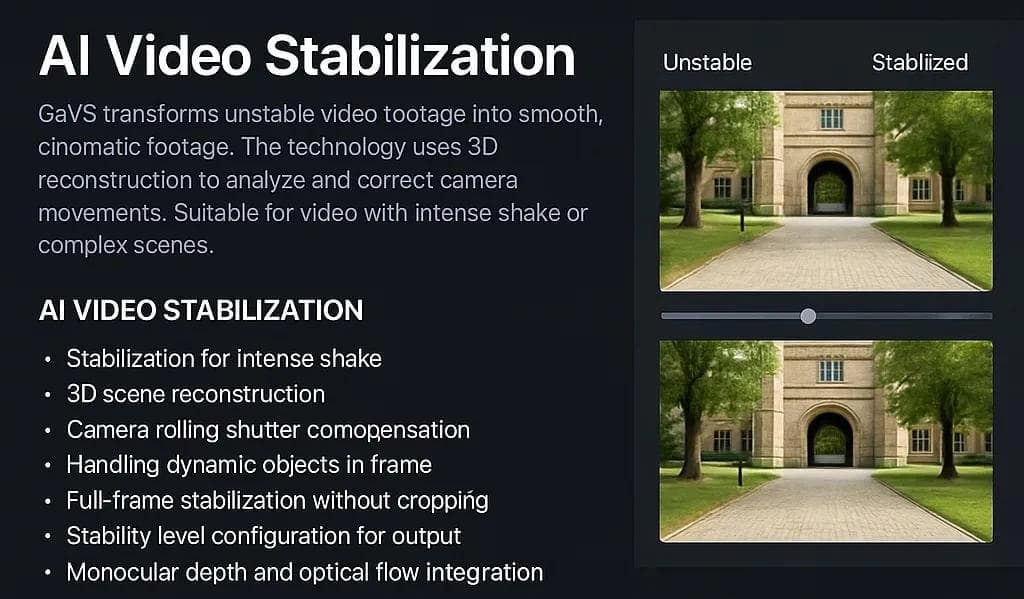
GaVS is an open-source neural network designed for video stabilization. Unlike classical algorithms that simply "smooth" the camera trajectory, GaVS uses a 3D scene reconstruction approach. This allows it to analyze frame geometry and camera motion in three-dimensional space, resulting in more accurate and natural output.
The tool can turn shaky and chaotic videos into smooth, cinematic footage. GaVS operates without additional sensors (such as gyroscopes), relying solely on the information contained in the video itself. Moreover, the neural network preserves the full frame without cropping, which is a significant advantage for post-production. It handles complex dynamic scenes, including footage from action cameras, drones, or smartphones under severe shaking conditions.
GaVS Features
| Feature | Value |
|---|---|
| Type | Neural network for video stabilization |
| Category | Video quality enhancement, Editing and post-production |
| Platform | Computer (local installation) |
| Interface language | English |
| Free tier available | Yes (open source) |
| Cost | Free (open source) |
| Distribution model | Free |
Who is GaVS suitable for?
Videographers and camera operators
The tool will be useful for videographers and camera operators working with action cameras, drones, or shooting handheld reports. GaVS allows you to avoid discarding footage with severe shaking and instead turn it into high-quality content.
Editors and post-production specialists
For editors, GaVS is interesting due to its ability to preserve the full frame without cropping. This provides more freedom in framing and color grading, as it does not require pre-compensating for edge loss during stabilization.
Developers and researchers
Thanks to its open source code, GaVS can be used by developers and researchers for integration into their own projects, studying 3D stabilization algorithms, or customizing the neural network's behavior for specific tasks.
How to use GaVS?
Installation and setup
Using GaVS requires a local installation. The main steps include:
- Installing Python 3.10.
- Cloning the GaVS repository from GitHub.
- Creating a conda virtual environment to isolate dependencies.
- Installing the required packages from the
requirements-torch.txtfile.
Running process
The video processing workflow is divided into several stages. First, the necessary datasets and pre-trained models are loaded. Then the train.py script is run for actual video stabilization. The evaluate.py script is used to verify results. Stabilization parameters, such as the degree of smoothing, are configured in the configuration file.
System requirements
It is important to note that CUDA 12.6 support is required for the neural network to work correctly. This requirement implies a modern NVIDIA graphics card and a corresponding driver.
Key features of GaVS
Motion and dynamics handling
- Stabilization of severely shaky video: GaVS excels at handling footage shot while running, off-road driving, or flying in windy conditions.
- Jello effect compensation: The neural network corrects distortions caused by rolling shutter (the "jello" effect), making the image more natural.
- Dynamic object handling: Unlike many alternatives, GaVS correctly processes scenes containing moving objects without blurring them or creating artifacts.
Technological highlights
- 3D scene reconstruction: The key feature that enables high stabilization accuracy.
- Full-frame stabilization: Preserves the full frame without cropping, setting the tool apart from many other stabilizers.
- GLOMAP usage: Used for computing 3D camera poses.
- Integration with monocular depth and optical flow: These technologies are used for more accurate scene and motion analysis.
Flexibility settings
- Stability adjustment: Users can adjust the stability level through parameters in the configuration file.
- Open source for customization: GaVS can be modified and adapted to specific needs.
Advantages of GaVS
Technological superiority
The main advantage of GaVS is its unique 3D scene reconstruction approach. This allows analyzing not just pixel movement but the actual geometry of the space in the frame, resulting in higher quality and more predictable stabilization output.
Frame preservation
The ability to preserve the full frame without cropping is a significant advantage for editors. It saves time and effort by allowing work with the original resolution and composition.
Complex scenarios
The tool is designed for videos with extreme shaking (running, off-road driving, flying). It also correctly handles dynamic scenes with moving objects. Additionally, the neural network can compensate for the rolling shutter jello effect, which is especially relevant for action cameras.
Accessibility and autonomy
GaVS is a free, open-source project. It requires no additional sensors or specialized equipment — only the source video is needed.
Disadvantages of GaVS
Resource requirements
The main drawback of GaVS is the need for local installation and environment setup. Python, CUDA 12.6, and compatible hardware (NVIDIA GPU) are required. This can be a barrier for users without technical experience.
Localization
The interface and all documentation are available only in English. This may be inconvenient for non-English-speaking users.
What problems does GaVS solve?
The GaVS neural network is designed to address a range of video post-processing tasks:
- Stabilization of severely shaky video: converting unstable recordings into smooth clips.
- Creating cinematic footage: turning raw, "dirty" material into images suitable for professional use.
- Camera shake compensation: eliminating minor and major vibrations caused by physical factors.
- Full-frame stabilization without edge loss: preserving the original resolution and composition of the frame.
- Complex scene processing: handling videos with dynamic objects shot under extreme conditions.
GaVS pricing
GaVS is distributed under a free, open-source software model. No paid plans or subscriptions are offered. This makes the neural network accessible to everyone, but it requires self-installation and configuration.
GaVS terms of use
To use GaVS, several requirements must be met:
- Install Python 3.10 on a local machine.
- Ensure CUDA 12.6 support (a compatible NVIDIA graphics card and drivers).
- Clone the repository and install all required dependencies.
This is a tool for technically proficient users who are comfortable working with the command line and configuration files.
GaVS availability
GaVS is freely available for download through its public repository on GitHub. The code is open, allowing users to study the algorithms and make modifications. However, note that the interface and all technical documentation are provided in English.
How GaVS differs from alternatives
GaVS stands out from other video stabilizers due to several key features:
- Unique approach: Using 3D scene reconstruction instead of simple 2D analysis is a key differentiator that provides higher accuracy in processing complex scenes.
- Frame preservation: Most stabilizers crop frame edges to hide motion artifacts. GaVS preserves the full frame.
- Dynamics handling: GaVS correctly processes scenes with moving objects, while many other algorithms create distortions in such cases.
- Jello effect compensation: The tool handles rolling shutter distortions, which is not always available in standard solutions.
Conclusion
GaVS is a powerful, technologically advanced, and free open-source tool for video stabilization. Its key feature — 3D scene reconstruction — delivers high-quality processing even in the most challenging shooting conditions, including dynamic scenes from action cameras and drones. Preserving the full frame without cropping is another strong argument for choosing this neural network for professional work. GaVS suits technically prepared users who are willing to install and configure the tool themselves, but in return for these efforts, they get results on par with professional studio solutions.
Frequently asked questions
See also

Open-source tool for quickly converting a single image into a 3D model.


AI toolkit for video generation and editing, including avatars, lip-sync, and voice cloning.


Platform for creating multi-agent AI systems and chatbots to automate customer support and lead generation.


Project management platform with task assignment, time tracking, and employee workload monitoring features.

Multifunctional AI platform for content creation, combining speech synthesis, text generation, avatar creation, and video editing.


Bleepify automatically detects and bleeps out profanity in video and audio.

Desktop application for Windows that upscales video resolution to 4K/8K and enhances the quality of old recordings using AI.

A multimedia AI toolkit for editing and enhancing photos, videos, and PDF documents.