
Dictaphone
AI-powered online service for fast and accurate audio-to-text transcription.
Overview
Dictaphone is a web service that solves one specific task: quickly converting audio recordings into text. Instead of manually transcribing voice notes or interviews, you upload a file to the service and receive a ready-made text document. It is powered by the OpenAI Whisper API, known for its high-quality speech recognition. The service is positioned as a tool for short recordings: the maximum file size is limited to 10 MB. This is a deliberate choice that enables near-instant processing and keeps the service as simple as possible for everyday and work scenarios that don't require handling long audio tracks.
Dictaphone Features
| Feature | Value |
|---|---|
| Type | Online AI audio-to-text transcription service |
| Categories | Speech recognition, Audio transcription |
| Technology | OpenAI Whisper API |
| Maximum file size | 10 MB |
| Supported formats | mp3, wav, m4a, ogg, flac |
| Distribution model | Not specified |
Who is Dictaphone for?
Journalists and content creators
For those who regularly work with interviews, voice recordings, or dictated ideas, the service helps save hours of manual effort. Instead of listening to a recording and typing it out, you simply upload the file and get a draft transcript ready for further editing.
Students and professionals
Students can use Dictaphone to transcribe lectures and voice reminders. Professionals who capture thoughts by voice or keep work notes can also quickly convert them into text for further processing and organization.
Anyone who values their time
Any user tired of manually typing text from audio can use the service for everyday tasks. Short voice messages, shopping lists, or dictated letters can be converted to text in a couple of clicks.
How to use Dictaphone?
Uploading a file
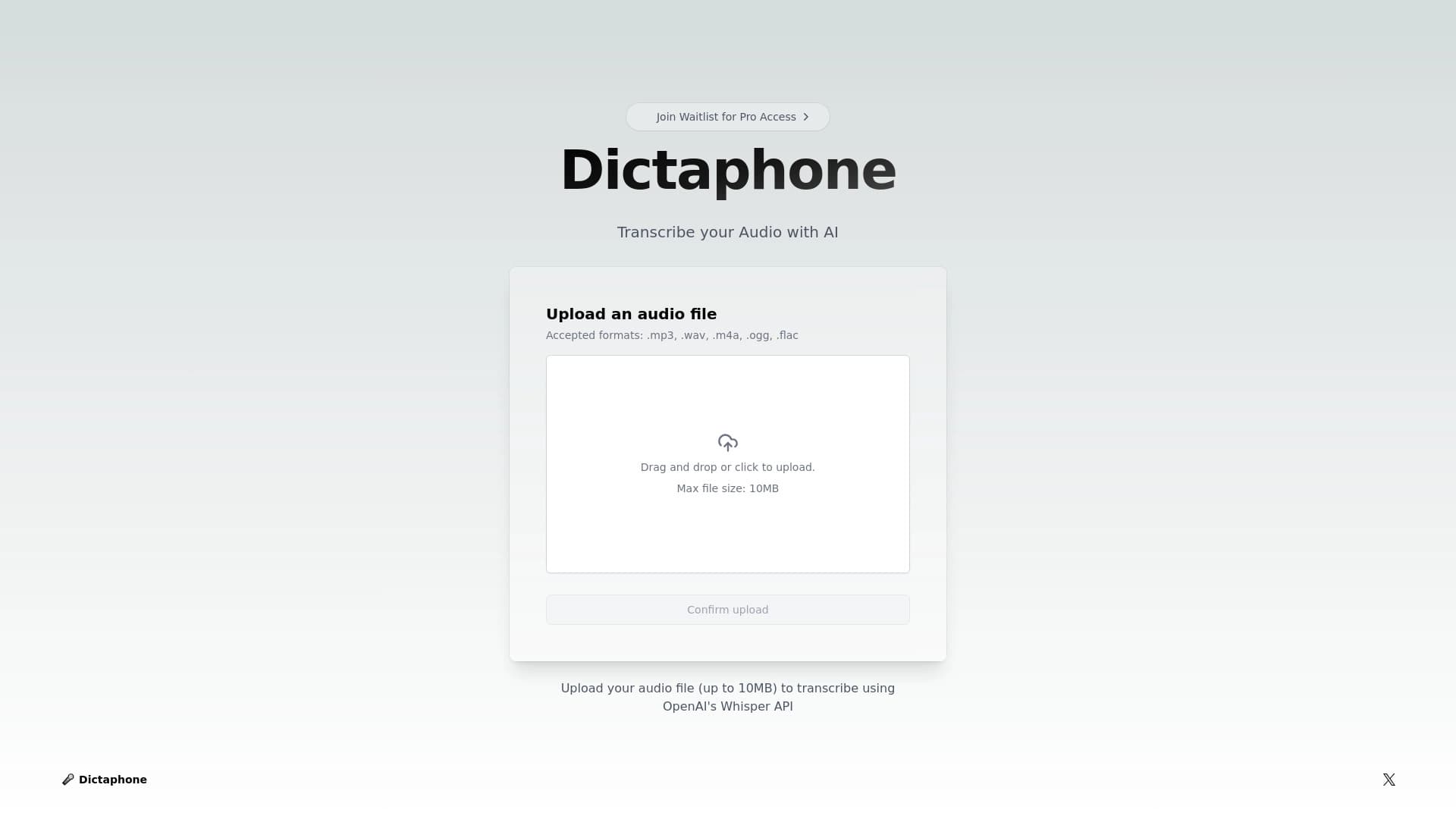
The workflow is extremely simple. The user uploads an audio file through the web interface. This can be done in two ways: drag and drop the file into a dedicated area, or click on it and select the desired file in the standard file browser window.
Supported formats and getting the result
The service accepts files in common audio formats: .mp3, .wav, .m4a, .ogg, and .flac. After a successful upload, Dictaphone automatically starts the processing. Within a few seconds, a text transcript of the recording appears on the screen, which you can copy or use as you see fit.
Key features of Dictaphone
Transcription powered by OpenAI Whisper
The core feature of the service is converting speech to text using the OpenAI Whisper API. This ensures high recognition accuracy and allows the service to correctly handle various voices and diction.
Support for popular audio formats
The system works with five main file types: mp3, wav, m4a, ogg, and flac. This covers the vast majority of use cases — from standard voice recorder files to audio files shared via messengers.
Automatic processing
The process is fully automated. The user doesn't need to adjust settings, select languages, or specify additional options. Just upload a file, and the system will handle recognition and deliver the finished text.
Advantages of Dictaphone
High recognition accuracy
Using the OpenAI Whisper API guarantees quality results. The technology handles natural speech recognition well, reducing the number of errors and the need for significant manual correction.
Speed
The service is designed for fast task completion. Thanks to the 10 MB file size limit, processing takes just seconds. Users don't have to wait — the result appears almost immediately after upload.
Simple interface
The web interface is not overloaded with unnecessary elements. A clear upload mechanism and the absence of complex settings make the service accessible to users with any level of technical expertise.
Drawbacks of Dictaphone
File size limit
The main limitation of the service is the maximum file size of 10 MB. This makes it impossible to use Dictaphone for transcribing long recordings, such as hour-long lectures, lengthy podcasts, or full-length interviews. The service is designed strictly for short audio recordings.
What tasks does Dictaphone solve?
Transcribing short audio notes
The primary purpose of the service is converting voice notes and dictated thoughts into text format. This is convenient for quickly capturing ideas that can later be used for work, study, or personal purposes.
Working with interviews and podcast segments
The tool is suitable for transcribing short interviews or individual podcast segments that fit within the file limit. This allows you to get a text version of key moments without long waits.
Saving time
The service eliminates the most labor-intensive step — manually typing text from audio. Instead of hours of work, users spend a few seconds uploading a file and receive a finished transcript.
Dictaphone Pricing
Official information about the pricing and cost of using the Dictaphone service is not disclosed in available sources. For current details on prices, the availability of a free tier, or a subscription model, it is recommended to check the service's official website directly.
Dictaphone Terms of Use
Detailed terms of use for the service have not been published in the source data. As with pricing, the exact usage rules, privacy policy, and conditions for processing uploaded files need to be clarified on the platform's official resource.
Dictaphone Availability
Information about the service's availability in various countries, interface language support, and the presence of mobile apps is absent from public sources. Currently, it is known that Dictaphone operates as a web application accessible through a browser. Details about regional restrictions should be sought on the product's official website.
How Dictaphone differs from alternatives
To understand Dictaphone's place in the market, it's worth comparing it with competitors: NeatScribe, Voice Gecko, Willow Voice, Fish Audio, Turbo AI, and Wispr Flow. The main difference is the service's narrow specialization. Dictaphone deliberately limits the file size to 10 MB, focusing on speed and simplicity. While many alternatives are oriented toward processing long recordings and offer extended functionality, Dictaphone fills the niche of fast transcription of short audio files. This approach makes the service ideal for instant note transcription but unsuitable for large-scale projects. A user needing to transcribe an hour-long interview should look at competing platforms, while for quick work with voice messages, Dictaphone offers the simplest and fastest solution.
Conclusion
Dictaphone is a focused tool for quickly transcribing short audio files using the OpenAI Whisper API. The service will be useful for journalists, students, and anyone who regularly needs to convert a voice note or a short interview into text. Its main advantages — high recognition accuracy and processing speed — are achieved through a deliberate limit on the size of uploaded files. If your tasks fit within the 10 MB limit, Dictaphone will become a reliable assistant that saves your time. For working with long recordings, it's worth considering other solutions that offer more extensive functionality.
Frequently asked questions
See also

AI platform for voice synthesis and cloning that converts text into realistic speech.


Service for live AI conversations, including text generation, voice, and speech recognition.

AI keyboard for Apple devices that speeds up typing with corrections, translation, and response generation.

Cloud platform for creating videos using AI avatars, synthesized speech, and automatic translation of clips into dozens of languages.


Bleepify automatically detects and bleeps out profanity in video and audio.

Multifunctional AI platform for content creation, combining speech synthesis, text generation, avatar creation, and video editing.
Tool for translating text directly in images while preserving the original design.


Service for automatic transcription of audio and video into text with support for over 100 languages.