

Biolytics
AI-powered app for collecting and analyzing laboratory test results.
Overview
Biolytics Neural Network Description
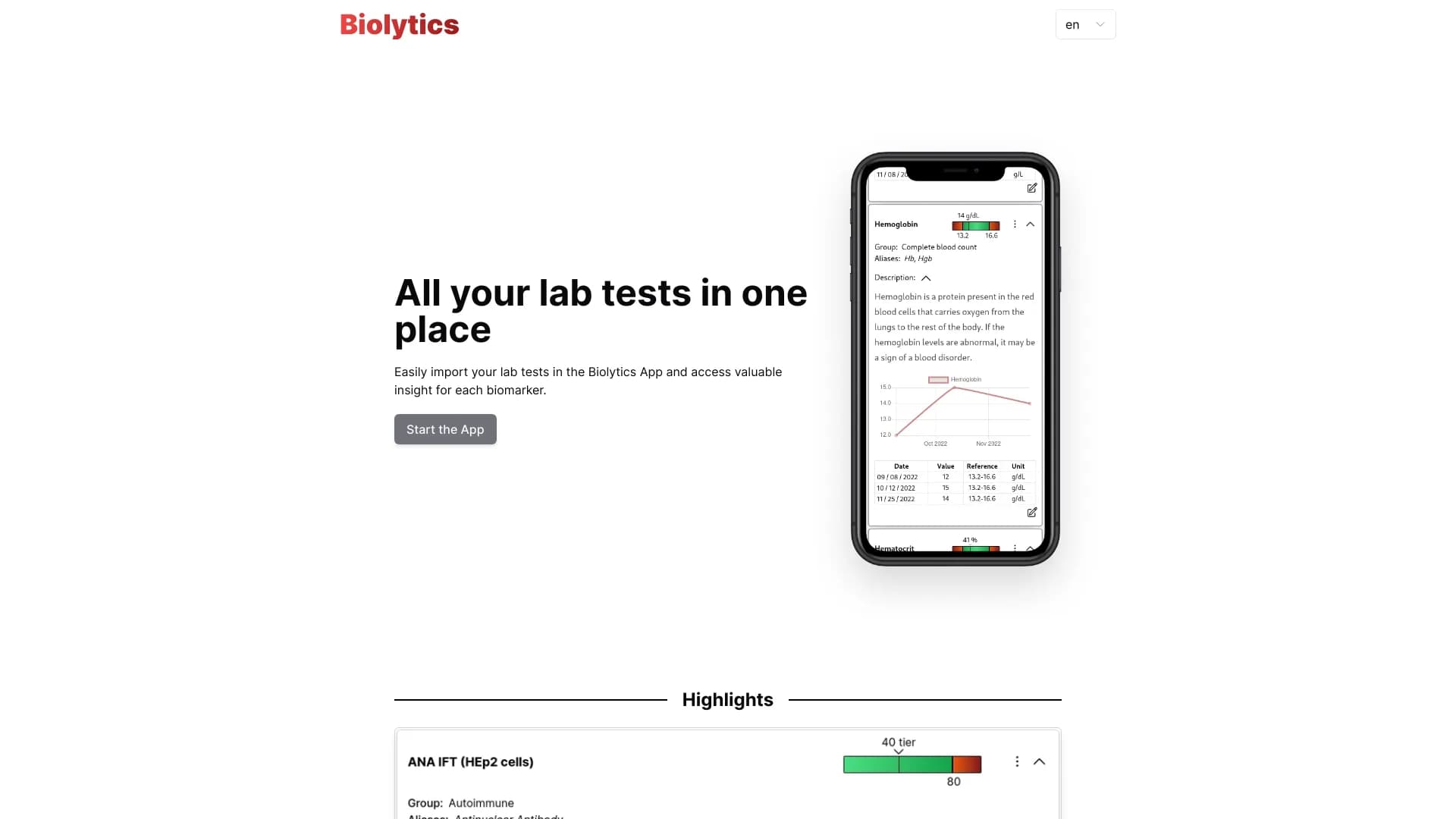
Biolytics is an app that simplifies working with laboratory test results. Instead of storing paper forms or PDF files in different folders, users upload them to the service, and built-in artificial intelligence recognizes the indicators, organizes them, and clearly shows the dynamics of changes.
The interface is designed to make medical data understandable for the average person. For example, when uploading a test, the AI doesn't just read the numbers — it also highlights deviations from reference values and explains what a particular indicator might mean. At the same time, all data remains on the user's device and is not transmitted to external servers.
Biolytics Features
| Feature | Value |
|---|---|
| Category | Miscellaneous |
| Type | Website |
| Developer | Mattia Canevascini |
| Monthly visits | 22.1K |
| Free plan | Yes (Basic) |
| Distribution model | Not specified |
Who Is Biolytics Suitable For?
For People Tracking Their Health
The app is aimed at those who regularly get tests done and want to see the full picture in one place. This could include wellness enthusiasts, people with chronic conditions, or those undergoing routine check-ups. Instead of digging through medical reference books, users can simply view a chart showing how their indicators change over time.
For Laboratories
The service is also useful for medical laboratories that want to provide clients with digital interactive reports instead of standard paper printouts. This improves service quality and simplifies interaction with patients.
How to Use Biolytics?
Step 1: Uploading Data
Users need to upload their test results in one of the supported formats — either by taking a photo of a paper form or attaching a PDF file. The system recognizes the document automatically.
Step 2: Analysis and Interpretation
The AI processes the image or file, extracts the numerical values of the indicators, and compares them with reference ranges. If any parameter falls outside the reference values, the system flags it.
Step 3: Tracking Dynamics
After uploading several results, the app builds charts showing changes in biomarkers, making it easy to visualize trends — for example, a rise or fall in hemoglobin levels over the past six months.
Key Features of Biolytics
Importing Laboratory Tests
Data can be uploaded in two ways: scanning a paper form with the camera or importing an electronic PDF file. This eliminates the need to enter numbers manually.
Automatic Recognition of Indicators
The AI independently identifies test names and numerical values. Users don't need to understand the structure of the form — the system handles this work.
Dynamic Chart Generation
All uploaded results are combined into a single database, which is used to generate charts of biomarker changes. This makes it possible to track trends and notice changes at an early stage.
Local Data Storage
All information is stored directly on the user's device. No data is sent to third-party servers, ensuring a high level of confidentiality.
Biolytics Advantages
- All tests in one place: No need to keep paper forms or search for files in email — your entire medical history is available in a single interface.
- Automatic change tracking: The AI itself notices rises or falls in indicators, which is especially useful for long-term health monitoring.
- Easy import: Simply photograph a form or upload a PDF — recognition happens automatically.
- Confidentiality: Data is stored locally on the device and is not transmitted to external systems.
Biolytics Disadvantages
- Quality requirements for source materials: If a photo of a form is blurry or a file contains errors, recognition inaccuracies are possible.
- Limited medical expertise: The AI does not replace a doctor and may incorrectly interpret rare diagnoses or complex clinical cases.
- Privacy concerns: Despite local storage, some users express concerns about the security of medical data, although the developer claims otherwise.
What Problems Does Biolytics Solve?
Simplifying Laboratory Test Tracking
The service eliminates the need for manual record-keeping of results. All data is collected automatically and organized in a clear format.
Visualizing Biomarker Dynamics
Change charts help quickly assess how indicators evolve over time, which is important for managing chronic conditions or evaluating treatment effectiveness.
Quick Understanding of Indicator Values
The AI explains deviations from the norm, saving users from having to consult medical reference books.
Organizing Result Storage
Biolytics allows users to store results from different laboratories in one place, which is convenient when switching healthcare providers or undergoing repeat examinations.
Biolytics Pricing
The service offers three pricing plans:
- Basic — free, includes access to core features.
- Standard — 999 RUB/month, unlocks advanced analysis and unlimited test uploads.
- Professional — 1999 RUB/month, includes premium support and additional medical recommendations.
Biolytics Terms of Use
- All data is stored only on the user's device.
- The AI does not replace a doctor's consultation — serious health concerns must be discussed with a qualified specialist.
- Users control access to their own data and can allow or deny third parties from viewing it.
Biolytics Availability
The service is available as a website at biolytics.app. A stable internet connection and a device with a browser are required.
How Biolytics Differs from Alternatives
The key difference of Biolytics lies in the combination of automatic indicator recognition and fully local data storage. Many competing services offer cloud-based solutions, which raises questions about the security of medical information. Biolytics, in contrast, focuses on confidentiality — all data remains only on the user's device.
In addition, built-in dynamic charts and explanations of deviations make the service convenient for non-specialists who don't want to figure out medical terms and reference ranges on their own.
Conclusion
Biolytics is a practical tool for organizing laboratory data with a clear interface and a focus on confidentiality. The service is suitable both for individual use by people who monitor their health and for laboratories looking to improve service quality. Its main strengths are automatic indicator recognition, clear visualization of changes, and local data storage. At the same time, the service does not replace professional medical consultation and should be considered a supporting tool for health monitoring.
Frequently asked questions
See also

Neural network for automating the analysis of lumbar spine MRI and report preparation.

AI assistant that analyzes uploaded study documents, identifies questions, and provides detailed explanations.


AI assistant for checking grammar, spelling, and style of English text, available as a browser extension and web editor.

A multimedia AI toolkit for editing and enhancing photos, videos, and PDF documents.


AI-powered online service for automatically creating presentations from text, PDF, audio, video, or URL links.

Chrome extension that helps you win in the educational game Blooket by suggesting answers and automating actions.

Multifunctional AI platform for content creation, combining speech synthesis, text generation, avatar creation, and video editing.

Online platform for preparing for the Duolingo English Test with an extensive question bank and AI-powered answer scoring.