
Bg Remover – Remove Background
Mobile AI app for iOS that removes backgrounds and unwanted objects from photos.
Overview
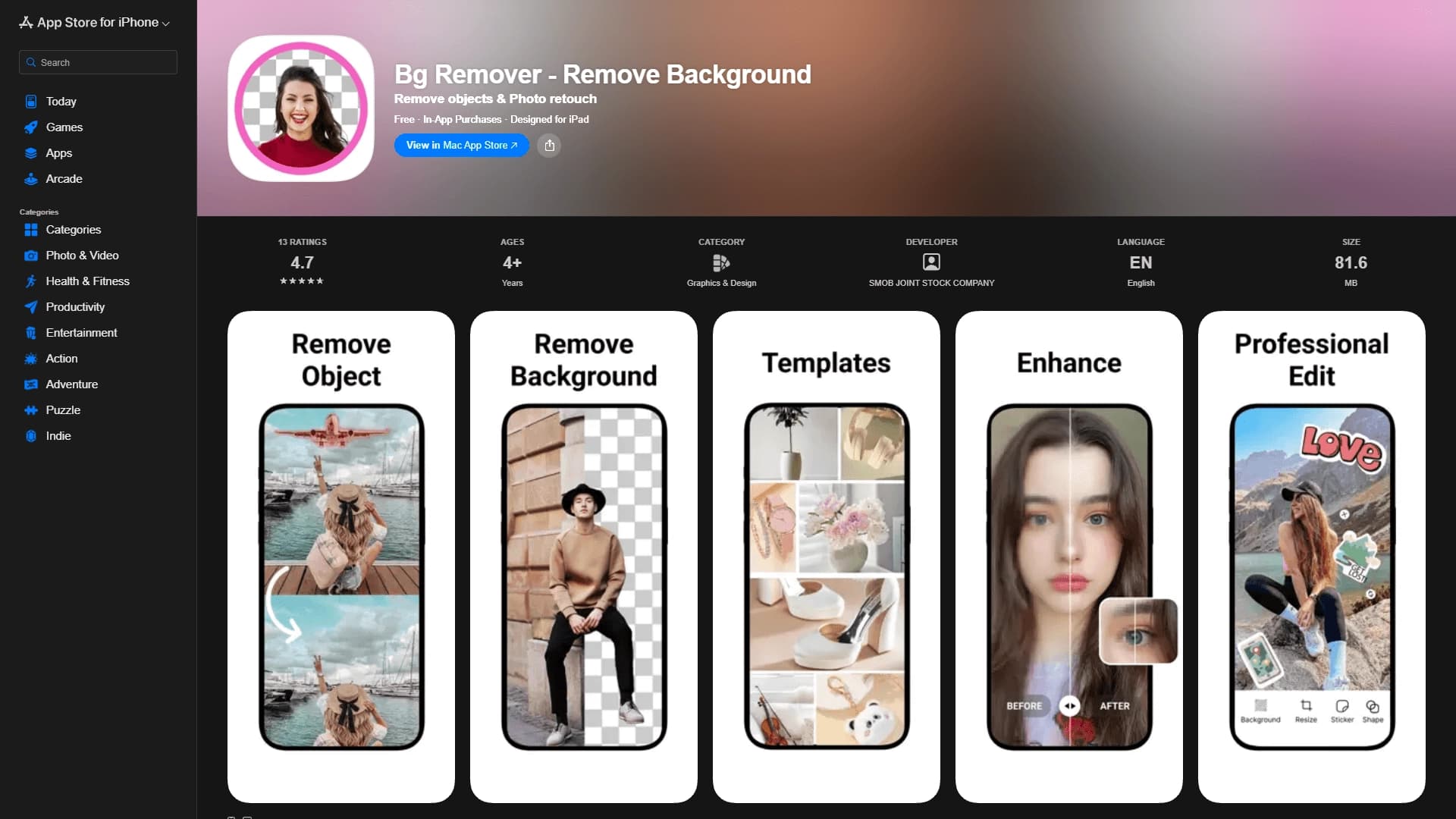
Bg Remover – Remove Background is a mobile application for Apple devices that uses artificial intelligence to automatically remove backgrounds and unwanted objects from photos. The tool eliminates the need for users to manually select objects or use complex graphic editors. Simply upload a photo to the app, and the algorithms will automatically identify the boundaries of a person, object, or product, then cut it out onto a transparent background or clean the frame of unwanted details.
The app is designed for quick operations: a few taps on the screen replace hours of work in desktop programs. It is useful for preparing images for publication in online stores, marketplaces, social media, and advertising banners. Unlike online services, there is no need to upload files to third-party servers — the entire process happens locally on the device, which is convenient when working with confidential or commercial content.
Bg Remover – Remove Background Features
| Feature | Value |
|---|---|
| Type | Mobile application |
| Category | Background editing, photo processing |
| Platforms | iPhone, iPad |
| Interface languages | Not specified |
| Free tier available | Not specified |
| Output formats | PNG, JPG, WebP |
Who is Bg Remover – Remove Background suitable for?
Marketplace and online store sellers
Online sellers process dozens of product photos every day. With Bg Remover, you can quickly bring photos to a uniform standard: remove a busy or distracting background, leaving a clean white or transparent backdrop. This improves the visual appeal of product listings and meets the requirements of many trading platforms.
Marketers and SMM specialists
Creating banners, ad creatives, and social media posts often requires cut-out objects. The app allows you to prepare covers with clean outlines without using professional editors. The entire cycle — from the original photo to the finished file — takes just a few minutes.
Anyone creating content without design experience
Any user who needs to quickly remove a background from a photo or remove a stray object from a frame can handle the task intuitively. The app does not require learning layers, masks, or other professional tools — the algorithms do the heavy lifting automatically.
How to use Bg Remover – Remove Background?
Step 1. Launch and upload a photo
Open the app on your iPhone or iPad and select a photo from your gallery. You can also take a new photo directly from the interface. The system automatically loads the image into the device's memory.
Step 2. Automatic processing
The artificial intelligence will identify the main object in the photo, build its outline, and separate it from background elements. In most cases, this happens automatically without any additional action from the user. If the algorithm makes a mistake, you can manually adjust the edges.
Step 3. Save and export
After editing is complete, choose the desired file format — PNG, JPG, or WebP — and save the result to your device. The image will be ready for use in a product listing, social media post, or print layout.
Key features of Bg Remover – Remove Background
Instant background removal
The app's algorithms recognize the outlines of people, animals, products, and other objects, automatically separating them from the background. This works in a single tap — no complex parameter settings are required from the user.
Cleaning the frame of unwanted elements
In addition to background removal, the utility allows you to remove unwanted objects that accidentally ended up in the frame, shooting defects, or distracting details. The AI analyzes the content and fills in the vacated areas in a way that is visually correct.
Retouching and print preparation
The app includes basic retouching tools for improving photo quality. It also supports preparing high-resolution images, which is critical when printing advertising materials or creating large-format banners.
Flexible result saving
Users can export a file with a transparent background in PNG format, use WebP for web publishing, or choose JPG for traditional scenarios. PNG, which preserves the alpha channel, is best suited for background removal.
Advantages of Bg Remover – Remove Background
High speed and simplicity
The main advantage is the minimal entry barrier. Users do not need to learn selection tools, masks, and layers typical of professional software. The AI handles all the technical work, leaving the user only to choose the file and press a button.
Full workflow on a mobile device
The app runs locally on iPhone and iPad. This means you can process photos anywhere — on a trip, in a warehouse, or at a café — without having a computer at hand. There is no tie to a stationary workstation.
Clean, professional results
Using AI to define object boundaries produces cleaner, smoother outlines compared to manual selection. Photos prepared in the app look neat and meet the requirements of product photography.
Time savings
Operations that take hours in desktop editors (for example, carefully cutting out hair or complex textures) are done here in a minute. This significantly speeds up the content production process for stores and social media.
Disadvantages of Bg Remover – Remove Background
Limited platform availability
The app is designed exclusively for the Apple ecosystem — iPhone and iPad. Owners of Android devices and users of web versions will not be able to use this tool directly.
Lack of public information about localization
Official data does not specify the list of supported interface languages or the exact list of regions where the app is available in the App Store. This may create difficulties for non-English-speaking users during installation and setup.
Dependence on device specifications
Like any mobile app, Bg Remover has certain requirements for the operating system version and computing power of the device. On older iPhones and iPads, processing highly detailed photos may take longer or result in errors.
Incomplete pricing information
The Freemium distribution model implies a free basic version and paid advanced features, but the exact price and scope of free capabilities are not detailed in public sources. Before purchasing a subscription, you will need to review the description inside the app.
What tasks does Bg Remover – Remove Background solve?
Background removal and object cutout
The main use case is creating images with transparent backgrounds. This is necessary when preparing product photos, creating collages, memes, avatars, and graphic design elements.
Removing defects and unwanted details
The tool can clean a good shot of accidentally captured passersby, wires, trash, or other objects. The AI fills in removed areas based on surrounding content, preserving a natural look.
Preparing commercial images
The app solves the key task of product photography — bringing photos to a uniform, clean appearance. It allows you to remove a busy background that distracts from the product and prepare images that meet the requirements of popular marketplaces.
Creating content for social media and banners
Marketers and bloggers use cut-out objects to create stylish covers, announcements, and ad creatives. The tool allows you to quickly prepare source material for further design without launching heavy software.
Bg Remover – Remove Background Pricing
The exact cost of using the app has not been described in public sources. It is known that it is distributed under the Freemium model, which includes a free basic set of features with the possibility of in-app purchases or a subscription for full access. To clarify the current price list, the list of paid features, and the free limit, you need to refer to the app's page in the App Store or the developer's official website.
Terms of use for Bg Remover – Remove Background
Compatibility with Apple devices
The tool is available exclusively as a mobile app for iPhone and iPad. Proper operation requires a device that meets the minimum technical requirements, as well as installation of the app from the App Store.
Freemium model
The basic version of the app is provided free of charge, but certain features, export formats, or the removal of restrictions may be included in a paid subscription. The terms of access to the full functionality are set by the developer and may be changed.
No details on languages and regions
Official data does not specify the supported interface languages or the list of countries where the app is available for download. Users from other regions should verify that the app appears in the search results of their local app store.
Availability of Bg Remover – Remove Background
The app is distributed through the App Store and is available for installation on iPhone and iPad devices. The number of supported operating system versions, specific age restrictions, and the list of countries where downloading is possible are not detailed in the source data. To check availability in a specific region, it is recommended to search by the exact name in your country's official app store.
How Bg Remover – Remove Background differs from alternatives
Fully autonomous mobile process
Many popular background removal services work as web tools or desktop applications that require uploading files to remote servers. Bg Remover operates locally on a single device, which guarantees data privacy and allows working without a stable internet connection.
Focus on the Apple ecosystem
While most alternatives offer cross-platform solutions for browser, Android, and desktop, Bg Remover focuses exclusively on iPhone and iPad users. This allows developers to optimize algorithms for specific hardware, but limits the potential user base.
Additional frame-cleaning tools
A significant portion of competitors only address the task of background removal. Bg Remover, however, can also remove unwanted objects from photos and perform retouching, combining cutout, cleaning, and cosmetic photo enhancement functions in one tool.
Flexible output formats
The app allows you to choose from several save formats — PNG, JPG, or WebP. Users can select the optimal balance of quality and file size depending on the specific platform: transparent PNG for design, compact WebP for web pages, or universal JPG for any system.
Conclusion
Bg Remover – Remove Background is a practical tool for iPhone and iPad owners who need to quickly prepare photos for publication or sale. The app's key advantage is that there is no need to learn professional graphic editors: routine background removal and frame-cleaning operations are performed automatically. The tool will be especially useful for online sellers, marketers, and content creators who need a clean visual presentation without unnecessary details. The Freemium model provides access to basic features without payment, while the need to pay for expanded functionality depends on the specific user's needs.
Frequently asked questions
See also

AI keyboard for Apple devices that speeds up typing with corrections, translation, and response generation.


Online editor for removing unwanted objects, text, and defects from photos using a neural network.

A multimedia AI toolkit for editing and enhancing photos, videos, and PDF documents.


An online service that recognizes text on manga and manhwa pages, translates it into different languages, and embeds it back into the image without damaging the original artwork.

Cloud platform for creating videos using AI avatars, synthesized speech, and automatic translation of clips into dozens of languages.


A multifunctional AI assistant for generating texts, images, and audio.

Service for creating personalized avatars and photo shoots using AI based on uploaded selfies.


Online AI tool for creating deepfakes and editing images.