
Bear Eraser - AI Remove Object
Mobile app for iOS that removes unwanted objects from photos directly on the device.
Overview
Bear Eraser - AI Remove Object Description
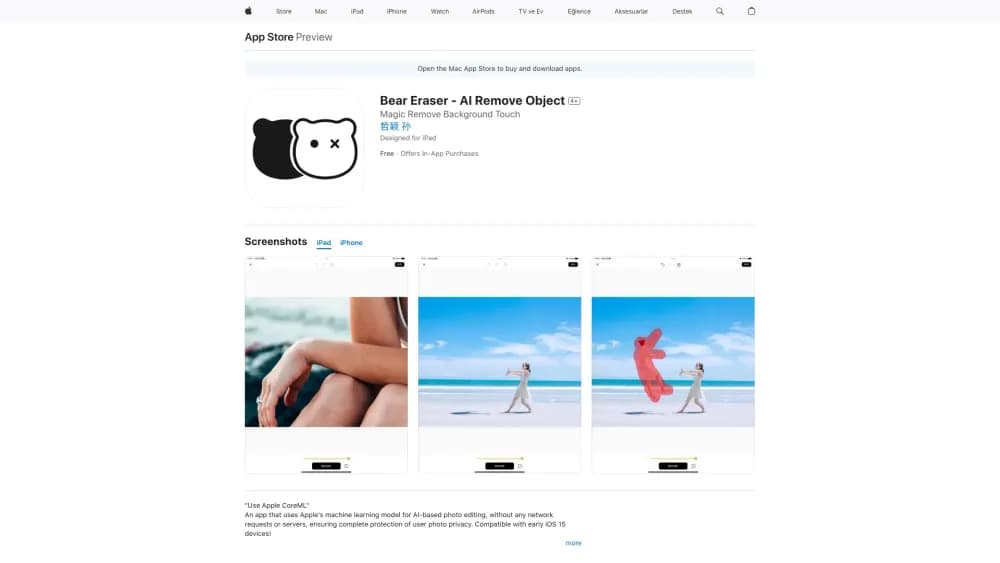
Bear Eraser is a mobile application for iOS that solves one specific task: removing unwanted objects from photos. Instead of mastering complex graphic editors, the user simply marks the unwanted element in the image, and the neural network automatically fills the vacated area with a suitable background.
The key feature of Bear Eraser is full autonomy. The app runs on Apple's machine learning technology (CoreML), and all computations are performed directly on the device. This means that no internet connection is required to process photos, and images never leave your iPhone or iPad. This approach guarantees the privacy of personal data, which is especially important for users who work with sensitive images.
Bear Eraser is positioned as a tool for quick "on-the-go" editing. It doesn't claim to replace professional software, but it handles basic tasks of cleaning a frame from random passersby, clutter, watermarks, or other distracting details perfectly well.
Bear Eraser - AI Remove Object Features
| Feature | Value |
|---|---|
| Type | Mobile application |
| Category | Photo editing, photo enhancement, photo restoration, graphic design, background removal |
| Platforms | iOS (iPhone, iPad) |
| Technology | Apple machine learning (CoreML) |
| Works offline | Yes, no internet connection required |
| Developer | Bear Eraser |
| Interface languages | Not specified |
| Support for older devices | Yes, starting from iOS 15 |
| Privacy | On-device processing, data is not sent to servers |
| Monthly visits | 388.9K |
Who is Bear Eraser - AI Remove Object for?
Bear Eraser is designed for iPhone and iPad owners who need to quickly and effortlessly remove unwanted details from photos. It's a solution for those who don't want to deal with complex professional editors featuring multi-layered structures, masks, and curves.
Users without editing experience — the main audience of the app. If you need to remove a random passerby from a frame or get rid of an obstructing object, and you lack Photoshop skills, Bear Eraser lets you do it in a few taps. The interface is intuitive: select a photo, mark the unwanted element, get the result.
Owners of older devices are also part of the target audience. Since all processes run locally via CoreML, the app doesn't require a powerful cloud server. It works on devices with iOS 15 and newer, which covers a fairly wide range of hardware, including models from previous years.
How to use Bear Eraser - AI Remove Object?
The process of using Bear Eraser is extremely simple and consists of several steps. No complex settings or preliminary calibration are required — all actions are performed in an intuitive order.
The step-by-step algorithm looks as follows. First, you need to download the app from the App Store and install it on your device. After launching, an interface opens where you can select a photo from the gallery or take a new one. Next, you mark the object to be removed with your finger (or a stylus if you're using an iPad). The neural network processes the selected area and automatically fills it with the surrounding background. The final step is saving the finished image.
No special knowledge is required to work with the app. The entire process takes just a few seconds. It's only important that the source photo has sufficient quality — on blurry or overly dark images, the algorithm may work less accurately.
Key features of Bear Eraser - AI Remove Object
On-device processing via CoreML — this is the main technological feature of the app. Using Apple's machine learning model allows complex object removal algorithms to run directly on the user's device. This ensures high processing speed and full independence from external servers.
Full autonomy without internet — the second key feature. Bear Eraser doesn't require a network connection to process photos. This is convenient during trips, vacations, or any other situations where internet access is limited or unavailable. At the same time, users can be confident that their images are not transmitted to third-party servers for analysis.
Advantages of Bear Eraser - AI Remove Object
Instant results without manual effort — the main advantage of the app. Object removal takes just a couple of seconds, whereas in classic editors this operation would take considerable time. The user doesn't need to carefully trace object boundaries or manually retouch the background — the neural network does everything automatically.
Data privacy — thanks to on-device processing, all photos remain only on your device. They are not uploaded to the cloud or sent to the developer's servers. This is especially important for those who work with personal or corporate images and don't want to risk their leakage.
Broad compatibility with Apple devices. The app works on various iPhone and iPad models, including fairly old devices. The minimum requirement is iOS 15, which makes Bear Eraser accessible to the majority of Apple device owners.
Disadvantages of Bear Eraser - AI Remove Object
Limited functionality — the app is designed exclusively for object removal. There are no tools for color correction, filter application, exposure adjustment, or other advanced features that might be needed for full-fledged photo editing.
Dependence on source image quality — the result of the algorithm directly depends on how good the uploaded photo is. On poor images — with low resolution, noise, or insufficient lighting — spots, blurriness, or artifacts may appear after object removal.
Issues with complex backgrounds — if the object is located on a busy or textured background, the neural network may struggle. In such cases, the algorithm can mistakenly remove extra elements, and the boundaries of the processed area may end up smudged, requiring additional manual correction.
What tasks does Bear Eraser - AI Remove Object solve?
Removing random people from a frame — the most in-demand feature of the app. Travel photos often suffer from passersby who unexpectedly appear in the frame and ruin the composition. Bear Eraser allows you to quickly clean such unwanted elements from the photo while preserving the natural background.
Removing watermarks and personal data — another important use case. The app allows removing watermarks, captions, dates, geolocation, or other elements from images that may interfere with using the photo for certain purposes. This can be useful both for personal use and for preparing materials for publication.
Bear Eraser - AI Remove Object Pricing
The app is distributed under a paid model — via a paid subscription or a one-time purchase. Depending on the user's needs, the following pricing plans are available:
| Plan | Price | Description |
|---|---|---|
| Subscription | $29.99 per month | Advanced features |
| Monthly membership | $5.99 per month | Basic tools |
| Lifetime membership | $29.99 one-time | Unlimited access |
Thus, users can choose the most suitable payment format for themselves — from a one-time purchase to monthly payments. The lifetime membership can be a cost-effective option for those who plan to use the app regularly over a long period.
Terms of use for Bear Eraser - AI Remove Object
To work with Bear Eraser, you need a device running iOS 15 or a newer version of the operating system. The app is installed from the official App Store. There are no additional strict hardware requirements, which is confirmed by support for fairly old device models.
Detailed terms of use, including data processing rules and license agreements, are not publicly disclosed at this time. It is recommended to carefully review the terms when installing the app from the App Store, as they may contain important legal details regarding rights to processed images.
Availability of Bear Eraser - AI Remove Object
Bear Eraser is available exclusively to Apple device owners. The app is only installed on iOS — iPhone and iPad. This limitation is related to the use of CoreML technology, which is a proprietary Apple development and is only available within their ecosystem.
Distribution is carried out through the App Store — Apple's official application store. Given that the app works locally and doesn't require an internet connection to process photos, it's available for use in any region where the App Store is accessible.
How Bear Eraser - AI Remove Object differs from alternatives
The app's page doesn't provide a direct comparison with competitors, but several features can be highlighted that distinguish Bear Eraser from other photo object removal tools.
The main difference is the use of Apple's CoreML technology. This allows images to be processed entirely on the user's device, without sending data to remote servers. Many alternatives, especially web services, require uploading photos for processing, which creates privacy risks.
The second difference is deep integration with the iOS ecosystem. Since the app is optimized for Apple's hardware and software, it works stably even on older devices with iOS 15. Competing solutions may be less optimized or require more modern hardware.
Conclusion
Bear Eraser is a specialized tool for iPhone and iPad owners who want to quickly and safely remove unwanted objects from their photos. Thanks to the built-in Apple machine learning model, processing happens directly on the device, guaranteeing complete privacy of images. The app is perfect for basic tasks — such as removing random passersby or watermarks — but it's not designed for professional retouching or complex editing scenarios. If you need to solve a simple and specific frame-cleaning task without spending much time, Bear Eraser will be a practical choice.
Frequently asked questions
See also

Online service for generating logos using neural networks.


AI-based platform for creating logos and brand identity.


BannsAi is an AI-powered service for quickly creating ad banners based on a text description or reference.

A platform for generating images, videos, and audio using artificial intelligence from text descriptions.


AI-powered platform for generating, editing images, and creating advertising creatives.


Online editor for removing unwanted objects, text, and defects from photos using a neural network.

AI-powered platform for generating and enhancing images, videos, and logos in real time.

A service that automatically generates enhanced photos for dating site profiles.