
ATemplate
Platform with ready-made templates for creating websites, landing pages, and online stores.
Overview
ATemplate Neural Network Description
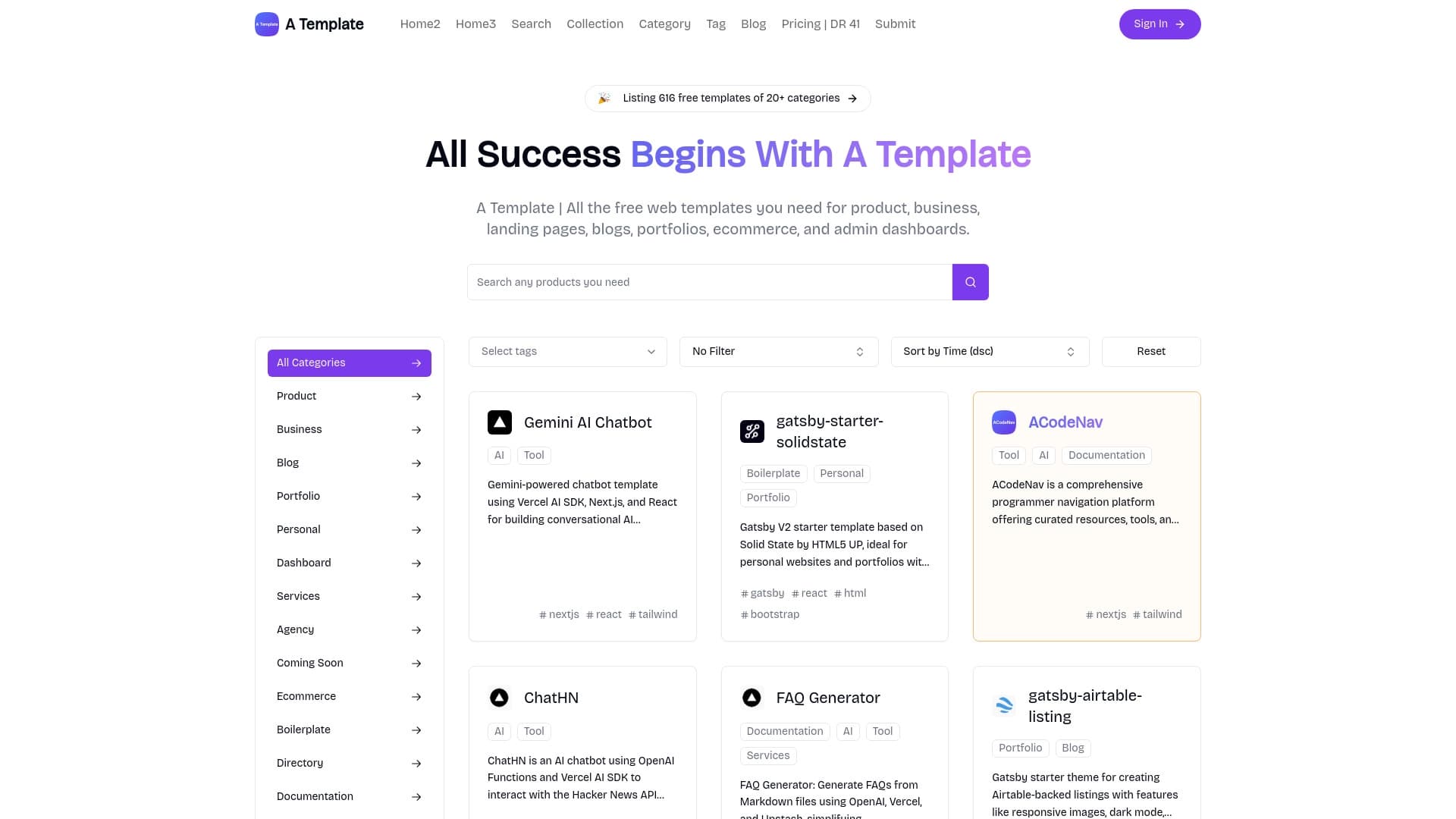
ATemplate is an online platform designed for quickly creating websites using ready-made templates. The service is positioned as a solution for those who need to launch a web project without a lengthy development and design process. Instead of hiring a designer and layout specialist, the user selects a suitable template from the catalog, downloads it, and fills it with their own content.
The platform covers a wide range of tasks: from creating simple landing pages and corporate websites to full-fledged online stores and blogs. It operates on a freemium model — basic templates are available for free, while extended functionality and premium options require payment.
The main advantage of the service is saving time and resources. The user does not need deep knowledge of HTML, CSS, or JavaScript to adapt the chosen template to their needs. However, it is important to understand that the ready-made structure imposes certain limitations on customization.
ATemplate Features
| Feature | Value |
|---|---|
| Type | Web template generator |
| Category | Tools for creating websites, landing pages, chatbots, e-commerce, text content generators |
| Developer | A Template |
| Free plan | Yes (access to basic templates) |
| Price | Professional: 499 RUB/month; Business: 999 RUB/month |
| Monthly visits | 388.9K |
| Platform | Website |
| Interface language | Russian |
| Distribution model | Freemium |
Who is ATemplate suitable for?
Business owners and startups
For entrepreneurs who need to quickly launch a landing page to collect leads or a company business card, the service allows this to be done in almost a single day. There is no need to spend budget on custom design — you can choose one of the ready-made options.
Bloggers and content creators
For maintaining a personal blog or portfolio, ATemplate provides suitable solutions. Templates can be adapted to your own style without delving into technical details. This is especially convenient for beginners who want to focus on content rather than layout.
Beginners without web development experience
The key audience of the service is people far from programming. The intuitive interface and simple logic of downloading and configuring a template allow even those who have never done it before to create a website. At the same time, professionals can also use the service as a basis for rapid prototyping.
How to use ATemplate?
Searching and selecting a template
The process begins with choosing a suitable template. The user can either browse the suggested categories (business, blog, store, portfolio, etc.) or use keyword search. After selection, the template is displayed in preview — you can assess how well it matches your task.
Downloading and customization
After choosing the desired option, you need to download it to your computer or hosting. Then comes the adaptation stage: replacing texts, images, logos, and color schemes. Thanks to the well-thought-out file structure, making changes is quite simple even without special layout knowledge.
Key features of ATemplate
- A large selection of free web templates for business websites, landing pages, blogs, online stores, portfolios, and admin panels.
- Filtering and search by categories, which speeds up finding the right layout among hundreds of options.
- The ability to download and customize the template to your needs — uploading files to your own hosting and subsequent content modification.
- The ability to share templates with other platform users, which helps expand the community and exchange experience.
Advantages of ATemplate
Saving time and budget
The main advantage is speed. Instead of waiting for a design for several weeks, you get a ready-made foundation in a couple of minutes. The large number of free templates allows you to avoid investing money at the start. Paid plans are significantly cheaper than the services of professional studios.
Ease of use
Templates are easy to customize, and the interface is intuitive. The user does not depend on a developer at every stage but can independently make changes to the structure. This gives a sense of control and independence.
Regular updates
The catalog is constantly updated with new options, allowing you to keep your website up to date without major overhauls.
Disadvantages of ATemplate
Customization limitations
The template cannot be fully customized — there are restrictions on changing certain elements. If a unique structure or non-standard solution is required, it will be difficult to achieve. In fact, you are limited by the capabilities of the chosen layout.
Risk of non-unique design
Since templates are publicly available, there is a high probability of encountering similar websites from other companies or bloggers. This can negatively affect your image if individuality matters. Coming up with distinctive features based on a standard framework is the user's own task.
What tasks does ATemplate solve?
Quickly creating a business website
If you need a company business card or a corporate website with information about services and contacts, ATemplate allows you to create such a project in the shortest possible time. Standard blocks are already built in — you only need to replace the content.
Creating a personal blog with individual design
For a blogger, it is important to stand out among many other resources. By choosing a suitable framework and adding your own texts and images, you can get a visually appealing and functional blog. Further customization of the appearance to your own style is welcome.
ATemplate Pricing
The service operates on a freemium model, offering three main pricing plans:
- Free plan: access to basic templates. Suitable for testing the platform's capabilities and simple projects.
- Professional (499 RUB/month): opens access to advanced features and premium templates.
- Business (999 RUB/month): includes all templates, priority support, and provides a commercial license for use.
The choice of plan depends on your goals: if the website is needed for earning money and attracting clients, it is worth considering paid options with a commercial license.
Terms of Use for ATemplate
The service page does not specify explicit terms of use regarding liability, content reprinting, or restrictions on the number of projects. Users are advised to review the terms of the offer before subscribing to avoid misunderstandings. Other information, including contract termination rules and refund procedures, is not detailed on the official website.
ATemplate Availability
The platform is available as a website with a Russian interface. No regional restrictions are specified, which suggests the service is accessible to users from different countries. Login and usage are possible from any device with a browser and internet access.
How ATemplate differs from alternatives
Explicit differences from competitors are not stated on the page. However, based on the characteristics, one can note the focus on the Russian-speaking audience and the low entry threshold — the presence of a significant number of free templates makes the service attractive for budget launches. The catalog structure and convenient search allow quick navigation through a large number of options, which is not always available on other similar platforms.
Conclusion
ATemplate is a practical tool for quickly launching a website with minimal costs. The service offers a wide selection of ready-made solutions for different types of projects, convenient navigation, and affordable plans. It is ideal for those who value speed and savings without strict requirements for design uniqueness. At the same time, it is worth considering the customization limitations and possible similarity to other websites created on the same templates. After weighing the pros and cons, you can decide how well this platform suits your needs.
Frequently asked questions
See also

AI platform for voice synthesis and cloning that converts text into realistic speech.


AI agent for assisting with programming and optimizing the development workflow.


Bleepify automatically detects and bleeps out profanity in video and audio.

AllChat is a universal platform that combines several popular language models in a single interface for communication, image generation, file analysis, and code execution.
Web service for making AI-generated texts look more natural and human.

Multifunctional AI platform for content creation, combining speech synthesis, text generation, avatar creation, and video editing.


Desktop AI assistant for macOS, Windows, and Linux that launches via hotkey above all windows and combines multiple language models in one interface.


Video editor with neural network support for video editing on Windows and Mac.