

SeaArt
A platform for generating images, videos, and audio using artificial intelligence from text descriptions.
Overview
SeaArt
Description of the SeaArt neural network
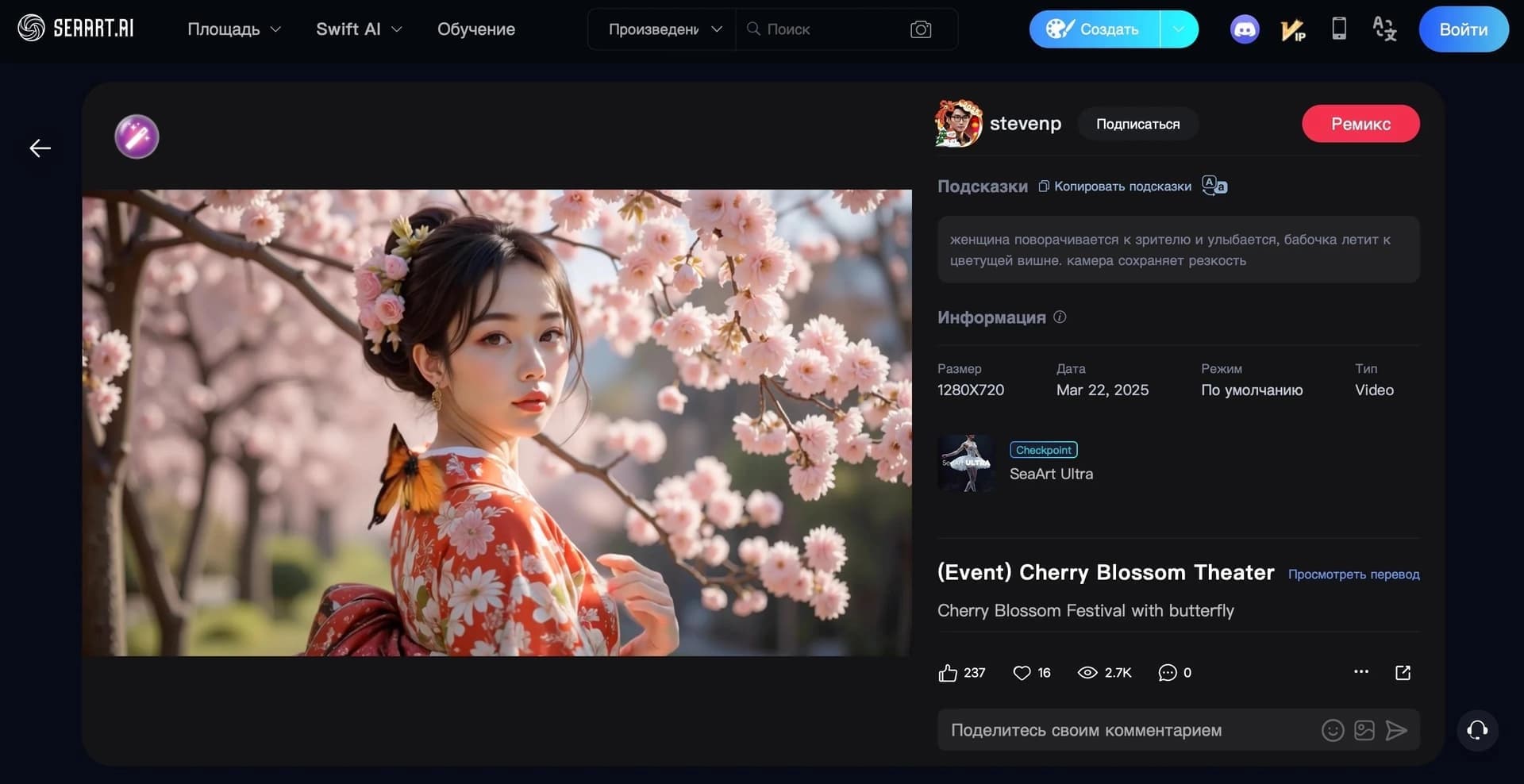
SeaArt is an online platform designed to generate images, videos, and audio using artificial intelligence from text descriptions. The service provides access to an extensive library of AI models and styles — over 300,000 options are available for creating visual content.
In addition to generating new images from text prompts, the platform allows editing and enhancing existing images. The service's tools include face swapping in photos, AI filters, image upscaling, and text-to-video generation. SeaArt also supports creating and chatting with AI characters in multiple languages, including Russian.
The service is aimed at artists, designers, and anyone who wants to quickly get unique images. The free version has limitations, and full functionality is available via a paid subscription.
SeaArt features
| Feature | Value |
|---|---|
| Type | Image, video, and audio generator |
| Categories | Image generation, Photo processing, AI characters |
| Base technology | Modified Stable Diffusion models |
| Supported languages | Russian, English, Chinese |
| Availability | Website, mobile apps for Android and iOS |
| Free version available | Yes (with limitations and watermarks) |
Who is SeaArt suitable for?
Artists and illustrators
The platform is suitable for those who work with visual content and want to quickly generate images from text descriptions. The extensive library of models and styles allows experimenting with different artistic directions.
Designers
For design professionals, SeaArt helps speed up routine tasks — generating ideas, selecting visual solutions, and processing photos. Editing, retouching, and background replacement tools allow refining images for specific tasks.
Beginners and hobbyists
The service is designed for ease of use and does not require installation in the web version. Thanks to multilingual support and an intuitive interface, anyone can master the tools without special training.
How to use the SeaArt neural network?
Access via the website
SeaArt is accessible through the website, so no additional software installation is required to get started. Simply open the service in a browser and start creating content.
Mobile apps
The platform is also available as mobile apps for Android and iOS. This allows using image generation and editing tools from a smartphone or tablet anywhere.
Queries in multiple languages
The service supports queries in Russian, English, and Chinese. Users can formulate text descriptions in their preferred language, and the neural network takes this into account when creating content.
Key features of SeaArt
Text-to-image generation
The service's key function is creating images from text prompts. More than 300,000 models and styles are available, allowing you to choose the right artistic direction for each task.
Photo editing and enhancement
The platform provides tools for image editing: quality enhancement, retouching, background replacement, stylization, and application of artistic styles. Multi-layer editing is supported, and finished works can be exported in PNG and JPEG formats.
Video, GIF, and audio creation
In addition to static images, the service can create videos, GIF animations, and audio from text descriptions. Text-to-video generation is also supported within the platform's general tools.
AI characters
SeaArt allows you to create unique AI characters and chat with them. Communication is supported in multiple languages, including Russian.
Advantages of SeaArt
Ease of use
The service is designed for a wide audience and does not require any special knowledge to get started. The web version requires no installation, and mobile apps make access even more convenient.
Wide range of tools
The platform combines many capabilities: image and video generation, photo processing, face swapping, upscaling, and chatting with AI characters. This set of features covers most visual content creation tasks in one place.
Multilingual support
Support for Russian, English, and Chinese makes the service accessible to users from different regions and countries.
Access to premium tools
The platform provides free access to premium tools, as well as a three-day free period to explore expanded capabilities.
Disadvantages of SeaArt
Free version limitations
The free plan has functional limitations, and generated content is marked with watermarks. Removing limitations and using advanced features requires a paid subscription, which also provides priority request processing.
What tasks does SeaArt solve?
Content generation from text
The service allows creating images, videos, and audio based on text descriptions. It is a convenient tool for quickly visualizing ideas and obtaining ready-made content on demand.
Photo processing and enhancement
The platform handles photo editing and enhancement tasks: retouching, background replacement, quality improvement, and image stylization.
Creating AI characters
SeaArt allows creating unique AI characters and using them for communication, opening additional opportunities for creativity and entertainment.
SeaArt pricing
There is a free version of the service with limited features and watermarks on generated content. A paid subscription unlocks expanded capabilities, provides priority request processing, and removes watermarks from images. Three days of free access are provided to explore the extended functionality (likely a subscription trial period).
SeaArt terms of use
The service operates on a freemium model. Free access includes functional limitations and the use of watermarks on created works. To get the full set of tools, priority processing, and remove watermarks, users need to switch to a paid subscription.
SeaArt availability
SeaArt is available through the website and mobile apps for Android (Google Play) and iOS (App Store). The platform supports queries in Russian, English, and Chinese, making it accessible to users from different countries.
How SeaArt differs from alternatives
The main difference of SeaArt is the combination of a wide range of tools in one service: image and video generation, photo editing and enhancement, face swapping, upscaling, and creating and chatting with AI characters. Multilingual support, including Russian, and an extensive library of over 300,000 models and styles set the service apart from competitors. At the same time, like its analogs, free access is limited, and full functionality is unlocked through a paid subscription.
Conclusion
SeaArt is a versatile platform for generating images, videos, and audio from text descriptions, combining dozens of visual content processing tools in one place. Thanks to its extensive library of models and styles, multilingual support, and availability via web and mobile apps, the service suits both professionals and beginners. The free version allows you to explore the core capabilities, while a paid subscription unlocks full functionality without limitations and watermarks.
Frequently asked questions
See also

AI-based web service for creating and processing videos, including face swapping, text-to-video generation, and animation.

Generative neural network from Adobe for creating and editing images, vectors, and videos based on text.
Browser-based AI platform for quickly generating videos and images from text or photos.

AI tool for creating and planning video content for social media.

Generative model that creates interactive video in real time, where the user can influence what happens through text commands.

Cloud platform for creating videos using AI avatars, synthesized speech, and automatic translation of clips into dozens of languages.

An online platform for creating and editing videos using neural networks based on text descriptions.
AI tool for generating and editing videos based on a text description or source video material.