

Visla
Онлайн-платформа для создания и редактирования видео с помощью нейросетей по текстовому описанию.
Обзор
Visla
Описание нейросети Visla
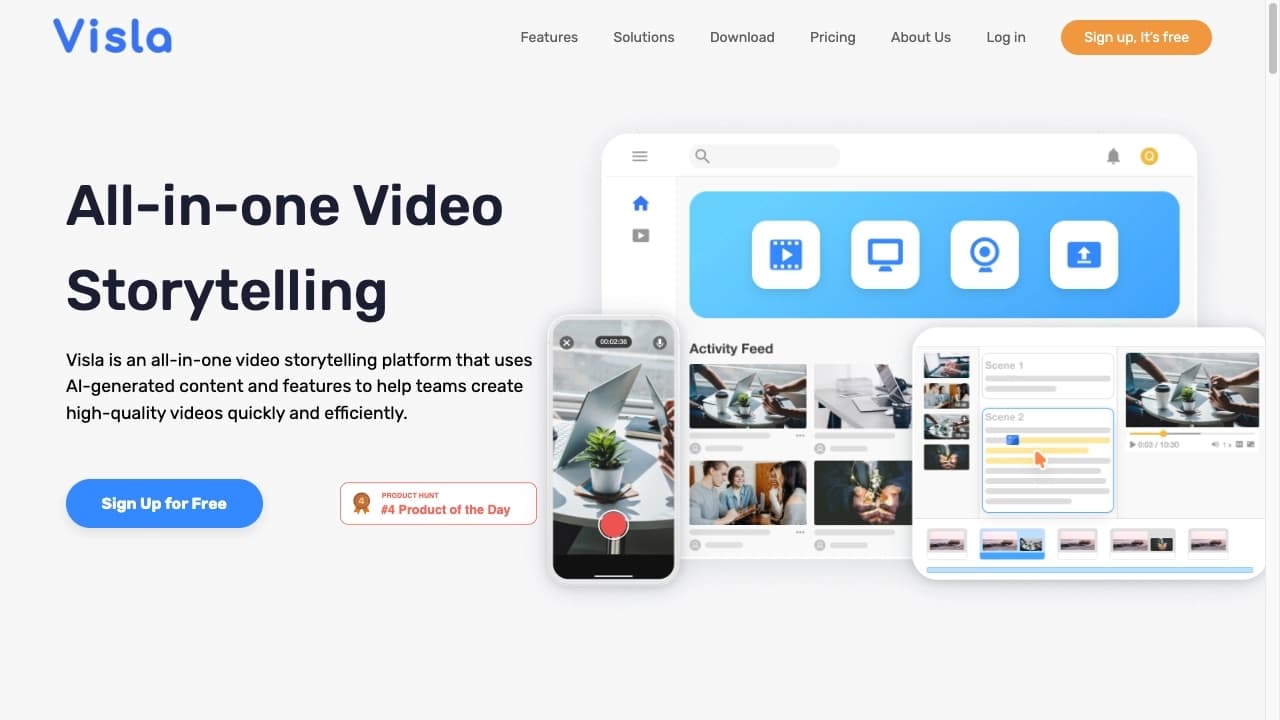
Visla — это онлайн-платформа для создания и редактирования видео с помощью нейросетей. Сервис автоматизирует большую часть работы видеопроизводства: монтаж, подбор визуальных сцен и озвучку. Пользователю достаточно написать текст, загрузить изображения, аудио или готовые клипы, а искусственный интеллект помогает превратить эти материалы в готовый ролик.
Инструмент рассчитан в первую очередь на тех, у кого нет навыков видеомонтажа. Visla берёт на себя рутинные задачи: подбирает подходящие сцены под сюжет, накладывает голосовое озвучивание, добавляет текст и брендинг. При этом созданное видео можно дополнительно оптимизировать для поисковых систем — нейросеть генерирует описания, теги и заголовки.
Характеристики Visla
| Характеристика | Значение |
|---|---|
| Тип | Онлайн-платформа для создания и редактирования видео с помощью нейросетей |
| Категории | Генерация видео, текст в видео, редактирование видео, написание сценариев, YouTube |
| Модель распространения | Freemium |
| Платформа | Web (браузер) |
| Веб-сайт | www.visla.us |
| Доступ из России | Только с помощью VPN |
| Рейтинг | 4.5 |
| Оценка редакции | 7.8 из 10 |
Для кого подходит нейросеть Visla?
Создатели контента и маркетологи
Visla будет полезна тем, кто регулярно публикует видео и нуждается в быстром производстве роликов. С помощью сервиса можно оперативно превращать идеи, тексты и блоги в видеоконтент, а встроенная SEO-оптимизация помогает делать такие видео более заметными в поисковых системах.
Бизнес и рекламодатели
Компании могут использовать платформу для создания маркетинговых материалов, демонстрации продуктов и внутренней коммуникации. Функции фирменного стиля и индивидуальных призывов к действию позволяют адаптировать контент под задачи конкретного бренда и аудитории.
Педагоги и тренеры
Преподаватели и тренеры могут быстро создавать обучающие видеоматериалы без обращения к профессиональным монтажёрам. Пошаговые видеоинструкции и готовые шаблоны делают сервис доступным даже для новичков.
Как использовать нейросеть Visla?
Условия запуска
Для работы с Visla нужен только браузер и подключение к интернету. Устанавливать дополнительное программное обеспечение не требуется — вся обработка видео происходит на серверах сервиса.
Пошаговая работа
Пользователь может быстро собрать видео из готовых шаблонов или загрузить собственные материалы. Искусственный интеллект предлагает подходящие сцены, накладывает голосовое озвучивание и добавляет текст. Для новичков предусмотрены пошаговые видеоинструкции, которые помогают освоить основные возможности платформы.
Основные функции Visla
Генерация видео и сценариев
Visla преобразует текст, изображения, аудио и клипы в готовый видеоряд. Функция «Идеи для видео» помогает генерировать сюжеты, а автоматический подбор визуального наполнения экономит время на монтаже.
Автоматизация монтажа и озвучки
Сервис автоматизирует монтаж, подбор сцен и озвучку с помощью ИИ. Система «Private Stock» автоматически маркирует сцены и подбирает подходящие фрагменты под сюжет, а умная маркировка сцен улучшает рекомендации по сборке ролика.
SEO-инструменты и интеграции
Платформа генерирует описания, теги и привлекательные заголовки для созданных видео, повышая их обнаружимость в поисковых системах. Также поддерживается интеграция с Zoom и Slack для быстрой загрузки материалов и организации командной работы.
Преимущества Visla
Простота использования
Visla не требует установки и работает прямо в браузере. Для новичков есть пошаговые видеоинструкции, а готовые шаблоны позволяют быстро собрать ролик даже без опыта монтажа.
Комплексный подход к созданию контента
Сервис генерирует не только само видео, но и SEO-оптимизированные описания, теги и заголовки. Это позволяет быстро создавать большие объёмы качественного контента с высокой степенью настройки под конкретную аудиторию, отрасль или стиль.
Интеграции и брендинг
Поддержка Zoom и Slack упрощает загрузку материалов и командную работу. Возможность добавлять фирменный стиль и индивидуальные призывы к действию делает платформу удобной для бизнеса.
Недостатки Visla
Основным ограничением сервиса является его недоступность из России без использования VPN. Кроме того, данные о конкретных ограничениях бесплатного тарифа и функциональных недочётах в исходных сведениях не раскрываются, поэтому объективную картину возможных недостатков платформы можно получить только при непосредственном тестировании.
Какие задачи решает Visla
Преобразование материалов в видео
Visla помогает превращать идеи, тексты, блоги, аудио, изображения и клипы в готовый видеоконтент. Это ускоряет процесс производства роликов для команд и отдельных создателей.
Улучшение онлайн-присутствия
Сервис повышает обнаружимость видео в поисковых системах за счёт автоматической SEO-оптимизации и помогает создавать привлекательные ролики для маркетинга, образования, внутренней коммуникации и демонстрации продуктов.
Брендинг и автоматизация монтажа
Платформа упрощает добавление текста, брендинга и фирменного стиля, а также автоматизирует подбор сцен, монтаж и озвучку, снимая с пользователя рутинные технические задачи.
Цены Visla
Visla работает по модели freemium. Это означает наличие бесплатного тарифа, который даёт базовые возможности для создания и редактирования видео. Подробные данные о стоимости платных планов и их конкретных условиях в исходных источниках не приводятся.
Условия использования Visla
Visla — это онлайн-платформа для создания и редактирования видео с помощью нейросетей. Для работы достаточно браузера и интернета, устанавливать дополнительное программное обеспечение не требуется. Вся обработка материалов происходит на серверах сервиса, что позволяет использовать платформу с любого устройства, имеющего доступ в сеть.
Доступность Visla
Visla работает на веб-платформе и доступна в браузере при наличии интернет-соединения. Из России сервис доступен только с использованием VPN. Для новичков предусмотрены пошаговые видеоинструкции, облегчающие знакомство с инструментом.
Чем отличается Visla от аналогов
Главное отличие Visla — это комплексный подход: платформа не просто генерирует видео, но и автоматически создаёт для него SEO-оптимизированные описания, теги и заголовки, а также берет на себя монтаж, подбор сцен и озвучку. Среди возможных аналогов упоминаются Visual, Lumine, Magic Hour, Visper, Revid AI, TextToVideo.Bot, BGREM и другие сервисы.
Дополнительно Visla выделяется поддержкой интеграций с Zoom и Slack, функцией генерации сюжетов «Идеи для видео» и системой «Private Stock» для автоматической маркировки сцен. Эти особенности делают платформу удобной для командной работы и быстрого производства контента пользователями без навыков монтажа.
Заключение
Visla — это онлайн-платформа для создания видео с помощью искусственного интеллекта, которая автоматизирует монтаж, подбор сцен и озвучку, поддерживает интеграции с Zoom и Slack и не требует установки. Инструмент ориентирован на пользователей без навыков видеомонтажа и решает широкий круг задач — от генерации сценариев и роликов по тексту до SEO-оптимизации созданного контента. Благодаря freemium-модели доступ к базовым возможностям можно получить бесплатно, что делает сервис привлекательным вариантом для создателей контента, маркетологов, бизнеса, педагогов и тренеров.
Часто задаваемые вопросы
Похожие нейросети



Смотрите также

Облачная платформа для создания видео с помощью ИИ-аватаров, синтезированной речи и автоматического перевода роликов на десятки языков.


AI-ассистент для маркетинга, который помогает создавать стратегии продвижения и оптимизировать рекламные кампании.

Онлайн-сервис на основе ИИ для автоматического создания субтитров к видео.


Нейросеть, которая генерирует изображения и иллюстрации на основе текстового описания.


Видеоредактор с нейросетевой поддержкой для монтажа видео на Windows и Mac.

ИИ-помощник, который анализирует загруженные учебные документы, выделяет вопросы и даёт подробные объяснения.


Сервис на базе ИИ для автоматической генерации текстового контента различного формата.

Многофункциональная AI-платформа для создания контента, объединяющая синтез речи, генерацию текста, создание аватаров и редактирование видео.