

Otter AI
Cloud-based AI service for automatic real-time transcription of audio and video meetings.
Overview
Otter AI
Description of Otter AI
Otter AI is a cloud-based service powered by artificial intelligence that provides real-time automatic transcription of audio and video recordings. The tool converts spoken language into text during meetings, lectures, interviews, and conferences. It can recognize different participants in a conversation, highlight key points, and generate concise summaries of discussions.
Otter AI integrates with popular video conferencing platforms such as Zoom, Google Meet, and Microsoft Teams, as well as with Google and Microsoft calendars. It is available as a web version and as mobile apps for iOS and Android. The service operates on a freemium model — the basic version is free, with limits on transcription minutes.
Otter AI Features
| Feature | Value |
|---|---|
| Tool type | Cloud service for audio and video transcription, AI assistant for note-taking |
| Categories | Transcription, Speech-to-Text, AI Assistants, Productivity |
| Platforms | Web, iOS, Android |
| Interface language | English |
| Supported transcription languages | English, French, Spanish, Russian, and others |
| Distribution model | Freemium |
| Free plan | Yes (basic version) |
| Starting price of paid plan | Depends on the plan and billing cycle; annual billing is available |
| Credit card required for free plan | No |
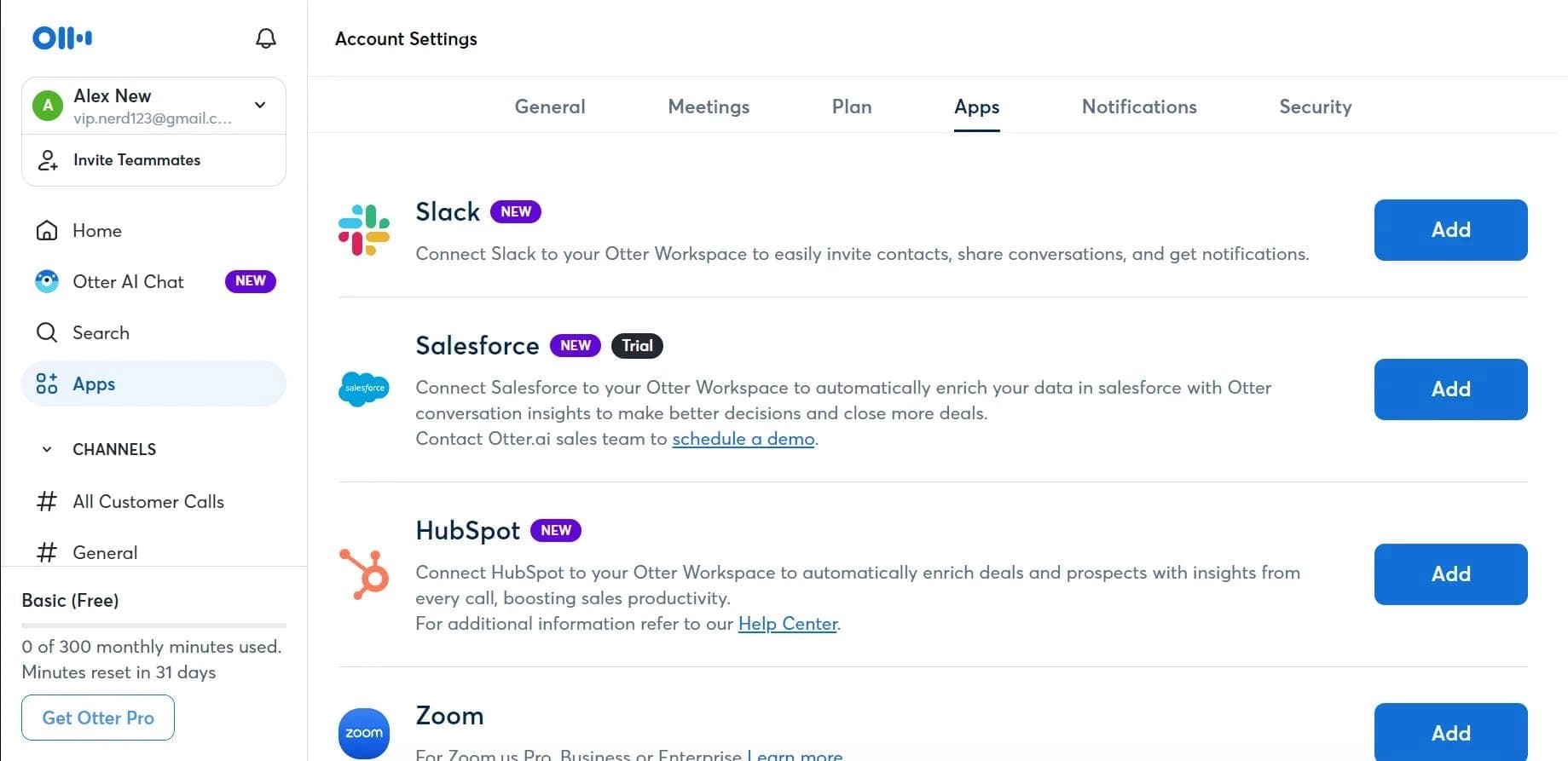
| Integrations | Zoom, Microsoft Teams, Google Meet, Slack, Dropbox, Google Calendar, Microsoft Calendar, Salesforce, Microsoft SharePoint |
| Developer API | Yes |
Who Is Otter AI For?
Business professionals and managers
Otter AI is suitable for executives, project managers, and employees who regularly participate in meetings and need accurate records of topics discussed, decisions made, and action items assigned. The service automatically creates transcripts and highlights key actions, saving time on manual note-taking.
Journalists and researchers
The tool is useful for recording and transcribing interviews, press conferences, and research conversations. The ability to search transcript text and identify speakers simplifies later analysis of materials and source citation.
Students and educators
Otter AI helps students take notes from lectures and seminars in real time, while educators can create text versions of instructional materials. The service supports audio recording and slide capture, which is especially valuable for educational purposes.
Teams and event organizers
For workgroups, podcasters, and conference organizers, Otter AI provides collaborative work on transcripts, creation of archived and searchable content from spoken speech, and real-time captions for live events.
How to Use Otter AI
Getting started and setting up your account
To use Otter AI, you need to create an account on the service website or in the mobile app. You can sign up using Google or Microsoft accounts, or with your email address. After registration, it is recommended to sync the service with a Google or Microsoft calendar — this allows Otter AI to automatically join scheduled meetings and start transcription without additional actions.
Recording meetings and transcription
Otter AI can be used in two main ways. The first is automatic transcription during video conferences through integration with Zoom, Google Meet, or Microsoft Teams: the AI joins the meeting on its own and starts recording. The second is manual recording through the mobile app or web version: just press the record button, and the service will begin converting speech to text in real time. You can also upload pre-recorded audio and video files for offline transcription.
Working with transcripts and sharing access
After a meeting ends, Otter AI creates a transcript that you can view, edit, and share with colleagues. The service automatically generates a brief summary and highlights action items. Transcripts are saved to a workspace where full-text search is available. Through integrations with Slack, Dropbox, and other tools, you can sync results with your team.
Key Features of Otter AI
Real-time transcription and speaker identification
Otter AI converts spoken language into text almost instantly during a conversation. The service automatically recognizes different participants and assigns each one an identifier, making it easy to track who said what. This works both in live sessions and with pre-recorded files.
Slide capture and action item extraction
During meetings with presentations, Otter AI can capture slide images and link them to the corresponding moment in the transcript. The AI also analyzes the conversation and highlights key decisions, tasks, and assignments, creating a structured action list.
Integration with collaboration tools
The service integrates with popular video conferencing platforms (Zoom, Microsoft Teams, Google Meet), calendars (Google Calendar, Microsoft Calendar), and team collaboration systems (Slack, Dropbox, Salesforce, Microsoft SharePoint). Users can set up automatic synchronization and share transcripts without additional manual steps.
Advantages of Otter AI
- High speech recognition accuracy — the service delivers strong results when transcribing conversations in supported languages, minimizing errors even with background noise or accents.
- Support for multiple languages, including Russian — Otter AI recognizes speech in English, French, Spanish, Russian, and other languages, making it useful for international teams and users from different countries.
- Free basic version — the entry-level plan does not require a credit card and includes 300 transcription minutes per month, which is sufficient for occasional use.
- Available on multiple platforms — Otter AI works on the web, iOS, and Android, so you can use the service from any device anywhere.
- Automated note and summary creation — the tool not only transcribes speech but also generates concise summaries of discussions, saving time on manual review.
Disadvantages of Otter AI
- The service interface is English-only — despite supporting transcription in multiple languages, menus, settings, and instructions are available only in English, which can be a barrier for non-English speakers.
- Free plan limitations — the basic version includes only 300 transcription minutes per month, no more than 30 minutes per recording, and allows importing only 3 audio or video files during the entire time of use.
- Dependence on an internet connection — most features, including real-time transcription and integrations with third-party services, require a stable internet connection. Full offline work is not supported.
- Not open source — the service’s source code is closed, which limits customization options and security auditing capabilities for some enterprise users.
What Problems Does Otter AI Solve?
- Automatic recording and transcription of meetings and conversations in real time — the service eliminates the need for manual note-taking by capturing every word spoken during meetings.
- Conversion of audio and video recordings into text transcripts — Otter AI can process pre-recorded files and turn them into editable text documents.
- Search through transcript text — users can quickly find relevant conversation fragments by keywords without listening to long recordings again.
- Creating discussion summaries and highlighting action items — the AI automatically summarizes meetings and creates a task list, speeding up follow-up work.
- Building archived, searchable content from spoken speech — all transcripts are saved in a workspace, forming a knowledge base for later analysis.
- Taking lecture notes and recording interviews — the tool is useful for education and for the professional work of journalists and researchers.
Otter AI Pricing
Otter AI operates on a freemium model and offers several pricing plans:
Free plan (Basic) — provided without requiring a credit card. Includes 300 transcription minutes per month, with a limit of 30 minutes per conversation. Only 3 audio or video files can be imported.
Pro plan — available with monthly billing. Provides 1,200 transcription minutes per month. A 20% discount is available for students and teachers. Annual billing offers a discount of up to 51%.
Business plan — billed at a fixed monthly rate and includes 6,000 transcription minutes. Designed for team use.
Enterprise plan — pricing is not publicly disclosed. Includes single sign-on (SSO), organization-wide deployment, and other advanced features for large companies.
Terms of Use for Otter AI
To get started, you need to register an account — via Google, a Microsoft account, or email. The basic version of the service is free and does not require a credit card.
To use automatic meeting joining, integration with a Google or Microsoft calendar is required. Depending on the selected plan, there are limits on monthly transcription minutes: from 300 minutes on the free plan up to 6,000 minutes on the Business plan. The free plan also restricts the number of imported files — no more than 3 during the entire time of use.
Paid Pro and Business plans can be billed monthly or annually — annual subscriptions provide a discount of up to 51%. Students and teachers receive an additional 20% discount on the Pro plan.
Availability of Otter AI
Otter AI is available on three platforms: web, iOS, and Android. The service interface is entirely in English. Transcription is supported in several languages, including English, French, Spanish, and Russian.
According to analytics data, the largest share of users is in the United States (62.5%), and the tool is also actively used in the United Kingdom, India, Canada, and Australia. There is no information about needing a VPN to access the service from specific regions.
How Otter AI Differs from Alternatives
Otter AI stands out from competitors primarily through its deep integration with popular video conferencing platforms and calendars. Unlike many other transcription services, Otter AI does not simply convert speech to text — it also automatically identifies speakers, captures slides, and extracts action items, functioning as a full-fledged AI meeting assistant.
The service offers one of the most generous free tiers in its segment — 300 minutes per month with no credit card required. At the same time, its support for Russian transcription makes it more accessible to Russian-speaking users compared with some foreign alternatives.
Competitors to Otter AI include Sonix, Temi, Happy Scribe, Trint, Rev, Scribie, and other transcription services. The main difference with Otter AI is its focus on real-time work and integration with corporate tools, while many alternatives focus primarily on post-processing of existing audio files.
Conclusion
Otter AI is a powerful cloud service for automatic real-time transcription of meetings, lectures, and interviews. The tool combines high speech recognition accuracy, support for multiple languages (including Russian), automatic highlighting of key moments and action items, and deep integration with popular video conferencing platforms and calendars. The availability of a free version with no credit card requirement makes the service accessible to a wide range of users — from students to business professionals. The main limitations are the English-only interface and dependence on an internet connection. Otter AI will be a useful tool for anyone who regularly participates in negotiations, meetings, and educational events and wants to efficiently capture and organize spoken information.
Pricing
Frequently asked questions
Similar AI tools




See also
A sales automation platform that combines customer prospecting, deal management, and AI-powered forecasting.
AI editor for creating, editing, and publishing content with templates and prompts.

Financial platform with an AI assistant for managing accounting, taxes, and budgets.

Platform for interview preparation with AI mock interviews and real-time support.
Enterprise language model platform focused on privacy and on-premise deployment.


AI assistant for creating short summaries of videos, PDF documents, and web pages.


AI email assistant that helps quickly draft messages, adapting to the user's style.


Free online platform with over 150 AI tools for working with PDFs, images, videos, and text.