
Kombai
AI tool for automatically converting layouts from Figma into HTML, CSS, and React components, as well as for creating and refactoring interfaces.
Overview
Kombai
Description of the Kombai AI
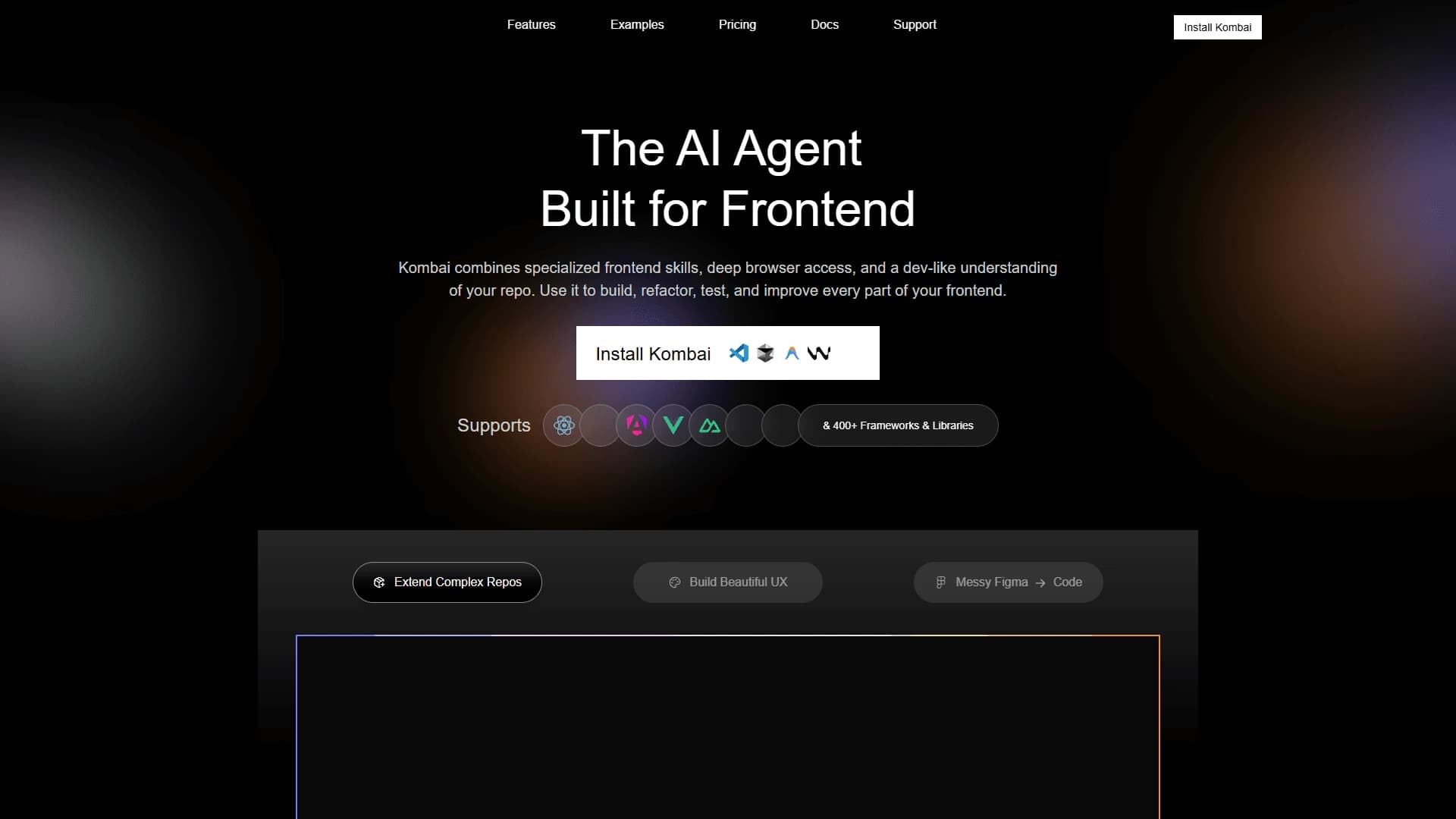
Kombai is a specialized AI tool designed to automatically convert Figma designs into working frontend code. Instead of manual markup, the service analyzes the design structure, including layers, spacing, and typography, and generates ready-made HTML, CSS, and React components in just a few minutes.
In a broader sense, Kombai works as an AI agent for frontend development: it helps not only turn designs into code but also create, refactor, and maintain interfaces. The tool understands the context of code, the browser, and the repository, which allows it to act as a full-fledged assistant for frontend developers, although the generated code still requires review and refinement.
Kombai characteristics
| Characteristic | Value |
|---|---|
| Type | Coding assistant / AI agent for frontend development |
| Category | Figma to code conversion, code assistants, refactoring |
| Business model | Freemium |
| Supported technologies | React 19, TypeScript, Material UI, Ant Design, Mantine |
| Framework support | More than 400 frameworks and libraries |
| Website | kombai.com |
| Catalog publication date | December 30, 2025 |
Who is the Kombai AI suitable for?
Frontend developers
The tool is primarily aimed at developers who need to quickly turn Figma designs into code without routine manual work. Kombai helps speed up typical tasks and focus on the more complex aspects of a project.
Designers and product teams
Kombai is useful for designers who want to hand off their designs to development faster, as well as for team leads and product teams looking to reduce routine work and improve code quality without losing control over the project architecture.
Developers working on large projects
The tool suits both modern SPAs and complex enterprise UIs, including work with large repositories containing hundreds of thousands of lines of code.
How to use the Kombai AI?
Getting started
To use the service, go to kombai.com. To begin, simply upload a design from Figma, and the tool will analyze its structure and start generating code.
Getting the generated code
After processing the design, Kombai outputs ready-made HTML+CSS or React components. The resulting code can be opened directly in an editor, previewed, and run.
Refining the result
It is important to remember that the generated code is not the final product. It should be reviewed and refined, since Kombai speeds up the process of creating interfaces but does not fully replace the developer.
Key features of Kombai
Converting Figma designs to code
The core function of the service is automatically turning a Figma design into working HTML, CSS, and React components. The tool parses the layers, spacing, and typography of the design to reproduce it as accurately as possible.
Support for modern technologies
Kombai works with React 19 and TypeScript and supports popular component libraries such as Material UI, Ant Design, and Mantine. In total, the tool is compatible with more than 400 frameworks and libraries.
Writing, refactoring, and optimizing code
In addition to markup, Kombai can add new features to existing code, refactor interfaces, write and improve tests, and optimize frontend performance.
Understanding project context
The tool has access to the browser and the repository, which allows it to better understand the project context and act like a developer familiar with the architecture of the codebase.
Benefits of Kombai
High layout accuracy
According to the service, Kombai achieves about 96% successful code compilation in tests and about 72% pass rate in code review. This is noticeably more accurate than general-purpose models such as Claude Sonnet and Gemini, especially in matching the layout to the original design.
Frontend specialization
Unlike general-purpose code assistants, Kombai is built specifically for frontend tasks: markup, working with components, state, styles, and integrations. This gives it a deeper understanding of the browser and repository structure.
Working with large projects
The tool handles large repositories, including projects of about 500,000 lines, and suits both simple pages and complex enterprise interfaces.
Drawbacks of Kombai
Code requires refinement
The main limitation is that the tool does not fully replace the developer. The generated code needs checking, review, and refinement, so fully automating the layout process is not possible.
Dependence on human oversight
Since Kombai only speeds up routine tasks, the final quality and alignment with the project architecture still depend on the participation and expertise of a frontend developer.
What problems does Kombai solve?
Layout automation
The main task of the tool is automatically turning Figma designs into code, saving developers from routine and often repetitive interface markup work.
Rapid prototyping
Kombai makes it possible to quickly create working prototypes of pages and interfaces, which is especially valuable in the early stages of projects and when an idea needs to be tested fast.
Adding new pages to existing code
The tool helps add new pages and interface modules to an existing codebase, as well as refactor and optimize the frontend.
Improving code quality
Writing and improving tests, as well as performance optimization, are among the tasks that Kombai helps product teams solve.
Kombai pricing
Free plan
Kombai offers a free plan with a credit system: upon registration, users get 150 credits, then 50 credits daily. That gives about 300 credits per month free of charge.
Pro plan
The paid plan costs $20 per month. It includes 2,000 credits, email support, and opt-out from having user data used for model training.
Enterprise plan
For large companies, there is an enterprise plan with a custom engine and dedicated support. The terms of this plan are discussed individually.
Terms of use for Kombai
Credit system
The free plan operates on a credit system with a limit of about 300 credits per month. Credits are spent on tasks such as converting designs or generating code.
Carrying over unused credits
Unused credits are carried over to the next period, but with a limitation: no more than half of the monthly limit can be carried over. This is worth keeping in mind when planning your workload.
Kombai availability
Web service
Kombai is available as a web service at kombai.com. You only need a browser to work with the tool; no separate installation is required.
Limitations
Information about regional restrictions, interface languages, or the need to use a VPN is not specified on the official page.
How Kombai differs from alternatives
Focus on frontend
Unlike general-purpose code assistants, Kombai is specifically built for frontend development tasks: markup, working with components, state, styles, and integrations. This makes it more accurate in areas related to building interfaces.
Specialized context engine
Compared with general-purpose models such as Claude Sonnet and Gemini, Kombai delivers higher layout accuracy and compilation success. This is achieved through a specialized context engine that better understands the specifics of design mockups and frontend code.
Deep project understanding
The tool accesses the browser and repository, giving it a developer-level understanding of the project context. Among the closest alternatives are Claude API, Kodik, Stagehand, browse.sh, Microsoft Foundry, and Huihui AI.
Conclusion
Kombai is a niche tool for quickly converting Figma designs into frontend code and a specialized AI agent that speeds up the creation and maintenance of interfaces. It saves significant time on routine markup and prototyping and delivers high accuracy thanks to its frontend specialization. At the same time, Kombai does not fully replace the developer — the generated code still needs review and refinement. The tool will be useful for frontend developers, designers, and product teams who want to speed up development without losing control over the project architecture.
Pricing
Frequently asked questions
See also

Open-source AI agent for developers, available in the terminal, IDE, and as a desktop application.

AI-powered code editor that analyzes your entire project and helps you write, rewrite, and optimize code.
AI assistant for programmers, working through your own API key and supporting popular language models.

AI assistant for developers that generates, explains, and refactors code, as well as creates documentation and tests from natural language descriptions.
A set of AI tools built into JetBrains IDEs to help with writing, refactoring, and understanding code.

Neural network for generating, explaining, and fixing program code in various programming languages.

AI assistant for developers that automates routine programming tasks.

AI agent for software development assistance, capable of writing, fixing, and reviewing code.