
Jam
Browser extension and AI assistant for automated collection of error information and code debugging.
Overview
Jam
Description of Jam AI
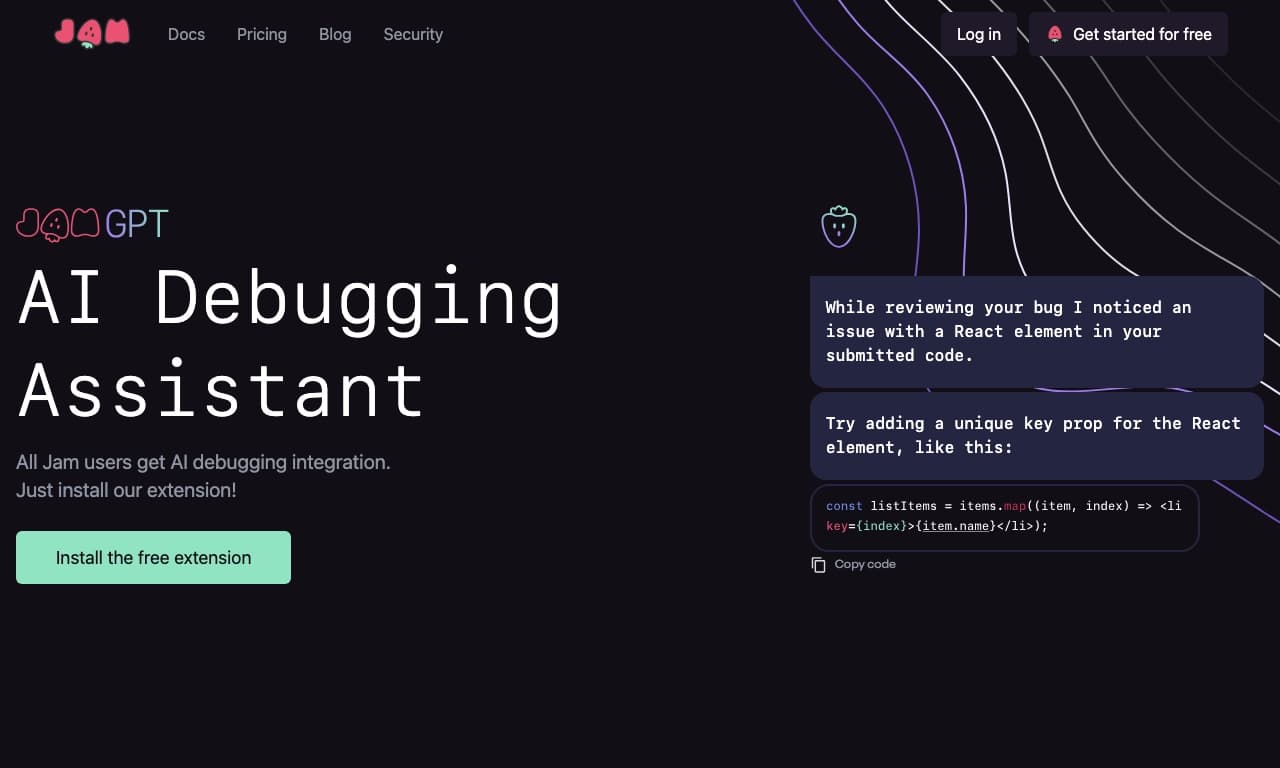
Jam is a browser extension and AI assistant designed for automated collection of error information and code debugging. When a bug is detected, the tool automatically gathers all related data: screenshots or screen recordings, logs, browser and device information, network requests, and the sequence of user actions. Based on this data, a detailed report is generated that developers can immediately use to analyze and fix the issue.
Jam includes a built-in AI assistant, JamGPT, based on OpenAI, which analyzes errors and suggests ready-made code fixes. The service integrates with popular issue trackers, and the completed report can be shared with the team via a single link.
Jam Features
| Feature | Value |
|---|---|
| Type | Bug report collection automation tool |
| Categories | Debugging and error detection, Logs and monitoring, Code assistants, Browser extensions |
| Platform | Browser extension, website |
| Developer | Jam.dev |
| Monthly visits | 12.4M |
| Distribution model | Freemium |
| Website | jam.dev |
| Publication date | August 3, 2025 |
Who is Jam AI for?
Teams working on web applications
Jam is primarily aimed at teams that develop web applications. This includes developers, testers, QA managers, and everyone involved in the process of identifying and fixing errors. The tool is especially useful in scenarios where detailed bug information needs to be quickly communicated between different team members.
Limitations by application type
It is important to note that Jam is not suitable for testing desktop or mobile applications — the tool only works in the browser. Also, for small teams with simple processes, its functionality may be excessive.
How to use Jam AI?
Installing the extension
To get started with Jam, you need to install the browser extension. After installation, the extension integrates into the browser and becomes available for use with one click.
Creating a bug report
When a user discovers an error, they take a screenshot or a short screen recording. The AI automatically collects all details: logs, network requests, browser and device information, user steps, and comments. Based on this data, a full report is generated.
Sending the report
The finished report can be sent to colleagues via a single link or immediately transferred to the issue tracker that Jam is integrated with. Developers receive the complete picture of the error and can start fixing it right away.
Key Features of Jam
Automatic collection of error data
Jam automatically captures all technical details of a bug: browser, device, network requests, logs, and user actions. This allows for a maximally complete report without manual filling.
JamGPT AI assistant
The built-in AI assistant based on OpenAI analyzes source code and suggests fixes for detected errors. JamGPT uses unique error diagnostic data collected by the extension, which speeds up the debugging process.
Integration with issue trackers
The service easily integrates with popular project management systems and bug trackers. The report can be sent directly to the system the team uses in a couple of clicks.
Reports via a single link
All collected error data is packaged into a report that can be shared via a single link. Developers don't need to gather information from different sources — everything is already in one place.
Advantages of Jam
Reduced communication time
Jam reduces miscommunication between testers and developers. Bug reports are complete from the start, engineers immediately get all the information they need for analysis, and the team spends less time clarifying details.
Faster error fixing
Thanks to automatic collection of all details and a built-in AI assistant that suggests ready-made code fixes, errors are found and fixed much faster. The service reduces time spent on explanations, re-checking, and searching for information in external sources.
Simplified collaboration
Jam accelerates information transfer between team members and simplifies joint work. A report link replaces long conversations and numerous attachments.
Disadvantages of Jam
Limitations by application type
Jam is designed exclusively for web applications and is not suitable for testing desktop or mobile applications. This significantly narrows the scope of the tool.
Redundancy for simple processes
For small teams with simple development processes, Jam's functionality may be excessive. In such cases, manually creating bug reports may be more justified.
Need to refine complex reports
For non-standard or complex errors, automated collection might not be sufficient, and reports have to be refined manually. Basic technical knowledge is also required to understand logs and important data.
Security risks
There is a risk of leaking personal or technical data if a report ends up in the wrong hands. Users should be careful about whom and how they send Jam-generated reports.
What Tasks Does Jam Solve?
Automating bug information collection
Jam automates the process of collecting and sharing information about errors in software projects. Instead of manually filling forms and writing messages, users get a ready report with one click.
Automatic collection of technical data
The tool independently collects logs, network requests, system information, and user action sequences — everything needed for a comprehensive analysis of a bug by developers.
Faster communication between testers and developers
Jam solves the problem of quickly and easily creating error reports, bridging the gap between testing and development. The team spends less time clarifying details and more time actually fixing issues.
Jam Pricing
Jam operates on a freemium model. The free plan is intended for individual use and includes basic features. Paid plans are available for professional and team use.
Jam Terms of Use
The terms of use for the service are not specified on the source websites.
Jam Availability
Jam is available as a browser extension and as a web tool at jam.dev. Monthly visits to the site amount to 12.4M.
How Jam Differs from Alternatives
The source data does not specify direct differences between Jam and similar tools. However, it can be noted that Jam combines the functions of a browser extension for automatic bug report collection and a built-in AI assistant for error analysis and code suggestions — such a combination of features is not found in all tools on the market. Among the mentioned alternatives are Microsoft Agent 365, Claude Code, GitHub Copilot, Cursor AI, AskCodi, Tabnine, Replit, Qwen AI, and others.
Conclusion
Jam is a tool for automating bug report collection and code debugging, designed for teams developing web applications. It helps reduce communication time between testers and developers, speed up the debugging process, and simplify collaboration. The built-in JamGPT AI assistant based on OpenAI adds the ability to automatically analyze code and suggest fixes. However, the tool is best suited for standard situations, requires basic technical knowledge from users, and is not suitable for testing desktop or mobile applications.
Pricing
Frequently asked questions
Similar AI tools








See also


A platform for managing, monitoring, and deploying applications based on large language models.
Platform for developing, testing, and deploying applications based on language models.


Platform for high-speed AI model inference on its own LPU hardware accelerator.

A platform for tracking, visualizing, and managing machine learning experiments.


A platform for security and access management of generative AI in companies.

Platform for managing prompts and analyzing neural network performance via API.


Platform for data management, labeling, and evaluation of AI models.

AI platform for analyzing users' digital experience on websites and in applications.