GitHub Copilot
AI assistant for programming that integrates into the code editor and provides autocomplete and real-time suggestions.
Overview
GitHub Copilot
About GitHub Copilot
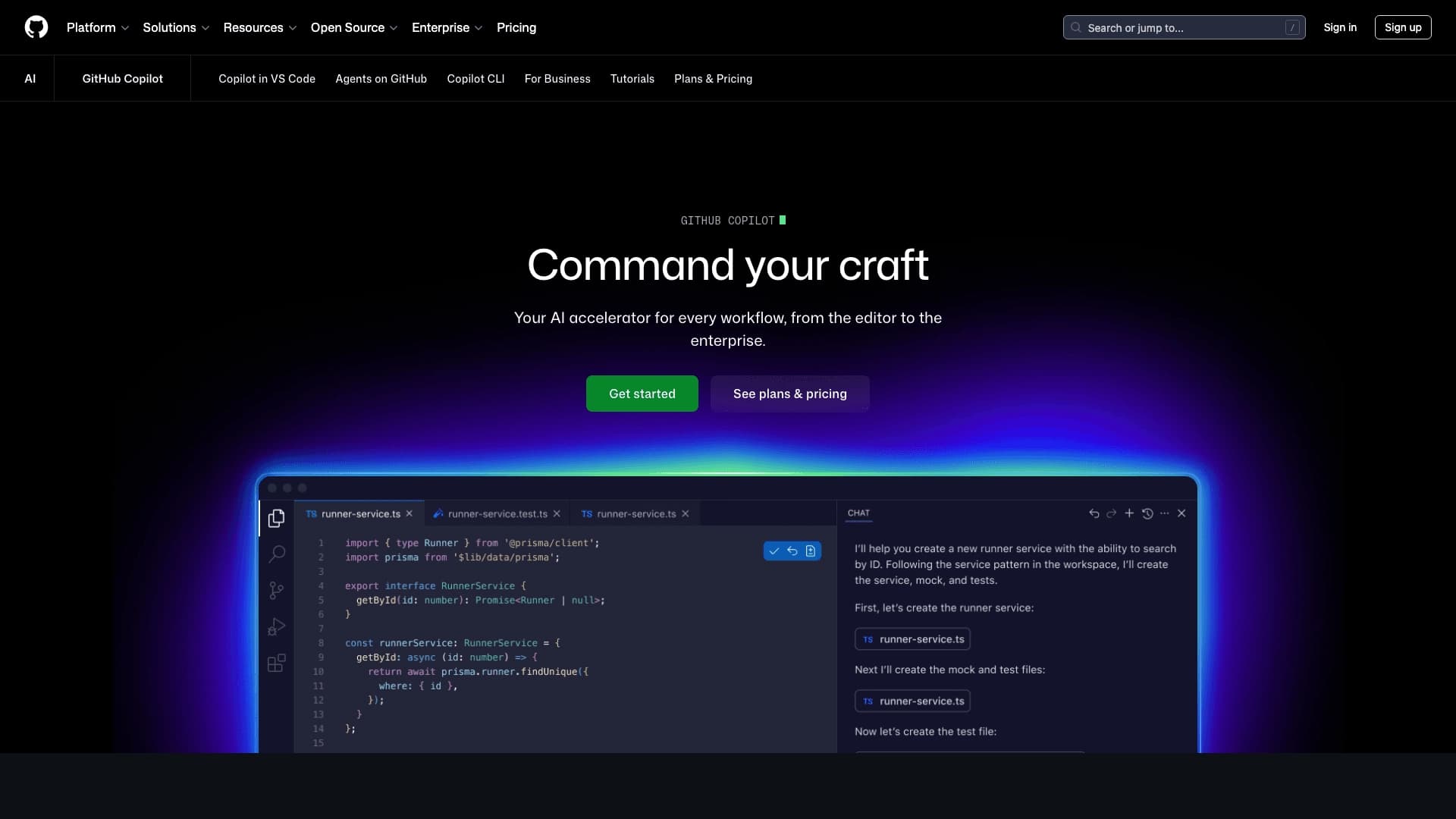
GitHub Copilot is an AI programming assistant developed by GitHub (owned by Microsoft). The tool integrates directly into the code editor and offers autocomplete and real-time suggestions. Copilot analyzes the context of the open file and repository and generates lines, functions, and entire blocks of code based on it. The system runs on OpenAI models and supports most popular programming languages, including Python, JavaScript, TypeScript, Java, and C++. Generated code should be reviewed for correctness, as suggestions are not always perfect.
GitHub Copilot Features
| Characteristic | Value |
|---|---|
| Type | AI programming assistant |
| Categories | Code assistants, Code generation, For developers |
| Developer | GitHub (Microsoft) |
| Monthly visits | 28.5M |
| Free plan | Yes (Copilot Free, for students and open-source) |
| Paid plan (Individual) | from $10/month (Copilot Pro) |
| Paid plan (Business) | from $19/month per user |
| Platforms | VS Code, JetBrains, Visual Studio, Neovim, GitHub, Xcode, Eclipse |
| Russian language support | Yes (interface is in English) |
Who Is GitHub Copilot For?
Beginner developers and students
Copilot is suitable for those who are just learning to program. The tool suggests the structure and syntax of constructs, helping you quickly understand how functions are written in different languages. At the same time, it is important to understand the code rather than simply copy it.
Experienced developers
The tool helps experienced programmers speed up routine tasks: writing boilerplate code, creating tests, and refactoring. Developers save time on typical operations and can focus on more complex logic.
Specialists in different fields
Copilot is suitable for frontend and backend developers, fullstack specialists, QA engineers, DevOps engineers, and analysts who write scripts. The tool is also useful for teams working on GitHub for collaborative projects.
How to Use GitHub Copilot?
Installing the extension
To get started, you need to install the Copilot extension in your code editor. The tool is available for VS Code, JetBrains IDEs, Visual Studio, Neovim, Xcode, and Eclipse. After installation, Copilot activates automatically and starts offering suggestions as you type.
Working with suggestions
While writing code, Copilot analyzes the context and offers options for completing a line or an entire function. You can accept a suggestion (usually with Tab), edit it, or ignore it and continue typing manually.
Using chat and agent mode
Copilot includes chat functionality for asking questions about code, explaining errors, refactoring, and generating tests. In agent mode, the tool can examine the context, propose a change plan, modify several files, and prepare the result for review.
Project-specific configuration
It is recommended to set up custom instructions by specifying the project language, framework, comment style, and testing rules. This improves the accuracy and relevance of the suggested code.
Key Features of GitHub Copilot
Real-time code completion
The system suggests lines, functions, and entire blocks of code based on the context of the open file, previously written code, and the programming language. Suggestions appear directly as you type, so you don't have to switch between tools.
Copilot Chat
The built-in chat for interacting with the AI assistant lets you ask questions about code, request explanations of functions and files, find the causes of errors, suggest refactoring options, and generate tests. The chat is available directly in the development environment.
Agent Mode
A mode in which Copilot can independently examine the project context, propose a change plan, modify several files, and prepare the result for review. Suitable for limited tasks that do not require a deep understanding of business logic.
Working with pull requests
The tool helps prepare and review pull requests by analyzing changes and suggesting comments. This simplifies the code review process and reduces review time.
Support for different models
Copilot offers a choice between different AI models, including the latest versions, allowing developers to find the optimal balance between speed and generation quality.
Advantages of GitHub Copilot
Faster development
Copilot significantly speeds up code writing by handling routine tasks: boilerplate code, common constructs, and frequently used patterns. Developers spend less time on mechanical writing and more on solving logical problems.
No switching between tools
The tool works directly in the code editor and does not require switching to a separate chat or web interface. The entire process—from suggestions to code discussion—takes place in a single development environment.
Help with learning new technologies
When working with unfamiliar languages or frameworks, Copilot suggests the structure and syntax, helping you get up to speed faster. This is useful for both students and experienced developers exploring new technology stacks.
Fewer minor errors
The tool helps reduce typos and syntax errors by suggesting correct constructs. However, it does not eliminate the need to review logic and business rules.
Free plan for trying it out
Copilot Free lets you start using the tool without payment, with limits on chat and code completion. This gives you a chance to evaluate the tool before buying a paid subscription.
Disadvantages of GitHub Copilot
Code is not always correct
Copilot may suggest solutions that contain errors, especially in complex scenarios or when the context is incomplete. Generated code must always be reviewed, especially business logic.
Less deliberate code writing
The habit of simply accepting suggestions can lead to reduced attention and thoughtfulness. Developers risk analyzing code less and relying on automatic suggestions.
Dependence on project context
If the code is poorly written or incomplete, Copilot's suggestions become less accurate and relevant. The quality of suggestions directly depends on how well the project is organized.
Paid subscription for active use
Although there is a free plan, full use—frequent work with agent requests, reviews, and large repositories—requires a paid subscription. The cost may be significant for individual developers and small teams.
Limited understanding of business logic
Copilot does not always understand hidden project requirements and may suggest solutions that do not match the specifics of business tasks. It should not be fully relied on for architectural decisions.
What Problems Does GitHub Copilot Solve?
Quickly writing functions and boilerplate code
The tool is effective for creating typical functions, API handlers, boilerplate code, and logic with repetitive elements. This reduces development time and the amount of manual work.
Understanding the syntax and structure of new languages
When switching to a new programming language, Copilot helps you get up to speed faster by suggesting correct syntax constructs. This lowers the barrier to entry and speeds up learning.
Finding and fixing errors in code
Copilot Chat can explain code fragments, find the causes of errors, and suggest fixes. This is useful both for debugging and for understanding someone else's code.
Writing tests and documentation
The tool helps prepare unit tests for functions, explain how code works, and create documentation. This reduces time spent on routine but necessary tasks.
Refactoring existing code
Copilot can suggest ways to simplify complex fragments, optimize logic, and improve code readability. Refactoring becomes faster and easier.
GitHub Copilot Pricing
Copilot Free
A free plan with limits on code completion and chat. Available for getting familiar with the tool and usually does not require a credit card. Intended for students and open-source projects under certain conditions.
Copilot Pro
An individual subscription starting at $10 per month. Includes expanded capabilities: higher limits on code completion and agent requests, access to different models, and priority support.
Copilot Pro+
A subscription for $39 per month with maximum capabilities for one user. Includes access to the most powerful models and expanded limits.
Copilot Business
A plan for teams starting at $19 per user per month. Includes access management tools, restrictions, and security settings for organizations.
Copilot Enterprise
A corporate plan for $39 per user per month. Provides maximum capabilities, including integration with corporate systems and expanded security features.
Terms of Use for GitHub Copilot
Registration via GitHub
A GitHub account is required to use Copilot. The tool is linked to the account through which the subscription and access are managed.
Free access
Copilot Free is available under certain conditions, including student status or participation in open-source projects. Activating the free plan usually does not require a credit card.
Paid subscriptions
Commercial use and expanded capabilities require a paid subscription. Payment is made monthly, and cancellation is possible at any time.
Team settings
For organizations and teams, it is important to configure access rights: who can use agent mode, what limits are set, and how changes are reviewed. Administrators manage subscriptions and usage policies.
Availability of GitHub Copilot
Platforms
Copilot is available on most popular platforms: GitHub.com, VS Code, Visual Studio, JetBrains IDEs, Xcode, Eclipse, and Neovim. The tool also works on GitHub Mobile, GitHub Desktop, Windows Terminal, and via CLI.
Programming languages
The tool supports most popular languages: Python, JavaScript, TypeScript, Java, C++, SQL, HTML, and others. Suggestion quality may vary by language: it is higher for common languages and may be less accurate for rare ones.
Regional restrictions
According to available data, no regional restrictions have been reported. Russian language support is available, although the interface is in English.
How GitHub Copilot Differs from Alternatives
Deep editor integration
Copilot is built directly into the development environment and offers real-time suggestions without the need to switch between windows. Unlike some alternatives, it "lives" next to the project and takes into account the context of the open file and repository.
Tied to the GitHub ecosystem
Copilot is deeply integrated with GitHub, which provides additional capabilities: working with pull requests, help with code review, and issue analysis. For teams using GitHub, this is a significant advantage over alternatives.
Agent mode and autonomous task execution
Copilot includes an agent mode that can independently examine the context, plan changes, and make edits to multiple files. Not all alternatives offer this functionality, making Copilot one of the most advanced tools in this category.
Support for multiple models
Copilot offers a choice between different AI models, including the latest versions, while many competitors work with only one model. This gives developers flexibility in choosing the optimal balance between speed and quality.
Conclusion
GitHub Copilot is one of the most popular and convenient AI tools for programming. It integrates directly into the development environment and speeds up code writing. It suits developers of any level, from students to experienced professionals, helping with autocomplete, code explanation, test writing, and refactoring. The tool offers a free plan for getting started, but active use requires a paid subscription. Copilot does not replace the developer—final decisions, especially in complex projects, remain with the person, and generated code requires mandatory review for correctness.