

AI Sound Effect Generator
An online tool that generates sound effects for games, videos, and podcasts from text descriptions.
Overview
AI Sound Effect Generator
Description of AI Sound Effect Generator
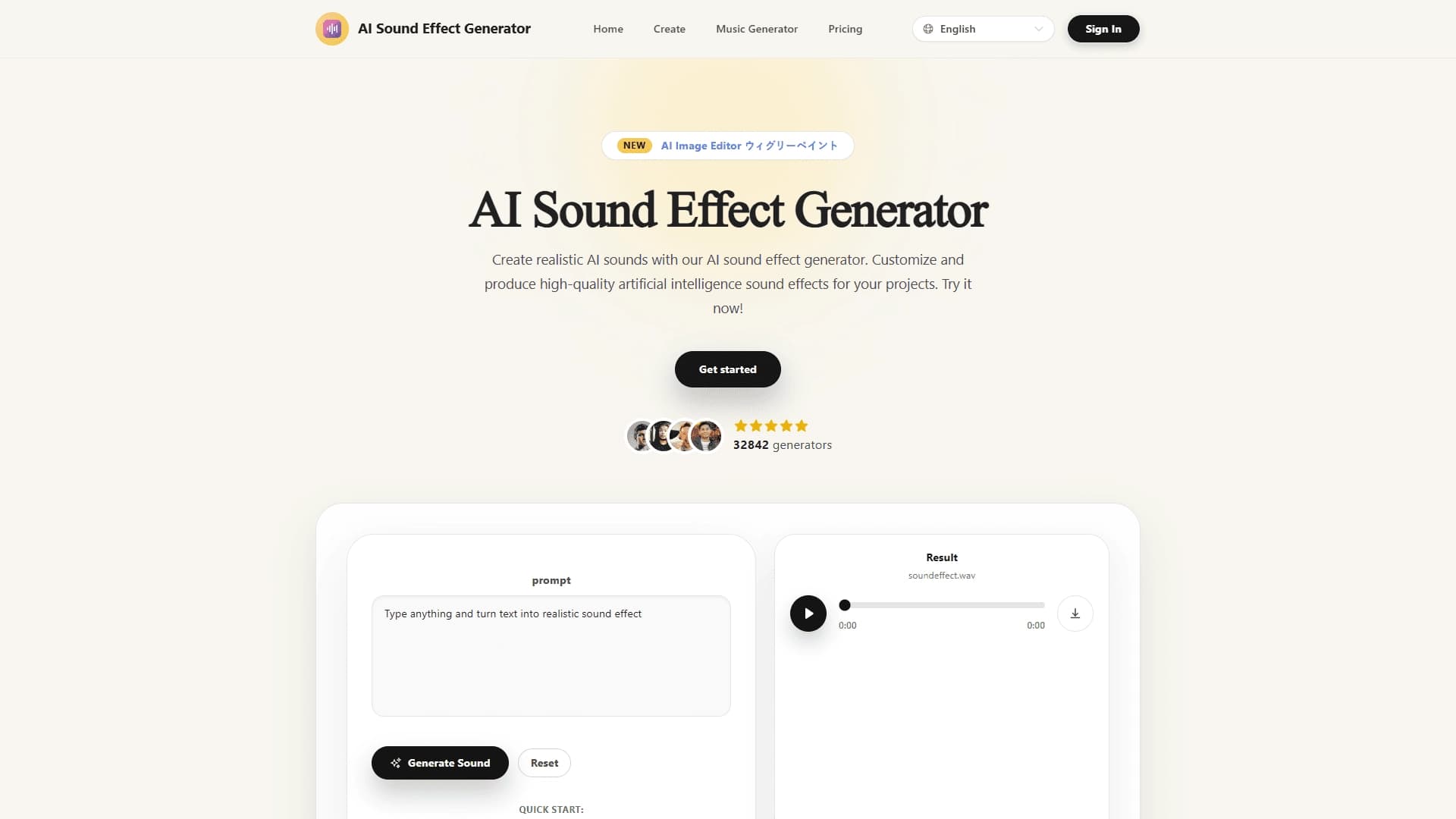
AI Sound Effect Generator is an online tool that creates sound effects from text descriptions. The service uses machine learning: the user enters a text prompt, for example “rain noise in the forest,” and the neural network converts it into a ready-made audio file.
The tool covers a wide range of sounds, from natural noise to technical and sci-fi effects. No sound engineering skills are required: you just write a description of the desired sound, set the duration, and wait for generation. The service offers both a free plan and paid subscriptions with extended capabilities, including lifted restrictions and priority support.
Characteristics of AI Sound Effect Generator
| Characteristic | Value |
|---|---|
| Type | Sound effect generator (AI generator) |
| Category | Sound effects, sound design |
| Format | Online service (web) |
| Input | Text prompt |
| Output | Sound effect audio file |
| Settings | Clip duration (30 seconds by default), credit usage |
| Free plan | Yes (limited access to basic features) |
| Developer | AI Sound Effect Labs |
| Website | aisoundeffectgenerator.com |
| Monthly visits | 116.4K |
Who is AI Sound Effect Generator suitable for?
Content creators and video editors
The tool will be useful for those who regularly add sound to videos, clips, and podcasts. Because sounds are generated from a text description, there is no need to search stock libraries for suitable effects—everything is created instantly based on an individual request.
Game developers and sound designers
Game designers and sound designers can quickly get unique sound effects for game scenes, animations, and ads. The service is especially convenient at the prototyping stage, when you need to quickly select or create a desired sound.
Beginners with no sound engineering experience
The tool is designed for users without specialized skills as well. The simple interface and intuitive workflow let even people encountering audio generation for the first time produce ready-made sound effects.
How to use AI Sound Effect Generator?
Step 1: Write a text prompt
Enter a text description of the desired sound, for example “rain noise in the forest” or “mechanical hum.” The more precise and detailed the prompt, the higher the chance of a quality result—generation quality depends largely on how detailed the request is.
Step 2: Set the parameters and start generation
Set the duration of the future clip (up to 30 seconds by default). You can also use ready-made presets for a quick start. After you click the generation button, the neural network processes the request using machine learning and creates an audio file.
Step 3: Listen to and download the result
You can listen to the generated sound right on the website and download it as an audio file if needed. There is also a generation history that lets you return to previously created effects and reuse them.
Key features of AI Sound Effect Generator
Sound generation from text descriptions
The main function of the service is creating a wide variety of sound effects based on a text prompt. The range covers natural noise, technical sounds, and creative or sci-fi effects, which covers most use cases.
Quick presets and generation history
Ready-made presets (Quick Start) are available to speed up work, letting you begin generation without spending too much time thinking about a prompt. Generation history stores created effects and makes it easier to reuse them.
Duration settings and file downloads
Users can set clip duration (up to 30 seconds by default). The resulting audio files can be listened to and downloaded, while the interface is simple and clear even for beginners.
Advantages of AI Sound Effect Generator
Wide variety and realistic sounds
The tool generates diverse audio effects, from natural to technical and creative. The neural network can reproduce real sounds very closely by analyzing many nuances, so the result is often hard to distinguish from the original.
Suitable for different skill levels
The service works well for professionals thanks to advanced settings, and for beginners thanks to an intuitive interface. No sound engineering experience or stock library searching is required.
Fast creation of unique effects
Sound effects are created almost instantly and are also unique—there is no need to search through ready-made stock materials. This saves time when adding sound to games, videos, podcasts, animations, and ads.
Disadvantages of AI Sound Effect Generator
Not always natural-sounding
Generated sounds can sometimes sound unnatural or “plastic.” Result quality depends heavily on how accurate and detailed the text prompt is, so several attempts may be needed to get a good sound.
Legal risks for commercial use
The neural network may generate a sound similar to copyrighted material. If you use generated audio files in commercial projects, it is worth checking that they are legally clean to avoid possible issues.
Unpredictable results
As with many generative tools, the output is not always fully predictable. Even with high-quality imitation of real noises, there is no absolute guarantee that the sound will exactly match what you intended.
What tasks does AI Sound Effect Generator solve?
Sound for games, videos, and podcasts
The service lets you quickly create sound effects for films, games, clips, and podcasts without stock libraries. This is useful when you need a custom sound for a specific scenario.
Generating original audio samples
The tool is suitable for building a personal library of sounds for animations, presentations, and ads. By experimenting with prompts, users can assemble a unique set of audio effects.
Sound for cartoons and unconventional videos
The neural network can provide cartoons and videos with unusual, creative sounds that are hard to find in ready-made collections. All you need is a text description of the desired effect.
AI Sound Effect Generator pricing
The service uses a freemium model and offers several plans. The free plan provides limited access to basic features. The Starter plan offers expanded features without watermarks and is priced on the website. The Premium subscription includes full access, priority support, and unlimited use for a fee. Credits are also available for generating sounds.
Terms of use of AI Sound Effect Generator
Access to the website is required to use the service. Registration is not explicitly mentioned, but you will need to sign in to the web platform to use the tool. A free plan with restrictions on basic functions is available, while paid subscriptions provide expanded capabilities.
Availability of AI Sound Effect Generator
The service runs entirely online and is available through the website aisoundeffectgenerator.com, so no additional software installation is required. Interface languages and regions are not specified in the sources, and no information about using a VPN is available either.
How is AI Sound Effect Generator different from alternatives?
The main difference is full generation of sound effects from text descriptions, with no need to search stock libraries. The service is positioned as a solution that requires no sound engineering skills: just write a prompt, and the neural network creates a ready-made audio file.
The tool covers a broad range of sounds, from natural to technical and sci-fi, and suits both beginners and professionals thanks to a balance between simplicity and advanced settings. Closely related alternatives include Sample Planet, TwoShot, TextToSample, AI Jinglemaker, Sound Effects AI, and Soundify, as well as sound generation capabilities in ElevenLabs and Mubert.
Conclusion
AI Sound Effect Generator is an online tool for quickly generating sound effects from text descriptions, aimed at content creators, game designers, video editors, and sound designers. The service lets users avoid stock libraries and does not require sound engineering skills, making it accessible to beginners as well. However, keep in mind that the quality of the result can vary and depends on how accurate the prompt is, and for commercial use of generated sounds, it is recommended to check that they are legally clean.
Pricing
Frequently asked questions
See also

AI-powered platform for generating and editing images and videos.
Cloud platform for text-to-speech conversion with realistic AI-powered voices.


Cloud platform for launching AI applications directly in the browser without installation.


An AI-powered service for handling phone calls that transcribes conversations in real time and creates concise summaries of the discussion.
AI tool for musicians that lets you split audio recordings into separate tracks, change tempo and key, and generate full arrangements from a single audio track.

Professional audio restoration and cleaning software powered by machine learning.

Neural network from Stability AI for generating music and sound effects from a text description or uploaded audio.


Platform for recording, editing, and publishing podcasts and video content with built-in AI tools.