What is Replit and why is it convenient
Replit is a browser-based development environment that lets you write, run, and debug code without installing additional software. Instead of setting up local environments, you open the website — and everything is ready to work. The platform was launched in 2016 thanks to a trio of founders — Amjad Masad, Faris Masad, and Haya Odeh. Since then, the service has grown into a full-fledged ecosystem supporting more than fifty programming languages.
The main advantage is accessibility. Code is stored in the cloud, so you can continue a project from any device: a laptop, tablet, or even a smartphone via the mobile app. This eliminates the problem of version synchronization and data loss. Built-in protection mechanisms safeguard your source code, and the interface remains intuitive even for beginners.
Collaboration and built-in AI
One of the strongest sides of Replit is the multiplayer mode. Several people can edit the same file simultaneously, just like in Google Docs. This makes the platform ideal for pair programming, code reviews, and team projects: you see your colleagues' actions in real time and can immediately comment on changes.
The built-in AI assistant deserves special attention. It helps with code autocompletion, suggests solutions during debugging, and even generates entire snippets from a text description. This is not just smart syntax highlighting, but a full-fledged assistant that speeds up routine tasks and lowers the entry barrier for those just learning to program. At the same time, all data is protected, and access to projects is controlled by privacy settings.
Getting started: creating an account and your first project
To get into Replit, simply register on the official website. Click the "Sign Up" button in the top right corner — and choose a convenient method: email, Google, Facebook, or GitHub. When registering via email, you'll need to confirm your address using the link from the message. After that, you accept the terms of use and enter your personal dashboard.
From there, it's simple:
- Click "Create," choose a programming language and a suitable template.
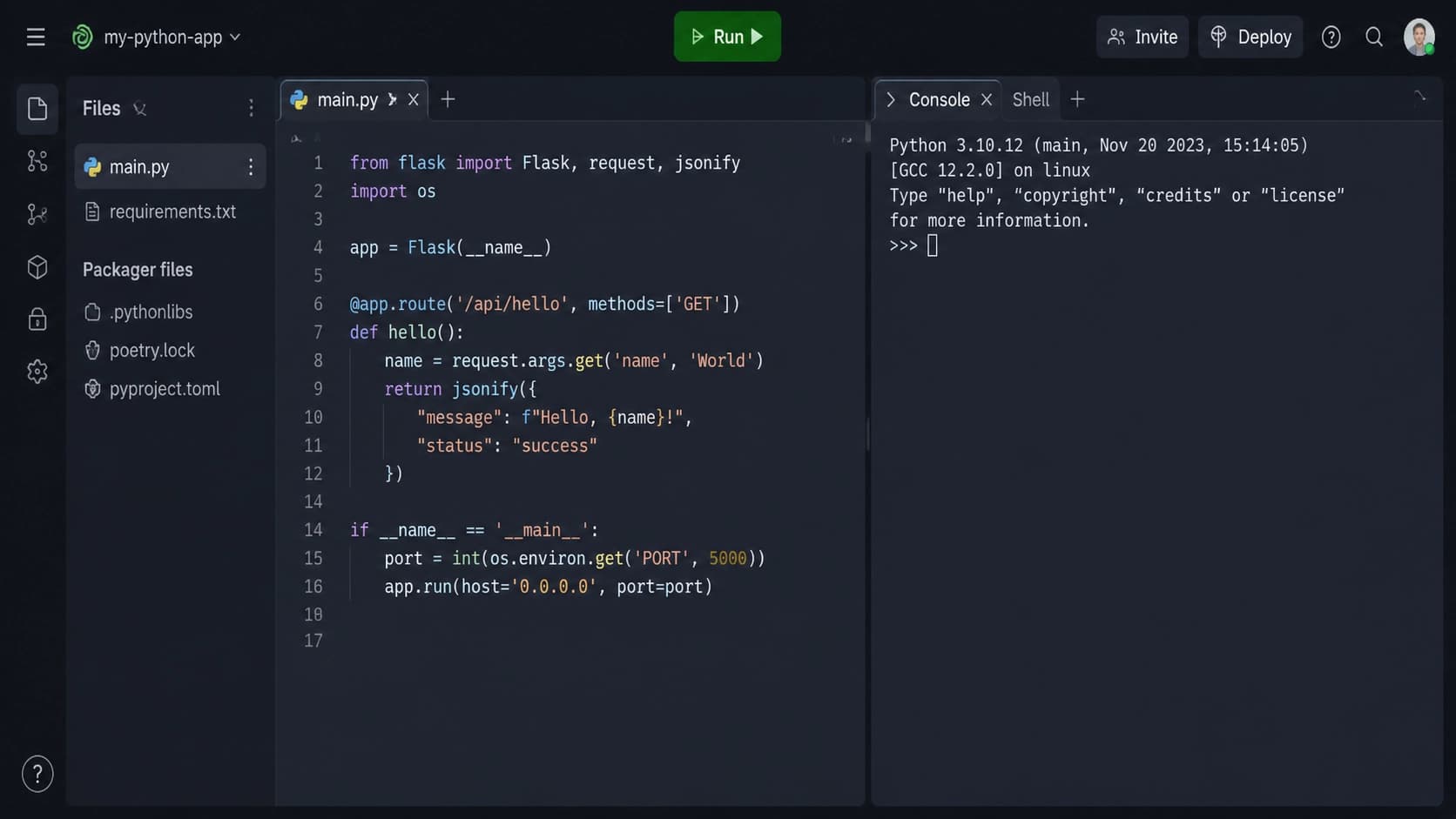
- The editor opens with a console and file manager.
- Write your code and run it with the "Run" button.
- For collaboration, invite participants via a link.
- If you need deployment, click "Deploy," and the project becomes available via a link.
For storing secret data, such as environment variables, there's a "Secrets" tab. You can also use the built-in key-value storage directly from code. If you want to share the result, make your repl public — the whole community will see it.

Where the platform is used
Education is one of the key scenarios. Teachers create assignments, and students complete them in the browser without installing anything. The teacher can monitor progress in real time and give feedback right as work happens.
Rapid prototyping also becomes easier: thanks to a wide range of ready-made templates, a project launches in a minute. No need to spend time setting up an environment — pick a template and start writing code.
For teams, Replit is convenient as a platform for collaborative development. Multiplayer turns routine reviews into a live dialogue, and hosting capabilities let you deploy a web app without additional DevOps tools.
Another unusual use case is technical interviews. Observers can watch a candidate's actions in real time, see their approach to solving problems, and evaluate not just the result but also the thought process. This is more convenient than classic offline assignments.
Tips for effective use
To get the most out of Replit, it's worth following a few simple recommendations:
- Organize files into folders — this makes it easier to navigate large projects.
- Actively use AI features: code generation, autocompletion, and debugging save hours of work.
- Use collaborative editing tools for pair programming and team tasks.
- Store confidential data in Secrets Manager rather than in open code.
- Don't reinvent the wheel: ready-made templates speed up the start of typical tasks.
- Deploy finished projects via Replit Deployments — it's a quick way to show the result to the world.
- Explore public community projects to learn from others' solutions and find inspiration.
- Use the mobile app when you need to fix something on the go or check how the service is running.

Summary
Replit works on a freemium model: the basic features are enough for learning and small experiments, while paid plans unlock expanded limits and additional functions. The platform combines cloud storage, collaboration, an AI assistant, and automatic deployment — it's a complete toolkit for fast development from any device. Try creating your first project in the browser, and chances are you'll feel the freedom that comes from not being tied to a local machine.