
MathGPT: full review of the service and setup guide
Here’s how to work with the AI solver MathGPT: upload problems via photo or text, get step-by-step solutions, and use extra features like graphing and generating practice examples.

What is MathGPT and who is it for
MathGPT is an intelligent math problem solver powered by artificial intelligence algorithms. Unlike regular calculators and graphing apps, this service doesn't just give you an answer — it shows the entire reasoning process. One of its key advantages is the ability to recognize problem conditions from photos. If you take a picture of an equation or a geometry problem, MathGPT will automatically identify the structure of the expression and choose an appropriate solution method.
The service has a very wide range of applications. It suits school students who want to understand their homework, university students preparing for advanced math exams, and even teachers who need to quickly prepare visual material for a lesson. MathGPT covers algebra, calculus, geometry, and other mathematical disciplines, so you can solve problems of varying difficulty levels with it.
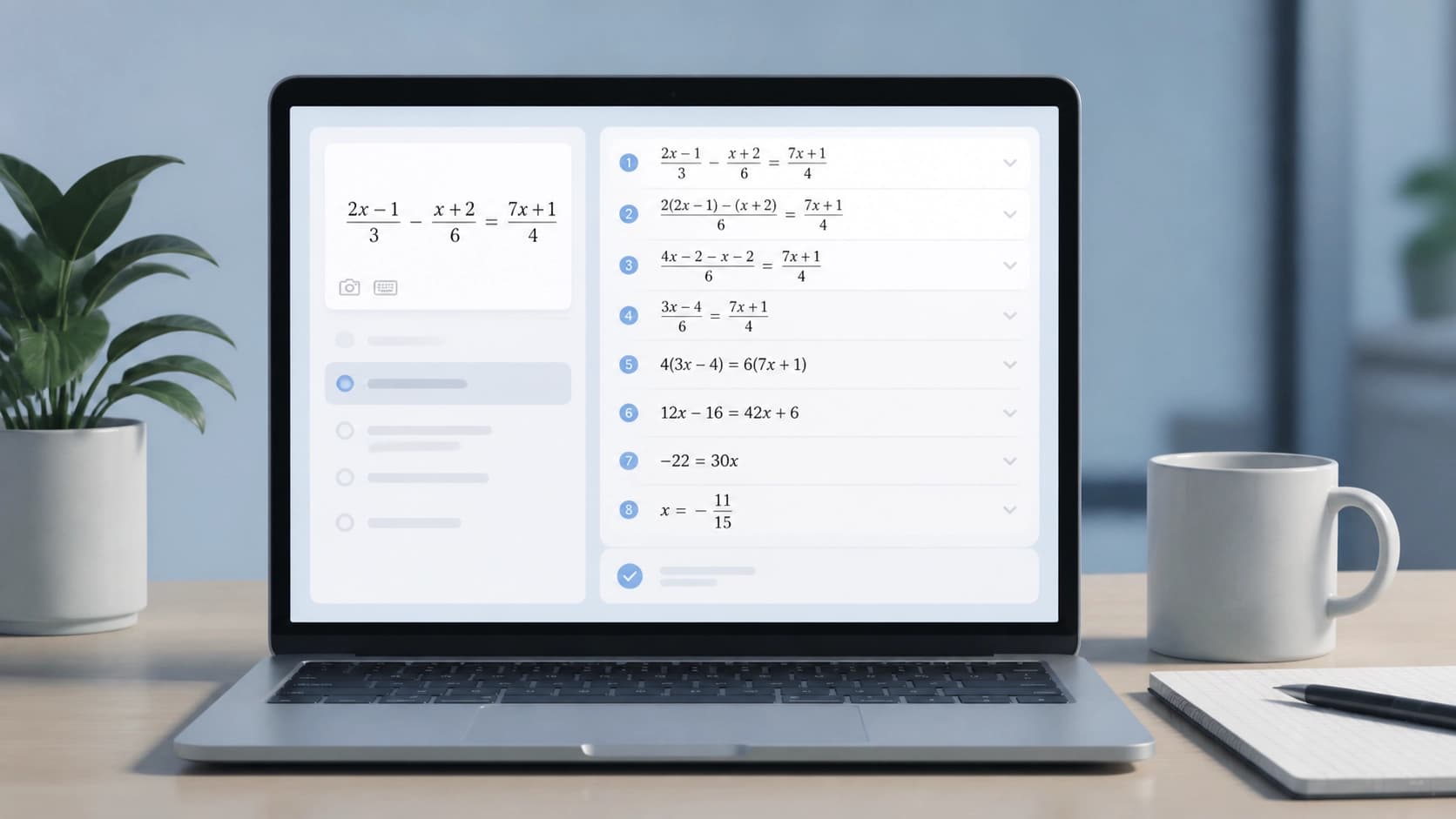
Thanks to step-by-step explanations, the service acts as a personal tutor: you don't just copy the answer — you can follow the logic of every transformation. This helps you grasp the method rather than memorize a ready-made solution. In addition, MathGPT can explain complex concepts in simple terms, which is especially valuable when learning new topics.
Quick start: how to solve your first problem
For one-off help, you don't need an account — no need to visit the site and register. Just open the MathGPT homepage, upload the problem, and hit the run button. This makes the service extremely accessible: you can get the answer you need in seconds.
Uploading an image or entering text
The fastest way to submit a problem is to drag a photo of the condition into the designated area or use the file selection button. For error-free recognition, the photo should be sharp and well-lit. It's best to avoid glare, dark areas, and stray objects in the frame — all of these can confuse the algorithm. Extra markings on the photo can also sometimes interfere with recognition. In such cases, take a new picture or enter the condition manually using the text input field.

You can use the service on any device with a browser: desktop computer, laptop, tablet, or smartphone. The key is a stable internet connection, since problem processing happens in the cloud.
How to check the solution after recognition
Before clicking the "Solve" button, review how the system interpreted the problem. Recognition errors do happen, especially with handwritten work or non-standard symbols. If the service understood the problem incorrectly, edit the image or upload a better-quality photo. Only after you've confirmed the problem is correct should you run the solution — that way you'll get exactly the result you expected.
Registration and account setup
While quick access works without an account, it's worth registering for regular use. Creating an account unlocks additional tools and lets you save your request history. To register, open the official MathGPT website and find the "Sign Up" button — it's usually located in the top-right corner of the page.
In the form that opens, you'll need to enter your name, a valid email address, and create a password. Before completing registration, you'll need to agree to the terms of use and privacy policy — this is standard procedure for most online services. After creating your account, you can return to your list of problems at any time and use certain features that aren't available to anonymous visitors.
Further profile setup usually involves specifying your goals: you can indicate how you plan to use the service — as a school student, university student, or teacher. This lets the system tailor the complexity of explanations and suggest more suitable practice problems. While such settings aren't always mandatory, filling them in improves how effectively you work with the service.
Additional features and use cases
MathGPT isn't limited to simply solving examples. The service includes several tools that make learning and exam preparation more flexible. For example, the video explanation generation feature creates short clips breaking down a problem — convenient for reviewing multiple times until the material sticks. Graph plotting helps visualize functions and see how an expression behaves across different parts of the coordinate plane. This is indispensable when studying trigonometry, calculus, or derivatives.
In addition, MathGPT can generate practice problems on a given topic. This is especially useful when preparing for tests and exams: you can work through similar examples endlessly until they become second nature. The service also explains complex mathematical ideas in simple terms, lowering the barrier to entry for beginners.
There are countless ways to use it. School students can photograph homework and compare their solutions against the model reasoning. University students can use the problem generator to sharpen their skills before exams. Teachers can quickly put together exercise sets for lessons and demonstrate graph plotting right in class. The visual presentation and step-by-step commentary make MathGPT a convenient tool both for independent math study and for collaborative work between a teacher and a group.

This variety of scenarios turns the service from a simple solver into a full-fledged educational platform. Math stops feeling like a set of abstract rules: you see practical examples, clear graphs, and the logical connections between individual stages of a solution.
Summary
MathGPT is a well-designed tool for working with math at any level of difficulty. It instantly recognizes problem conditions from photos, provides detailed step-by-step solutions, plots graphs, and helps you prepare for exams. It's also worth noting how easy it is to get started: with no registration required for quick access, the service works both for one-off help and for regular use. Thanks to its broad topic coverage and clear explanations, MathGPT is useful for school students, university students, parents, and teachers who want to make the process of learning math more understandable and effective.
Frequently asked questions
Related materials
All materials
Hybrid Image Annotation: Automation Accelerates Computer Vision Model Training
The article describes how pre-labeling with algorithms reduces manual work and improves the cleanliness of training datasets, as well as why selective human verification remains essential. It covers the method’s limitations in challenging shooting conditions and with rare object types.
5 November 2026
GoldiMask Method for Fine-Tuning Diffusion Language Models: Context Selection and Target Weighting
This paper presents GoldiMask, a supervised fine-tuning approach for discrete diffusion language models that selects visible tokens via approximate maximization of a submodular function and assigns weights to remaining targets based on their training utility. Experiments across several models and datasets demonstrate improved average accuracy, gains on reasoning and coding tasks, and fewer parallel decoding iterations on GSM8K and MATH-500 at comparable quality.
30 October 2026
Transformers adds support for running quantized GGUF models on Apple Silicon
The article describes integrating the GGUF format from llama.cpp into Transformers: local inference on Mac, loading models via the library API, and running an OpenAI-compatible server. Using Qwen3.5-4B as an example, it shows how the choice of quantization level affects weight size and memory requirements.
18 October 2026