

Runway
AI-powered platform for video generation and editing.
Overview
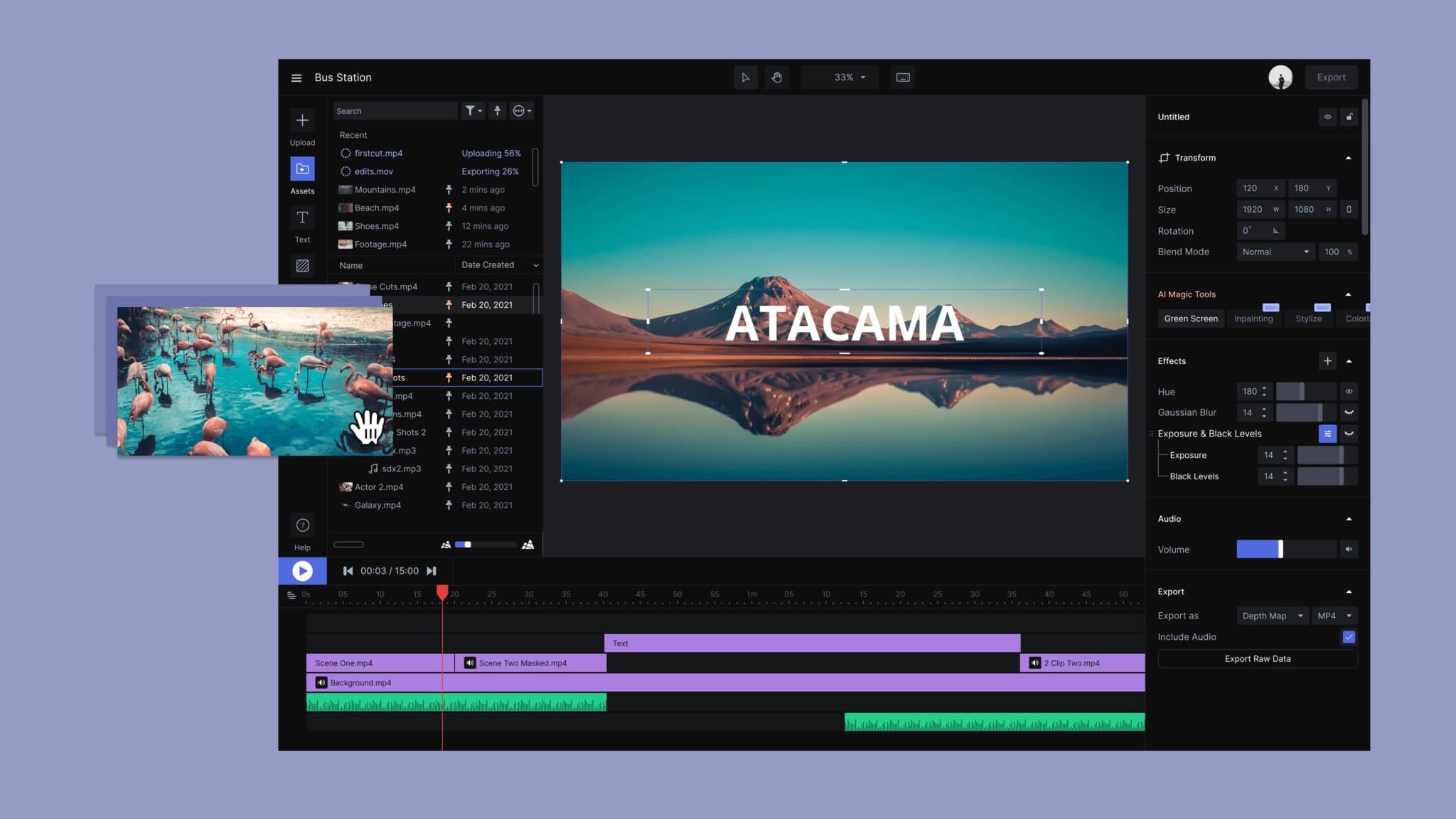
Runway is a multifunctional platform for creating and editing videos using artificial intelligence. The service combines more than 30 different AI tools that allow you to generate videos from text descriptions, animate static images, edit ready-made scenes, and work with 3D models. It's not just a content generator, but a full-fledged ecosystem that covers almost the entire video production cycle — from idea to final editing.
The platform is based on advanced models, including Gen-3 Alpha, which uses visual transformer architecture and diffusion models. This makes it possible to achieve high realism, physically correct behavior of objects, and stability of visual style throughout the entire video. Runway is actively used both in the film and advertising industries and in small creative projects, providing tools that previously required complex software and deep technical knowledge.
The platform is aimed at a wide range of users — from beginners to professional studios. It allows you to create videos up to 60 seconds long in 4K resolution, and built-in editing tools make it possible to refine generated scenes without using classic video editors.
Runway Features
| Feature | Value |
|---|---|
| Type | Neural network, platform for video generation and editing |
| Purpose | Creating and editing videos, images, 3D models |
| Categories | Video generation, image generation, 3D models and objects, animation, editing |
| Number of AI tools | More than 30 |
| Developer | Runway AI, Inc. |
| Distribution model | Freemium (free tier with limitations, paid subscriptions) |
| Interface language | English |
| Query language | English and other languages |
| Registration | Required (via Google, Apple ID, or email) |
| Platforms | Website (runwayml.com) |
| Maximum resolution | 4K |
| Maximum video length | Up to 60 seconds |
| Monthly visits | ~198 million |
Who is Runway suitable for?
Professional content creators
Runway is aimed at directors, animators, videomakers, and creative teams that work with video, advertising, and branded content. The platform is suitable for producing videos for social media, creating promo materials, and even micro-cinema. Major studios, including Netflix, Amazon, and Disney, are already integrating Runway tools into their post-production processes.
Designers and artists
For designers and artists, Runway provides extensive opportunities for visual experimentation: generating images and videos from text descriptions, creating 3D scenes, stylizing and transforming ready-made materials. The platform allows you to quickly create concepts, storyboards, and art objects without the need for complex specialized software.
Beginners in AI video
Despite its professional focus, Runway is also suitable for beginners. Basic functions — generating videos from text or images — are learned fairly quickly thanks to a simple and intuitive interface. However, fully unlocking the platform's potential requires time and practice.
How to use Runway?
Step-by-step instructions
To get started with Runway, you need to register on the platform's official website (runwayml.com) using a Google account, Apple ID, or email. After registration, the user enters a workspace where all tools are available.
- Select a model for generation, for example, Gen-3 Alpha.
- Click the "Get Started" button.
- Enter a text description (prompt) in English or upload an image.
- Configure parameters: aspect ratio, duration, style, filters.
- Start generation and wait for the result.
- If necessary, edit the video in the built-in video editor.
Operating modes
Runway supports several generation modes: text-to-video, image-to-video, stylization of ready-made videos (video-to-video), and working with keyframes. Depending on the task, the user selects the desired tool from more than 30 available.
Key Runway Features
Video and image generation
The platform allows you to create videos from text descriptions or static images. Built-in models provide realistic physics, correct lighting, and motion consistency. Image generation and 3D model creation are also available.
Video editing and processing
Runway provides a set of tools for working with ready-made videos: background removal without chroma key, automatic color correction, retouching, stabilization, and slow motion. The built-in video editor allows frame-by-frame editing. More advanced features are available for professional users — changing camera angles, adding and removing objects, and transforming scenes.
Specialized AI tools
The platform includes lip sync, storyboard creation, 3D modeling, and physical process simulation features. Pro and Enterprise users can train their own AI models to achieve unique results.
Advantages of Runway
High quality and realism
Runway is considered one of the leaders in video generation thanks to the high quality of results, realistic physics, and stability of visual style. Many users consider Gen-3 the best text-to-video model, surpassing competitors in detail and cinematic quality.
Versatility
Unlike many AI services that focus only on generation, Runway combines video creation, editing, and post-production in one platform. This saves time and eliminates the need to use multiple programs simultaneously.
Multilingual prompt support
Although the interface is in English, prompts can be entered in other languages. However, for more accurate results, it is recommended to use English, as other languages may be analyzed with semantic errors.
Disadvantages of Runway
Accessibility limitations
The service interface is available only in English, which can be a barrier for some users. In addition, the platform does not have a separate application — work is done through the website.
Technical and resource limitations
Runway is resource-intensive: a modern computer and a stable internet connection are required for stable operation. Delays may occur when the service is under load. Generation does not always produce a stable result — sometimes videos need to be regenerated or refined manually.
Financial limitations
The free tier provides a limited number of credits (105 credits are enough for approximately 25 images and 105 seconds of video), which run out quickly with active use. Some models, such as Gen-3 Alpha, are available only with a paid subscription without a free trial period.
What tasks does Runway solve?
Creating content without filming
Runway allows you to quickly generate videos for advertising, presentations, social media, and branded content without the need for filming. The user can describe a scene with text or upload an image, and the neural network will create ready-made video material.
Editing and post-production
The platform covers post-production tasks: background removal, object replacement, lighting changes, color correction, and stabilization. The ability to extend scenes and create alternative camera angles makes Runway a useful tool for professional editing.
Prototyping and visualization
Runway is suitable for rapid scene prototyping, creating storyboards, and concept videos. The platform is also used for product visualization, creating virtual showrooms, and presentation materials.
Runway Pricing
Runway operates on a freemium model. The basic Free tier provides 105 credits, enough for approximately 25 images and 105 seconds of video. Videos created on the free tier contain watermarks.
Paid plans start at $12–15 per month. The Standard subscription (from $15/month) includes more generations and access to additional tools. The Pro plan (from $35/month) offers expanded limits, higher quality, and priority access to the service. Individual Enterprise plans with the ability to train custom AI models are available for large companies.
Some models, such as Gen-3 Alpha, are available exclusively with a paid subscription without a free trial period. The minimum cost of use is $12 per month.
Terms of Use for Runway
Registration via a Google account, Apple ID, or email is mandatory to use the platform. The service works online, so a stable internet connection is required. The system is based on limits (credits) that are spent on content generation.
It is recommended to write prompts in English — other languages may be analyzed with semantic errors. The platform is available only through the official website; no separate application is provided.
Runway is suitable for commercial use — the platform is actively used in marketing, production, and social media content creation.
Runway Availability
Runway operates as an online service and is available through the website runwayml.com. The platform does not have a desktop application or mobile version — all work is done in the browser. With a poor internet connection or high service load, generation delays are possible.
Work with the service is possible on any modern computer with internet access, but for comfortable use, sufficiently powerful hardware is recommended, since video processing is performed on remote servers.
How Runway Differs from Alternatives
Unlike Sora and Kling, which focus primarily on video generation as a separate function, Runway is a full-fledged platform where AI generation is just one of the components. The service offers significantly more control and editing tools, making it a universal solution for the full video workflow.
The main advantage over Pika Labs and Kaiber is the higher quality of generated videos and the ability to fine-tune scenes. Runway outperforms competitors in speed and detail of results. Compared to Synthesia, which is limited to avatars, Runway works with any video and supports a wide range of visual styles — from photorealism to art animation.
The key difference from Luma is the lack of a free trial period for using the Gen-3 model, but with higher generation quality. Many users consider Gen-3 the best text-to-video model, setting a new standard in the industry.
Conclusion
Runway is one of the most versatile and powerful platforms for creating and editing videos using artificial intelligence. The service combines generation, editing, processing, and visual effects, covering almost all tasks related to video production. The platform is suitable for both professional studios and directors, as well as beginners looking to master AI video. Despite some limitations — the English-language interface and resource requirements — Runway remains one of the leading tools in its category, offering high-quality results and extensive opportunities for creative and commercial projects.
Pricing
Frequently asked questions
See also


AI agent for e-commerce that creates marketing materials and analytics from a single product photo.

AI tool for automatically creating infographics from text content.


Trending video, post, and ad creative generator based on ideas, images, and text prompts.


AI-powered platform for generating and editing images and videos.

Service for animating photos and creating videos with digital avatars using artificial intelligence.


Service for turning static images into videos with singing and lip-syncing using AI.

Automatically cuts long videos into short vertical clips for social platforms.

A web tool that automatically generates graphics for web pages, social media, and blogs from a site's URL.