

Fuser
A platform aggregator with a nodal interface for working with hundreds of AI models for generating images, videos, audio, 3D, and text.
Overview
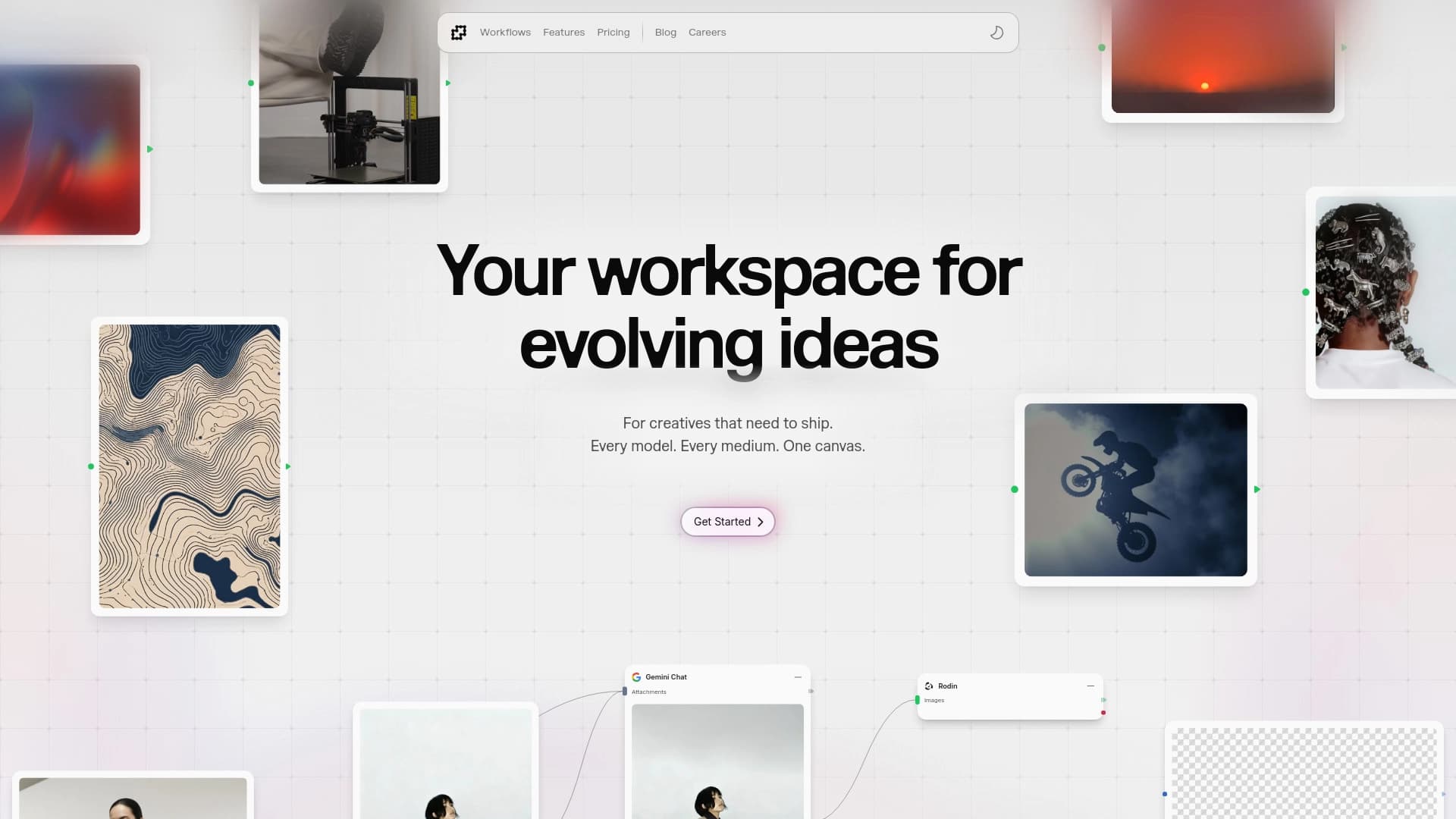
Fuser is an aggregator platform that brings together more than 250 image, video, audio, and 3D generation models, as well as over 300 language models, on a single "canvas." Instead of switching between dozens of separate services and figuring out each provider's API, users get a unified working environment.
Fuser's key feature is its node-based interface. Work is organized like a builder: you create workflows by connecting individual block-nodes into a logical chain. For example, you can sequentially generate an image, pass it through an upscaler, add a text annotation, and animate the result — all within a single visual process.
The platform integrates tools from OpenAI, Runway, Stability, Kling, Luma, Anthropic, and dozens of other providers. The Fuser team independently tests new models and adds the best ones, saving users from having to monitor the AI tool market.
Fuser Characteristics
| Characteristic | Value |
|---|---|
| Platform type | AI tool aggregator with a node-based interface |
| Number of generation models | 250+ (images, video, audio, 3D) |
| Number of language models | 300+ |
| Key providers | OpenAI, Runway, Stability, Kling, Luma, Anthropic, and others |
| Interface | Visual workflow builder (nodes) |
| Programming required | No |
| Workflow templates | Yes, for common tasks |
| Distribution model | Freemium |
| Payment system | Credits for generations, no mandatory subscription |
| Additional paid options | File storage |
Who is Fuser for?
Designers and creative professionals
Fuser is useful for those who regularly work with generative models and need flexible pipeline configuration. The ability to combine image generation, animation, and refinement in one interface saves significant time.
Users without a technical background
Not needing to write code is a key advantage for marketers, content creators, entrepreneurs, and anyone who wants to automate routine tasks without diving into the technical details of APIs and data formats.
Professionals handling large volumes of tasks
Analysts, researchers, and product managers who need to quickly switch between different models to compare results or build multi-step experiments. Ready-made templates help standardize routine processes.
How to use Fuser?
Building workflows with nodes
First, you create a new project and land on the canvas. Then you add block-nodes, each corresponding to a specific operation: generation, processing, analysis, output. By connecting nodes with lines, you define the sequence of actions.
Choosing models and combining them
For each block, you select a specific model from the available list. Since all providers are integrated into the platform, you don't need to understand their individual APIs. You can freely mix tools from different developers in a single pipeline.
Using templates
Ready-made workflow templates are available for common tasks. You can use a template as a starting point and modify it to suit your needs: change models, add or remove nodes, adjust parameters. This is faster and easier than building a chain from scratch every time.
Key Fuser Features
Unified canvas for multimodal tasks
Tools for working with images, video, audio, 3D, and text are combined in one visual space. Users don't switch between windows or convert files manually.
Visual node-based builder
An intuitive block-connection system lets you build complex sequences of operations. The process feels more like assembling a diagram than writing code, which lowers the entry barrier.
Catalog of vetted models
The Fuser team independently selects and adds the best new models. Users don't need to track releases or search for reviews themselves — the platform acts as a curator.
Flexible payment system and templates
There's no hard subscription requirement: you pay for actual generation usage and, optionally, for storage. Workflow templates reduce the time needed to launch common tasks.
Fuser Advantages
Time savings and no coding required
The main benefit is having dozens of services concentrated in one place. You don't need to spend hours learning each provider's API or writing integrations. All work is done through a visual interface.
Up-to-date tools
Since the Fuser team tests and adds new models themselves, users always have access to modern, proven solutions. This eliminates the risk of using outdated tools.
Flexibility and scalability
The node-based approach allows you to create everything from simple single-step generations to complex pipelines. The ability to customize templates and combine models from different providers offers plenty of room for experimentation.
Fuser Disadvantages
Information about clear disadvantages of the platform is not available in the source data. It can be assumed that users with very specific needs might miss a particular specialized model, and credit-based payment with intensive use may require more careful budget planning. However, these claims are not supported by factual data from the sources.
What problems does Fuser solve?
Multi-step pipelines
The platform solves the problem of automating complex scenarios: for example, when you need not just to generate an image, but to process it, add elements, and animate it. In Fuser, this is built as a visual chain without a single line of code.
Model comparison and selection
With access to hundreds of models in one place, users can quickly compare results from different providers for the same task and choose the best option.
Working with heterogeneous content
Tasks that require using different data types (text + image + video or audio) are handled in a single workspace, simplifying logistics and process control.
Fuser Pricing
Exact figures and credit costs are not specified in the source data. It is known that the platform operates on a freemium model and does not require a mandatory subscription. Users purchase credits for generations and can additionally pay for storage for their files.
There is a choice of payment format: a one-time credit package, a recurring subscription, or an annual plan. Which option is more advantageous depends on usage intensity and individual needs.
Fuser Terms of Use
Detailed terms of use, including the user agreement, rights to generated content, and data processing rules, are not disclosed in the provided source materials. Obviously, as with most aggregator platforms, terms may vary depending on the model and provider used.
It is recommended to review the current terms directly on the platform's official website before starting commercial use.
Fuser Availability
The platform is a web service, which means access through a browser on a personal computer. Information about mobile apps, an offline version, or geographic availability restrictions is not present in the source data.
It can be assumed that, like most similar services, Fuser is designed to work in modern browsers from any internet-connected device.
How Fuser differs from alternatives
Model curation and relevance
The key difference is that the Fuser team selects and adds models themselves. Many aggregators provide users with a full "raw" list, shifting the responsibility of choice onto them. Here, the platform acts as a filter, keeping only vetted and best tools.
Breadth of multimodal coverage
Combining image, video, audio, 3D generation, and language model work is an uncommon combination. Many platforms specialize in just one area. Fuser, on the other hand, allows building cross-modal pipelines in a single interface.
No subscription lock-in
A flexible payment system based on actual usage differs from services that require mandatory monthly fees. The ability to buy one-time packages or choose an annual plan is an important advantage for users who work irregularly.
Conclusion
Fuser is a practical solution for those who want to use a wide range of AI tools without technical complexity or wasted time. The platform successfully solves the main problem of the modern user — service fragmentation — by offering a unified visual builder with vetted models from leading providers. The flexible payment system and ready-made templates make it convenient both for professionals building complex pipelines and for beginners who want to quickly get quality results.
Frequently asked questions
See also


Generative platform for creating realistic images and short videos from text or images with control over style and camera movement.

A presentation creation service that uses multiple AI agents for information gathering, design, and data analysis.

Online service for creating a realistic voice clone from a short audio recording and text-to-speech.


A platform for creating corporate chatbots based on your own documents without coding.


AI assistant for quickly creating and editing texts in various formats.


Online AI tool for creating deepfakes and editing images.


Chrome extension that helps manage tabs, history, and bookmarks with an AI assistant.
A platform for professional audio processing with AI features for track separation, mastering, and voice changing.