
Editee
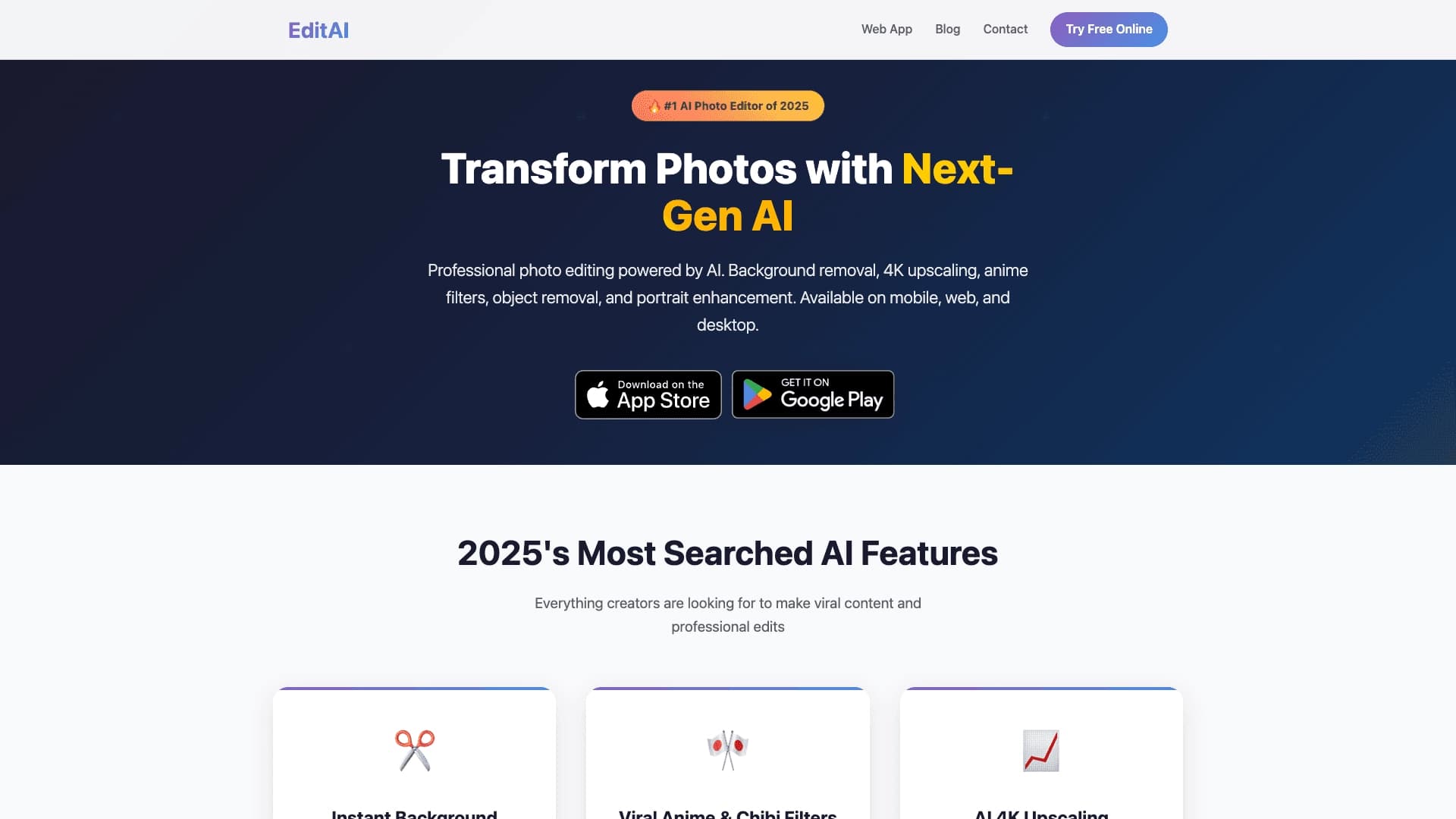
Browser-based AI photo editor for background removal, object cutout, and upscaling to 4K, with additional fun features.
Overview
Editee is a browser-based AI image editor that handles a wide range of photo processing tasks. The tool combines practical features such as background removal, object cutout, and resolution enhancement with creative capabilities like transforming photos into anime frames or creating Chibi characters. Since the service runs in the browser, users don't need to install heavy software on their devices.
Key Feature
Editee's main feature lies in combining utilitarian tools for retouching and enhancing photo quality with entertainment filters. This makes the service a versatile solution for those who need quick access to popular AI features without switching between different apps. For example, a user can simultaneously restore an old photo and generate a dance video from a portrait.
Target Audience
The service is aimed at a broad audience: from designers and SMM specialists to regular social media users. The simple interface and entertainment tools make Editee accessible to beginners, while professional features like 4K upscaling may appeal to those working with print or stock photography.
Editee Characteristics
| Characteristic | Value |
|---|---|
| Type | AI photo editor |
| Categories | Photo processing, Quality enhancement (upscaling) |
| Platforms | Browser, mobile devices, desktop |
| Website | editee.app |
| Free tier | Not specified |
Who is Editee suitable for?
For content creators
Bloggers, SMM managers, and content makers can use Editee for quick visual preparation: removing backgrounds from product photos, cleaning frames of unwanted objects, and upscaling images for social media posts. The feature of turning photos into anime frames or Chibi characters adds opportunities for creating unique entertainment content.
For designers and retouchers
Professionals working with images will appreciate the tools for upscaling to 4K with texture and detail restoration. This is especially useful when preparing materials for print or working with outdated, low-quality stock photos.
For regular users
People without professional photo editing skills can quickly improve their personal shots: retouch portraits, remove random passersby from the background, or restore old family photos. Entertainment features make it easy to create unusual images for memes or messenger avatars.
How to use Editee?
Step 1: Uploading an image
Since Editee runs in the browser, users simply need to open the service's website on a computer, tablet, or smartphone and upload the desired photo. No special app installation is required, which speeds up getting started.
Step 2: Choosing a tool
After uploading the image, users need to select one of the available features: background removal, object cutout, 4K upscaling, portrait enhancement (skin, lighting, sharpness), or entertainment filters. Each tool activates with a single click, and the processing is automated.
Step 3: Saving the result
Once processing is complete, the final image can be downloaded to the device immediately or used for further editing. The exact download process and list of formats are not specified in the source data.
Key Features of Editee
Background removal and object cutout
Users can remove the background from a photo with one click, as well as cut out individual objects or clean the frame of unwanted details. The algorithms adapt to object contours and lighting, allowing for natural results even on complex scenes.
4K upscaling
The resolution enhancement feature works not by simply stretching the image, but by restoring textures and fine details. This allows users to improve the quality of old photos or prepare images for large-format printing.
Portrait enhancement tools
For portrait shots, there are features for skin improvement, lighting adjustment, and sharpness enhancement. This helps quickly bring selfies or studio shots to a presentable state without using complex editors.
Entertainment AI effects
The service can turn photos into anime frames, create Chibi characters (stylized characters with oversized heads), and generate dance videos based on the source image. These features are aimed at creating viral content and entertainment.
Editee Advantages
- Natural results: The algorithms adapt to object contours and lighting conditions, minimizing artifacts during background removal or upscaling.
- Detail restoration: 4K upscaling doesn't stretch pixels but redraws textures and fine elements, maintaining image sharpness.
- Cross-platform: The tool runs in the browser on mobile devices and desktops, so there's no tie to a single computer or operating system.
Editee Disadvantages
An exhaustive list of disadvantages is not provided in the available sources. However, the lack of detail on the free tier and paid subscription pricing could be a hurdle for users who want to plan their budget in advance. Also, the policy on limits for the number of processed images remains unclear, which could be critical when working with large batches of photos.
What tasks does Editee solve?
- Quick photo editing: Background removal, cutting out unwanted objects, and cleaning frames of details that interfere with composition.
- Portrait enhancement: Skin retouching, lighting correction, and sharpness enhancement for creating high-quality shots.
- Resolution enhancement: Upscaling images to 4K for social media publishing and print preparation.
- Old photo restoration: Restoring textures and details on damaged or outdated photos.
- Creative content creation: Generating anime frames, Chibi characters, and dance videos for entertainment purposes.
Editee Pricing
The exact subscription costs and free tier terms are not disclosed in the source data. It is known that the service uses a freemium distribution model (free basic access with the option of paid upgrades). For up-to-date information on pricing, file processing limits, and available features on paid plans, it is recommended to visit the official website editee.app.
Editee Terms of Use
The available data does not include detailed information about the service's user agreement. Typically, such browser-based tools require account registration, consent to rules for processing uploaded files, and data storage conditions. It is recommended to carefully review the privacy policy and terms of use on the website before uploading images, especially when dealing with commercial materials.
Editee Availability
Editee runs in the browser and works on mobile devices and personal computers. This provides access to the service without installing additional software. The list of supported interface languages and the countries where the service is officially available are not specified in the source materials, so users should check the site's availability in their region before getting started.
How Editee differs from alternatives
Combining utilitarian and entertainment features
Most AI editors specialize either in professional retouching and upscaling or in creative effects. Editee combines both directions in a single browser: users can restore an old photo and immediately turn another shot into an anime frame without switching between services.
No device lock-in
Unlike many desktop programs, Editee works entirely in the browser. This is convenient for those who frequently switch between a work computer, tablet, and smartphone — processing history and tools remain equally accessible.
Approach to upscaling
Editee's resolution enhancement technology differs from simple scaling: the algorithms restore textures and fine details, which is especially valuable when working with low-quality sources. This allows the service to be used for preparing images for print, where detail matters.
Conclusion
Editee is a browser-based AI photo editor that combines practical tools (background removal, 4K upscaling, portrait enhancement) with entertainment filters like turning photos into anime frames or creating dance videos. The service targets a broad audience and works on any device through the browser. The main advantage is versatility and natural processing results; however, users should verify the pricing policy and free tier terms on the official website themselves.
Frequently asked questions
See also


Service for turning static images into videos with singing and lip-syncing using AI.


Online AI-powered service for quickly creating presentations based on a given topic or an uploaded document.


AI platform for user support in applications, including a chatbot and ticketing system.


Aimi is a service that automatically creates music and voiceovers for videos by analyzing the video footage.


Neural network for generating SEO-optimized articles and automating blog management.

AI assistant for automating retail tasks and optimizing call center operations.


BannsAi is an AI-powered service for quickly creating ad banners based on a text description or reference.
Music generator from text descriptions with style and mood customization, as well as export of individual tracks.