

AutoPPT
Online AI-powered service for quickly creating presentations based on a given topic or an uploaded document.
Overview
AutoPPT Neural Network Description
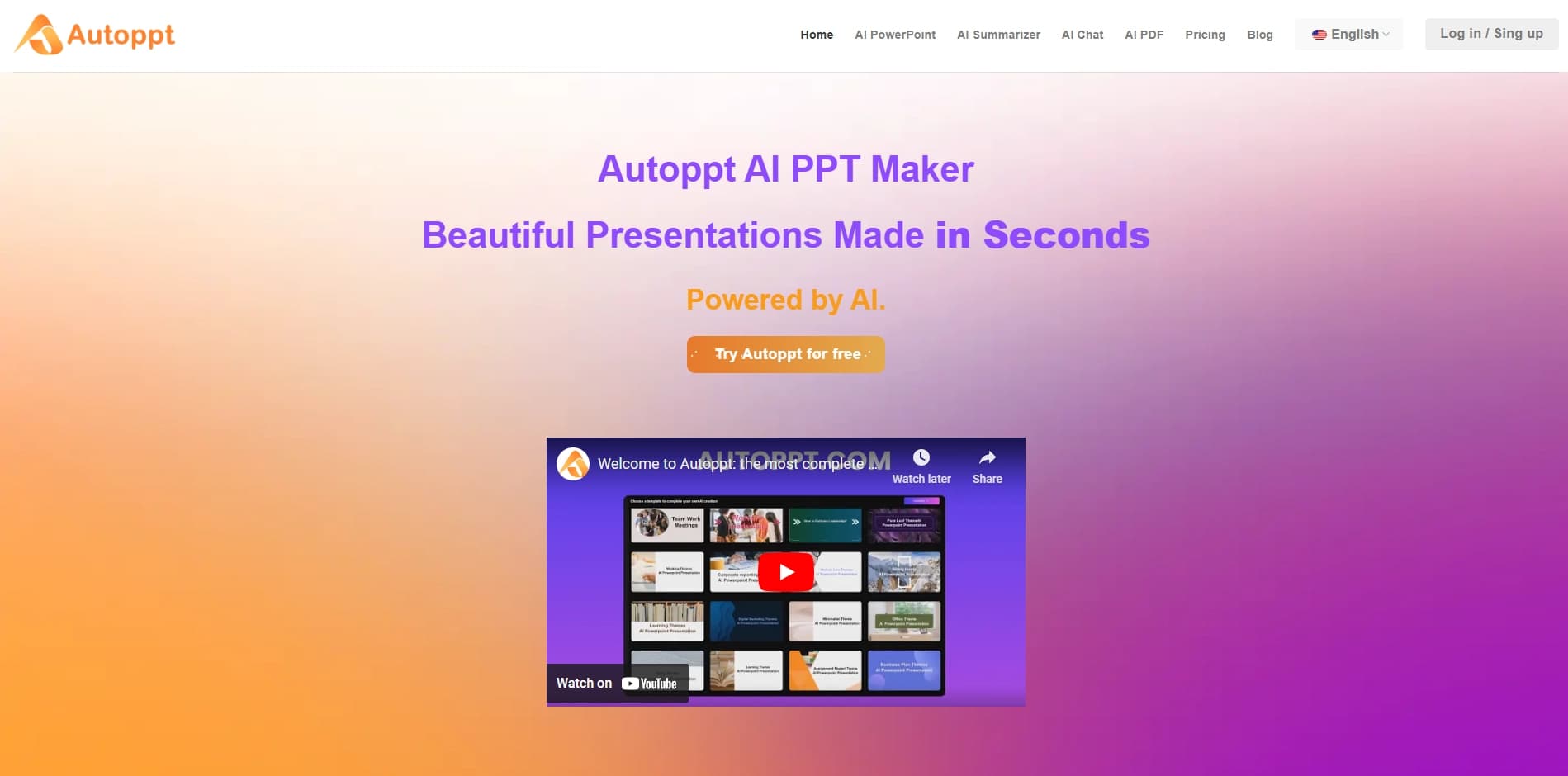
AutoPPT is an online service that helps you quickly create presentations using artificial intelligence. Instead of manually selecting the design, layout, and structure of slides, you can simply enter a topic or upload a ready-made document, and the neural network will assemble the material into a finished presentation.
The service works through a browser and offers several ways to input source data. You can use a text description of the topic, upload a file in one of the popular formats, or paste text directly. Based on this information, the AI generates structured slides that you can then edit and customize to suit your needs.
The finished presentation can be downloaded in PowerPoint format or shared with another person via a link — this makes the service a convenient tool for work and study when deadlines are tight and the result needs to look professional.
AutoPPT Features
| Feature | Value |
|---|---|
| Type | Neural network for creating presentations |
| Category | Presentation creation tools, productivity, PDF tools, mind map generators |
| Developer | Autoppt Inc. |
| Platform | Web service (website) |
| Supported languages | Over 100 languages |
| Input sources | Text, Word, PDF, Excel, PPT, JPG |
| Output format | PowerPoint (download), shareable link |
| Free plan available | Yes (basic presentation creation features) |
| Monthly visits | 39.9K |
| Catalog publication date | November 7, 2025 |
Who is AutoPPT suitable for?
For business users
AutoPPT will be useful for entrepreneurs, managers, and marketers who regularly need to prepare presentations for clients, partners, or internal meetings. The tool allows you to quickly put together a pitch deck or report without spending time on manual design. The service is also suitable for freelancers who need to deliver materials on time.
For students and educators
Students can use AutoPPT to prepare reports, term papers, and research projects, while educators can use it to create teaching materials and lectures. Uploading a Word or PDF document eliminates the need to manually copy text onto slides — the neural network does this automatically, breaking the content into logical blocks.
For quick tasks
The tool is designed for situations where a presentation needs to be created urgently. If you have 5–10 minutes and ready-made material in electronic form, or at least a clear topic, AutoPPT will help you put together visually neat slides without involving a designer.
How to use AutoPPT?
Step 1: Provide source data
The first step is to determine what the presentation will be based on. You can enter a key topic in the text field or upload an existing file. The service accepts Word, PDF, Excel, PPT documents, as well as JPG images. If the required material is already written, you can simply attach it to the service.
Step 2: Choose a design template
After processing the source data, the system will offer you a choice of available design templates. At this stage, you can estimate which design style best suits your task — business, academic, minimalist, or another one available in the service's library.
Step 3: Edit the slides
The generated presentation opens in the built-in editor. Here you can change the text on slides, adjust the color scheme, choose different layouts, and add tables and images. The editor does not require design skills — all changes are made through intuitive tools.
Step 4: Download or share the result
The final stage is exporting the finished work. You can download the presentation in PowerPoint format for offline use or get a link to send to colleagues, clients, or classmates. Publishing via link works directly from the browser, without additional setup.
Key AutoPPT Features
Slide generation from text or files
The service's core capability is automatically converting source material into structured slides. In just a few seconds, the neural network creates up to 30 slides, distributing content across sections and adding headings. This helps you quickly get a draft version of the presentation that can then be refined.
Multi-format document upload
AutoPPT accepts input texts in various formats: Word documents, Excel spreadsheets, PDF files, ready-made PPT presentations, and JPG images. The versatility of input data makes the service convenient for those whose source material already exists in some electronic form and does not require reformatting.
Template library and built-in editor
The service offers a wide selection of design templates that can be changed before and after slide generation. The built-in editor allows you to adjust text, colors, layouts, and add graphics and tables. This makes it possible to adapt the presentation to the requirements of a specific event or corporate style.
Export to PowerPoint and link sharing
The finished presentation can be saved in PowerPoint format — a standard format for work and academic presentations, compatible with most software. There is also the option to publish via a link, which simplifies file sharing without email attachments.
AutoPPT Advantages
Time savings
The main advantage of AutoPPT is the speed of presentation creation. A professional level of design is achieved in just 5 minutes, including uploading materials, choosing a template, and generating. Doing this manually usually takes significantly more time, especially if you don't have ready-made assets.
Ease of use and format accessibility
The service accepts many file types — Word, PDF, Excel, PPT, JPG — so you don't need to convert content into one specific format in advance. The interface and editor do not require design skills, and a large set of templates lets you customize the presentation's appearance in just a couple of clicks.
Multilingual support
AutoPPT supports more than 100 languages, making it a versatile tool for international teams, students learning foreign languages, and professionals preparing materials in multiple languages simultaneously.
AutoPPT Disadvantages
Template-based results
Since slides are created automatically based on templates, presentations may look generic, without unique design flair. If the task requires a special visual style or strong individuality, the result may seem too standard.
Content quality
When processing complex or highly specific source documents, the neural network may make errors in content. AI does not always correctly interpret professional terminology or complex data, so it is worth checking the accuracy of the generated text before using the presentation for important purposes.
Internet dependency
The service only works with a network connection. It is impossible to create or edit a presentation offline. This could be a limitation if you plan to work remotely in places without stable internet access.
What tasks does AutoPPT solve?
Quick creation of business presentations
The main use case is preparing business presentations: work reports, commercial proposals, pitch decks for investors, and product and service presentations. AutoPPT helps you put together structured materials when it's important to quickly package information into a persuasive or informative format.
Generating educational materials
For students and educators, the service is useful for preparing academic presentations, term papers, research reports, and educational materials for classes. Source materials can include study guides, research articles, essays, and lecture plans.
Converting documents into slides
Another practical task is converting existing text documents (Word, PDF) into a presentation. This eliminates the tedious manual work of transferring text to slides and restructuring the layout — the neural network handles the routine stages.
AutoPPT Pricing
New users are offered a free plan that includes basic presentation creation features. It is suitable for testing the service and solving simple one-off tasks.
The paid tier includes two main options:
- Starter plan — $10 per month. Includes expanded templates and additional editing tools.
- Professional plan — $32 per month. Provides an unlimited number of presentations and priority support.
The exact list of features for each plan, free version limits, and upgrade terms are not specified — it is best to check this information on the official service website, as it may change.
AutoPPT Terms of Use
Mandatory registration is not specified to start using the service — you can create your first presentation without creating an account. However, using paid plans will likely require registration. New users have access to a free trial period during which you can explore the service's capabilities and create several presentations without commitment.
It is important to note that AutoPPT is an online tool, and its operation fully depends on internet access. Without a network, the service cannot be used. No information about specific regional restrictions or VPN requirements is provided on the service page.
AutoPPT Availability
AutoPPT is a web service accessible through a website from any device with a browser and internet connection. The platform does not require installing additional software — all actions are performed in the browser window.
The service is localized into more than 100 languages, allowing it to be used in virtually any country without a language barrier. There is no data on regional restrictions in service availability. VPN requirements are not mentioned in official sources.
How AutoPPT differs from alternatives
AutoPPT stands out among other AI presentation generators due to several features. First, it offers broad support for input formats: the service accepts not only text but also Word, PDF, Excel, ready-made PPT files, and JPG images. Many competitors are limited to text input only or accept only text documents.
Second, the built-in editor, available immediately after generation, allows you to refine slides without switching between different services. This is more convenient than an approach where you have to download the result and edit it in a third-party program.
Third, the flexibility of generation — you can get up to 30 slides from a topic or file in seconds, and you can explore alternative options by changing templates before the final version. When it comes to alternatives such as Beautiful.ai, Gamma.app, or AiPPT, AutoPPT is easier to learn and faster to work with, although it may be less flexible in design. It is a "here and now" tool where speed and predictable results are the priority.
Conclusion
AutoPPT is a practical online tool that solves the main task: quickly assembling a presentation from text, a document, or a topic, saving hours of routine work. It is suitable for standard business and academic tasks where speed and structure matter more than unique creativity. The service makes sense to use when you need a working version of a presentation in minutes and then refine it in the built-in editor. Due to template-based results and possible errors when working with complex documents, the content should still be proofread before use. The product will be especially useful for students, business users, and anyone who regularly needs to prepare presentations under tight deadlines.
Frequently asked questions
See also

AI agent for assisting with programming and optimizing the development workflow.

AI-powered online platform for quickly creating text content, including blogs, articles, and social media posts.

AI-powered tool for generating character images and avatars.
Syft - neural network for creating personal News collections based on user interests.


AI platform for fast website creation and small business process management.

Platform for developing, monitoring, and evaluating AI applications based on large language models.
Browser extension and web service with AI assistant features: answering queries, summarizing videos and documents, and translating text.
AI tool that instantly provides answers to homework assignments.