

DesignCode UI
Design system for Figma with a component and template library for creating modern interfaces.
Overview
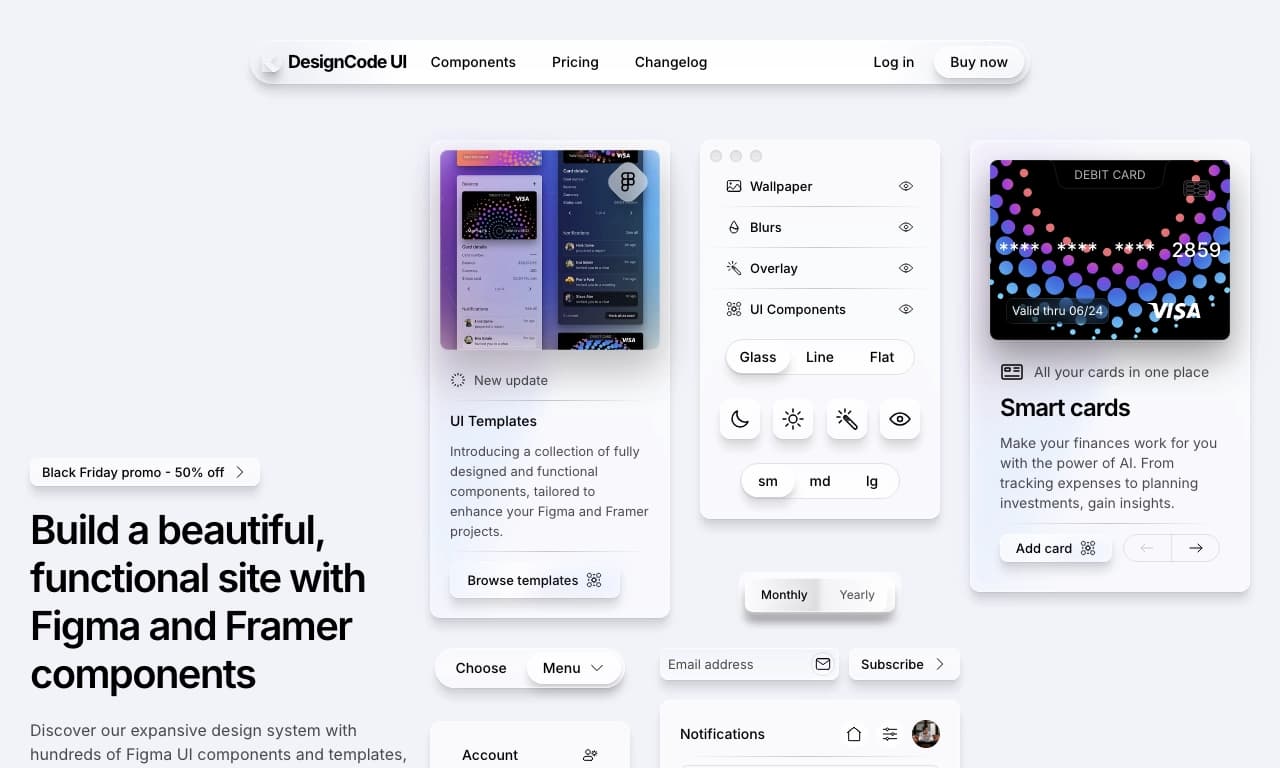
DesignCode UI is not a standalone neural network in the traditional sense, but rather a well-thought-out design system built on Figma. It is designed to speed up and simplify a designer's work on user interfaces. Instead of drawing every element from scratch, you get access to an extensive library of ready-made components and templates that can be adapted to specific tasks.
The tool is positioned as a comprehensive solution for modern web design challenges. It combines a rich library of elements with flexible customization options. Particular attention is paid to integration with Framer, which allows you to go beyond static layouts and easily transfer them into interactive prototypes for client presentations or user experience testing. Essentially, it is a bridge between static design and a living prototype.
What is it in simple terms?
Simply put, DesignCode UI is a large construction set made of ready-made parts. Imagine having a set of high-quality, modern buttons, forms, navigation bars, and cards that fit together perfectly. You don't need to reinvent the wheel every time — you take the element you need, place it in your layout, and adjust it to your needs. This allows you to focus on more important things: structure, logic, and the overall concept of the interface.
The key idea
The main goal of DesignCode UI is to free designers from routine work. The tool helps maintain design consistency across the entire project by using a unified system of variables and components. Thanks to this, all interface elements look cohesive, and the process of creating layouts becomes significantly faster and more efficient.
DesignCode UI Characteristics
| Characteristic | Value |
|---|---|
| Type | Design system |
| Platform | Figma |
| Category | Design, Web Design |
| Integration | Framer |
| Editorial Rating | 8.6 out of 10 |
| User Rating | 4.7/5 |
| Platform | Web |
Who is DesignCode UI for?
DesignCode UI is primarily created for practicing designers and web designers. The tool will be useful both for professionals working in large studios and for freelancers who want to speed up their workflow.
Interface Designers
For specialists who work in Figma daily, this set will be a real find. It allows you to create neat and modern layouts in minutes, eliminating the need to spend hours refining small details. Instead, the designer can focus on solving more complex compositional and user experience challenges.
Web Designers
For those involved in designing websites and landing pages, the tool offers convenient responsive layouts and templates. This is especially relevant when you need to quickly prepare design options for different types of devices without creating each layout from scratch or getting distracted by the technical nuances of adaptation.
How to use DesignCode UI?
Working with DesignCode UI is built on familiar Figma principles, which lowers the entry barrier for most specialists. The tool does not require learning a complex interface — it simply complements Figma's standard functionality with a library of ready-made solutions.
Step 1: Getting Started
To get started, you will need Figma. DesignCode UI is a set of libraries that connects to your Figma project via the "Community" feature or through a direct link. Once connected, all available components will appear in the "Assets" side panel.
Step 2: Using Components
The design creation process is very intuitive. You simply drag and drop components you like from the library onto your canvas. Each component can be customized: changing colors, sizes, texts, and other parameters using so-called "variables" and component properties, which are well organized in the interface.
Step 3: Transferring to Framer
Once the static layout is ready, it can be easily transferred to Framer to create an interactive prototype. Integration with this tool allows you to set up connections between screens and add animations, turning your design into a full-fledged prototype without writing code. This makes the process of presenting work and testing user experience as comfortable as possible.
Key Features of DesignCode UI
DesignCode UI stands out with its solid set of features aimed at optimizing the design process. All elements of the library are well thought out and interconnected, ensuring high quality and speed of work.
Extensive Library of Components and Templates
This is the foundation of the tool. You get access to hundreds of ready-made UI elements: from simple buttons and input fields to complex navigation systems and product cards. The availability of templates allows you to start work using the structure of typical pages, for example, for an online store or a landing page.
Well-Organized Variables
The library contains a well-designed grid of variables for colors, fonts, spacing, and other style parameters. This allows you to quickly change the appearance of an entire layout by changing values in just a few variables rather than editing each element manually. This approach ensures high design consistency.
Responsive Layouts and Framer Integration
Most ready-made components are designed to work correctly in responsive layouts. This means your interfaces will look equally good on both desktop and mobile devices. Tight integration with Framer expands the tool's capabilities, allowing you to quickly move from a static layout to an interactive prototype.
Advantages of DesignCode UI
The tool has a number of undeniable strengths that have been recognized by the professional community. They make DesignCode UI an attractive choice for many studios and individual specialists.
Professional Recognition
The quality of the tool is confirmed by a high editorial rating of 8.6 out of 10. This indicates that design experts highly value the composition of the library and its organization. A user rating of 4.7 out of 5 also confirms that the tool is convenient and reliable for practical use.
Saving Time and Effort
The main advantage users note is a significant acceleration of work. The ability to reuse ready-made, high-quality components frees you from routine tasks, allowing designers to focus on creative aspects. Projects are completed faster without losing quality.
Cohesion and Quality
The set is not a collection of disparate elements. It is a well-thought-out system with finely tuned variables and styles. Thanks to this, all layouts created on the basis of the library look professional, harmonious, and cohesive, which is an important criterion for working on commercial projects.
Disadvantages of DesignCode UI
Despite all the advantages, the service also has a significant drawback that could be decisive for a certain category of users.
Limited Availability
Currently, the service demonstrates its functionality only under certain conditions related to the user's geographic location. This creates additional inconvenience, as it requires setting up additional software for stable work with the library. For some, this could be an insurmountable barrier.
What tasks does DesignCode UI solve?
DesignCode UI is designed to solve a wide range of tasks related to design and the creation of digital products. The tool is aimed at achieving the main goal — creating a high-quality and modern interface with minimal time investment.
Accelerating the Design Process
Perhaps the main task the library solves is minimizing the time needed to create a layout. Instead of spending hours drawing standard elements, a designer can assemble a finished screen in minutes using DesignCode UI's ready-made components. This frees up time for creativity and iterations.
Creating Responsive Solutions
Developing interfaces that display correctly on any platform is a complex task. The library includes responsive layouts that help designers solve this problem. You no longer need to worry about how an element will behave on another screen — these aspects are already thought out and implemented.
Transferring Design to Prototype
Another feature that solves specific tasks is integration with Framer. It breaks down the wall between a static layout and an interactive prototype. Thanks to this, a designer can quickly hand off a layout for "animation" and significantly speed up the stage of presenting ideas to a client or development team.
DesignCode UI Pricing
Currently, precise and structured information about DesignCode UI pricing is not available in the open sources we analyzed. This may mean that the service's distribution model is not strictly defined.
It is likely that the cost may depend on the selected feature package or licensing terms, but specific figures and pricing plans are not advertised. For up-to-date pricing information, potential users are advised to contact official channels or project documentation.
DesignCode UI Terms of Use
Detailed terms of use for the service also remain not fully disclosed in the data available on source websites. We were unable to find information about what licenses are provided, whether there is a free plan, and if so, what restrictions it imposes.
With confidence, we can only speak about technical aspects: Figma is required to work, and access may require additional tools depending on the user's location. We recommend visiting the project's official website for information about the user agreement.
DesignCode UI Availability
The tool's availability is directly related to its platform. DesignCode UI is a solution for the web platform, making it cross-platform. You can work with it on any computer that has a browser and can run Figma.
However, there is one significant nuance affecting availability for users in certain regions. As mentioned earlier, the DesignCode UI website and services may not be directly accessible from some territories, and access may require a VPN connection. This is the main and perhaps the only limitation for designers in those regions.
How DesignCode UI differs from alternatives
There are many tools on the market for creating interfaces, and DesignCode UI has its own distinctive features that set it apart.
Deep Integration with Framer
Unlike many universal design systems, DesignCode UI places a strong emphasis on interaction with Framer. This integration is not merely formal. It is deeply developed and speeds up the prototyping process. For designers who use Framer in their work, this could be a decisive argument, as the transition from design to prototype becomes seamless and fast.
Quality and Thoughtfulness of the Library
While many alternatives simply offer a set of random elements, DesignCode UI is a cohesive system. A high user rating of 4.7/5 indicates that users value it for its quality. Well-organized variables and responsive layouts make the system almost a "turnkey solution" for product design, unlike rawer or less structured competitors.
Focus on Professionals
Many alternatives like Canva AI or RoomGPT are aimed more at quick amateur results or narrowly specialized tasks. DesignCode UI, however, is designed for professional daily designer work. It aims to become a reliable foundation for the workflow, saving the professional's time and effort, rather than just being a quick idea generator. This is a fundamental difference from many similar services.
Conclusion
DesignCode UI is a powerful and well-thought-out design system created to improve the efficiency of professional interface and web designers. Thanks to its extensive library of quality components, well-organized variables, and tight integration with Framer, it allows you to significantly speed up the creation of layouts and the transition to prototyping. The tool has received high ratings from both the editorial team and users, confirming its quality and usability. The only notable drawback is its limited availability in certain regions. Despite this, for product designers looking to establish a component-based approach to their work, DesignCode UI could be an excellent addition.
Frequently asked questions
See also

A neural network-powered cloud service for generating 3D models, textures, and animations from text descriptions or images.


Online AI tool for creating deepfakes and editing images.


Online neural network service that transforms ordinary photos into stylized artistic portraits and avatars.


Online service for creating anime images from a text description in seconds.

Cabina AI is a unified platform for working with various generative neural networks, enabling you to create texts, images, and videos.


Online editor for removing unwanted objects, text, and defects from photos using a neural network.

Service for creating personalized avatars and photo shoots using AI based on uploaded selfies.


Google's neural network for generating and editing images from text descriptions, based on Gemini models.