
Colorify.ai
AI-powered online service for automatic colorization of black-and-white photos.
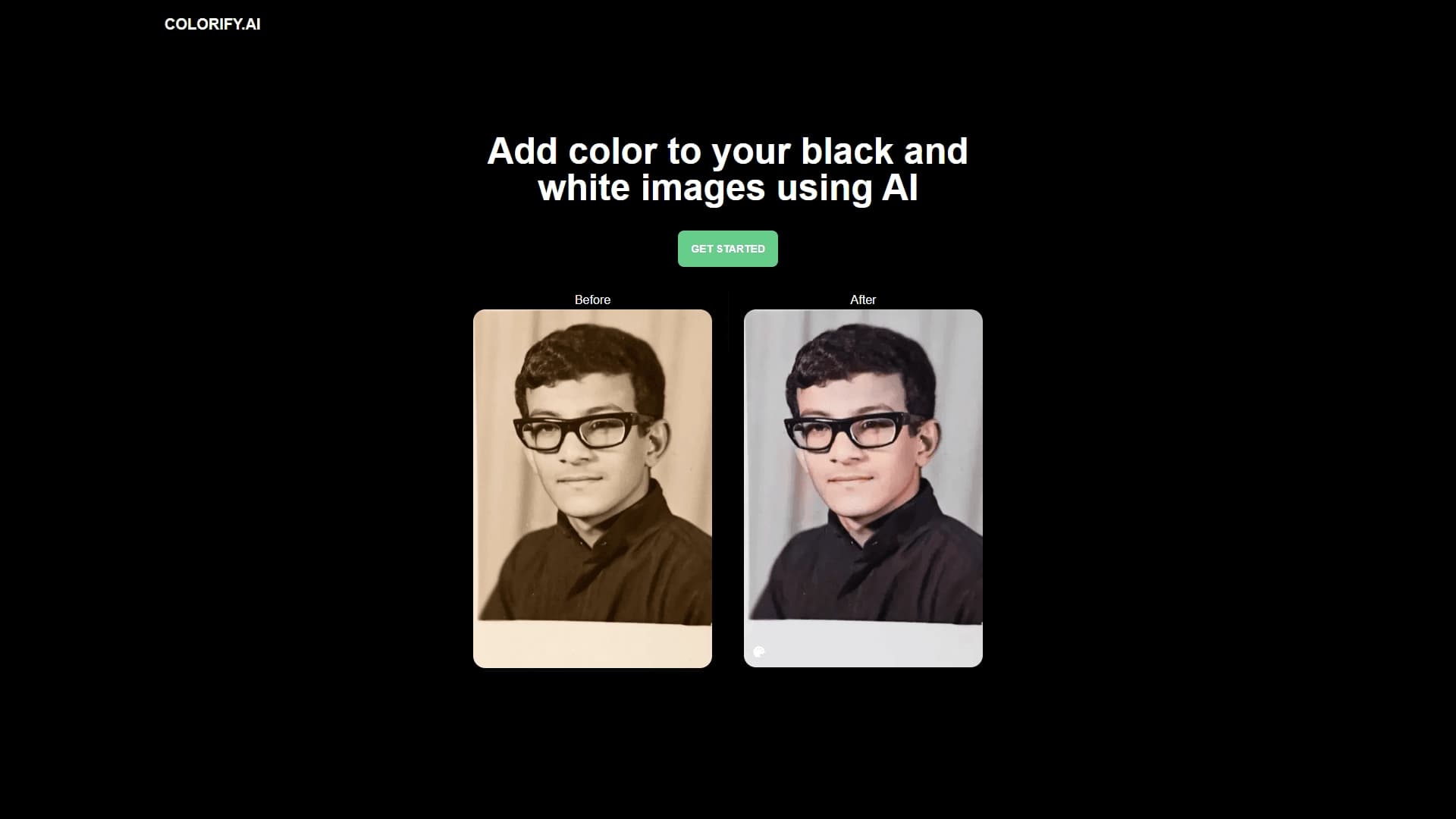
Overview
Colorify.ai is a web service that uses artificial intelligence algorithms to automatically turn black-and-white photos into color. The principle is simple: the user uploads a photo to the site, and the neural network analyzes the content of the frame, recognizes objects, people, landscapes, and selects natural shades for them. The entire process takes no more than a few seconds.
The technology is based on computer vision and machine learning models trained on thousands of image pairs. The service does not simply apply a monochrome filter — it "understands" that, for example, the sky is usually blue, grass is green, and human skin has various warm tones. This preserves the detail and atmosphere of the original frame while adding only color information.
The service was designed as a universal solution for "reviving" old photos. With no software installation required and a simple interface, it is accessible to anyone with a browser and internet access.
Colorify.ai Features
| Feature | Value |
|---|---|
| Type | Online service (web application) |
| Category | Photo restoration, photo editing |
| Primary function | Automatic AI-powered colorization of black-and-white photos |
| Website | www.colorify.ai |
| Ease of learning | Low, no retouching skills required |
| Processing speed | A few seconds |
| Target audience | General users, photographers, archivists, historians, content creators |
Who is Colorify.ai suitable for?
General users and families
First and foremost, the service is aimed at people who want to restore family photo archives. Old pictures of grandparents, wedding photos, or childhood portraits of parents take on new life. Colorization happens automatically, so the only thing that matters is selecting suitable frames.
Professional environments
Photographers can use Colorify.ai to speed up the preliminary processing of retro photos. Historians and archivists get a tool for quickly visualizing archival documents and photographic materials for exhibitions or publications. Content creators (bloggers, journalists, SMM managers) use the service to prepare themed collections and illustrations for articles.
How to use Colorify.ai?
The workflow follows the "upload and get results" principle and requires no special instructions. To colorize a photo, the user needs to take two simple steps:
- Upload an image: Open the site www.colorify.ai and upload a black-and-white photo from your device. The system accepts files in standard graphic formats.
- Get the finished file: The neural network automatically processes the image. Within a few seconds, a color version of the original appears on the screen. The details and composition of the original are preserved; only the color content changes.
For best results, it is recommended to use images with clear object outlines and sufficient resolution, although the service also handles amateur scans.
Key features of Colorify.ai
- Automatic colorization of black-and-white photos: The core and primary use case, requiring no manual area selection (masks) or brush settings.
- Object recognition: Computer vision algorithms identify people, nature, architecture, and everyday objects in photos to select correct shades (grass stays green rather than turning blue).
- High processing speed: Getting the final result takes minimal time — from a few seconds to a couple of minutes, depending on image complexity and server load.
Advantages of Colorify.ai
Accessible to beginners
The main advantage is the lack of an entry barrier. You don't need to know how to use Photoshop, GIMP, or other graphic editors, and no knowledge of color theory or retouching is required. The interface is intuitive.
Versatility
The tool suits various tasks, from restoring old family albums to professionally preparing materials for media publications or presentations. The service is useful for "reviving" historical footage and private archives.
Time savings
Manual colorization can take hours or even days of painstaking work. Automating the process delivers an acceptable result in seconds, which is especially important when working with large batches of photos (e.g., for an exhibition).
Drawbacks of Colorify.ai
Currently, public data about the service does not include information on technical limitations, such as possible caps on the number of uploaded files or restrictions on image size/resolution. There is also no detailed information on fine-tuning the result — users likely cannot manually adjust shades after processing and simply accept what the neural network produces. As with any automated tool, colorization quality may vary depending on the source photo.
What tasks does Colorify.ai solve?
Restoring and "reviving" old archives
The service adds color to historical frames, making them perceived differently by modern viewers — closer and more emotional. This makes it a valuable tool for family projects, creating family history books, and designing display stands.
Content preparation
For photographers and designers, the service solves the task of quickly creating color versions of black-and-white originals for a specific client request from a publication or brand. This speeds up pre-sale preparation and simplifies idea presentation.
Colorify.ai Pricing
Information about the cost of using the service (free tiers, subscription, per-image processing fees) is not available in the public sources this article is based on. Exact pricing and available plans should be checked directly on the developer's official website.
Colorify.ai Terms of Use
General terms of service were not described in the source data. The data processing policy, rules for commercial use of colorized images (whether license restrictions apply to the resulting content), and storage conditions for uploaded files are unknown. Before commercial use, it is recommended to review the public offer and privacy policy on the website.
Colorify.ai Availability
Colorify.ai is an online service that works through a browser. No software installation on a computer or mobile device is required. Users only need a stable internet connection from any device (PC, laptop, tablet, or smartphone) — as mentioned, it is a fully web-based platform.
How Colorify.ai differs from alternatives
The key difference lies in full automation. Unlike complex programs like Adobe Photoshop, where colorization requires manual layer selection and color matching, Colorify.ai acts as a black box: the user gets a finished result on the "upload-and-get" principle. The service focuses on simplicity and speed, sacrificing detailed manual control in favor of convenience.
This makes it an optimal solution for mass use, where the priority is not perfect artistic fidelity but the quick, high-quality "revival" of historical photos without the need to learn professional software.
Conclusion
Colorify.ai is a simple and effective online tool for automatic colorization of black-and-white photos. The service targets a broad audience, from households restoring family archives to professionals in photography and history. Thanks to neural networks and computer vision, it quickly selects realistic shades without requiring special skills from the user. It is a practical solution for "reviving" static historical frames and giving them a modern feel.
Frequently asked questions
See also

AI tool for product image processing and generating professional photos with virtual models.


Online neural network service that transforms ordinary photos into stylized artistic portraits and avatars.

Cloud platform for creating videos using AI avatars, synthesized speech, and automatic translation of clips into dozens of languages.

A platform for generating images, videos, and audio using artificial intelligence from text descriptions.
AI tool for automatically removing backgrounds from images right in the browser.

Online tool for swapping faces in photos, videos, and GIFs without registration or watermarks.


An online service that recognizes text on manga and manhwa pages, translates it into different languages, and embeds it back into the image without damaging the original artwork.
Online service powered by neural networks for automatic restoration of old and damaged photos.