
Code to Flowchart
An online service that uses AI to turn source code into clear flowcharts and other diagrams.
Overview
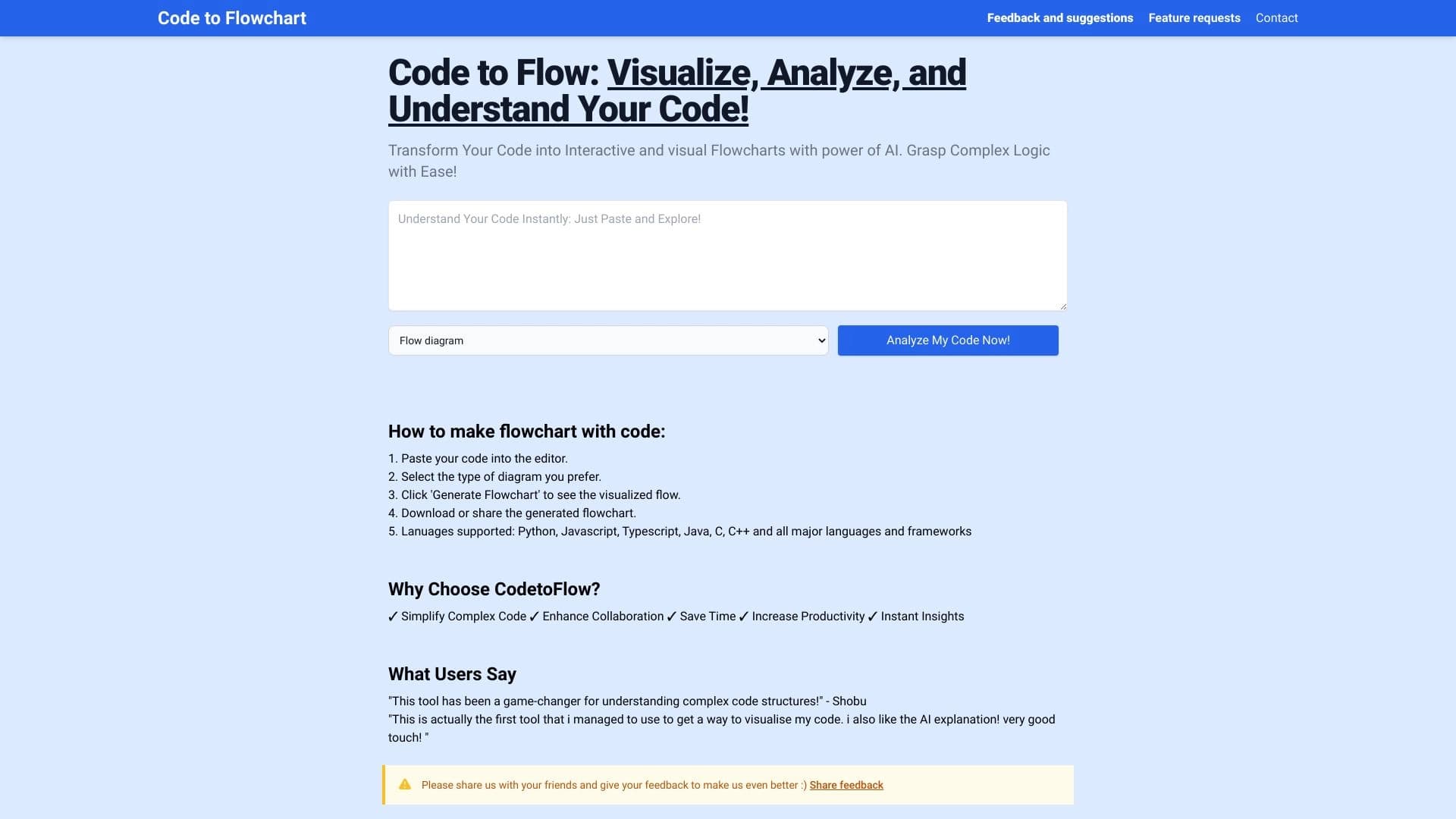
Code to Flowchart is an AI-powered online service that automatically converts source code into clear flowcharts and other types of diagrams. Instead of manually analyzing a program's logic line by line, a developer can paste code or upload a file — and get a visual representation of the algorithm in seconds.
In addition to classic flowcharts, the service can build sequence diagrams, class diagrams, and visualize user scenarios. This makes the tool a versatile assistant for working with a codebase: from quickly analyzing someone else's code to creating full technical documentation.
How the service works
The principle is quite simple: the user uploads source code, the AI algorithm analyzes its structure, identifies functions, conditions, loops, and branches, and then builds an interactive diagram that can be used to trace the program's execution flow. The diagrams are not static images but interactive elements that can be worked with.
Key value
The main value of Code to Flowchart is time savings. What might take a developer several hours of manual analysis and diagramming, the service does in minutes. The result remains accurate and structured, as the AI does not miss important logical connections and accounts for all possible execution paths.
Code to Flowchart characteristics
| Characteristic | Value |
|---|---|
| Type | AI-powered online service |
| Categories | Diagrams and schematics, Code explanation and analysis |
| Website | codetoflow.com |
| Publication date on site | December 31, 2025 |
| Programming languages | Support for major programming languages |
| Diagram types | Flowcharts, sequence diagrams, class diagrams, user scenarios |
| Code input method | Pasting a code snippet or uploading a file |
| Availability | Online service, available at codetoflow.com |
Who is Code to Flowchart suitable for?
Programmers and developers
The service helps developers quickly understand unfamiliar code — whether it's a legacy project, a colleague's code, or an open-source library. Instead of reading through source code for a long time, you can generate a visual diagram and immediately see the structure and logic of the program. This is especially useful for code reviews and preparing for refactoring.
Architects and team leads
For architects and technical leaders, Code to Flowchart is a tool for analyzing project architecture and communicating with the team. Visual diagrams help explain complex technical concepts, discuss changes, and make decisions based on a clear picture of what's happening in the code.
Educators and students
In education, the service is indispensable: teachers can use generated diagrams to explain algorithms and data structures, while students can use them to self-check their understanding of code. Visualization lowers the barrier to entry into programming, making abstract concepts more tangible.
Anyone who needs to explain code
If your task is to explain how a program works to someone without deep technical knowledge (a client, manager, or new team member), Code to Flowchart will be a great help. A clear flowchart is often easier to understand than hundreds of lines of code.
How to use Code to Flowchart
Step 1: Prepare the code
Start by preparing your source code. You can copy a code snippet and paste it into the appropriate field on codetoflow.com, or upload a code file directly. The service supports major programming languages, so you can work with most popular languages without prior conversion.
Step 2: Generate the diagram
Once the code is uploaded, start the generation process. The AI algorithm automatically analyzes the code structure, identifies functions, classes, conditions, loops, and branches, and then builds a clear diagram. No manual configuration is needed for a basic result — everything happens automatically.
Step 3: Work with the result
Once the diagram is ready, you can interact with it: trace the program's execution flow, explore branches, and navigate to individual logic elements. Interactivity allows you to understand the algorithm more deeply, not just see a static image. If needed, the diagram can be used in documentation, presentations, or educational materials.
Key features of Code to Flowchart
Automatic code-to-flowchart conversion
The core of the service is an AI algorithm that automatically analyzes code and builds flowcharts. The user doesn't need to draw diagrams manually or configure elements — just upload the code, and the visualization is ready.
Support for major programming languages
The service works with most popular programming languages, making it a universal tool for developers with different tech stacks. There's no need to find a separate solution for each language — one service covers the main needs.
Generation of various diagram types
In addition to flowcharts, Code to Flowchart can build sequence diagrams (to visualize interactions between objects over time), class diagrams (to show class structure and relationships), and user scenario diagrams. This allows you to describe a system from different angles.
Visualization of technical concepts
The service helps turn abstract technical concepts into clear diagrams. Complex logic, multi-level branching, module interactions — all of this becomes easy to grasp thanks to visual representation.
Interactive diagrams
Diagrams created by Code to Flowchart are interactive: you can trace the program's execution flow, explore branches, and individual logic blocks. This turns a static diagram into a working analysis tool.
Advantages of Code to Flowchart
Time and effort savings
The main advantage of the service is speed. A developer doesn't need to manually analyze every line of code and build diagrams. The AI does this automatically, allowing you to focus on the essence of the task rather than mechanical work.
Convenience for documentation and onboarding
Code to Flowchart is great for creating code documentation and onboarding new developers. Instead of multi-page text descriptions, you can use clear diagrams — this speeds up project onboarding and reduces cognitive load.
Lower barrier to entry into unfamiliar projects
Unfamiliar code is one of the hardest challenges for a developer. The service helps quickly build an overall picture: see how functions, classes, and modules are structured, how they relate to each other, and where the key logic points are.
Faster refactoring
When preparing for refactoring, it's important to understand the current code structure and all its dependencies. Visual diagrams from Code to Flowchart provide a complete picture, allowing for more informed decisions and avoiding errors during changes.
Disadvantages of Code to Flowchart
Since information about the service is limited to data from open sources, it's difficult to compile a full list of drawbacks. However, several potential limitations are worth noting:
- Dependence on source code quality: like any AI tool, the service works better with higher-quality, more structured code. Very convoluted or poorly written code may result in less clear diagrams.
- Internet access required: the service works online, so a stable connection is needed. An offline mode does not appear to be available based on available information.
- Limitations for very large projects: when trying to visualize a very large amount of code, the diagram may become bulky and hard to read, requiring additional decomposition.
A complete picture of limitations can only be formed after hands-on use of the service.
What tasks does Code to Flowchart solve?
Visualizing code logic
The main task of the service is to turn source code into clear flowcharts. This allows you to quickly see algorithms, conditions, loops, and branches without reading code line by line.
Creating code documentation
Generated diagrams can be used as a basis for technical documentation. They are clear, structured, and accurately reflect program logic, making documentation more useful and understandable for the team.
Explaining the structure of functions, classes, and modules
Code to Flowchart helps explain how a program is organized at different levels: from individual functions to entire classes and modules. This is useful both for internal team communication and external communications.
Preparing educational materials and presentations
Teachers, mentors, and speakers can use diagrams to create educational materials, lectures, and presentations. Visual representation of code makes learning more effective and presentations more compelling.
Code to Flowchart pricing
At the time of data collection from source sites, no pricing information for Code to Flowchart was available. It is unknown whether the service is completely free, operates on a freemium model (free basic tier with paid advanced features), or offers only paid plans.
For up-to-date pricing information, it is recommended to visit the service website directly at codetoflow.com — a pricing page may be published there, or you can contact project support. It's also worth checking for any trial periods or free usage limits, which such online services often offer.
Code to Flowchart terms of use
Detailed terms of use are not described in the sources available to us. However, given that this is an online service that processes user-uploaded code, several important aspects typically governed by such platforms' terms are worth noting:
- Code confidentiality: when using the service, uploaded code is processed on the company's servers. If you work with proprietary or sensitive code, make sure the service's terms guarantee its confidentiality and do not share data with third parties.
- Data retention policy: it's important to understand how long the service stores uploaded files and processed results, and whether users can delete their data.
- Permitted use cases: the terms may specify restrictions on service usage — for example, a ban on automated data extraction, limits on the volume of uploaded code, or limits on the number of requests per unit of time.
Before starting work, it is recommended to carefully review the terms of use and privacy policy on the official website codetoflow.com.
Code to Flowchart availability
Code to Flowchart is an online service available at codetoflow.com. All you need is a browser and an internet connection — no additional software installation is required. This makes the service cross-platform: it works equally well on Windows, macOS, Linux, and mobile devices.
Thanks to this approach, you can access the tool from any device: a work computer, laptop, tablet, or even a smartphone. This is convenient for developers who work in different environments or travel frequently.
How Code to Flowchart differs from alternatives
There are several similar tools on the market that can also build diagrams from code. The main difference of Code to Flowchart lies in its comprehensive approach: the service doesn't just build flowcharts — it covers several types of visualizations at once, from classic flowcharts to sequence diagrams and class diagrams.
Notable alternatives include the following tools:
| Tool | Key feature |
|---|---|
| Lucidchart AI | Popular diagramming platform with AI features |
| ChatFlowchart | Flowchart generation via chat interface |
| Cloudairy AI Flowchart Generator | Cloud-based AI flowchart generator |
| Miro AI Flowchart | AI features in the popular Miro tool |
| ChartGen AI | AI-powered diagram generator |
Unlike universal diagramming platforms (such as Lucidchart or Miro), Code to Flowchart focuses specifically on automatic code-to-diagram conversion. The user doesn't need to manually create diagram elements — just upload the code, and everything is built automatically. At the same time, unlike narrowly specialized tools, the service offers multiple diagram types, making it a more versatile solution for code analysis.
Conclusion
Code to Flowchart is a practical AI-powered online tool that automatically converts source code into clear flowcharts and diagrams. The service will be useful for programmers, architects, educators, students, and anyone who needs to quickly understand or explain how code works. Support for multiple diagram types, file upload capability, and interactivity make it a convenient assistant for documentation, code reviews, onboarding, and learning. If you need to quickly understand someone else's code or clearly present the logic of your own program — Code to Flowchart could be a solid choice.
Frequently asked questions
See also


AI agent for assisting with programming and optimizing the development workflow.


A platform for creating corporate chatbots based on your own documents without coding.


Platform for creating multi-agent AI systems and chatbots to automate customer support and lead generation.


Desktop AI assistant for macOS, Windows, and Linux that launches via hotkey above all windows and combines multiple language models in one interface.


Chrome extension that helps manage tabs, history, and bookmarks with an AI assistant.


Platform for developing, monitoring, and evaluating AI applications based on large language models.

Unified API for accessing over 100 popular AI models for developers.


Open neural network for solving complex problems in mathematics, programming, and logic.