
ChatGPT Organize
Chrome extension that sorts ChatGPT chat history into folders.
Overview
ChatGPT Organize AI Description
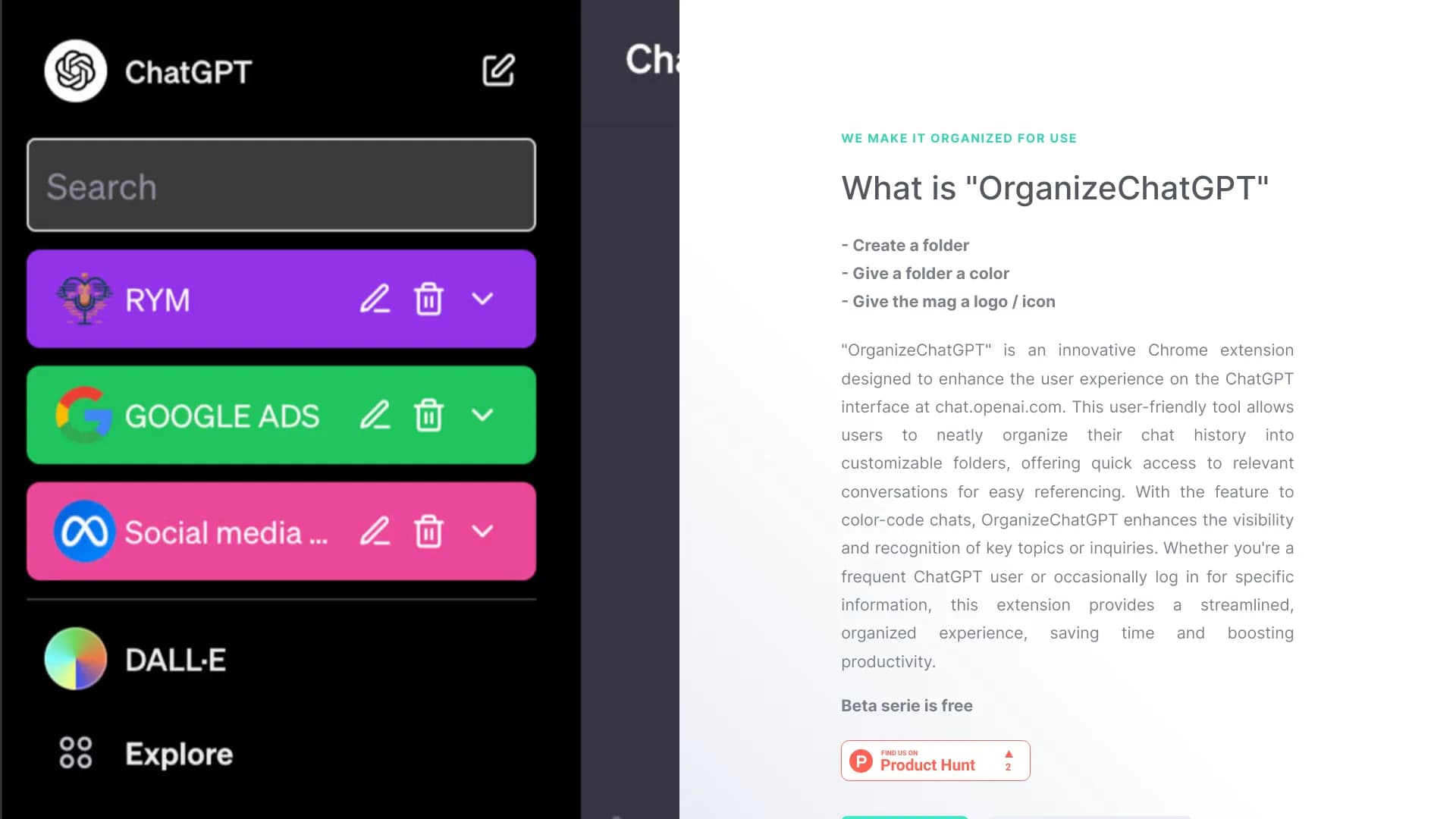
ChatGPT Organize is a Chrome browser extension that solves the problem of chaos in your ChatGPT conversation history. Instead of an endless feed of chats where you have to manually search for the right conversation, this tool offers a simple folder system. You can sort conversations by topic, project, or any other principle by dragging and dropping them into the desired sections. A more advanced scenario is automatic sorting, which distributes dialogues into created folders on its own. The tool integrates directly into the ChatGPT interface, so you don't have to switch between tabs to get organized.
Key Idea
The main goal of ChatGPT Organize is to save time and frustration for users who actively work with ChatGPT. Instead of scrolling through dozens of old dialogues looking for a specific discussion, you open the right folder and find it in a couple of clicks. This is especially relevant for those who use ChatGPT not occasionally, but as a work tool — for writing texts, data analysis, learning, or research.
ChatGPT Organize Features
| Feature | Value |
|---|---|
| Category | AI Productivity Tools, AI Chat Generator, AI Meeting Assistant, AI Room Planner |
| Platforms | Web, Chrome extension |
| Pricing Model | One-time payment |
| Free Tier Available | Yes |
| Date Added | July 11, 2024 |
Who Is ChatGPT Organize For?
Professionals and Frequent Users
The tool is primarily aimed at those who use ChatGPT on a regular basis. If you write texts, handle correspondence, prepare reports, or engage in other activities where quick access to old dialogues is important, ChatGPT Organize will help streamline your workflow.
Students and Researchers
Learners and researchers often manage multiple parallel discussions, from breaking down study topics to analyzing scientific articles. The ability to organize conversations into folders and quickly find the needed material is a real time-saver when preparing for exams or writing papers.
Anyone Who Values Order
Even if you use ChatGPT occasionally, accumulated chat history can become unmanageable. ChatGPT Organize suits anyone who wants to bring order to their dialogues without extra effort.
How to Use ChatGPT Organize?
Step 1: Registration and Connection
To get started, visit organizechatgpt.com and register or log in to an existing account. After that, you need to connect your ChatGPT account — the extension works in conjunction with it.
Step 2: Creating a Folder Structure
Once connected, you can create customizable folders for your tasks. For example, "Work Projects," "Personal Questions," "Study" — the structure depends entirely on your needs.
Step 3: Sorting Conversations
From there, you have two options. The first is manual sorting: simply drag and drop dialogues into the desired folders. The second is automatic sorting, which distributes chats into folders on its own. Access to organized conversations and their management is done through the created folder structure.
Key Features of ChatGPT Organize
Customizable Folders
Create folders for any tasks and topics. You decide how to structure your dialogue history — no rigid restrictions.
Drag-and-Drop Interface
Intuitive dragging of conversations lets you quickly move dialogues into the desired sections. Setting up the structure takes minutes.
Automatic Sorting
A feature for those who don't want to spend time on manual organization. The extension distributes conversations into folders on its own, based on their content.
Smart Search
Quick search across all conversations helps you find the needed dialogue, even if you don't remember which folder it's in. This is handy when you have a lot of dialogues.
Advantages of ChatGPT Organize
Organization and Order
The main benefit is bringing order to your personal chat history. Customizable folders let you structure conversations the way that suits you, not the way the standard ChatGPT interface suggests.
Additional Management Capabilities
The extension supports color coding for folders, allowing you to quickly visually distinguish sections. You can also pin important chats — they'll always be at hand. A nice bonus is the ability to add multiple conversations to folders at once, speeding up bulk organization. With a one-time payment, you get access on multiple devices.
Ease of Installation
The tool is distributed as a Chrome extension, so installation takes minimal time and requires no complex setup.
Disadvantages of ChatGPT Organize
Platform Limitation
The main limitation is its dependence on Chrome. The tool is not a standalone application, so users of other browsers will have to look for alternatives.
Paid Synchronization
Folder synchronization across multiple devices is only available after payment. The free tier has limitations in this regard.
Not Open Source
The extension is not open source, which rules out the possibility of community-driven improvements. Users cannot make changes themselves or audit the code for security.
What Problems Does ChatGPT Organize Solve?
Managing Work Chats
A clear folder structure helps keep all work discussions under control, from brainstorming to final text versions.
Organizing Personal Conversations
Personal correspondence with ChatGPT can also be structured. For example, you can create folders for advice, planning, leisure, and other topics.
Categorizing Study Materials
For students, the tool becomes a convenient way to organize study dialogues by subject or topic.
Sorting Research Topics
Researchers can group conversations by research areas, simplifying the search for relevant information.
Tracking Project Discussions
Separate folders for each project allow you to keep context and quickly return to discussions at any time.
ChatGPT Organize Pricing
ChatGPT Organize has a free plan that doesn't require entering a credit card. It lets you evaluate the tool's basic capabilities. For full functionality — specifically, folder synchronization across multiple devices — you need to purchase a lifetime plan. Its cost is a one-time payment. After payment, you get lifetime access for use on multiple computers without a monthly subscription.
Terms of Use for ChatGPT Organize
To get started, registration on the official website and connecting a ChatGPT account are required. If you plan to use the tool on multiple devices and sync folders between them, you'll need to purchase the lifetime plan. The free tier is available without entering a bank card.
Availability of ChatGPT Organize
The tool is available as a web service and as a Chrome extension. No regional restrictions or special conditions for other countries are mentioned in official sources.
How ChatGPT Organize Differs from Alternatives
Focus on ChatGPT
The main difference is its narrow specialization. Unlike universal note-taking and work organization tools like Notion or Evernote, ChatGPT Organize is entirely tailored to the ChatGPT ecosystem. It integrates directly into the interface and works only with its dialogue history.
Chrome Extension Specifics
While Slack or Microsoft Teams are full-fledged platforms for team collaboration, ChatGPT Organize solves one specific task: sorting ChatGPT chats. This is both an advantage (simplicity and convenience) and a limitation (tied to a specific browser). For users not on Chrome, this could be a significant barrier, whereas alternatives like Google Keep are accessible from any device via a browser.
One-Time Payment Instead of Subscription
Many competing services operate on a subscription model. ChatGPT Organize offers a one-time payment for lifetime access, which sets it apart from Notion or Slack pricing plans where recurring fees are mandatory.
Conclusion
ChatGPT Organize is a niche but useful tool for those who actively work with ChatGPT and want to bring order to their dialogue history. Customizable folders, intuitive drag-and-drop, and automatic sorting significantly simplify navigation. At the same time, it's important to consider the limitations: the tool only works as a Chrome extension, and full functionality with cross-device synchronization requires a one-time payment. For users who spend a lot of time in ChatGPT and value organization, this is a reasonable investment that lets you quickly find needed discussions and keep your workflow under control.
Pricing
Frequently asked questions
See also


Platform for automatic work time tracking and team productivity analysis.


AI chatbot for automating customer communication and lead qualification.

Platform for creating custom AI chats trained on your own business data.

An online service that lets you chat with PDF documents: ask questions and get concise answers with source attribution.


A browser with built-in AI tools for chatting with neural networks, generating texts and images, translating and summarizing pages.


AI-based service for automatic generation of text content in various formats.


Service for automatic transcription of audio and video into text with support for over 100 languages.


A tool for generating 3D models based on text descriptions, images, or sketches.