
ChatGPT for Google
Browser extension that shows answers from multiple AI models right on the search results page.
Overview
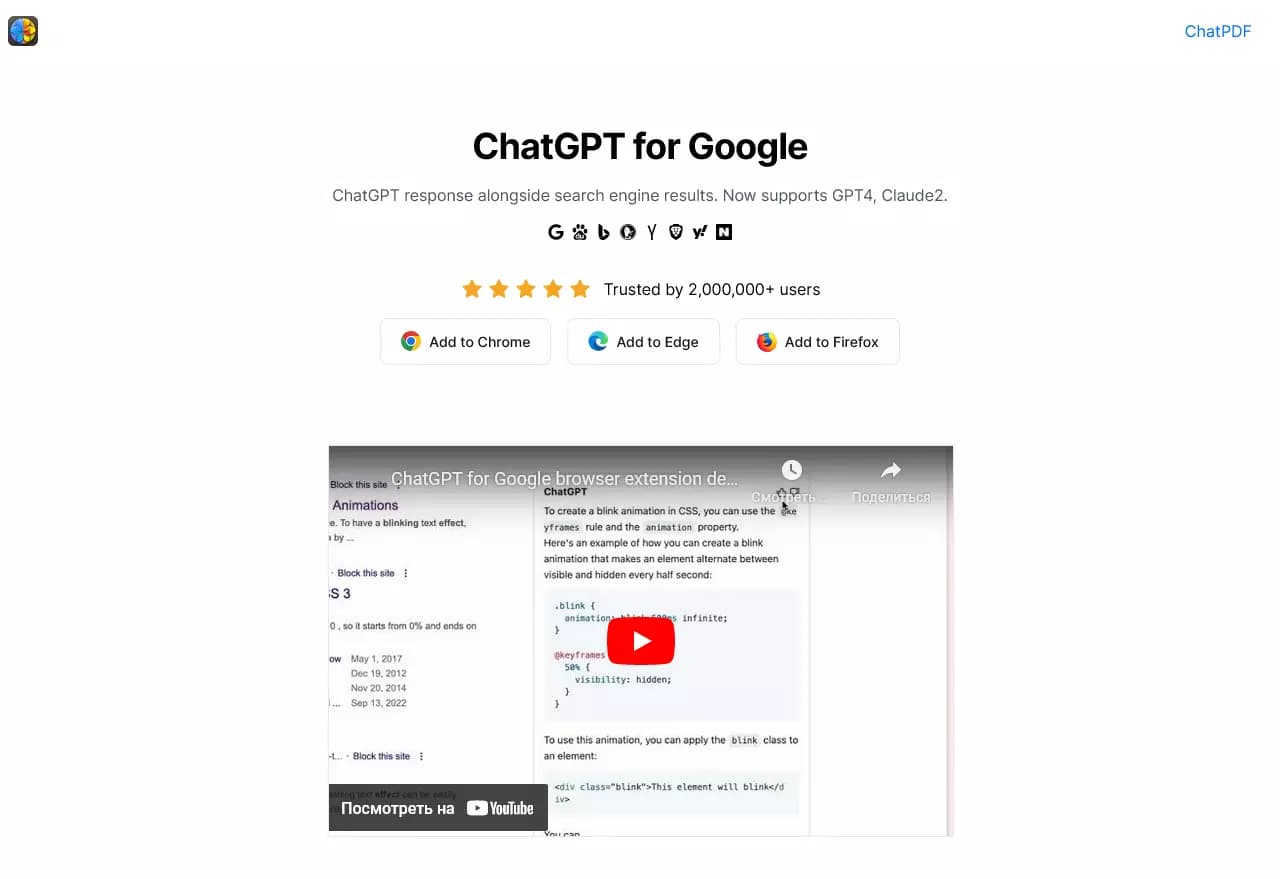
ChatGPT for Google is a browser extension that embeds responses from multiple artificial intelligences directly into the search results page. Instead of opening ChatGPT or Bard in a separate tab, the user gets a block with ready-made AI answers right below the search bar or to the side of the main results.
The extension works with popular search engines: Google, Bing, DuckDuckGo, and Yandex. It doesn't rely on a single model but taps into several at once — ChatGPT, GPT-4, Google Bard, and Claude. This lets you look at a query from different angles and compare the wording, completeness, and structure of the answers.
The tool is designed for those who are tired of sifting through dozens of links in search of a precise answer. The extension automatically picks up the search query, sends it to AI models, and shows the result in a convenient format. Answers appear in the background, without the need to visit third-party sites, saving time and simplifying research on complex topics.
ChatGPT for Google Features
| Feature | Value |
|---|---|
| Type | Browser extension |
| Category | Search and search engines |
| Business model | Free (freemium) |
| Platforms | Chrome, Edge, Firefox |
| Supported search engines | Google, Bing, DuckDuckGo, Yandex, Baidu, Kagi, Searx, and others |
| Supported AI models | ChatGPT, GPT-4, Google Bard, Claude |
| Required account | ChatGPT (free registration) |
Who is ChatGPT for Google suitable for?
Researchers and analysts
The extension suits those who regularly search for complex information, compare viewpoints, and need quick access to structured data. Simultaneous output of answers from different models provides a way to see alternative interpretations and approaches to the same topic, which is especially valuable when preparing analytical materials.
Professionals working with large volumes of information
Developers, engineers, students, and teachers — anyone who has to look up technical explanations, step-by-step instructions, or academic references — will appreciate getting ready-made answers right on the results page. Instead of opening site after site, you can simply look at the block of AI answers and quickly grasp the essence.
Regular users tired of clicking through links
Even for everyday queries — from recipes to travel tips — the extension saves time. Model answers often contain specifics, structured lists, and direct recommendations that can be used right away, without reading long articles.
How to use ChatGPT for Google?
Step 1: Install the extension
Install the extension from the official stores of Chrome, Edge, or Firefox browsers. The process is no different from installing any other extension: click the "Install" button and confirm the action.
Step 2: Connect your account
The extension requires a ChatGPT account to work. Registration is free and takes a couple of minutes. After creating an account, you will be automatically logged into the extension.
Step 3: Use it in search
After installation, the extension works in the background. When you enter a query into a search engine (Google, Bing, DuckDuckGo, or Yandex), the extension automatically sends it to several AI models and displays a block with answers to the right of the regular results. No additional actions are required.
Key features of ChatGPT for Google
Automatic integration with search engines
The extension embeds itself into the search engine interface and, without user involvement, sends the query to several AI models at once. The output appears as a block located to the right of the standard search links.
Comparison of AI model responses
The key capability of the extension is the parallel display of answers from ChatGPT, GPT-4, Google Bard, and Claude to the same query. This gives the user a panoramic view of the question: each model phrases its answer differently, sets different emphases, and picks different examples.
Follow-up questions without leaving the page
The extension's interface allows you to ask a follow-up question right in the AI answers block. You don't need to switch to a ChatGPT or Bard tab — the conversation continues directly on the search results page.
Advantages of ChatGPT for Google
Instant access to ready-made answers
The main advantage of the extension is solving the problem of finding a specific answer among many links. Instead of clicking through ten sites, you get a ready-made answer from a neural network, which often already contains the information you're looking for.
Multi-model approach and a well-rounded perspective
Simultaneously comparing answers from ChatGPT, GPT-4, Google Bard, and Claude lets you see how different models approach the same task. This provides a more complete picture and reduces the risk of a one-sided perception of information.
Time savings on complex queries
For questions that require analysis, structuring, or step-by-step instructions, the extension saves minutes and sometimes hours. You get not a set of scattered quotes from other sites, but a cohesive, logically structured explanation.
Drawbacks of ChatGPT for Google
The main drawback of the extension is its dependence on having a ChatGPT account. Without registration, use is impossible, which may deter users who don't want to create extra profiles. In addition, the extension only works in three browsers — Chrome, Edge, and Firefox — so Safari or Opera users won't be able to use it. It's also worth noting that AI answers can in some cases be inaccurate or outdated, so critically important information should be double-checked against primary sources.
What tasks does ChatGPT for Google solve?
Quickly getting structured information
The extension is aimed at tasks where a concise, structured answer is needed without going through a dozen sites. Complex questions that allow a brief answer with a list of points are handled especially well.
Finding technical solutions and explanations
For technical professionals, the extension is useful when looking for explanations of complex concepts, step-by-step instructions, or error breakdowns. Neural networks provide action algorithms that can be applied immediately after reading.
ChatGPT for Google Pricing
The extension is distributed under a free business model (freemium). The basic functionality is completely free — to install and use it, you only need to register a ChatGPT account, which also requires no payment. Which specific additional features are available in the paid version is not specified in the source data.
Terms of use for ChatGPT for Google
A ChatGPT account is required for the extension to work. Registration is free. The extension is installed from the official stores of Chrome, Edge, and Firefox browsers. There is no need for a paid subscription for basic use.
Availability of ChatGPT for Google
The extension is available for Chrome, Edge, and Firefox browsers. It is compatible with a wide range of search engines, including Google, Bing, DuckDuckGo, Yandex, Baidu, Kagi, Searx, and others. Thanks to this versatility, users can use the extension with whichever search engine they prefer, without changing their habits.
How ChatGPT for Google differs from alternatives
The main difference between ChatGPT for Google and other extensions and services is its simultaneous work with several AI models at once. Most similar tools are limited to a single model, such as only ChatGPT or only Bard. Here, the user sees answers from four different AIs (ChatGPT, GPT-4, Google Bard, and Claude) in parallel, which makes it possible to understand which model handles a particular type of query better.
Another significant difference is integration with a large number of search engines. In addition to the obvious Google and Bing, the extension supports DuckDuckGo, Yandex, Baidu, Kagi, Searx, and others. This makes the tool universal and convenient for users around the world, regardless of their search preferences.
Conclusion
ChatGPT for Google is a practical tool that combines familiar search with the capabilities of modern AI models. The extension saves time when working with complex queries, provides access to several neural networks from a single window, and allows you to compare their answers without switching between tabs. The free distribution model, support for popular browsers, and a wide list of search engines make it useful for a broad range of users — from students to technical specialists. If you often search for information and value your time, this extension will become a reliable addition to your workflow.
Frequently asked questions
See also


AI marketing assistant that helps create promotion strategies and optimize advertising campaigns.


AI email assistant that integrates with Gmail and Outlook.


A platform for chatting with virtual AI characters that you can create and customize to suit yourself.

AI platform for fast resume screening that helps recruiters select suitable candidates.


Desktop AI assistant for macOS, Windows, and Linux that launches via hotkey above all windows and combines multiple language models in one interface.


A platform for chatting with virtual AI characters with image generation during the conversation.
Online platform for creating interactive AI twins based on the user's biography, personality, and personal experience.


An open-source AI development agent that helps generate, refine, and debug code directly in the IDE.