

ChatCraft
A web assistant for developers that helps write, improve, and analyze code directly in the browser.
Overview
ChatCraft AI Description
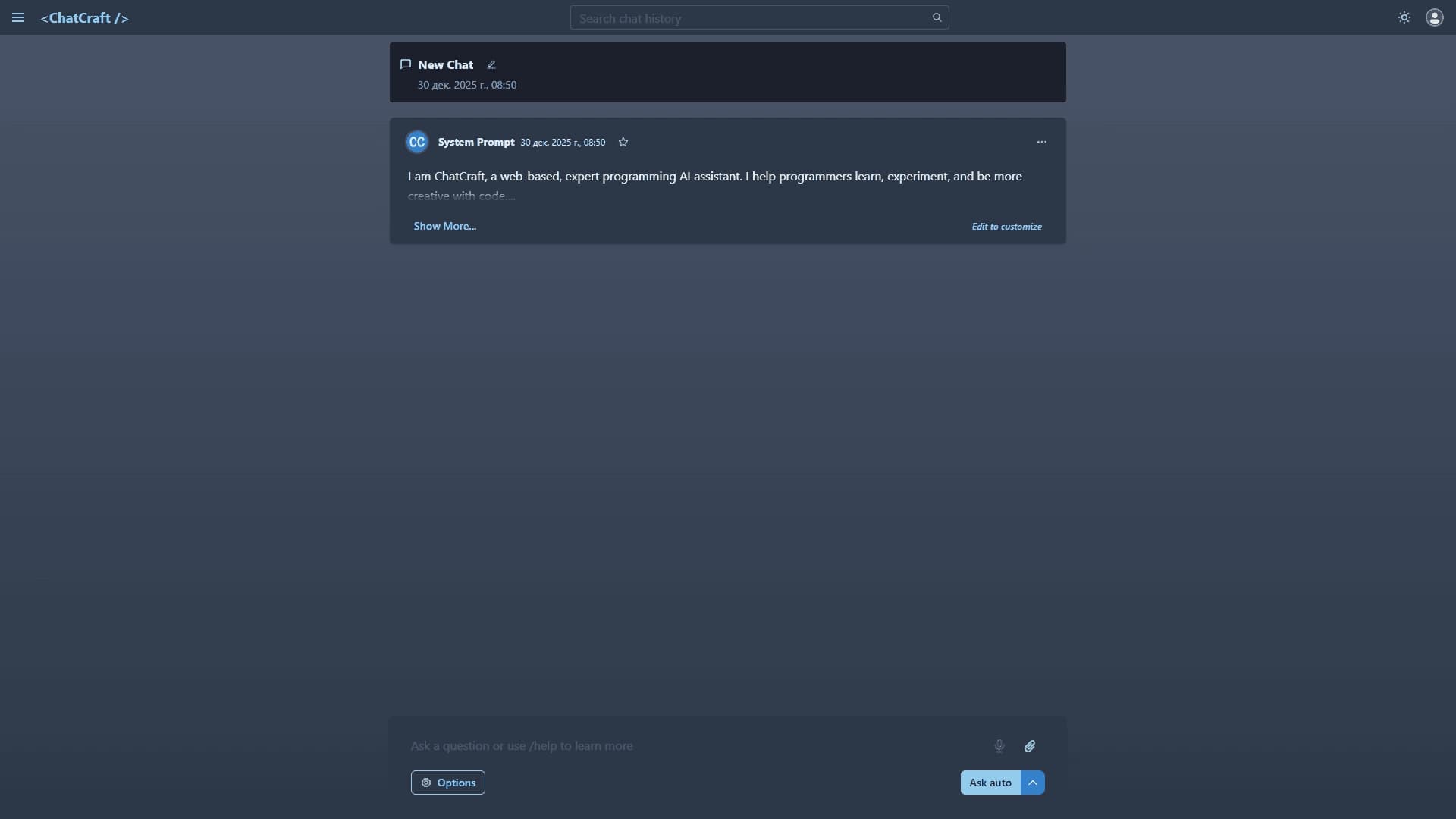
ChatCraft is a browser-based AI web assistant designed specifically for developers. Its key feature is that the entire code workflow — from writing to analysis — happens directly in the web browser. This solution eliminates the need to install any software, configure a local environment, or deal with complex setups.
The tool is positioned as a versatile environment for code experimentation. ChatCraft can not only generate new code snippets but also improve existing code and explain complex programming concepts in simple terms. A built-in chat history system lets you return to previous conversations, while the ability to customize the system prompt provides flexibility in controlling the assistant's behavior.
With this approach, ChatCraft addresses several needs at once: from quickly testing an idea to fully learning new technologies. The service runs through the chatcraft.org website and requires no complex steps to start using it.
ChatCraft Features
| Feature | Value |
|---|---|
| Type | AI-powered web assistant |
| Category | Code assistant, prompt engineering |
| Platform | Web browser |
| Website | chatcraft.org |
| Publication date | December 30, 2025 |
Who is ChatCraft AI for?
Beginner developers
ChatCraft is a great tool for those just starting to learn programming. The service lets you ask questions about unfamiliar concepts, get explanations of complex topics, and break down someone else's code piece by piece. No installation required makes it accessible to beginners who haven't yet set up a full development environment.
Experienced programmers
For professionals, ChatCraft is useful as a tool for quick experiments. You can test a hypothesis, look for alternative solutions to a problem, or get a tip on a new technology without leaving the browser or creating temporary projects in a local environment.
Professionals learning new technologies
For those mastering a new programming language or framework, the service helps you quickly understand unfamiliar syntax and approaches. The ability to save chats lets you keep notes as you learn.
How to use ChatCraft AI?
Getting started
To start using the service, simply go to chatcraft.org. No complex steps, additional software installation, or environment setup are required. All you need is a browser and internet access.
Interaction process
Users interact with the assistant through a chat interface, sending requests to write code, improve it, or explain it. The service processes requests in the browser, making interaction fast and visual.
Additional capabilities
While working, you can customize the system prompt to adapt the assistant's behavior to your tasks. You can also save your conversation history and return to it when needed.
Key ChatCraft Features
Writing and improving code
The assistant helps create new code snippets from scratch and suggests improvements to existing code. This speeds up the development process and helps find more efficient solutions.
In-browser experimentation
A key feature is the ability to test ideas immediately without creating a separate project. This saves time and resources.
Saving and sharing chats
All conversations can be saved to return to later. There's also a feature to share chats with other users, which is convenient for team collaboration.
System prompt customization
Users can set their own system prompt to control the style and tone of the assistant's responses.
Explanations and suggestions
The service can explain complex programming concepts and offer ideas for implementing new projects.
ChatCraft Advantages
Ease of use
The main benefit is no need to install or configure an environment. The service runs in the browser, making it accessible from any device.
Versatility
The tool is equally useful for learning and professional development. It covers the needs of different user categories.
History management
Saving chats and sharing them is a significant advantage for those working on long-term projects or learning step by step.
ChatCraft Disadvantages
Browser dependency
Since the service only works in a web browser, this can be a limitation for those used to full-featured IDEs or working offline.
Limited information
Official sources do not disclose details about pricing or technical limitations. This information may not be available at the time of the tool's review.
Internet connection required
ChatCraft requires a stable network connection to work, which can be inconvenient in some situations.
What problems does ChatCraft solve?
Working with code
The service helps write and improve code, as well as find alternative solutions to problems. This speeds up a developer's daily work.
Code analysis and understanding
ChatCraft is useful when you need to review someone else's code or understand complex logic. The assistant explains what a given snippet does.
Learning programming
The service acts as a mentor: it explains complex concepts, helps you learn new technologies, and test different approaches.
Quick experiments
The tool lets you quickly test an idea or try a new approach without creating a full project.
ChatCraft Pricing
Detailed information about ChatCraft's pricing plans is not disclosed in available sources. Reliable data on service cost, the availability of a free tier, or a subscription model is absent at the time of review. For up-to-date pricing information, it is recommended to contact the official website chatcraft.org directly.
ChatCraft Terms of Use
The exact terms of service, including license agreements and data processing rules, have not been published in open sources. Based on the distribution model (type "unknown" at the time of review), transparent information about the legal aspects of using the service may not be fully disclosed. Before starting to use the platform, users are advised to carefully review the terms on the official website.
ChatCraft Availability
ChatCraft is available as a web service at chatcraft.org. This means it works on any platform with a modern browser and internet access. No software needs to be downloaded or installed to get started. The service is available to users regardless of operating system, making it a universal solution for developers.
How ChatCraft differs from alternatives
No installation required
Unlike many similar tools, ChatCraft does not require environment setup or additional software installation. This makes it extremely accessible to users with different levels of technical expertise.
Browser-native adaptation
Most AI code assistants integrate into IDEs or require plugin installation. ChatCraft works exclusively in the browser, providing freedom from system requirements and the ability to work from any device.
Focus on learning and experimentation
Thanks to the ability to save chats and customize prompts, the service is well-suited for learning and running experiments — scenarios that are not always fully implemented in classic IDE solutions.
Conclusion
ChatCraft is a convenient browser-based AI web assistant that helps developers write, improve, and analyze code without complex installation or environment setup. The service is suitable both for learning programming and for solving professional tasks. The ability to save and share chats, customize the system prompt, and experiment with code directly in the browser makes it a practical tool for daily work. At the same time, available information about pricing and terms of use is limited, so it's worth checking the details on the official website before getting started.
Frequently asked questions
See also

A tool for creating diagrams and mind maps from text descriptions in natural language.

A platform for accountants that combines task management, file sharing, and client communication in a single interface.

AI business name generator with domain availability checking.

AI-powered platform for automatically generating ad banners, texts, and videos optimized for conversion.


Neural network for generating images and short videos from text descriptions.


AI tool for creating presentations, documents, and web pages from a text description.


AI tool for automating social media marketing, including content generation, post scheduling, and analytics.


Russian-language GPT-based AI chatbot for information retrieval and text generation.