

Auto Caption AI
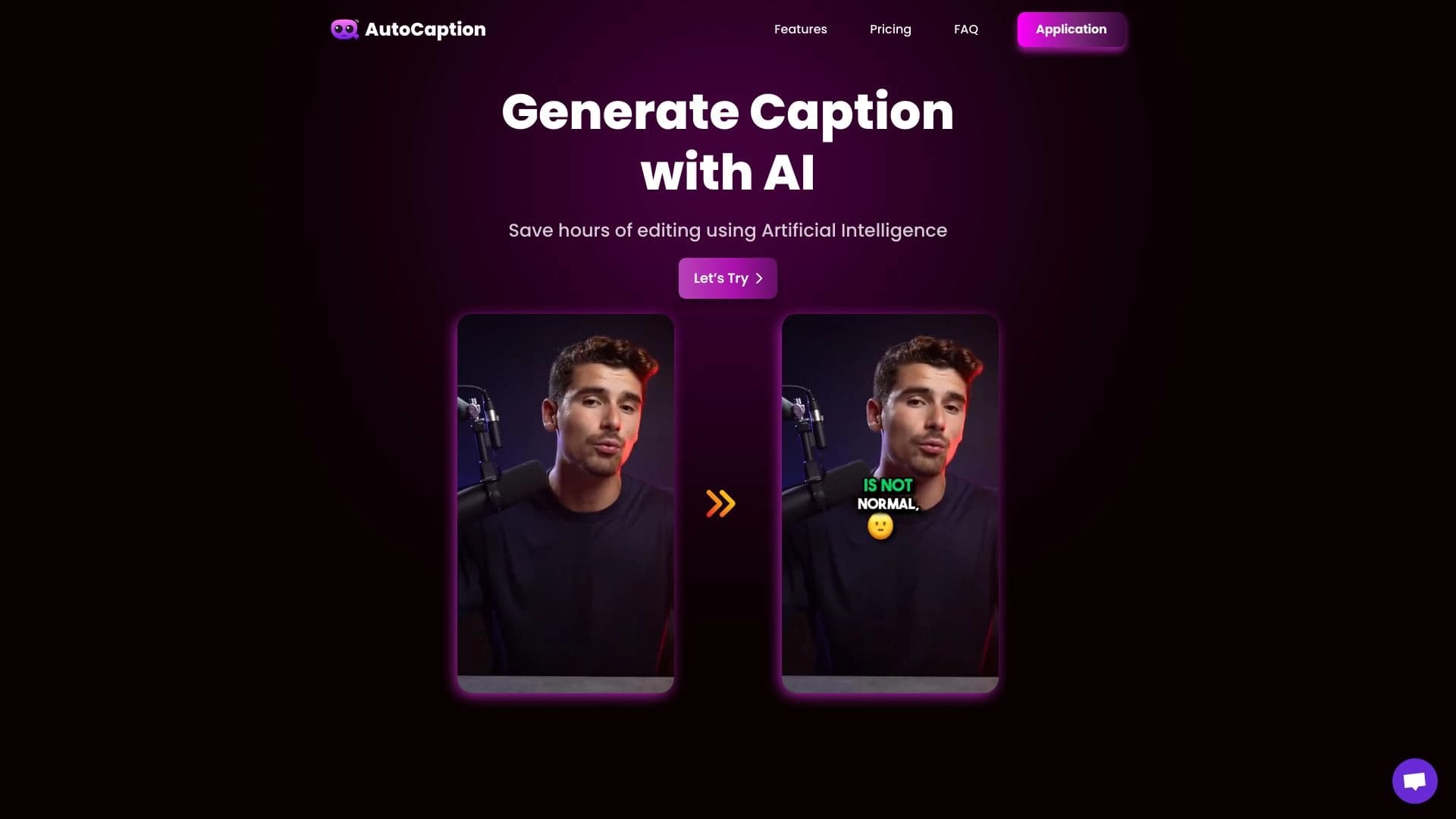
Automatically adds subtitles and animated emojis to vertical videos for social media.
Overview
Auto Caption AI is an online service powered by artificial intelligence that automates the process of creating subtitles for vertical videos. Instead of manually transcribing speech and overlaying text on the track, you simply upload your video, and the neural network recognizes the spoken words, converts them into synchronized text, and adds animated emojis if needed.
The service is designed for short-form content creators and marketers who need to quickly adapt videos for platforms such as TikTok, Instagram Reels, and YouTube Shorts. The tool's main goal is to reduce content production time by eliminating the tedious manual work of transcription and text styling.
Key Feature: Automated Styling
The main difference between Auto Caption AI and simple editors is its full-cycle processing. You don't just get a text track — you get publication-ready subtitles with customizable appearance options: font, color, and entrance animations. This lets you set a visual style that matches your brand without using additional software.
Format Limitations
It's important to understand that the algorithm is tailored to a specific format. Currently, the service only accepts short vertical videos with a 9:16 aspect ratio. If you upload a horizontal video or a long film, the system won't process it. This is a deliberate limitation, as the product was created exclusively for the needs of short-form content creators.
Auto Caption AI Characteristics
Below are the main technical and functional parameters of the service, based on data from the official website and AI tool directories.
| Characteristic | Value |
|---|---|
| Type | Online service (web platform) |
| Category | Subtitle and caption generator, social media tools |
| Developer | AutoCaption Inc. |
| Language Support | 57 speech recognition languages (including Russian, English, Chinese, Spanish); some sources indicate support for over 100 languages for the interface and subtitles |
| Platform | Web browser (requires a constant internet connection) |
| Video Format | Vertical videos only (9:16), maximum resolution — FULL HD (1080x1920) |
| Distribution Model | Freemium (free tier + paid subscriptions) |
| Starting Price | Paid plans start at an entry-level subscription per month |
| Monthly Website Visits | ~388.9K |
Who Is Auto Caption AI For?
The tool is designed for those who regularly produce content for short vertical videos and need quick text styling.
Bloggers and Content Creators
First and foremost, it's for authors on TikTok, Instagram Reels, and YouTube Shorts. If you shoot videos with speech but don't want to spend time manually setting timings and typing text, Auto Caption AI will handle that work for you. The automatic speech recognition and emoji insertion feature helps make videos more engaging without spending hours in the editing suite.
SMM Specialists and Small Businesses
For those managing company and brand accounts, processing speed and adherence to visual style are critical. The service allows you to customize fonts and colors to match brand guidelines and boost engagement through animated elements. This is useful for international brands, as recognition works across dozens of languages, allowing content to be adapted for a global audience.
How to Use Auto Caption AI
The workflow with the service is extremely simple and consists of two main stages.
Step 1: Upload Video
You need to upload a vertical video (9:16) to the platform. The system accepts files of a certain size and duration (depending on the plan). This is the only manual action required from the user.
Step 2: Processing and Customization
After uploading, the neural network automatically recognizes speech and converts it into a text track synchronized with the audio. At this stage, you can customize the appearance of the subtitles: choose the font, color, size, and type of animation for text or emojis. Once editing is complete, all that's left is to export the finished video.
Key Features of Auto Caption AI
The service offers a set of features covering the needs of short-form video creators.
Automatic Speech Transcription
The core of the service is speech recognition converted into text. The neural network independently identifies speech segments and binds them to timestamps, creating precise synchronization of words with lip movements. This completely eliminates manual transcription and timing.
Subtitle Customization
Once you have the base text, you can completely change its appearance. Font settings (choosing typeface and style), colors, sizes, and background overlays are available. This is necessary for maintaining a consistent visual style for a channel or brand.
Animated Emojis and Effects
To boost attention retention and add dynamism, the service can embed animated emojis. They are placed contextually or manually and make static text more lively, which positively impacts viewer engagement (CTR).
Advantages of Auto Caption AI
Using this tool offers concrete benefits compared to manual editing.
Time Savings and Speed
Subtitles are generated automatically in seconds or a couple of minutes, depending on video length. This is a huge resource saver, especially when producing large volumes of content daily. You don't need to scrub through videos manually and type text — the algorithm does it all.
Increased Engagement
Subtitles with animated emojis look more attractive than plain text. Dynamic animation catches viewers' attention in the feed and helps keep them watching longer, thereby increasing engagement and click-through rates.
Multilingual and Accessibility
Support for dozens of languages (from English and Russian to Chinese and Spanish) makes the service a versatile tool for international teams and creators targeting foreign audiences. Subtitles also make content accessible to people with hearing impairments.
Disadvantages of Auto Caption AI
Despite the obvious advantages, the service has several limitations that are important to consider when choosing.
Strict Technical Limits
The main limitation is support for vertical videos only. The service does not process horizontal videos. Additionally, there are limits on duration (up to 2 minutes on the basic plan) and file size (up to 300 MB), which prevents its use for long videos or high-bitrate materials.
Internet Dependency
Since this is exclusively a web service, a stable internet connection is required to work. There is no offline mode, which can be a problem when working in the field or in areas with poor connectivity.
What Problems Does Auto Caption AI Solve?
The tool is designed to solve a narrow set of practical tasks for short-form video creators.
Automatic Speech Transcription
The main task is to remove the need for manually listening to the audio track and writing text. The neural network does this automatically, with fairly high recognition accuracy.
Content Styling and Adaptation
The service solves the problem of visual subtitle styling. It turns plain text into stylish captions with animation and emojis, adapted for the vertical social media format. This allows videos to be brought to a consistent style without using complex video editors.
Expanding Audience Reach
Automatic subtitle generation in different languages allows a brand or blogger to easily adapt the same video for audiences in different countries, removing language barriers.
Auto Caption AI Pricing
The service operates on a freemium model: there is a free tier and several paid subscriptions with expanded limits.
Free Tier
The basic plan requires no payment. It includes 100 generations per month, with a maximum video duration of 2 minutes and a file size of up to 300 MB. This is enough for testing the service and small volumes of work.
Paid Subscriptions
For more active users, three paid plans are available (prices are based on catalog data; current pricing should be checked on the official website):
- "Starter": 100 videos per month, file size up to 300 MB, duration up to 2 minutes, standard feature set.
- "Expert": 250 videos per month, file size up to 500 MB, duration up to 4 minutes, premium settings set.
- "Professional": 500 videos per month, file size up to 1000 MB, duration up to 7 minutes, personalized functionality and support.
Terms of Use for Auto Caption AI
To start using the service, registration on the platform's website is required. The registration process is standard — you need to create an account with an email or using third-party authorization services. Without creating an account, uploading videos and using the tools is not available.
It's also worth noting that the user agrees to comply with platform rules regarding uploaded content. Since the service is an online product, part of the terms of use is the need for stable internet access — all computations are performed server-side, not on the user's device.
Auto Caption AI Availability
The service is a purely web-based solution and has no desktop or mobile apps for offline work. Access to functionality is via a browser from any device (computer, laptop, tablet) with an internet connection.
Speech recognition in videos supports 57 languages, covering the needs of the vast majority of international content creators. As for formats, the service only accepts vertical videos with a 9:16 aspect ratio and a maximum resolution of FULL HD (1080x1920). Long videos, horizontal videos, or files with higher resolution are automatically rejected by the system.
How Auto Caption AI Differs from Alternatives
There are many subtitle creation tools on the market, but Auto Caption AI stands out due to several specific features.
Specialization in Vertical Format
While many competitors (e.g., universal video editors) try to cover all video types, Auto Caption AI deliberately works only with the 9:16 format. This allows it to refine synchronization algorithms specifically for mobile vertical videos, delivering better recognition and text placement quality in this narrow segment.
Comprehensive Approach: From Speech to Animation
Many competitors focus either only on transcription or only on styling already-prepared text. Auto Caption AI offers an "all-in-one" solution: it simultaneously recognizes speech and adds animated emojis with style customization. This saves users from switching between two programs, saving time.
No Focus on Design
Unlike its conditional analogs, the main emphasis here is not on generating images or memes (as with generative services), but specifically on typography and synchronization. This is a niche solution that occupies a unique position between video editing and graphic creation tools.
Conclusion
Auto Caption AI is an effective online tool created to solve a narrow but highly in-demand task: quickly generating subtitles with animated emojis for vertical videos. It significantly simplifies the lives of SMM specialists, bloggers, and content creators for TikTok, Reels, and Shorts by fully automating the speech transcription and initial text styling process. Despite the video format limitations (vertical videos only, up to 7 minutes on paid plans, and internet dependency), the service offers good processing speed and support for a large number of languages. Thanks to the free tier, it's an excellent solution for quickly creating quality content with minimal effort.
Frequently asked questions
See also


A tool for automated SEO content creation with keyword research and long-form text generation.

Catalog of neural networks and online tools for generating images, animations, and videos.

AI-powered platform for automatically generating ad banners, texts, and videos optimized for conversion.
Catalog of free video editors without watermarks for creating and editing videos.
AI tool for automatically creating comics and manga from text scripts and stories.


AI toolkit for video generation and editing, including avatars, lip-sync, and voice cloning.


Video editor with neural network support for video editing on Windows and Mac.


AI-powered online service for automatically creating presentations from text, PDF, audio, video, or URL links.