
AI TranslateDocs
Service for automatic document translation while preserving the original formatting.
Overview
AI TranslateDocs Neural Network Description
AI TranslateDocs is a specialized web service for automatic document translation while preserving the original formatting. The tool is designed for working with office files and scanned materials where the structure of tables, lists, and paragraphs is critical.
The service is built on Azure and Google Translate machine translation technologies, as well as OCR (Optical Character Recognition). The latter enables processing scans and images by extracting text for subsequent translation. The product is developed by AscentApp Software LLP.
The service is positioned as a solution for quickly obtaining draft and working versions of documents where perfect stylistic refinement is not required, but preserving the visual integrity of the source file is important.
AI TranslateDocs Features
| Feature | Value |
|---|---|
| Type | Online document translation |
| Platform | Website (web service) |
| Developer | AscentApp Software LLP |
| Number of languages | Over 130 |
| Technologies used | Azure Translate, Google Translate, OCR |
| Supported formats | PDF, Word, Excel, PowerPoint, CSV, TXT |
| Categories | PDF and documents, Text translation |
| Distribution model | To be confirmed (pricing plans) |
| Catalog publication date | September 23, 2025 |
Who is AI TranslateDocs suitable for?
Professionals working with international documentation
First and foremost, the service will be useful for lawyers and businesspeople who regularly deal with contracts, agreements, and legal documents in foreign languages. The tool allows quickly obtaining a translated version of a document while preserving its structure for further analysis.
Students and researchers
For students and academics, the service will be an assistant when working with foreign articles, study materials, and reports. The ability to upload documents in popular formats and receive a translation in the native language without losing formatting saves significant time.
Companies and freelancers
Organizations with international clients and independent professionals can use AI TranslateDocs to prepare commercial proposals, presentations, and reports in different languages. The service is also suitable for everyday tasks related to exchanging documents with foreign partners.
How to use AI TranslateDocs?
Step-by-step translation process
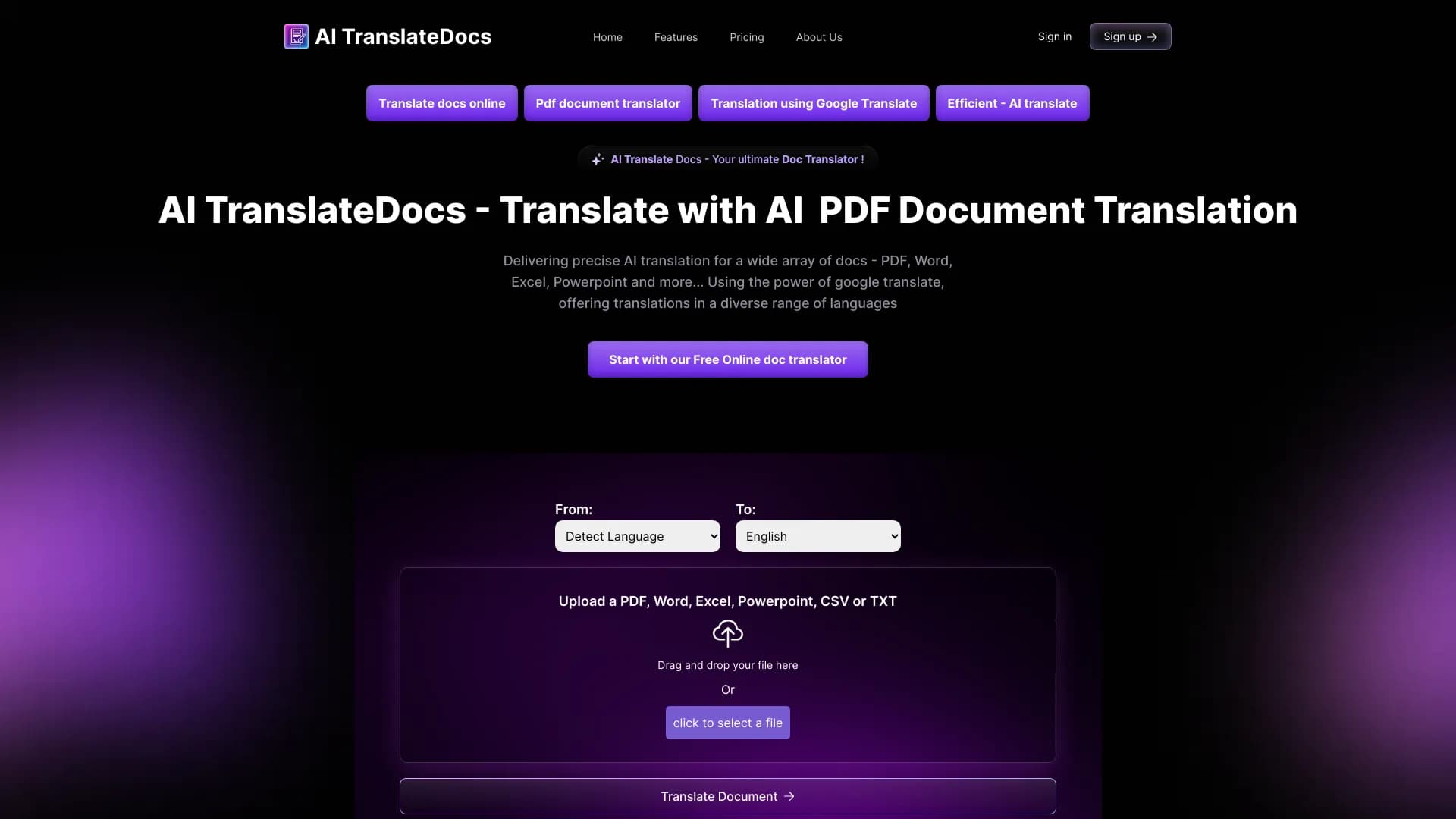
The workflow is extremely simple. The user needs to upload a document in one of the supported formats — PDF, Word, Excel, PowerPoint, CSV, or TXT. This can be done via the upload button or by simply dragging and dropping the file into the browser window.
Selecting the language and getting the result
The next step is to choose the language into which the document should be translated, or enable the automatic language detection function. After that, simply click the "Translate document" button. The system will process the file using AI and OCR, and the user will receive the finished translated version in just a few clicks.
Key features of AI TranslateDocs
Translation with structure preservation
The key feature of the service is its ability to preserve the original document formatting. Tables, lists, paragraphs, and other layout elements remain in place, allowing the translated file to be used immediately after processing, without manual refinement.
Broad language support
AI TranslateDocs provides translation into more than 130 languages, including rare and less common ones. Depending on the language pair, Azure or Google Translate technologies are automatically engaged, improving the accuracy of the result.
Working with scans
Thanks to built-in OCR, the service can recognize text in scanned documents and images, making it suitable for processing archival papers, handwritten materials, and other non-digital sources.
Automatic language detection
The user does not have to specify the source language of the document — the automatic recognition function allows the system to determine it independently and immediately select the appropriate translation pair.
Advantages of AI TranslateDocs
Formatting preservation
The main advantage over regular online translators is working with formatting. The service carefully handles the document structure, preserving tables, lists, indents, and other layout elements, which is especially important for business and legal documentation.
Wide selection of languages and formats
More than 130 languages and support for all popular office file formats make the tool a universal solution for a wide range of tasks. The user does not need to pre-convert files — the service independently handles most document types.
Reliable work with multilingual documents
The use of two powerful translation technologies — Azure and Google Translate — ensures stable translation quality for most language pairs, including rare languages and complex combinations.
Disadvantages of AI TranslateDocs
Sensitivity to source file quality
The service may encounter issues when working with poorly scanned documents. Blurred text, noise pixels, or low scan resolution lead to recognition errors and, consequently, inaccuracies in translation.
Inaccuracies in professional vocabulary
Complex professional terms, rare expressions, and highly specialized vocabulary may be translated incorrectly. For legal and technical documents, it is recommended to have the translated text reviewed by a specialist.
Limitations with exotic languages
Despite the declared support for more than 130 languages, translation quality for rare languages may be unstable. Inaccuracies and distortions of meaning are possible, so the result should be carefully proofread.
What tasks does AI TranslateDocs solve?
Automating file translation
The service eliminates the routine manual work of translating documents in various formats. Instead of copying text into an online translator and then manually assembling the file, the user gets a finished result in just a few clicks.
Preparing working and draft versions
The tool is suitable for quickly obtaining working versions of translations of reports, instructions, contracts, presentations, and study materials. The translated document can be used for internal review or as a basis for further professional editing.
Working with legal and business documents
Thanks to formatting preservation, the service is successfully used for translating contracts, legal documents, and business correspondence. The document structure is maintained, making it easier to read and analyze.
AI TranslateDocs Pricing
The service offers three pricing plans:
Starter — an entry-level plan. Includes up to 100,000 characters, 50 pages, and files up to 10 MB. Maximum PDF volume — up to 100 pages.
Medium — a mid-tier plan. Expands limits to 200,000 characters, 100 pages, and files up to 40 MB. For PDF, up to 1,000 pages is allowed.
Business Custom — an individual plan with pricing on request. Has no restrictions on the number of characters and pages, file size, and supports more than 15 formats. Suitable for corporate clients with maximum needs.
Terms of Use for AI TranslateDocs
Explicit registration terms are not specified on the website; however, the service is expected to be used through the web interface. The main restrictions are related to the pricing plans: limits on the volume of translated text (number of characters and pages) and the maximum size of the uploaded file depend on the selected package. To work within the basic plans, it is sufficient to pay for the subscription, after which all service features become available.
AI TranslateDocs Availability
The service operates as a web application and is available via the website aitranslatedocs.com. No regional restrictions or VPN requirements are stated on the page. The interface supports more than 130 languages, making the service accessible to users from different countries. To use the service, an up-to-date web browser and a stable internet connection are sufficient.
How AI TranslateDocs differs from alternatives
The service positions itself as the "best" tool for translating documents while preserving formatting through the use of OCR. Unlike universal neural networks and chatbots focused on translating text fragments, AI TranslateDocs is initially designed for processing complete files in office formats.
The key difference from classic online translators is the comprehensive approach: the user receives not just text, but a finished document with the preserved structure of tables, lists, and paragraphs. This makes the service more convenient for professional scenarios where not only translation accuracy matters, but also the file's readiness for use without additional processing.
Conclusion
AI TranslateDocs is a practical specialized service for automatic document translation while preserving the original structure. Thanks to support for more than 130 languages, integration of Azure and Google Translate technologies, as well as built-in OCR, the tool covers a wide range of tasks — from translating contracts and legal documents to processing scanned materials. The availability of several pricing plans with transparent limits makes the service flexible and accessible both for individual users and for companies with large documentation volumes.
Frequently asked questions
See also


An online service that recognizes text on manga and manhwa pages, translates it into different languages, and embeds it back into the image without damaging the original artwork.

Cloud platform for creating videos using AI avatars, synthesized speech, and automatic translation of clips into dozens of languages.


AI language teacher in the form of a browser extension and web service for practice, translation, and explanation of language materials.

AI-powered online service that automatically converts bank statements from PDF into structured CSV files.


Online AI-powered service for quickly creating presentations based on a given topic or an uploaded document.

AI assistant that analyzes uploaded study documents, identifies questions, and provides detailed explanations.


Service for automatic transcription of audio and video into text with support for over 100 languages.

A neural network for document analysis that extracts key information, creates summaries, and answers questions about the contents of uploaded files.