
Bank Statement Converter
AI-powered online service that automatically converts bank statements from PDF into structured CSV files.
Overview
Bank Statement Converter AI Overview
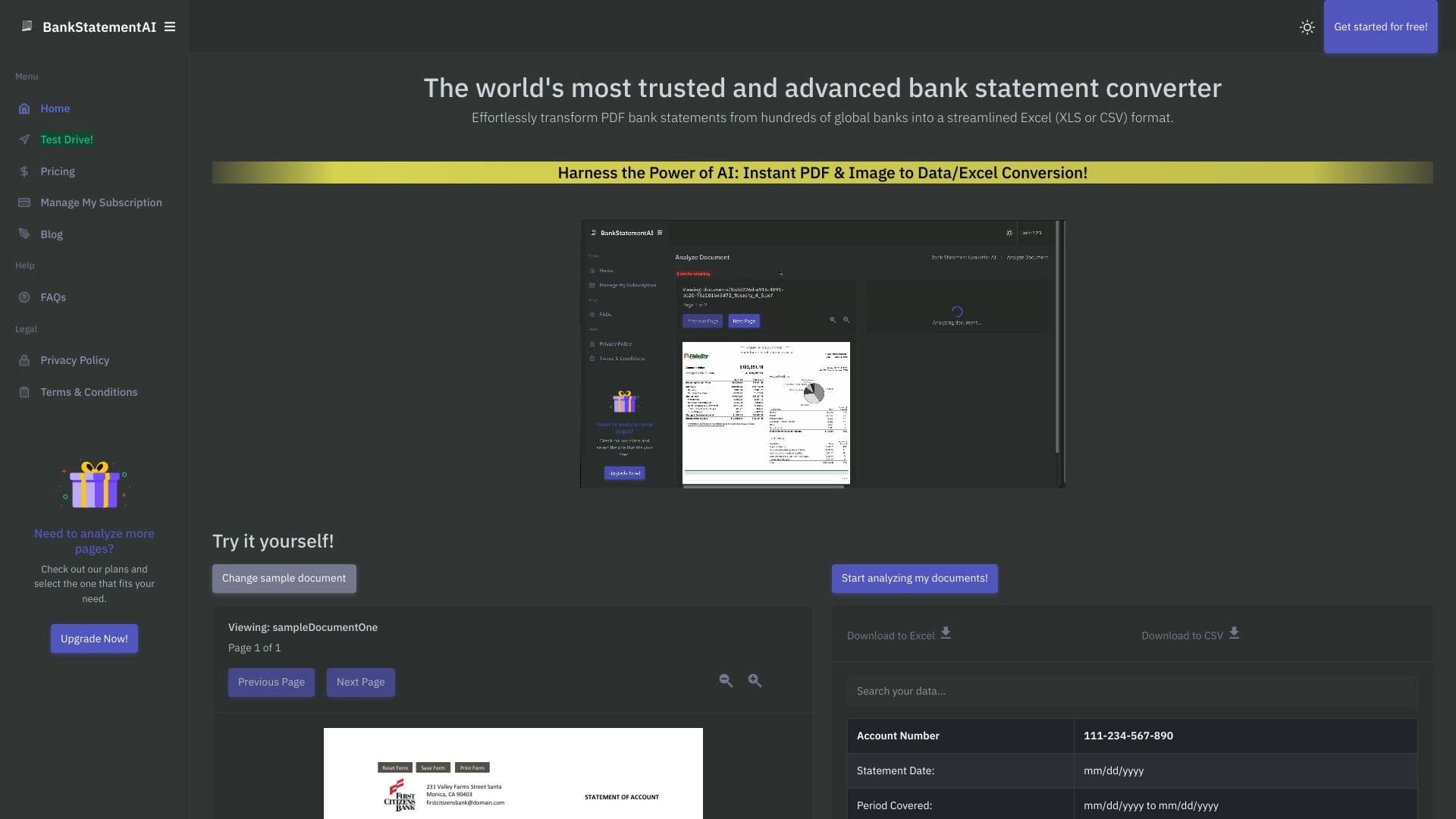
Bank Statement Converter is an online AI-powered service designed to automatically convert bank statements from PDF format into structured CSV files. Instead of manually transferring each transaction line from a document into a spreadsheet, users simply upload a file — and the neural network locates the tabular section, recognizes the data, and formats it for convenient analysis.
The service works entirely through a browser: no software installation or complex setup required. The system can process both individual documents and entire batches of statements, which is especially useful when handling large volumes of financial information spanning several months or years. The tool's main goal is to eliminate manual work and minimize errors caused by human factors.
Bank Statement Converter Features
| Feature | Value |
|---|---|
| Type | AI service |
| Category | Document data extraction tools, data analysis tools |
| Platforms | Website (web service) |
| Free plan | Yes (with volume limits) |
| Monthly visits | 388.9K |
| Developer | BankStatementConverter.org |
Who Is Bank Statement Converter AI For?
Accountants and Financial Professionals
For those who deal with reconciling statements from different banks on a daily basis, the service helps eliminate monotonous manual work. Instead of spending hours copying data, users can spend a couple of minutes uploading files and get a ready-made spreadsheet.
Analysts and Financial Managers
For specialists working with large volumes of cash flow data, the tool quickly turns scattered reports into a unified structured format. This simplifies further processing in Excel, Google Sheets, or specialized analytical software.
Entrepreneurs and Individuals
Business owners and regular users tracking personal finances can also use the service to quickly convert statements into an analysis-friendly format. No deep technical knowledge is required — just upload a PDF and download the result.
How to Use Bank Statement Converter AI?
Uploading Documents
Users need to visit the service website and upload one or more PDF files containing bank statements. The system accepts documents of various formats and layouts — from simple tables to complex multi-page reports.
Getting the Result
After upload, the AI automatically processes the documents, identifies table locations, and extracts data. With just a few clicks, users receive a single CSV file with all transactions from the uploaded statements. The ready file can be immediately used for further work — building reports, uploading to accounting systems, or conducting analysis.
Key Functions of Bank Statement Converter
PDF to CSV Conversion
The service automatically converts bank statements from PDF to CSV spreadsheet format. This is the core and primary functionality of the tool.
Automatic Table Detection
The AI independently identifies table boundaries and data structure within documents. Algorithms recognize transaction rows, amounts, dates, and other significant fields, extracting them without human intervention.
Advantages of Bank Statement Converter
Significant Time Savings
Manually copying data from PDFs is a slow and tedious process, especially when dealing with hundreds or thousands of transactions. The service completes the task in minutes, turning hours of work into a short wait.
High Processing Accuracy
AI algorithms demonstrate high reliability in information extraction. Errors related to human factors (missed rows, typos, incorrect copying) are virtually eliminated.
Handling Complex Documents
The neural network can extract data even from non-standard PDF files — with unusual layouts, merged cells, or non-standard field positioning. Information loss is minimal in these cases.
Disadvantages of Bank Statement Converter
Issues with Non-Standard Documents
If a statement contains scanned images, embedded pictures, or extremely unusual formatting, the service may not work correctly. In such cases, results will require manual refinement.
Potential Security Risks
Like any online service handling sensitive financial data, Bank Statement Converter carries potential risks when uploading documents to the internet. This is especially relevant for free plans, where data protection guarantees may be less robust.
Format Limitations
Not all PDF files are processed equally well. If a document's structure deviates significantly from standard layouts, errors or incorrect recognition may occur — manual correction may be unavoidable in such cases.
What Problems Does Bank Statement Converter Solve?
Converting Statements for Analysis and Reporting
The service converts bank PDF statements into CSV format, which is easily imported into spreadsheet editors and accounting systems. This enables quick report generation, balance reconciliation, and financial analysis.
Automating Manual Data Entry
The tool completely eliminates the need to manually retype or copy transaction rows from documents. All data is transferred automatically, speeding up accounting and finance department workflows.
Consolidating Multiple Statements into One Table
When working with a batch of documents, users receive not a set of scattered files but a single structured CSV combining data from all uploaded statements. This is convenient for consolidating information from different banks or across different periods.
Bank Statement Converter Pricing
The service operates on a subscription model with several pricing plans. New users have access to a free plan with basic conversion and volume limits on uploaded documents. For those needing more, paid options are available: a starter plan with a monthly subscription offering higher limits and expanded features, as well as a professional plan with a higher monthly fee that includes maximum conversions, priority support, and the ability to export large files.
For exact volume parameters and the full list of features for each plan, it's best to check the official service website, as these may change.
Bank Statement Converter Terms of Use
The service has no special usage conditions beyond volume limits on the free plan. There are no strict requirements for the format of uploaded PDF files; however, stability depends on the quality and structure of source documents. For full-fledged work with large volumes or non-standard statements, a paid subscription is recommended.
Bank Statement Converter Availability
The service is fully available online via a web browser. No additional software installation is required — just visit the developer's website, upload documents, and get results. The tool works on any internet-connected device: desktop computers, laptops, and tablets.
How Bank Statement Converter Differs from Alternatives
Narrow Specialization
Unlike general-purpose AI assistants (such as ChatGPT or Jasper AI), Bank Statement Converter solves one specific task — converting bank statements to CSV. This allows the tool to work more accurately and faster in this particular area.
Ease of Use
Compared to data analysis platforms (such as Julius AI or Polymer), this service requires no workflow configuration or prompt engineering skills. The interface is extremely simple: upload a file — get a result.
Processing Speed
Because the service doesn't try to be a universal solution for all tasks, it processes statements significantly faster than general-purpose competitors. This makes it a convenient tool for regular routine work with financial documents.
Conclusion
Bank Statement Converter is a practical online service that solves a narrow but highly important task: fast and accurate conversion of bank statements from PDF to CSV. The tool will become a reliable assistant for accountants, analysts, and anyone who regularly works with large volumes of financial transactions. Despite all its advantages — time savings, accuracy, and automation — the service also has limitations: potential issues with non-standard documents and potential security risks when uploading confidential data online. Nevertheless, for most typical tasks, it is a convenient and effective solution.
Pricing
Frequently asked questions
See also

AI agent for integrating data from various sources and managing knowledge within organizations.

TensorStax is an AI agent for management model-cycle machine learning simplifying theirs deployment and monitoring.

AI assistant for business that helps manage tasks and automate routine through dialogue.

AI website builder from Hostinger for quickly creating websites based on a business description.

AI agent for automating customer communications and support.

Service for automatically creating mind maps from uploaded materials.


Multimodal AI agents for automating customer service and sales via chat, voice, and video.
A neural network for document analysis that extracts key information, creates summaries, and answers questions about the contents of uploaded files.