Topaz Gigapixel
A neural-network-based program for increasing image resolution with detail restoration.
Overview
Topaz Gigapixel
Topaz Gigapixel neural network description
Topaz Gigapixel is a desktop application and plugin for Adobe Photoshop and Lightroom, created by Topaz Labs. Unlike ordinary pixel stretching, the program uses neural network algorithms to upscale images up to 600% (6x) of the original size while restoring fine details and textures.
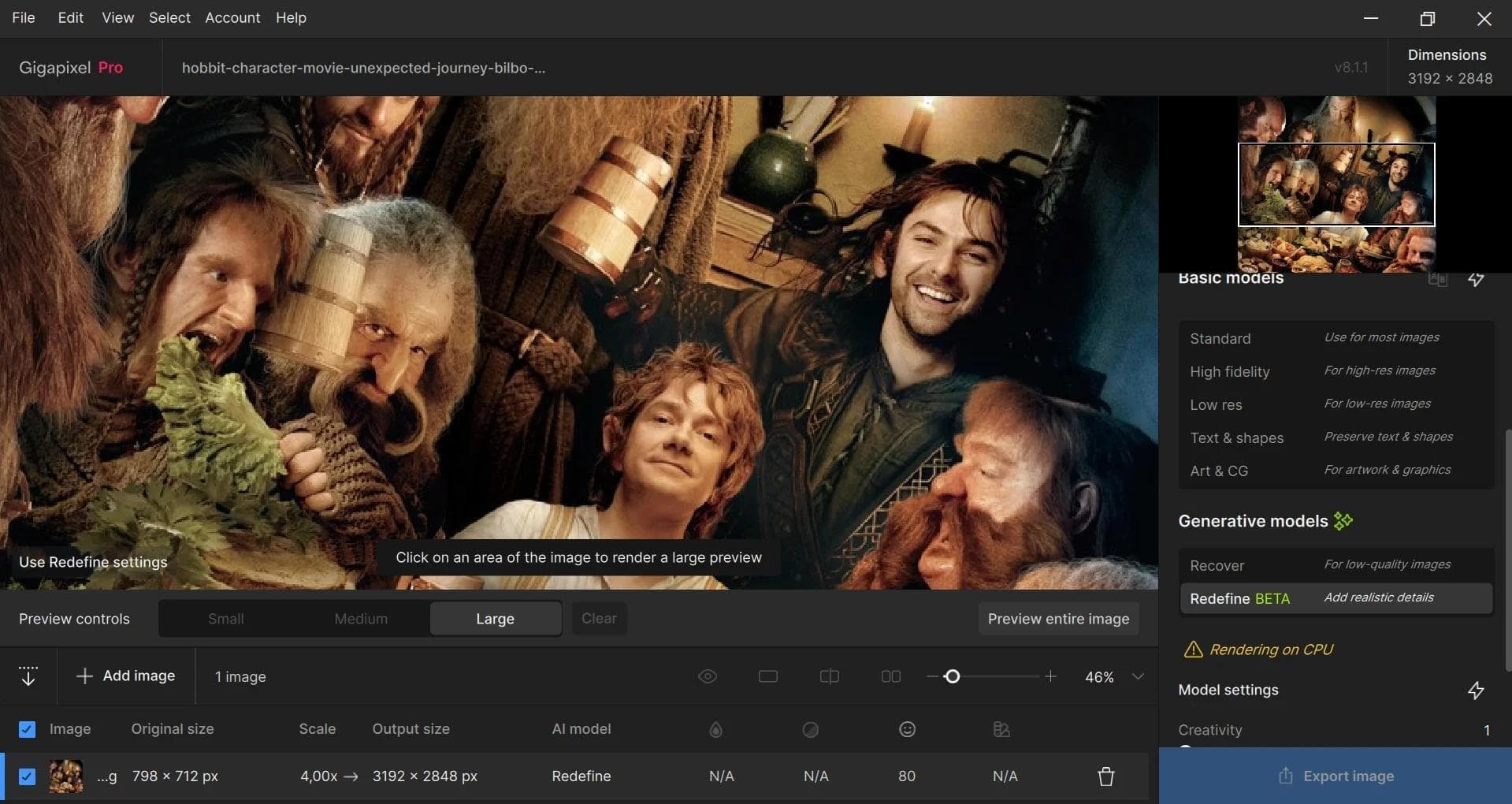
The tool does not just enlarge the image — it draws in the missing pixels, keeping the image looking natural. The program's arsenal includes several specialized AI models, each optimized for a specific type of content: face photos, text, artwork (art and CG), as well as universal scenarios. Both local processing on your computer (files never leave the device) and cloud rendering for faster performance are supported.
Topaz Gigapixel specifications
| Characteristic | Value |
|---|---|
| Type | Neural network program for photo processing |
| Developer | Topaz Labs |
| Categories | Photo enhancement, Image editing, Photography |
| Distribution model | Paid (cannot be downloaded for free) |
| Platforms | Windows, macOS |
| Integration | Adobe Photoshop, Lightroom (including Lightroom Classic) |
| Maximum upscaling | up to 600% (6x) |
| RAW support | Yes |
| Interface language | English (unofficial Russian localization available) |
| Formats | RAW, JPEG, TIFF, MP4, MOV, AVI and most popular graphics formats |
| AI models | Wonder 1, 2, 3; Standard Max; Standard; High Fidelity; Low Res; Text & Shapes; Art & CG; Recover; Redefine; Face Recovery and others |
Who is the Topaz Gigapixel neural network suitable for?
Photographers
Topaz Gigapixel will be useful for professional photographers who need to increase the resolution of their shots for large-format printing — from posters to billboards. RAW file support and integration with Adobe Photoshop and Lightroom allow the tool to be embedded into an existing workflow without extra steps.
Designers and artists
Designers and digital artists working with raster graphics can use specialized AI models (Art & CG, Text & Shapes) to upscale illustrations, logos, and layouts without losing sharpness of lines and contours. The Lossless Zoom feature allows cropping image fragments and then enlarging them up to 6x without quality loss.
Archive restoration specialists
For restoring old, damaged, or low-quality photos, Topaz Gigapixel provides noise reduction and sharpening tools, as well as the Face Recovery model, which can improve the quality of faces in low-resolution images.
How to use the Topaz Gigapixel neural network?
Installation and launch
The program must be downloaded from the official Topaz Labs website and installed on a computer running Windows or macOS. After installation, the application works as a standalone desktop program and can also be connected as a plugin to Adobe Photoshop and Lightroom Classic.
Loading an image
To get started, you need to open an image — this can be done via the "Browse" button or simply by dragging and dropping a file into the program window. The program supports the vast majority of popular graphics formats, as well as RAW files from cameras.
Adjusting settings
After loading an image, the user can choose the upscaling level (2x, 4x, or 6x) and the appropriate AI model depending on the image type. Topaz Gigapixel can also automatically analyze the photo and suggest optimal settings. A preview of the result is available before final export.
Saving the result
After applying the changes, all that remains is to click the "Save Image" button and choose the format and folder for export. The average processing time for one image is about 1–2 minutes depending on file size, selected model, and computer performance.
Key features of Topaz Gigapixel
Upscaling up to 600% with detail restoration
The program's key feature is enlarging images up to 6x the original size. Instead of stretching pixels, the neural network analyzes the contents of the frame and creates new, detailed pixels, producing sharp images suitable for large-format printing.
A set of specialized AI models
Topaz Gigapixel includes several machine learning models, each tailored to a specific type of subject: Wonder 1, 2, 3 — for universal enhancement; Standard and Standard Max — for standard upscaling; High Fidelity — for maximum preservation of original details; Low Res — for working with heavily compressed images; Text & Shapes — for text and shapes; Art & CG — for artwork and computer-generated works; Recover and Redefine — for restoring lost elements; Face Recovery — for improving faces.
Noise reduction and sharpening
The program can reduce digital noise, including grain in high-ISO shots, while trying to preserve fine details. Sharpening tools are also available to give images crispness.
Batch processing
Topaz Gigapixel supports batch processing of multiple images at once, significantly speeding up the workflow when working with large volumes of photos.
Lossless Zoom
The Lossless Zoom feature allows you to crop an image and then enlarge the selected area up to 6x without quality loss — useful when you need to isolate and magnify a specific fragment of a shot.
Advantages of Topaz Gigapixel
Intelligent pixel generation
Unlike ordinary interpolation algorithms that simply stretch existing pixels, Topaz Gigapixel generates new, detailed pixels. The result looks natural, without blurring or characteristic artifacts.
Specialized models for different scenarios
Having several AI models makes it possible to choose the optimal algorithm for a specific image type — be it text, a portrait, a landscape, or digital art. This produces better results than a one-size-fits-all approach.
Flexible processing: locally or in the cloud
The program supports two operating modes: local processing (all data stays on the user's computer, which is important for privacy) and cloud rendering to speed up processing on weaker hardware. Cloud rendering has no limits on the number of images processed.
Works as a standalone application and plugin
Topaz Gigapixel can be used both as a standalone program and as a plugin for Adobe Photoshop and Lightroom Classic, making it easy to integrate into existing workflows for photographers and designers.
Disadvantages of Topaz Gigapixel
Paid distribution model
The program cannot be downloaded for free — a license purchase is required for full use. There is no free version.
No official Russian-language localization
The program interface is available in English. For Russian-speaking users, an unofficial Russian localization exists, but there is no official Russian language support.
High system requirements
For comfortable operation, especially with large files and when using cloud rendering, powerful hardware is recommended. When processing resource-intensive images locally, slowdowns may occur on weaker computers.
What tasks does Topaz Gigapixel solve?
- Increasing the resolution of photos and images without quality loss, with restoration of fine details, textures, and line sharpness.
- Improving the quality of old and archival photos — removing digital noise, sharpening, correcting color balance and contrast.
- Restoring faces in low-resolution photos using the specialized Face Recovery model.
- Preparing images for large-format printing (posters, billboards, banners) — scaling to sizes suitable for high-quality printing.
- Cropping with upscaling — isolating a fragment of a shot and then enlarging it up to 6x without quality loss (Lossless Zoom).
- Batch processing of large numbers of images to speed up the workflow.
Topaz Gigapixel pricing
Topaz Gigapixel is distributed under a paid model. It cannot be downloaded and used for free.
Several pricing plans are available on the official website:
- Personal plan — from $12 per month with annual billing.
- Pro plan — from $42 per month with annual billing, includes an expanded set of models and full commercial rights to use the results.
- The base subscription price is from $19 per month (as shown on the product page).
Specific prices and available purchase options may change; it is recommended to check current information on the official Topaz Labs website.
Terms of use for Topaz Gigapixel
To use the program, you need to download the installation package from the official Topaz Labs website and install it on your computer. The application is available for Windows and macOS.
The program works as a standalone desktop application. Plugin integration for Adobe Photoshop and Lightroom Classic is also available. An internet connection is required to use cloud rendering.
Purchasing a license grants the right to use the program in accordance with the selected pricing plan. The Pro plan includes full commercial rights; the Personal plan may have restrictions on commercial use.
Availability of Topaz Gigapixel
Topaz Gigapixel is available for download and installation on computers running Windows and macOS. The program supports most popular graphics formats, including RAW, JPEG, TIFF, as well as video formats MP4, MOV, AVI.
The application can be used as a standalone tool or as a plugin for Adobe Photoshop and Lightroom Classic. No regional restrictions or VPN requirements are stated on the official website.
The program interface is in English. For users who prefer a Russian-language interface, an unofficial Russian localization is available.
How Topaz Gigapixel differs from alternatives
The main difference between Topaz Gigapixel and other image upscaling tools is the combination of specialized AI models, each optimized for a specific type of content. While many alternatives offer a single universal upscaling algorithm, Topaz Gigapixel lets you choose a model for text, faces, artwork, standard scenes, and other subjects, delivering better results in each specific case.
In addition, the program offers flexible processing options: locally (for data privacy) or via cloud rendering (for speed). RAW file support, integration with Adobe Photoshop and Lightroom, and the Lossless Zoom feature for cropping with upscaling set Topaz Gigapixel apart from competitors.
Among the closest alternatives are Topaz Photo AI (combining noise reduction, sharpening, and upscaling) and Topaz Video AI (designed for working with video, including upscaling to 16K, stabilization, and