Prezi
Platform for creating non-linear interactive presentations using AI.
Overview
Prezi
Description of Prezi AI
Prezi is a presentation platform that uses artificial intelligence to generate slides with text and images based on a user's description. The service's main feature is moving away from the traditional linear slide structure in favor of a nonlinear interactive map. The user can upload text, documents, or a ready-made presentation, and the AI independently selects a unique design and builds the visual logic of the narrative.
How Prezi's nonlinear structure works
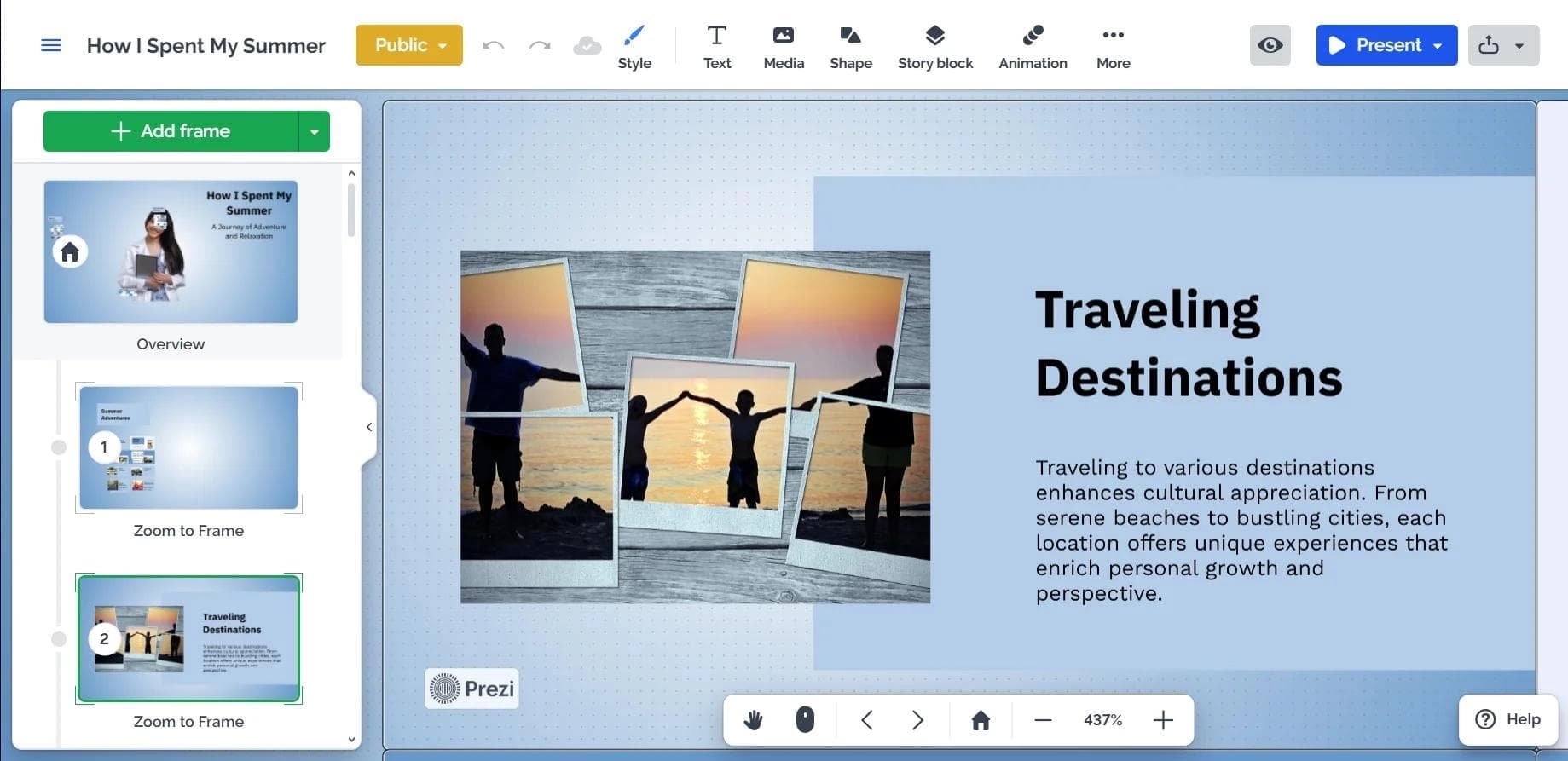
Instead of sequentially flipping through slides, a presentation in Prezi is a single canvas that can be navigated in any direction. This allows viewers to see the big picture and details depending on the context of the presentation. AI algorithms analyze uploaded content and automatically place elements on the map, creating dynamic transitions between semantic blocks.
Key capabilities of the service
In addition to presentation generation, the platform includes a built-in image generator, tools for creating charts and tables, video presentation recording, as well as support for teamwork with real-time commenting. Corporate users can configure a unified brand book and export finished projects to PDF.
Prezi characteristics
| Characteristic | Value |
|---|---|
| Type | Presentation platform |
| Categories | Pitch decks and presentations, Presentations and reports, Diagrams and charts |
| Interface language | English |
| Russian query support | Yes |
| Platforms | Web version, desktop app (Windows, macOS) |
| Free plan available | Yes (basic functionality) |
| Business model | Freemium |
Who is Prezi suitable for?
Students and teachers
Prezi is convenient for academic presentations: students can quickly create visual projects from text materials, and teachers can transform lectures into interactive maps that are easier for audiences to grasp. The ability to select the audience type (business, academic, or personal) helps the AI choose the design style more accurately.
Marketers and designers
For marketers, the platform is useful for creating pitch decks, reports, and product presentations. Designers will appreciate tools for working with charts, a built-in image library, and the ability to record video presentations. The nonlinear structure allows building unexpected demonstration scenarios, which is especially important in creative industries.
Business users
Entrepreneurs and managers use Prezi for corporate reports, strategy sessions, and negotiations. Setting up a unified brand book simplifies adherence to corporate style, and teamwork with real-time comments speeds up project approval within the company.
How to use Prezi
Registration and getting started
To get started, you need to register on the prezi.com website. In your personal account, click "Create new" and select "Presentation". The system will prompt you to enter a topic or upload ready-made materials — text, documents, or an existing presentation. Additionally, you can specify the audience type so that the AI selects the structure and design more accurately.
Presentation creation process
After uploading the data, the artificial intelligence generates a unique design and builds the visual logic of the narrative. The user can edit the result using the built-in editor: add text, images, videos, and customize fonts, colors, and background. Dynamic animated transitions between map elements are available.
Presentation and export
The finished project can be saved and a presentation method chosen — online (with video conferencing integration) or offline. The platform supports recording video presentations with speaker notes and timers. Export to PDF is available for archival storage or printing.
Main features of Prezi
AI-powered presentation generation
Based on a text description or uploaded materials, the neural network creates a presentation with the required number of slides. The design is generated uniquely for each project rather than from fixed templates. The built-in editor allows adding images, text, videos, as well as using a library of millions of images, icons, GIFs, and stickers.
Interactive capabilities
Prezi creates nonlinear presentations in the form of an interactive map where you can move between semantic blocks without a strict sequence. The platform offers dynamic animated transitions, tools for building charts and tables, as well as video presentation recording with the ability to conduct online presentations.
Teamwork and customization
The service supports working in a team with real-time comments. Corporate users can configure a unified brand book to maintain corporate style. Individual recommendations for improving the project and video conferencing integration are available.
Advantages of Prezi
Quick creation of unique design
The AI generates a unique design for each presentation rather than picking from a set of templates. This saves time on formatting and design, especially when working with large volumes of text. The ability to import existing files lets you transform old presentations into an interactive format without fully recreating the content.
Accessible basic functionality
Basic functionality is available for free, allowing you to evaluate the platform's capabilities without financial investment. The service works both in a web version and through desktop applications for Windows and macOS, providing convenience across different devices.
Support for Russian-language queries
Despite the English-language interface, the neural network understands queries in Russian. This simplifies work for users who are not fully fluent in English but want to use AI capabilities to create presentations.
Disadvantages of Prezi
English-only interface
The platform's main drawback is the lack of Russian interface localization. This can create difficulties for users who do not have a sufficient command of English. All menus, settings, and prompts are displayed in English, even though the neural network understands Russian-language queries.
Limitations of the free plan
The free plan provides access only to basic functionality. For expanded capabilities — working without functional limitations, full access to image generation, and teamwork tools — you need to purchase a paid subscription.
What problems does Prezi solve?
Creating presentations from text and documents
Prezi solves the problem of quickly turning text materials, documents, or existing presentations into visually designed projects. The user does not need to select the design and structure themselves — the AI automatically builds the narrative logic.
Creating nonlinear interactive presentations
Instead of the traditional linear slide-by-slide format, the platform allows creating interactive maps. This solves the problem of visually demonstrating complex concepts where it is important to show both the big picture and details in context.
Creating pitch decks, reports, diagrams, and charts
Prezi is suitable for preparing various types of documents: pitch decks for investors, reports for management, and diagrams and charts for illustrating data. Built-in chart and table tools simplify the visualization of numerical information.
Prezi pricing
Prezi operates on a freemium model: free access is provided to basic functionality that allows creating presentations with limited capabilities. For expanded features — full access to image generation, advanced teamwork tools, and removal of limits on the number of projects — you need to purchase a paid subscription. The exact subscription price is not listed on the official website; current prices can be confirmed during registration.
Terms of use for Prezi
Registration on the prezi.com website is required to use the platform. The user creates a personal account where they can manage projects, settings, and subscription. Terms of use include compliance with the service's rules regarding content upload, copyright, and confidentiality. Detailed terms are available in the relevant sections of the website during registration.
Prezi availability
The service is available as a web version through a browser, as well as desktop applications for Windows and macOS. The interface is in English, but the neural network understands Russian-language queries. No information about regional restrictions or the need to use a VPN is provided on the official pages — the service is available to users in most countries around the world through standard internet access.
How Prezi differs from its alternatives
The main difference between Prezi and other presentation platforms is its nonlinear structure in the form of an interactive map instead of the traditional sequential slide-by-slide format. While alternatives such as Beautiful.ai or Deliverables AI offer slide generation with adaptive design, Prezi changes the very logic of the narrative, allowing viewers to move between semantic blocks in any order.
In addition, Prezi generates a unique design for each specific piece of content rather than selecting from a set of templates. The service also stands out with its built-in image generator, video conferencing integration, and the ability to record video presentations with speaker notes. For corporate users, configuring a unified brand book is important, which is not always available in similar solutions.
Conclusion
Prezi is a presentation platform with neural network features that allows you to quickly generate slides based on a description, add multimedia, and use dynamic animations. The service's main feature is its nonlinear structure in the form of an interactive map, which sets it apart from traditional tools. Basic functionality is available for free, but the interface works only in English. Prezi is suitable for students, teachers, marketers, designers, and business users who need to quickly create visually appealing and unconventional presentations.