

Kimi AI
Multifunctional AI assistant for processing large volumes of text, analyzing files, and automating work tasks.
Overview
Kimi AI
Description of the Kimi AI neural network
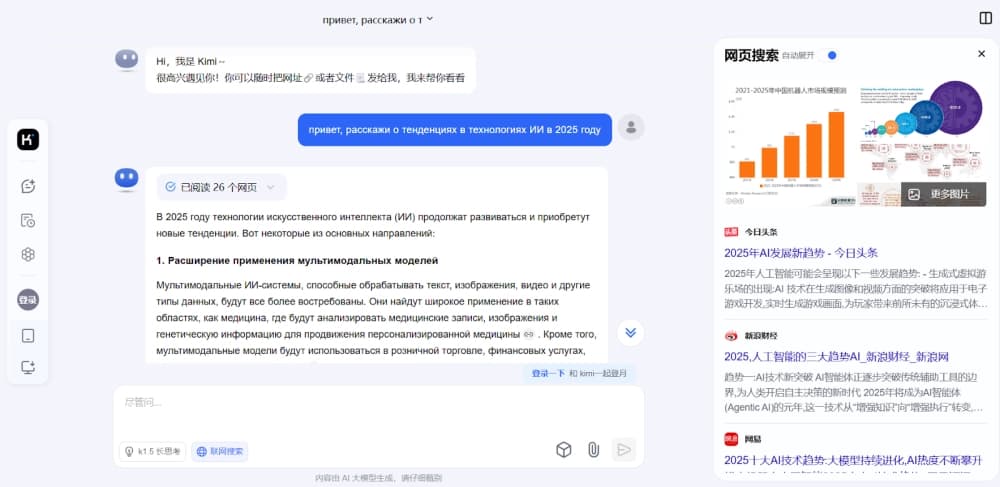
Kimi AI is a multifunctional neural network designed to process large volumes of text, analyze uploaded files, and automate work tasks. The tool can handle long documents of up to 200,000 characters, including images and PDF files.
Service positioning
Kimi AI was designed as a universal assistant for working with information. It is not just a chat with a large context, but an environment where a task moves from the initial request to a finished result. The neural network simplifies working with large volumes of data and attracts users with its speed, accuracy, and accessibility.
Primary purpose
The main focus is on working with long documents: summarization, extracting key data, and carrying on a dialogue with the artificial intelligence. In addition, an agent mode is available that allows tasks to be completed from the initial request to a finished file.
Characteristics of Kimi AI
| Characteristic | Value |
|---|---|
| Type | Text generator |
| Price | Free |
| Distribution model | Freemium |
| Text processing volume | Up to 200,000 characters |
| File analysis | Images, PDF |
| Agent mode | Yes |
Who is the Kimi AI neural network suitable for?
Kimi AI will be useful for users who regularly work with large volumes of text information and documents.
Professionals working with long documents
The tool is aimed at those who need to summarize lengthy texts, extract key data from them, and organize information. These may include analysts, researchers, and other specialists who work with large data sets.
Users who need a finished result
Since the service supports agent mode, it suits those who need to take a task to a final working format rather than just get an answer in a chat. If the tasks are long, there are many documents, and the result is needed in a working format, the platform deserves attention.
How to use the Kimi AI neural network?
Using Kimi AI revolves around processing text and files in a conversational mode.
Working with text
Simply upload or paste a long text, and the neural network will help summarize it, extract key data, or simply hold a conversation about the document's contents.
Working with files
The tool supports analyzing uploaded files, including images and PDFs. You can upload documents and ask the model to process them, extract information, or convert them into the desired format.
Agent mode
For more complex scenarios, agent mode is available, in which a task is completed from the initial request to a finished result without the need for constant user intervention.
Key features of Kimi AI
Processing large volumes of text
The neural network can work with texts of up to 200,000 characters, allowing long documents to be processed in full without losing context or needing to split the material.
Summarization and data extraction
Kimi AI condenses documents and highlights key information from them, which speeds up work with voluminous materials.
Working with files
The tool analyzes uploaded images and PDF documents, allowing file contents to be processed in a dialogue.
Agent mode
Allows a task to be run from start to finish, producing a finished result in a working format.
Advantages of Kimi AI
Large context
The ability to process up to 200,000 characters of text makes the tool convenient for working with long documents without data loss.
Free entry
The free plan allows the model and agent mode to be evaluated without payment, which lowers the barrier to entry for new users.
Multifunctionality
Combining text processing, file analysis, and agent mode in a single service saves time and eliminates the need to use several tools.
Accessibility
The service attracts users with its speed and accuracy, as well as ease of use.
Drawbacks of Kimi AI
Limitations of paid plans
New subscriptions are currently not being sold. Until slots become available, it will not be possible to fully evaluate the higher-tier plans — with parallel tasks, a swarm of agents, and a cloud assistant.
Organizational challenges
The main caveat at the moment is organizational in nature: the lack of open subscriptions limits new users' access to the platform's advanced features.
What tasks does Kimi AI solve
Kimi AI covers a wide range of tasks related to information processing and automating routine work with texts.
Processing long documents
The neural network helps work with large volumes of text while preserving the integrity and context of the source material.
Data analysis and organization
The tool simplifies extracting key data from documents, which is useful when preparing summaries, reports, and analytical materials.
Automating tasks to a finished result
Thanks to agent mode, the service delivers tasks to a final result in a working format, allowing routine work stages to be delegated to the artificial intelligence.
Kimi AI pricing
Kimi AI operates on a freemium model. The free plan provides the opportunity to evaluate the model and agent mode without any payments.
Paid plans unlock additional capabilities such as parallel tasks, a swarm of agents, and a cloud assistant. However, new subscriptions are not currently being sold, so until slots open up, it is not possible to fully evaluate the higher-tier plans and their pricing.
Kimi AI terms of use
Basic access to the service is provided free of charge: users can use the model and agent mode without paying and assess the tool's capabilities.
Advanced features are tied to paid plans. However, new subscriptions cannot be purchased at the moment — sales have been paused, and onboarding new users to paid plans is temporarily limited. This is important to keep in mind when planning to use the service on a paid basis.
Availability of Kimi AI
The service is available via a web interface on the official website, which is linked from thematic tool directories. Basic features, including processing large volumes of text and agent mode, are available free of charge.
At the same time, the availability of paid plans is currently limited: new subscriptions are not being sold, and slots for them have not yet been opened. Thus, new users' ability to fully evaluate all the platform's capabilities is currently limited.
How Kimi AI differs from alternatives
The main difference of Kimi AI is its ability to process up to 200,000 characters of text at once, allowing you to work with long documents in full without splitting them or losing context.
In addition, the service stands out by combining file analysis (including images and PDFs), summarization, data extraction, and agent mode in one tool, taking a task from the initial request to a finished result. Such a combination of features is rarely found in similar tools, which usually cover only some of these scenarios.
Another important difference is the distribution model: the free plan lets users evaluate the service before moving to paid plans, although purchasing those plans is currently unavailable to new users.
Conclusion
Kimi AI is a multifunctional assistant that has grown from a simple chat with a long context into a full-fledged environment for processing large volumes of text, analyzing files, and automating tasks. The ability to work with documents of up to 200,000 characters, summarize them, extract key data, and deliver tasks to a finished result through agent mode makes the tool valuable for specialists working with large amounts of information. The main limitation today is the organizational pause in the sale of paid subscriptions, which means new users can currently only evaluate the free functionality. Despite this, the platform is worth keeping an eye on for anyone whose tasks are long, whose documents are numerous, and whose results are needed in a working format.
Frequently asked questions
Similar AI tools





See also
A sales automation platform that combines customer prospecting, deal management, and AI-powered forecasting.
AI editor for creating, editing, and publishing content with templates and prompts.

Financial platform with an AI assistant for managing accounting, taxes, and budgets.

Platform for interview preparation with AI mock interviews and real-time support.
Enterprise language model platform focused on privacy and on-premise deployment.


AI assistant for creating short summaries of videos, PDF documents, and web pages.


AI email assistant that helps quickly draft messages, adapting to the user's style.


Free online platform with over 150 AI tools for working with PDFs, images, videos, and text.