

Grok AI Chat & Video for iPhone
Mobile application from xAI that combines a chatbot with search for up-to-date information, image and video generation, and integration with the X social network.
Overview
Grok AI Chat & Video for iPhone
Description of Grok AI Chat & Video for iPhone
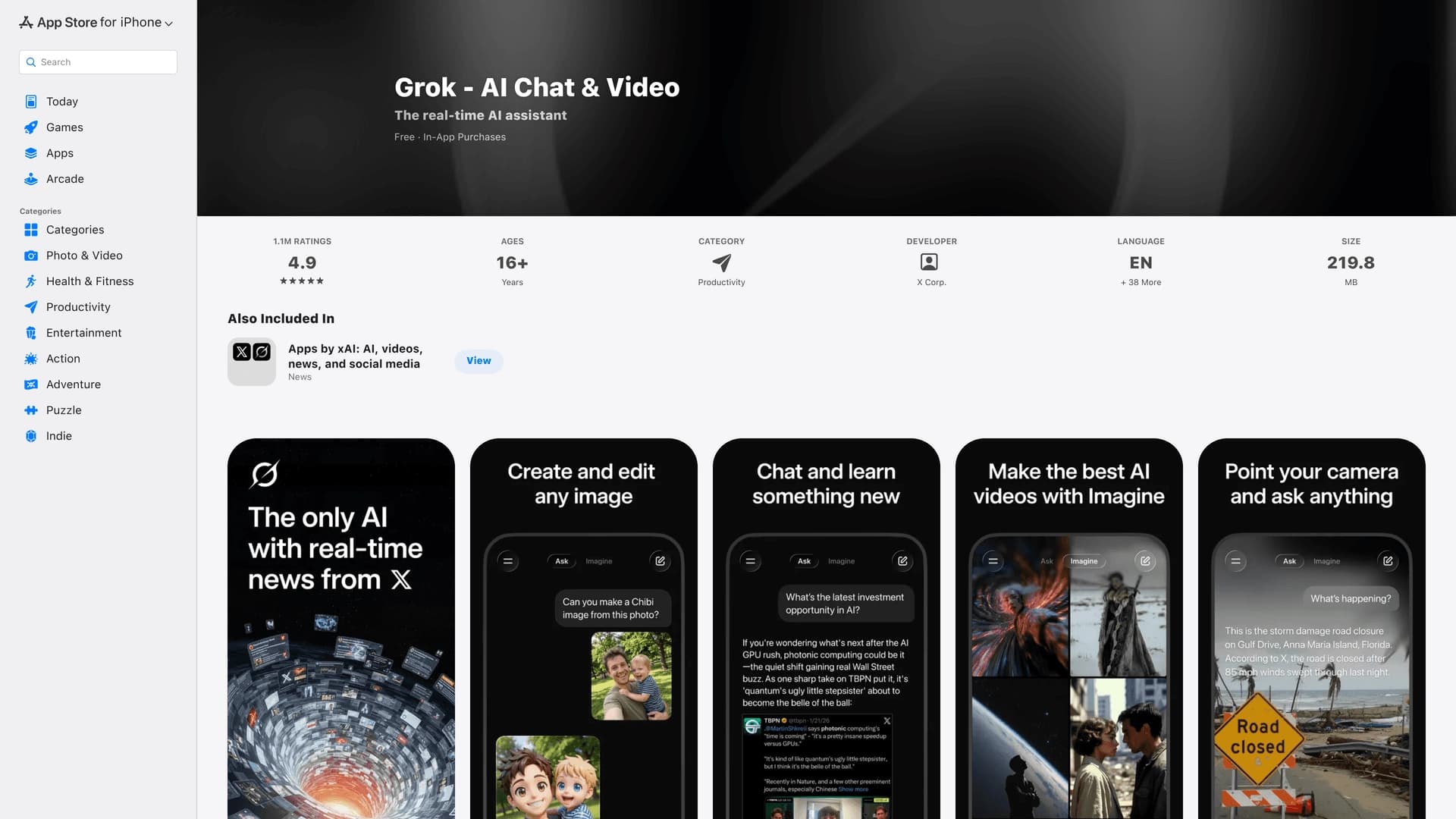
Grok AI Chat & Video is a mobile app developed by xAI that combines a chatbot, a search tool, and a visual content generator. The main feature of the neural network is deep integration with the social network X (Twitter), allowing the assistant to draw on current discussions, news, and trends when generating responses. The app is available on iOS and is designed for iPhone users who appreciate an informal, direct communication style and want to get not only text answers but also images and videos right on their phone.
Core concept of the app
The developers at xAI bet on combining real-time information search with generative AI. Grok doesn’t just answer questions — it analyzes context from the social network X, making its answers more relevant to the current agenda. At the same time, the assistant’s communication style is noticeably different from competitors: it is bolder, more direct, and less formal.
What Grok can do on iPhone
Users can chat with the AI, request news and trend searches, and generate images and short videos. All features are available in a single mobile app interface, which is convenient for quick on-the-go tasks — from finding information to creating visual ideas.
Grok AI Chat & Video for iPhone specifications
| Specification | Value |
|---|---|
| Type | Mobile app |
| Developer | xAI |
| Platform | iOS (iPhone) |
| Categories | Search and analysis, Image generation, Code assistants |
| Publication date | May 1, 2026 |
| Model | Grok 4 |
| Key features | Chat, search, image and video generation |
| X integration | Yes, uses X context |
Who is Grok AI Chat & Video for iPhone suitable for?
Users who need up-to-date information
The app is suitable for those who want answers based on the latest news and discussions. Thanks to X integration, Grok can reference real posts and trends, making it useful for people tracking the agenda in real time.
Fans of informal communication
Grok’s communication style is one of its main selling points. If you are tired of overly polite, formulaic answers from other assistants, Grok offers a more direct and bold tone. This will appeal to those looking for an AI with personality.
Content creators on mobile devices
Built-in image and video generation features make the app a handy tool for quick visual ideas, short scripts, and drafts. All of this is available directly on iPhone, without needing to switch to desktop solutions.
How to use Grok AI Chat & Video for iPhone
Installation and first launch
The app is available for download in the App Store. After installation, you need to sign in with your X (Twitter) account — this is mandatory for the app to work, since many features rely on social network context.
Working with chat and search
The main interface is a dialog window where you can enter text queries. Grok analyzes the question, accesses up-to-date data from X, and produces an answer based on current discussions. Search works both in real time and across the post archive.
Generating visual content
To create an image or video, simply describe the desired result in text. The neural network processes the request and outputs the finished content. All actions are performed within a single app, which simplifies creative experimentation on the go.
Key features of Grok AI Chat & Video for iPhone
Chat with the Grok 4 AI assistant
At the core of the app is the Grok 4 model, which supports conversational mode. The assistant understands conversation context, remembers chat history, and responds in its signature informal style.
Information search based on news and trends
Grok can search current data using X posts. This sets it apart from ordinary search engines: answers are shaped by what real users are discussing right now.
Image and video generation
The app lets you create visual content from a text description. This covers both static images and short videos, expanding the tool beyond text-based communication.
Using X context
Deep integration with the X platform means Grok sees the context of your feed, discussions, and trends. This makes answers more personalized and tied to the real agenda.
Advantages of Grok AI Chat & Video for iPhone
Up-to-date answers thanks to X integration
The app’s biggest plus is access to live discussions and news. Grok doesn’t rely only on static knowledge bases; it uses data from the social network, which is especially valuable for questions about current events.
Bold and informal communication style
Many users choose Grok precisely for its tone. Unlike the cautious wording of Claude or ChatGPT, Grok responds more directly, making conversations lively and natural.
Support for text, images, and video
The app is not limited to one format. You can chat in text and then immediately ask the AI to generate an image or short video — all in one interface.
Convenience of the mobile format
Everything works on iPhone and requires no additional equipment or desktop access. This is convenient for quick tasks on the go or during breaks.
Drawbacks of Grok AI Chat & Video for iPhone
Dependence on account, region, and plan
Some of the app’s features may be unavailable depending on your X account, your region, and your subscription plan. This limits functionality for some users.
Not suitable for calm, business-style editing
If you need a carefully polished, calm, and businesslike tone — for example, for official correspondence or corporate documents — Grok may be too blunt. In such cases, Claude or ChatGPT are often more convenient.
What tasks does Grok AI Chat & Video for iPhone solve?
Quick overview of news and trends
The app helps you quickly understand the current agenda. Just ask a question, and Grok provides a snapshot of what is being discussed on X, with links to relevant posts.
Finding information based on discussions on X
If you need to learn people’s opinions, gather feedback, or understand audience sentiment on a specific topic, Grok effectively uses social network context to shape its answer.
Generating images and short videos on demand
For creative tasks, the app lets you quickly create visual materials — from illustrations to short video scenes. This is useful for sketching ideas, social media content, or simply experimenting.
Grok AI Chat & Video for iPhone pricing
No pricing information for the app was available in the provided sources. For current details on usage costs and available plans, please refer to the official xAI website or the app’s page in the App Store.
Terms of use for Grok AI Chat & Video for iPhone
Some app features depend on the user’s account, region, and selected plan. The exact terms of use are set by the developer — xAI — and may vary across user categories. We recommend reviewing the user agreement before getting started.
Availability of Grok AI Chat & Video for iPhone
The app is available for download on iPhone via the App Store. The provided sources do not mention regional restrictions, but it is noted that features may depend on the user’s region.
How Grok AI Chat & Video for iPhone differs from alternatives
Competitors: Claude and ChatGPT
The main alternatives to Grok are Claude and ChatGPT. Both offer similar chatbot functionality with search and content generation. However, their communication style is noticeably calmer and more formal.
Grok’s strengths
If fresh discussions, X social network context, and an informal tone matter to you, Grok looks like the better choice. It is more attuned to the current agenda and adapts faster to trends thanks to direct access to X data.
When to choose a different tool
If you need extremely calm, businesslike, and polished text editing — for example, for official documents or corporate correspondence — Claude or ChatGPT may be more suitable.
Conclusion
Grok AI Chat & Video for iPhone is an app from xAI that combines chat, search, and image and video generation, drawing on X social network context. It suits those who value up-to-date information and an informal communication style. At the same time, keep in mind that some features depend on region, account, and plan, and for calm business editing, alternatives like Claude or ChatGPT may be a better fit.
Frequently asked questions



See also
A sales automation platform that combines customer prospecting, deal management, and AI-powered forecasting.
AI editor for creating, editing, and publishing content with templates and prompts.

Financial platform with an AI assistant for managing accounting, taxes, and budgets.

Platform for interview preparation with AI mock interviews and real-time support.
Enterprise language model platform focused on privacy and on-premise deployment.


AI assistant for creating short summaries of videos, PDF documents, and web pages.


AI email assistant that helps quickly draft messages, adapting to the user's style.

Multifunctional AI platform for content creation: generation of texts, images, videos, and presentations.