

Blackbox AI
An AI platform that helps developers write, improve, and understand code.
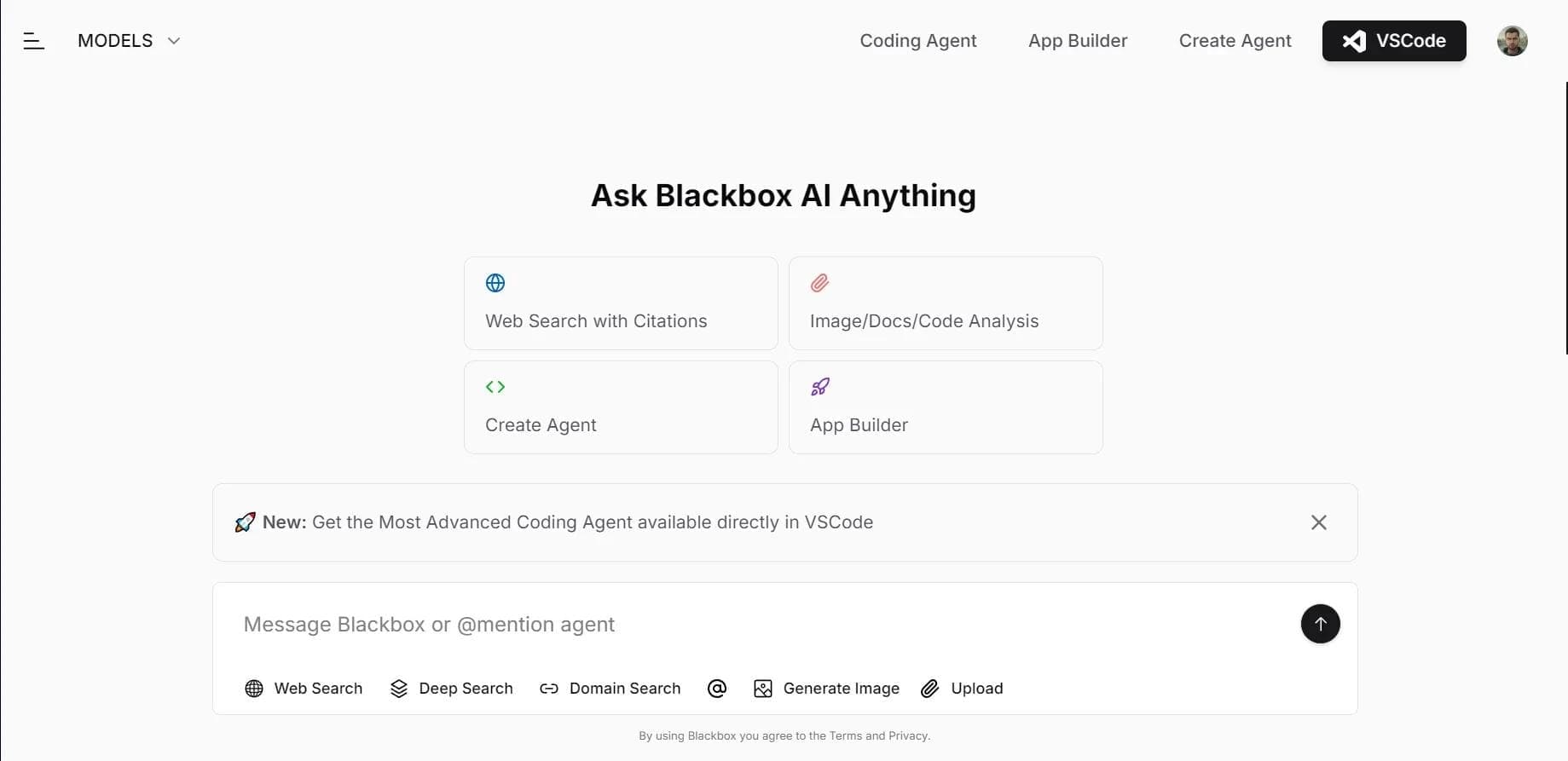
Overview
Blackbox AI
Description of the Blackbox AI neural network
Blackbox AI is an artificial intelligence platform designed to help developers work with software code. The tool can generate entire blocks of code from a text description, offer autocomplete while writing, find the right fragments in repositories, and improve existing code.
The platform fits well into a programmer's workflow: it integrates with popular development environments, including Visual Studio Code, and supports many programming languages. Blackbox AI is also used for data analysis and extracting practical insights from it.
Key idea of the tool
The main goal of Blackbox AI is to speed up development by automating routine operations. Instead of manually writing every piece of code or searching for solutions in documentation, a developer can describe the task in words and get a ready-made result.
Who the platform is for
The service is aimed primarily at software developers of all levels — from beginners who need to understand someone else's code to experienced specialists looking to speed up routine tasks.
Blackbox AI characteristics
| Characteristic | Value |
|---|---|
| Type | Platform for automatic code generation using artificial intelligence |
| Categories | Code generation, Code assistants, AI assistants, Automation |
| Free plan | Yes (the neural network is available for free) |
| Distribution model | Freemium |
| Russian language support | Yes (the chatbot understands requests in Russian and English) |
| Website | www.blackbox.ai |
| Supported IDEs | Visual Studio Code and other popular IDEs |
| Main programming languages | Python, JavaScript, Java and others |
| Target audience | Software developers |
Who is the Blackbox AI neural network suitable for?
Software developers
The main audience of the tool is programmers who need a helper when writing, reading, and improving code. Blackbox AI works well both for commercial projects and for personal tasks and educational purposes.
Specialists working with large volumes of code
The platform will be useful for those who often need to quickly find the right fragments in existing repositories, understand someone else's code, or optimize complex algorithms.
Beginner developers
Thanks to the code explanation feature and text-based generation, the tool helps newcomers learn programming languages faster and understand how typical solutions are structured.
How to use the Blackbox AI neural network?
Registration on the website
The first step is to create an account on the official platform website. Registration unlocks access to the main features of the service and allows you to sync work between the website and the extension.
Installing the extension in an IDE
After registration, you need to install the free Blackbox extension into your development environment — for example, Visual Studio Code or another supported IDE. The plugin connects to your workspace and starts suggesting code.
Getting started with code
Launch your development environment, choose a programming language, and start working. The system will begin offering autocomplete suggestions, generating code from descriptions, and helping with optimization, adapting to your writing style.
Main features of Blackbox AI
Code generation and autocomplete
The platform can create entire blocks of code from a text description of the task, as well as suggest continuations as you type. This saves time on standard constructs and reduces the likelihood of syntax errors.
Code search and explanation
The tool helps find the needed fragments in repositories, saving you from manually going through files. In addition, Blackbox AI can explain how a particular piece of code works, which is especially valuable when studying other people's projects.
Optimization and analysis
The service analyzes existing code, identifies potential problems, and suggests ways to fix them. It also helps optimize complex algorithms and is used for data analysis to draw practical conclusions.
Integration and adaptation
A key feature is integration with popular IDEs and support for many programming languages. The system adapts to the coding style of each developer, making suggestions as natural as possible for their way of working.
Advantages of Blackbox AI
Development speed and quality
The tool significantly speeds up the programming process by automating routine tasks. Code suggestions help reduce the chance of errors and achieve a higher-quality result in less time.
Accessibility and ease of getting started
The neural network is available for free, which makes it attractive to a wide range of developers. Installing the extension requires no complex setup — registration and connecting the plugin to an IDE are enough.
Russian language support and compatibility
The platform understands requests in both Russian and English, which expands its audience. Integration with common development environments lets you use the tool in your usual workspace.
Drawbacks of Blackbox AI
Dependence on description quality
As with most code generation tools, the quality of the result directly depends on how accurately and thoroughly the task is described in words. Vague requests can lead to unexpected or unsuitable solutions.
Free plan limitations
Although the basic version is available for free, the freemium model means that some advanced features may be limited or require a paid subscription. It is worth checking the current plan terms on the official website in advance.
Need to review the output
Generated code still requires the developer's attention. The tool speeds up work but does not remove the need to check ready-made fragments for correctness and security before using them in projects.
What tasks does Blackbox AI solve?
Automation of routine operations
The platform handles repetitive tasks when writing code — from standard constructs to finding suitable fragments in existing repositories. This frees up developer time for more complex and creative work.
Getting recommendations and improving code
The service helps you get recommendations for writing and improving code, analyzes existing solutions, and identifies potential problems. Complex algorithms can be optimized with the platform's hints.
Learning and analyzing existing code
With its code explanation feature, the tool helps you pick up new languages faster and understand other people's projects. This makes the platform useful not only as a work tool but also as a learning aid.
Blackbox AI pricing
Free access
The neural network is available for free — this is one of the platform's key advantages. Developers do not need to pay for the basic functionality; simply register on the website and install the extension in your development environment.
Additional features
The platform operates on a freemium model, meaning there are paid plans with extended functionality. The exact terms and cost of additional features should be checked on the official service website, as they may change.
Terms of use for Blackbox AI
To start using the platform, you need to register on the website and install the free plugin in your development environment. After that, choose a programming language and connect the extension to your workspace.
The main workflow involves using the tool alongside an IDE — for example, Visual Studio Code. The platform's chatbot understands requests in both Russian and English. Before getting started, it is recommended to review the current service terms on the official website to account for all the nuances and plan limitations.
Availability of Blackbox AI
The tool is available as an extension for popular development environments, including Visual Studio Code and other common IDEs. This lets you use it in your familiar workspace without switching between services.
The platform supports Russian and English, so developers from different countries can use it. To get started, simply register on the official website and install the free extension — after that, you can immediately begin generating and improving code.
How Blackbox AI differs from alternatives
Free access and Russian language support
Unlike many competitors that require a full paid subscription, Blackbox AI offers free access to the neural network. Russian language support makes the tool more accessible to Russian-speaking developers who are not always comfortable phrasing requests in English.
Broad coverage of tasks
Many alternatives focus on a single function — for example, only generation or only autocomplete. Blackbox AI combines generation, autocomplete, fragment search, explanation, and code optimization, covering several developer needs at once.
Simple integration and adaptation to style
The platform easily integrates into popular IDEs and adapts to each user's coding style. This sets it apart from services that either do not offer editor integration or do not account for an individual developer's writing style.
Conclusion
Blackbox AI is a free AI tool for developers that speeds up programming through code generation, autocomplete, search, and optimization. The platform integrates with popular development environments, including Visual Studio Code, supports many programming languages, and understands requests in Russian. Thanks to its combination of accessibility, broad functionality, and ease of installation, the service suits both beginning and experienced developers looking to speed up routine tasks and improve the quality of their code.
Frequently asked questions
See also

Autonomous cloud-based AI agent that independently plans and executes complex multi-step tasks based on a textual description of the goal.

Multimodal neural network from Google that processes text, images, code, and audio in a conversational format.
An open-source desktop AI agent that stores conversation history in a local knowledge base and automatically pulls relevant context into new discussions.

A set of built-in AI features in the Figma editor for automating routine designer tasks.
A service that translates legal documents from professional legal language into plain, easy-to-understand text.

AI platform for automating educational tasks for teachers and students.

A community for daily discovery and discussion of new technology products.
AI tool for rapid data visualization via OpenAI API, transforming heterogeneous datasets into detailed graphical representations.