
WebSim
Онлайн-платформа, которая превращает текстовые запросы в сайты, игры и интерактивные приложения прямо в браузере.
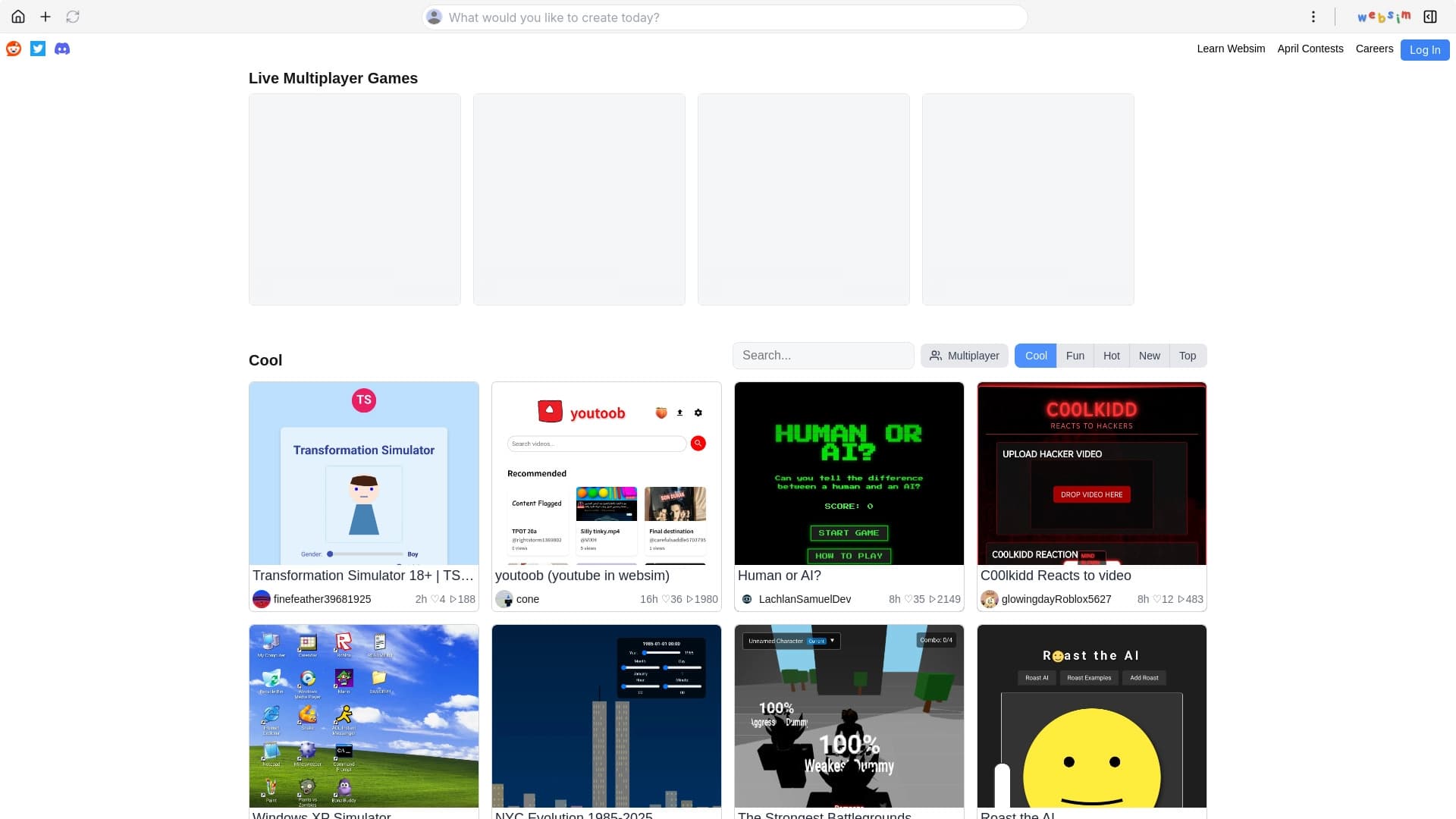
Обзор
WebSim
Описание нейросети WebSim
WebSim — это онлайн-платформа, которая превращает текстовые запросы в полноценные сайты, игры и интерактивные приложения прямо в браузере. Сервис работает на базе языковых моделей, таких как Claude 3.5 Sonnet и GPT-4o, которые автоматически генерируют код, дизайн и функционал по описанию пользователя.
Как устроена платформа
Вместо классического конструктора с перетаскиванием элементов WebSim предлагает общаться с нейросетью на естественном языке. Достаточно написать, что вы хотите получить, — и сервис соберёт страницу или приложение за секунды. Созданные проекты можно дорабатывать с помощью уточняющих запросов.
Среда сообщества
WebSim — это не только инструмент генерации, но и живая социальная лента. Пользователи публикуют свои интерактивные эксперименты, симуляторы, мини-игры и другие веб-проекты, которые другие участники могут смотреть, оценивать, комментировать и переделывать. По сути, это платформа, где проекты постоянно эволюционируют благодаря ремиксам.
Характеристики WebSim
| Характеристика | Значение |
|---|---|
| Тип | Онлайн-платформа для создания сайтов, приложений и игр из текста |
| Категория | Конструкторы сайтов и интерфейсов, генерация кода |
| Поддерживаемые модели ИИ | Claude 3.5 Sonnet, GPT-4o, Opus, Haiku |
| Язык ввода запросов | Естественный язык, псевдокод, фейковые ссылки |
| Формат вывода | HTML, CSS, JavaScript |
| Бесплатный тариф | Да |
| Ценообразование | Полностью бесплатно |
| Веб-сайт | websim.ai |
| Дата публикации на сайте | 25 марта 2025 |
Для кого подходит нейросеть WebSim?
Разработчики и фрилансеры
Профессиональным разработчикам WebSim помогает ускорить создание сайтов и прототипов. Вместо написания кода с нуля можно быстро сгенерировать основу проекта, а затем доработать её вручную. Для веб-разработчиков это удобный способ сэкономить время на рутинных задачах.
Новички без опыта в программировании
Начинающим разработчикам, дизайнерам, блогерам и предпринимателям WebSim открывает доступ к созданию веб-страниц без глубоких знаний кода. Понятный интерфейс и возможность управлять проектом с помощью текстовых запросов делают процесс интуитивно понятным.
Творческие люди и экспериментаторы
Платформа также привлекает тех, кто любит экспериментировать, тестировать концепции и развлекаться. Это пространство, где можно быстро воплотить любую идею — от простой игры до абсурдного интерактивного эксперимента — и поделиться ею с сообществом.
Как использовать нейросеть WebSim?
Регистрация и вход
Для начала работы необходимо авторизоваться на платформе websim.ai — доступна регистрация через Google или Discord. Аккаунт требуется для сохранения и публикации собственных проектов, тогда как просмотр и игра в чужие работы доступны и без него.
Создание проекта через запрос
После входа откройте встроенный виртуальный браузер и введите текстовый запрос на естественном языке, например «Сайт-визитка для фотографа». Выберите модель ИИ (например, Sonnet или Opus) — и сервис мгновенно сгенерирует страницу, игру или приложение.
Редактирование и публикация
Готовый проект можно уточнять с помощью дополнительных запросов, добавлять новые страницы и дорабатывать функционал. После этого проект сохраняется, его можно публиковать на платформе, делиться с сообществом или разворачивать через GitHub Pages.
Основные функции WebSim
Генерация веб-проектов из текста
WebSim создаёт сайты, игры и прототипы приложений на основе HTML, CSS и JavaScript по текстовому описанию. Генерация происходит за секунды, причём создаются не только статичные страницы, но и динамичные симуляции, 3D-галереи и простые игры.
Поддержка нескольких моделей ИИ
Пользователь может выбирать, какую языковую модель задействовать для генерации — среди доступных Claude 3.5 Sonnet, GPT-4o, Opus и Haiku. Это даёт гибкость в управлении качеством и характером результатов.
Работа с запросами и шаблонами
Платформа поддерживает ввод запросов на естественном языке, а также использование псевдокода и фейковых ссылок для более точного управления генерацией. Встроенная библиотека шаблонов позволяет быстро начать проект с готовой основы.
Сохранение, обмен и деплой
Созданные проекты можно сохранять для дальнейшего редактирования, публиковать для сообщества и разворачивать через интеграцию с платформами вроде GitHub Pages. Редактирование возможно без глубоких знаний программирования.
Социальная механика
Платформа работает как лента творческих проектов с вкладками — горячее, подборки для вас, топ за день или месяц и новинки. Пользователи могут ставить лайки, комментировать, просматривать авторские страницы и создавать ремиксы чужих работ.
Преимущества WebSim
Лёгкость и доступность
Главное преимущество — простота. Создать сайт или игру можно за секунды, не обладая навыками программирования, а интерфейс понятен новичкам. Сервис работает через любой браузер без установки ПО.
Бесплатный доступ
WebSim полностью бесплатен для всех пользователей — платных тарифов и подписок на текущий момент нет. При этом проект поддерживает несколько мощных моделей ИИ, что делает бесплатный доступ особенно ценным.
Гибкость и скорость
Платформа ускоряет прототипирование и позволяет быстро тестировать концепции. Благодаря поддержке нескольких моделей и широкому набору шаблонов можно создавать как простые страницы, так и динамичные интерактивные эксперименты.
Недостатки WebSim
Ограничения в глубокой настройке
По гибкости дизайна WebSim уступает традиционным конструкторам вроде Squarespace. Возможности тонкой настройки внешнего вида страниц ограничены по сравнению с более специализированными платформами.
Неопределённость будущего тарифов
Разработчики намекают на возможное введение платных функций или ограничений на количество генераций в будущем. Сейчас сервис бесплатен, но нельзя исключать появления платных опций.
Какие задачи решает WebSim
Создание сайтов и приложений
WebSim автоматически генерирует веб-страницы и веб-приложения, превращает текстовые идеи в полноценные сайты и позволяет быстро прототипировать — полезно как для личных проектов, так и для тестирования концепций.
Создание игр и симуляций
Платформа позволяет превращать идеи в игры и создавать динамичные симуляции, 3D-галереи и другие интерактивные эксперименты с использованием JavaScript. Это открывает простор для творчества и развлечения.
Упрощение веб-разработки
WebSim делает процесс веб-разработки доступным для пользователей без навыков программирования, одновременно ускоряя работу опытных разработчиков. Проекты можно создавать, редактировать, сохранять и публиковать в едином рабочем процессе.
Цены WebSim
Сервис полностью бесплатен для всех пользователей. Платных тарифов или подписок на данный момент нет — нейросеть доступна бесплатно. Вместе с тем разработчики допускают, что в будущем могут появиться платные функции или ограничения на количество генераций, поэтому текущие условия могут измениться.
Условия использования WebSim
Для работы с платформой необходима регистрация — авторизация выполняется через Google или Discord. Аккаунт требуется для сохранения и публикации собственных проектов. Играть в чужие работы и смотреть их можно без регистрации.
Доступность WebSim
WebSim — онлайн-платформа, доступная через сайт websim.ai. Сервис работает через любой браузер и не требует установки программного обеспечения. Для полноценного использования нужна авторизация через Google или Discord.
Чем отличается WebSim от аналогов
WebSim часто сравнивают с Wix ADI и Midjourney. Wix ADI требует больше шагов и ориентирован на бизнес-пользователей, тогда как WebSim предлагает больше свободы творчества и экспериментов. Midjourney, в свою очередь, генерирует изображения, а не сайты, поэтому решает совершенно другие задачи. По скорости и простоте WebSim выигрывает у традиционных конструкторов, однако уступает им в глубине настройки дизайна — например, Squarespace даёт больше возможностей для тонкой кастомизации внешнего вида.
Заключение
WebSim — это бесплатный и доступный инструмент для быстрого создания сайтов, приложений и игр из текстовых идей. Он поддерживает несколько мощных моделей ИИ, позволяет вводить запросы на естественном языке и делает веб-разработку доступной даже для новичков, одновременно выступая живой социальной платформой, где сообщество публикует, ремиксирует и оценивает интерактивные проекты. Инструмент подойдёт тем, кто ценит лёгкость воплощения замыслов, скорость прототипирования и свободу творчества, особенно пока доступ остаётся бесплатным.
Тарифы
Часто задаваемые вопросы


Смотрите также


ИИ-платформа для быстрого создания сайтов и управления процессами малого бизнеса.

Генерация рекламных UGC-роликов с виртуальными актерами без реальных съемок.

Расширение для Chrome, которое помогает выигрывать в учебной игре Blooket, подсказывая ответы и автоматизируя действия.

Anakin.ai — это low-code платформа, объединяющая различные AI-модели для создания контента и автоматизации рабочих процессов без программирования.


Платформа на основе ИИ для создания и редактирования изображений и видео товаров для продавцов в электронной коммерции.


Bleepify автоматически находит и заглушает нецензурные слова в видео и аудио.

ИИ-инструмент для автоматизированного ревью кода, который анализирует изменения в реальном времени и предлагает исправления.


Сервис для превращения текста в подкасты с естественно звучащими голосами на разных языках.