
Vocalremover
AI-powered online service for separating music tracks into vocals and instrumental parts.
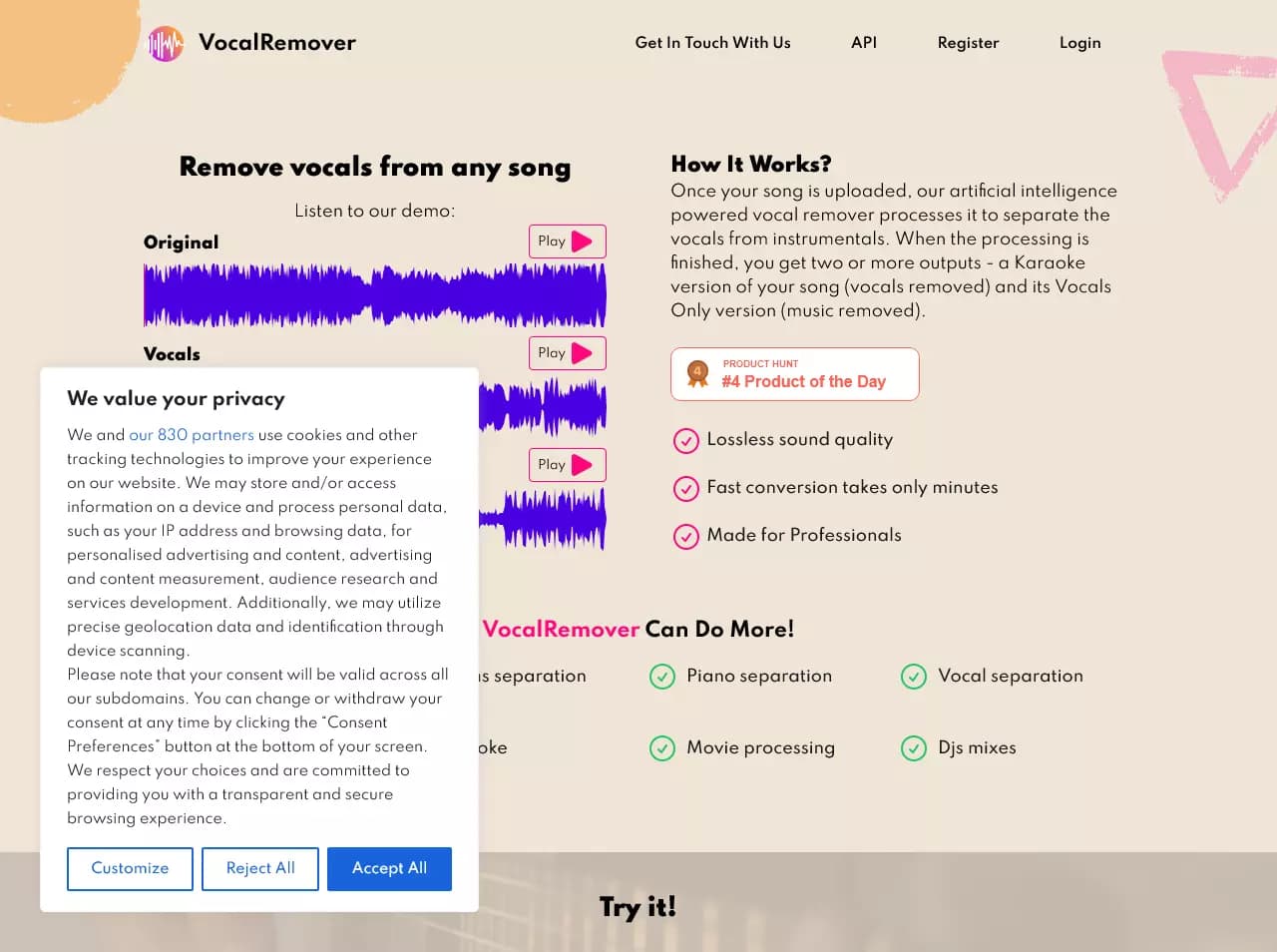
Overview
Vocalremover
Description of the Vocalremover Neural Network
Vocalremover is an online service based on artificial intelligence designed for separating music tracks into vocal and instrumental components. The user only needs to upload an audio file, after which the neural network automatically processes it and produces two results: a karaoke version (instrumental track) and a separately extracted vocal. The service does not require installing additional software or having special skills — all the work is done in the browser.
How the technology works
Vocalremover is based on deep learning algorithms trained on large datasets of music recordings. The neural network analyzes the audio file's spectrogram and separates the sound stream into components corresponding to the voice and musical instruments. Processing takes from a few seconds to a couple of minutes depending on the track's duration and complexity.
Key focus of the service
The service focuses on quickly producing high-quality instrumental tracks and vocal stems without using professional audio editors or complex settings. Vocalremover solves a task that previously required either expensive equipment or skills in working with specialized software.
Vocalremover Characteristics
| Characteristic | Value |
|---|---|
| Type | Online service for removing vocals from music using AI |
| Category | Audio processing, Audio editing, For musicians |
| Business model | Freemium |
| Availability | Web version (online service) |
| Processing method | Artificial intelligence (deep learning) |
| Software installation required | No |
Who is the Vocalremover neural network suitable for?
Musicians and composers
Professional musicians and composers can use Vocalremover to quickly obtain instrumental versions of tracks. This helps when creating remixes, covers, or when working on arrangements where the vocal needs to be separated from the musical accompaniment for further processing.
Music and karaoke enthusiasts
For people who enjoy singing or hosting home karaoke parties, the service makes it possible to quickly turn any song into a karaoke version. No need to search for ready-made instrumental tracks — just upload the original track and get an instrumental version in a couple of minutes.
Content creators
Bloggers, videomakers, and podcast producers often need instrumental tracks for background scoring of their materials. Vocalremover allows them to get such tracks from any composition without infringing copyright, provided the use is personal.
How to use the Vocalremover neural network?
Step 1: Uploading a file
The user goes to the service's website and uploads a music file in a supported format. The interface is intuitive — just click the file selection button or drag the track into the dedicated area.
Step 2: Processing by the neural network
After upload, the AI algorithm automatically begins analyzing and separating the track. The user does not need to adjust parameters or select operating modes — the entire process happens automatically.
Step 3: Downloading the results
Once processing is complete, the service provides two or more files: the instrumental version (karaoke) and the extracted vocal. The user can download each of them separately and use them in their projects.
Vocalremover's Key Features
Removing vocals from tracks
The service's main function is intelligent removal of the voice from a music recording. The neural network removes the vocal part as cleanly as possible, leaving only the instrumental accompaniment, which makes it possible to get a high-quality instrumental track.
Splitting into vocal and instrumental parts
In addition to removing vocals, the service also outputs a separate vocal track. This is useful for those who want to work with the voice separately — for example, to analyze a vocal part, create a cappella versions, or remixes.
Creating karaoke versions
The automatic karaoke creation feature is one of the key ones. The user gets a ready-made instrumental version of the song, suitable for live performance or for recording their own vocal on top of it.
Vocalremover's Advantages
Ease of use
The service does not require registration, software installation, or reading manuals. The entire process fits into three steps: upload, wait, download. This makes Vocalremover accessible to users of any skill level.
High processing quality
Thanks to modern artificial intelligence algorithms, the quality of track separation is at a high level. The neural network handles various music genres and vocal types, minimizing artifacts and quality loss.
Processing speed
Processing a track takes just a few minutes regardless of its length. The user does not have to wait for hours — the result is available almost immediately after uploading the file.
Personalized support
If questions or issues arise, users can contact the service's support team, which provides targeted assistance for each request.
Vocalremover's Drawbacks
Like any online service, Vocalremover has a number of limitations. The quality of separation may vary depending on the complexity of the source track: some compositions with dense mixing or unconventional vocals may have processing artifacts. The service's free version likely has limits on the number of tracks processed per day or on the duration of uploaded files, though the exact limits are not specified in the available sources. The service also requires a stable internet connection for uploading and processing files, which can be inconvenient with a slow or unstable connection.
What Tasks Vocalremover Solves
Getting karaoke versions
The main task for which users turn to the service is removing vocals from existing songs to obtain karaoke tracks. This eliminates the need to search for instrumental tracks online or order them from professionals.
Extracting the instrumental part
Musicians and producers often need an instrumental track separate from the voice — for sampling, remixing, or using as background. Vocalremover solves this task quickly and without unnecessary steps.
Creating new versions of songs
The service allows experimenting with tracks: layering your own vocal over a ready-made instrumental, replacing the vocal part, or creating remixes based on extracted elements of the original composition.
Vocalremover Pricing
Vocalremover operates on a Freemium model. This means that the service's basic functionality is available for free, while extended features may be paid. Exact plans and the price of the premium subscription are not disclosed in available sources. Users can start using the service without paying and, if needed, check out the paid offers directly on the website.
Vocalremover Terms of Use
The service is provided as an online tool for personal, non-commercial use. Detailed terms of use, including the policy for handling uploaded files and copyright restrictions, are set out on the service's official website. It is recommended to review them before uploading copyrighted material.
Vocalremover Availability
Vocalremover is a web service and works exclusively online. No software installation is required to access it — any modern browser and an internet connection are enough. The service is available on all devices: computers, laptops, tablets, and smartphones. Mobile browser support allows processing tracks even from a phone without installing an app.
How Vocalremover Differs from Alternatives
No installation required
Unlike desktop audio editing programs, Vocalremover does not require downloading or installation. Everything works in the browser, saving disk space and setup time.
Process automation
Many professional audio editors require manual configuration of separation parameters, understanding of spectrograms, and experience working with frequencies. Vocalremover fully automates this process — the user simply uploads a file and gets a finished result.
Aimed at the general user
While professional tools are designed for experienced sound engineers and require training, Vocalremover is made for a broad audience: from karaoke enthusiasts to beginner musicians. The simplified interface and absence of settings make it accessible to everyone.
Conclusion
Vocalremover is a simple and fast online service based on artificial intelligence for separating music tracks into vocal and instrumental parts. It suits both professional musicians and enthusiasts, allowing them to get high-quality instrumental tracks and vocal stems without special skills. Browser-based operation, high processing speed, and free basic functionality make the service a convenient tool for creating karaoke, remixes, and instrumental versions of songs.
Frequently asked questions
Similar AI tools

See also


Online AI speech synthesis platform that allows generating audio with voices of famous characters and celebrities.
A platform for professional audio processing with AI features for track separation, mastering, and voice changing.

AI platform for voice synthesis and cloning that converts text into realistic speech.

AI-based platform for generating music and songs from a text description.

AI-powered online ASMR video generator that creates relaxing clips from a text description.


Bleepify automatically detects and bleeps out profanity in video and audio.

A multimedia AI toolkit for editing and enhancing photos, videos, and PDF documents.
Platform for recording, editing, and publishing podcasts and video content with built-in AI tools.