

TLDR this
Сервис на основе ИИ для автоматического сокращения длинных текстов, статей и документов в краткий пересказ.
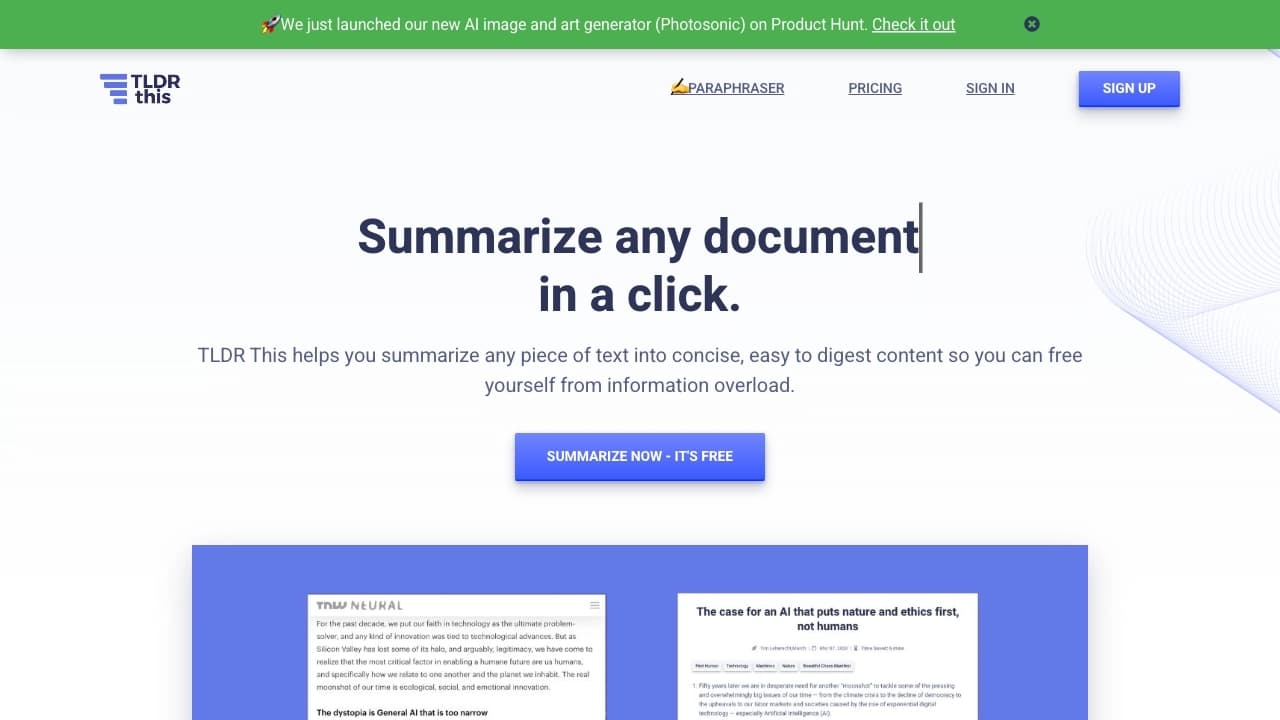
Обзор
TLDR this
Описание нейросети TLDR this
Что это за инструмент
TLDR this — это сервис на основе искусственного интеллекта, предназначенный для автоматического сокращения длинных текстов. Вместо того чтобы механически обрезать материал, алгоритм анализирует содержимое и выделяет ключевые предложения, формируя из них связный и сжатый пересказ, который передаёт основную суть оригинала.
Основная идея сервиса
Инструмент помогает быстро понять, о чём длинная статья или документ, не читая его целиком. TLDR this упрощает тексты, структурируя краткое изложение по основным пунктам, и экономит значительное количество времени при работе с большими объёмами информации.
Способы применения
Сервис одинаково полезен для работы со статьями в интернете, загруженными файлами документов и текстами, вставленными напрямую. Благодаря поддержке разных форматов и удобному веб-интерфейсу, он становится универсальным помощником для чтения и обработки информации.
Характеристики TLDR this
| Характеристика | Значение |
|---|---|
| Тип | Расширение браузера, веб-сервис |
| Категории | Расширения, Пересказ, Суммаризация |
| Бизнес-модель | Freemium |
| Поддерживаемые форматы | PDF, DOC, DOCX (до 25 МБ), ссылки, вставленный текст |
| Платформа | Веб-интерфейс, браузерные расширения |
| Поддержка языков | Работает с разными языками, включая русский |
| Дата первой публикации | 07-03-2023 |
| Средства доступа | Браузер и интернет, установка не требуется |
Для кого подходит нейросеть TLDR this?
Для специалистов, работающих с большими объёмами информации
Инструмент создан для тех, кто постоянно изучает много материалов в рамках работы или учёбы. Это помогает быстро обрабатывать статьи, отчёты и документы, извлекая из них самое главное без потери времени на полное чтение.
Для студентов и исследователей
Студенты могут использовать сервис для подготовки к занятиям, сокращая объёмные учебные материалы и научные работы. Исследователям инструмент помогает обрабатывать большие отчёты и быстро получать сводку по изучаемому тексту.
Для журналистов и учителей
Журналисты могут получать краткие сводки по новостным материалам для дальнейшей работы, а учителя — готовить сокращённые версии текстов для проведения уроков. Сервис понятен и удобен для широкой аудитории без специальной подготовки.
Как использовать нейросеть TLDR this?
Через веб-интерфейс
Для работы достаточно открыть сервис в браузере — установка не требуется. Нужно ввести текст или ссылку в специальное поле ввода и нажать кнопку запуска. Краткое изложение появится в отдельном блоке сразу после обработки.
С загрузкой файлов
Инструмент поддерживает загрузку документов форматов PDF, DOC и DOCX размером до 25 МБ. Файлы можно просто перетащить в окно браузера, после чего сервис автоматически обработает их содержимое и подготовит пересказ.
С помощью браузерного расширения
Для постоянной работы доступны браузерные расширения, которые позволяют сокращать статьи прямо на сайтах без перехода на отдельную страницу. Это удобно для тех, кто регулярно читает материалы в интернете и хочет получать выжимку мгновенно.
Основные функции TLDR this
Автоматическое сокращение текстов
Главная функция сервиса — создание кратких выжимок из длинных статей, документов и текстов. Алгоритм выделяет ключевые смысловые предложения, сохраняя связность и основные идеи оригинала.
Извлечение метаданных
Помимо пересказа, инструмент извлекает дополнительную информацию: имя автора, дату публикации, заголовок и связанные изображения. Это позволяет сформировать мини-досье на каждый обработанный материал.
Дополнительные возможности
Сервис рассчитывает примерное время чтения оригинальной статьи и позволяет сохранять и экспортировать итоговые резюме. Пользователю доступен чистый интерфейс без рекламы и всплывающих баннеров, что обеспечивает концентрированную работу.
Преимущества TLDR this
Экономия времени
Результат обработки можно прочитать за минуту вместо получаса, потраченного на чтение полного материала. Это существенно ускоряет работу с большими объёмами информации.
Умный подход к сокращению
Сервис не делает механическое обрезание текста, а выделяет ключевые смысловые предложения. Краткое изложение получается осмысленным и структурированным по основным пунктам.
Чистота и простота
Интерфейс без отвлекающих элементов — баннеров и всплывающей рекламы — обеспечивает комфортное использование. Удобное поле ввода и понятное отображение результата делают сервис доступным для любого пользователя.
Недостатки TLDR this
Сервис работает по модели freemium, что означает ограниченный бесплатный функционал, однако точные лимиты бесплатного тарифа в доступных данных не указаны. Стоит также учитывать, что, как и любой автоматический суммаризатор, инструмент может не передавать все детали и нюансы оригинального текста, особенно при сложных или специфических материалах. Конкретные ограничения по объёму обрабатываемых текстов за один раз на странице сервиса не раскрываются.
Какие задачи решает TLDR this
Быстрое понимание сути материалов
Сервис помогает мгновенно получать выжимку из длинных статей, отчётов и научных работ, позволяя быстро понять, о чём идёт речь, без полного чтения исходного текста.
Создание сводок и досье
Инструмент формирует мини-досье на каждый обработанный материал, извлекая метаданные. Это удобно для журналистов, получающих сводки по новостям, и для исследователей, обрабатывающих большие отчёты.
Работа с учебными и подготовительными материалами
Сервис применяется для сокращения текстов в учебных целях и подготовки материалов для уроков. Учителя и студенты получают структурированное изложение, удобное для усвоения и использования.
Цены TLDR this
Модель распространения
Сервис работает по бизнес-модели freemium. Это означает, что базовая функциональность доступна бесплатно, а для расширенного использования предусмотрены платные возможности.
Особенности ценообразования
Конкретные тарифы, объёмы бесплатных запросов и стоимость платных планов в доступных данных не указаны. Подробную информацию о лимитах и ценах следует уточнять непосредственно на официальной странице сервиса, где приводится актуальная информация о тарифах.
Условия использования TLDR this
Технические требования
Для использования сервиса нужны только браузер и подключение к интернету. Установка дополнительного программного обеспечения не требуется, поскольку сервис работает через веб-интерфейс.
Дополнительные сведения
Первая публикация сервиса состоялась 07-03-2023, последнее редактирование — 02-06-2026. Другие условия использования на странице сервиса явно не перечислены, поэтому детальную информацию о правилах и ограничениях следует уточнять у разработчика.
Доступность TLDR this
Платформы и форматы
Сервис доступен как веб-сервис, работающий в браузере, так и в виде браузерных расширений для сокращения статей прямо на сайтах. Инструмент поддерживает работу с разными языками, а страница сервиса доступна, в том числе, на русском языке.
География
Конкретные регионы, в которых доступен сервис, в исходных данных явно не указаны. Благодаря веб-формату работы сервис, вероятно, доступен широкому кругу пользователей при наличии интернет-соединения.
Чем отличается TLDR this от аналогов
Подход к обработке текстов
В отличие от механического обрезания текста, TLDR this выделяет ключевые смысловые предложения и формирует связный пересказ, структурированный по основным пунктам. Это делает результат более осмысленным по сравнению с простыми суммаризаторами.
Дополнительный функционал
Сервис выделяется извлечением метаданных — автора, даты публикации и заголовка — а также расчётом времени чтения оригинала. Такое формирование мини-досье на каждый материал встречается далеко не у всех конкурентов.
Чистота и удобство интерфейса
Интерфейс TLDR this лишён рекламы и всплывающих баннеров, что обеспечивает концентрированную работу без отвлечений. В сочетании с поддержкой загрузки файлов и браузерного расширения это делает сервис удобным и полноценным инструментом в своей нише.
Заключение
TLDR this — это продуманный ИИ-инструмент для автоматического сокращения длинных текстов, статей и документов. Он экономит время, выделяя ключевые смысловые предложения и формируя связный краткий пересказ, а также извлекает полезные метаданные и рассчитывает время чтения оригинала. Поддержка загрузки файлов PDF, DOC и DOCX до 25 МБ, работы по ссылке и вставленного текста в сочетании с браузерным расширением делает сервис универсальным помощником для студентов, журналистов, учителей, исследователей и всех, кто сталкивается с большими объёмами информации. Благодаря freemium-модели, чистой работе без рекламы и простому интерфейсу TLDR this станет надёжным инструментом для быстрого и концентрированного чтения.
Часто задаваемые вопросы

Смотрите также


AI-ассистент для создания кратких конспектов видео, PDF-документов и веб-страниц.

Браузерное расширение и веб-сервис с функциями ИИ-ассистента: ответы на запросы, суммаризация видео и документов, перевод текста.

Облачная платформа для создания видео с помощью ИИ-аватаров, синтезированной речи и автоматического перевода роликов на десятки языков.


AI-учитель иностранных языков в виде браузерного расширения и веб-сервиса для практики, перевода и объяснения языковых материалов.

Многофункциональная AI-платформа для создания контента, объединяющая синтез речи, генерацию текста, создание аватаров и редактирование видео.


Онлайн-платформа на базе ИИ для быстрого создания текстового контента, включая блоги, статьи и посты для соцсетей.


AI-инструмент для создания презентаций, документов и веб-страниц из текстового описания.


Инструмент, встраиваемый в Microsoft Word, который с помощью нейросетей автоматизирует создание, редактирование и анализ юридических контрактов.